You are not logged in.
- Topics: Active | Unanswered
Pages: 1
#1 2015-10-27 15:47:05
- vlast777
- Member
- Registered: 2015-02-10
- Posts: 57
Maximizing Notebook Battery Lifetime
Hey there,
I thought about putting this thread in the "Laptop Issues" - Subforum, but since it is not really an issue and (like I think) has to do with kernel and hardware I finally decided to put it here.
The thing is, the battery of my notebook seems to run empty pretty fast. I have not installed any power saving features yet, so I hope I may get a bit more lifetime out of it.
I need it at university and there is not always a power plug next to you (at least not during the seminars) and so I need A LOT of battery. Not something like 5% more lifetime, but really ALOT.
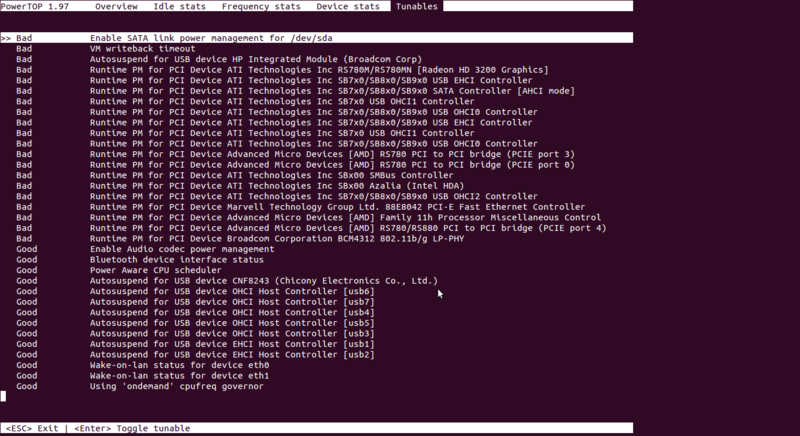
My notebook is made by ASUS, has an Intel Core i5 4210U processor (which is good for my purpose I think, because I read it is a power-saving CPU), it has an Intel HD 4400 and a dedicated nvidia 820M GPU (bumblebee installed,so it _should_ only use this one when it is supposed to and otherwise use the Intel HD, which should use less battery). Additionally it has 8 GB DDR3 Ram and a 1TB SATA Hard Drive.
Now for maximizing the battery life span I thought of something like TLP or something similar, but I don't know if there are other, maybe better and more effective ways of saving power.
I am a total noob in things like that so I hope anyone of you could provide me an easy and (most important) working way of saving power in a notebook. I heard there are many ways to save power (at least i keep my screen dimmed  ) like dimming backlight, slowing down HDD and CPU frequency scaling, but like I said, I don't know much about this. Basically I just have (like said before) my screen dimmed and set it to go black after one minute of idleness. But that's probably not the most professional nor the most successful way of doing.
I am willing to provide any information needed, but please, anyone give me some hints
Thanks alot!
Offline
#2 2015-10-27 16:54:40
- riggt
- Member

- Registered: 2015-10-20
- Posts: 21
Re: Maximizing Notebook Battery Lifetime
Have you read through this section of the wiki? Are you looking for more power management tips beyond those outlined in this article? You say you're only dimming your screen right now, which, yes, is the main power draw on your laptop's battery, but this article runs through quite a bit of other things too.
Offline
#3 2015-10-27 17:43:18
- ewaller
- Administrator

- From: Pasadena, CA
- Registered: 2009-07-13
- Posts: 20,701
Re: Maximizing Notebook Battery Lifetime
I would install and run powertop. It gives you the ability to tune a few things, but most importantly it will use the information provided by the battery to calculate the power being dissipated by your system.
Tell us what powertop reports for your Wattage.
Unfortunately I cannot connect to my machine at home right now (for reasons I cannot fathom  ), so I cannot peek at its /sys directory. But, inside /sys there are sub-directories like /sys/class/power/BAT0 (I think). Anyway, poke around under sys/class and find stuff having to do with your battery. When you get down to the bottom of the tree, you will find files like design_capacity and last_full_capacity. cat the contents of those files and see if the battery is still reaching its design capacity. This will help determine if it is wearing out. Also, knowing the capacity and the Wattage will tell us how long you can expect to operate.
Nothing is too wonderful to be true, if it be consistent with the laws of nature -- Michael Faraday
The shortest way to ruin a country is to give power to demagogues.— Dionysius of Halicarnassus
---
How to Ask Questions the Smart Way
Offline
#4 2015-10-27 18:27:50
- vlast777
- Member
- Registered: 2015-02-10
- Posts: 57
Re: Maximizing Notebook Battery Lifetime
I would install and run powertop. It gives you the ability to tune a few things, but most importantly it will use the information provided by the battery to calculate the power being dissipated by your system.
Tell us what powertop reports for your Wattage.Unfortunately I cannot connect to my machine at home right now (for reasons I cannot fathom
I am going to return home in about three Hours.
When I am back home, i will Post the necessary Information 
Offline
#5 2015-10-27 18:33:29
- R00KIE
- Forum Fellow

- From: Between a computer and a chair
- Registered: 2008-09-14
- Posts: 4,734
Re: Maximizing Notebook Battery Lifetime
I suppose you already got rid of windows but it would be good if you could get a baseline there for the time you can spend on battery. At least it could tell you if you were getting close a state where everything is working as it should or if there is something that really needs to be looked at.
R00KIE
Tm90aGluZyB0byBzZWUgaGVyZSwgbW92ZSBhbG9uZy4K
Offline
#6 2015-10-27 23:51:57
- wes
- Member
- Registered: 2011-03-05
- Posts: 67
Re: Maximizing Notebook Battery Lifetime
Anyway, poke around under sys/class and find stuff having to do with your battery. When you get down to the bottom of the tree, you will find files like design_capacity and last_full_capacity. cat the contents of those files and see if the battery is still reaching its design capacity. This will help determine if it is wearing out. Also, knowing the capacity and the Wattage will tell us how long you can expect to operate.
If you have the acpi client, then `acpi -ib` will do the math for you : )
$ acpi -ib
Battery 0: Charging, 99%, 00:05:01 until charged
Battery 0: design capacity 5600 mAh, last full capacity 5209 mAh = 93%
(Arch package is "acpi", btw.)
Offline
#7 2015-10-28 10:09:10
- vlast777
- Member
- Registered: 2015-02-10
- Posts: 57
Re: Maximizing Notebook Battery Lifetime
acpi -ibgives me
Battery 0: Discharging, 100%, discharging at zero rate - will never fully discharge.
Battery 0: design capacity 2600 mAh, last full capacity 2455 mAh = 94%
Edit:
Okay I installed TLP now and xfce4 battery applet says the battery will last for about 3:14h while the MATE power applet says something like 10:01h with the same services/devices running / plugged in.
Is there anything else / additionally which I can do for powersaving instead (or plus) TLP? I mwan something more efficient.
Last edited by vlast777 (2015-10-28 10:15:54)
Offline
#8 2015-10-28 11:45:26
- Alad
- Wiki Admin/IRC Op

- From: Bagelstan
- Registered: 2014-05-04
- Posts: 2,420
- Website
Re: Maximizing Notebook Battery Lifetime
As ewaller mentioned, go with powertop to actually identify power usage, then adjust settings selectively. This includes avoiding applications which cause a lot of interrupts. More effective than a "one size fits ???" approach like TLP.
Dimming the screen (as you already do) is also good, and double-checking that the nvidia GPU is disabled.
Last edited by Alad (2015-10-28 11:45:53)
Mods are just community members who have the occasionally necessary option to move threads around and edit posts. -- Trilby
Offline
#9 2015-10-28 12:11:09
- vlast777
- Member
- Registered: 2015-02-10
- Posts: 57
Re: Maximizing Notebook Battery Lifetime
As ewaller mentioned, go with powertop to actually identify power usage, then adjust settings selectively. This includes avoiding applications which cause a lot of interrupts. More effective than a "one size fits ???" approach like TLP.
Dimming the screen (as you already do) is also good, and double-checking that the nvidia GPU is disabled.
Okay. So install powertop and simply run it, to get the needed Information?
If I go for
lspci | grep VGA it just returns
00:02.0 VGA compatible controller: Intel Corporation Haswell-ULT Integrated Graphics Controller (rev 0b)which should mean the nvidia GPU _should_ be disabled, right?
EDIT2:
$ sudo powertop

PowerTOP 2.7      Übersicht  Leerlauf-Sta Frequenz-Statisti Gerät-Statisti Abstimmbare Optionen

Die Batterie meldet eine Entladungsrate von 10.5 W
Die geschätzte Restzeit beträgt 3 Stunden, 11 Minuten

Zusammenfassung: 1939,3 Aufwachvorgänge/Sekunde,  271,8 GPU-Operationen/Sekunde, 0,0 VFS-Operatione

                Auslastung       Ereignisse/s    Kategorie       Beschreibung
              7,5 ms/s     444,7        Process        xfwm4 --display :0.0 --sm-client-id 23355a0f
              4,5 ms/s     382,9        Interrupt      PS/2-Tastfeld / Tastatur / Maus
             44,7 ms/s     308,8        Process        mate-terminal
             74,6 ms/s     247,0        Process        /usr/lib/xorg-server/Xorg vt2 -displayfd 3 -
              2,3 ms/s     259,4        Interrupt      [48] i915
             11,7 ms/s     111,2        Process        /usr/lib/xfce4/panel/wrapper-1.0 /usr/lib/xf
              1,2 ms/s     111,2        Timer          tick_sched_timer
             18,6 ms/s      86,5        Process        powertop
            448,2 µs/s      86,5        Process        [rcu_preempt]
              1,4 ms/s      37,1        kWork          flush_to_ldisc
              5,7 ms/s      24,7        Process        xfce4-panel --display :0.0 --sm-client-id 2d
              0,9 ms/s      24,7        Process        xfdesktop --display :0.0 --sm-client-id 2dcb
            130,1 µs/s      24,7        Process        [rcu_sched]
              3,0 ms/s      12,4        Timer          hrtimer_wakeup
              1,2 ms/s      12,4        Process        mono /usr/lib/docky/Docky.exe
             99,0 µs/s      12,4        kWork          ieee80211_iface_work
             85,8 µs/s      12,4        kWork          console_callback
             30,0 µs/s      12,4        kWork          ath_tx_complete_poll_work
              1,8 ms/s      0,00        Process        [kworker/0:1]
              1,0 ms/s      0,00        Interrupt      [9] RCU(softirq)
              0,7 ms/s      0,00        Interrupt      [7] sched(softirq)
              0,7 ms/s      0,00        Process        xfce4-session
            440,4 µs/s      0,00        Timer          intel_pstate_timer_func
            430,6 µs/s      0,00        Timer          ath_ani_calibrate
            416,7 µs/s      0,00        Interrupt      [6] tasklet(softirq)
            280,2 µs/s      0,00        Timer          process_timeout
            217,1 µs/s      0,00        Interrupt      [1] timer(softirq)
            192,1 µs/s      0,00        Process        [ksoftirqd/2]
            183,2 µs/s      0,00        Interrupt      [19] ath9k
            180,4 µs/s      0,00        Process        [kworker/2:1]

<ESC> Beenden |
Last edited by vlast777 (2015-10-28 13:15:24)
Offline
#10 2015-10-28 14:29:08
- ewaller
- Administrator
- From: Pasadena, CA
- Registered: 2009-07-13
- Posts: 20,701
Re: Maximizing Notebook Battery Lifetime
I should have asked you to find the voltage too. ASUS likes voltages of 10.8 to 11.2, so lets pretend the voltage is 11V. Your battery capacity last time was 2.46 Ah. By my math, 2.46 Ah / ( 10.5 VA / 11V) = 2.6h. I would only count on 80 to 90% of that.
If the pack voltage is higher, that number will go up.
Anyway, that is your baseline. Working it the other way, if you want to achieve say 4 hours with the same battery, then: 4h = 2.46Ah / (P/11V) or (2.46 x 11)Wh /P ==> P =27Wh/4h=6.8A
Your mission, to get to 4 hours, is to tweak things until you get the Wattage reported by powertop down below 7W. (Again, based on 11 V to convert Ah to Wh)
Last edited by ewaller (2015-10-28 14:30:33)
Nothing is too wonderful to be true, if it be consistent with the laws of nature -- Michael Faraday
The shortest way to ruin a country is to give power to demagogues.— Dionysius of Halicarnassus
---
How to Ask Questions the Smart Way
Offline
#11 2015-10-28 15:11:30
- vlast777
- Member
- Registered: 2015-02-10
- Posts: 57
Re: Maximizing Notebook Battery Lifetime
I should have asked you to find the voltage too. ASUS likes voltages of 10.8 to 11.2, so lets pretend the voltage is 11V. Your battery capacity last time was 2.46 Ah. By my math, 2.46 Ah / ( 10.5 VA / 11V) = 2.6h. I would only count on 80 to 90% of that.
If the pack voltage is higher, that number will go up.Anyway, that is your baseline. Working it the other way, if you want to achieve say 4 hours with the same battery, then: 4h = 2.46Ah / (P/11V) or (2.46 x 11)Wh /P ==> P =27Wh/4h=6.8A
Your mission, to get to 4 hours, is to tweak things until you get the Wattage reported by powertop down below 7W. (Again, based on 11 V to convert Ah to Wh)
How exactly do I tweak those things?
With what tool I mean.
Offline
#12 2015-10-28 15:40:22
- ewaller
- Administrator
- From: Pasadena, CA
- Registered: 2009-07-13
- Posts: 20,701
Re: Maximizing Notebook Battery Lifetime
A big start is to turn down the display brightness. It could easily be consuming half your energy.
Then use the tunables (I think) tab in powertop. It should have a couple dozen things that can all help. Especially stand by modes on PCI, USB, audio subsytem and the wired network.
Look at htop and see what processes are consuming your resources. Minimize them. Stop whatever services you don't need.
Consider your desktop environment. Gnome and KDE are big energy consumers. So are streaming graphics. And audio.
Nothing is too wonderful to be true, if it be consistent with the laws of nature -- Michael Faraday
The shortest way to ruin a country is to give power to demagogues.— Dionysius of Halicarnassus
---
How to Ask Questions the Smart Way
Offline
#13 2015-10-28 15:43:37
- vlast777
- Member
- Registered: 2015-02-10
- Posts: 57
Re: Maximizing Notebook Battery Lifetime
A big start is to turn down the display brightness. It could easily be consuming half your energy.
Then use the tunables (I think) tab in powertop. It should have a couple dozen things that can all help. Especially stand by modes on PCI, USB, audio subsytem and the wired network.
Look at htop and see what processes are consuming your resources. Minimize them. Stop whatever services you don't need.
Consider your desktop environment. Gnome and KDE are big energy consumers. So are streaming graphics. And audio.
what you mean by saying "tunables tab" in powertop? It doesn't seem to have a GUI for me.
Offline
#14 2015-10-28 16:05:02
- Alad
- Wiki Admin/IRC Op
- From: Bagelstan
- Registered: 2014-05-04
- Posts: 2,420
- Website
Re: Maximizing Notebook Battery Lifetime
Use the arrow keys ...
Mods are just community members who have the occasionally necessary option to move threads around and edit posts. -- Trilby
Offline
#15 2015-10-28 16:08:14
- ewaller
- Administrator
- From: Pasadena, CA
- Registered: 2009-07-13
- Posts: 20,701
Re: Maximizing Notebook Battery Lifetime
I am not in front of my machine. Try tab or left and right arrows. It is a ncurses program that has about four different screens. One is about processes, another about processor states, another is about things you can tweak -- it will tell you good or bad as to their state. You can change them. Be aware, tweaking some things might freeze your system.
Edit: Yeah, what Alad said
Last edited by ewaller (2015-10-28 16:08:57)
Nothing is too wonderful to be true, if it be consistent with the laws of nature -- Michael Faraday
The shortest way to ruin a country is to give power to demagogues.— Dionysius of Halicarnassus
---
How to Ask Questions the Smart Way
Offline
#16 2015-10-28 20:13:41
- kox
- Member
- Registered: 2015-05-01
- Posts: 149
Re: Maximizing Notebook Battery Lifetime
You can try laptop mode tools and thermald. Also if you have a dual gpu system, then you can power down dedicated gpu https://wiki.archlinux.org/index.php/Hy … screte_GPU
Offline
Pages: 1