You are not logged in.
- Topics: Active | Unanswered
#1 2017-12-13 19:14:17
- nicolodo93
- Member
- Registered: 2016-12-20
- Posts: 47
boot from uefi of mb with refind
Dear guyz
i have correctly completed the install of arch, and i have installed the refind bootloader. My hard disk is partitioned in this way
-dev/sda1 -> root
-dev/sda2 -> partizione EFI
-dev/sda3 -> swap
The problems is: if i use refindi in the bios(uefi) of my pc there isn't no more the entry of cd/dvd player and this is very strange because for my newbie knowledge the scan of bios of pc is first of refind . For riactivate the entry into the firmware of bios i must remove the hard disk, rebboot the pc and after little time i can boot one more time form cd/dvd .
But in this way i can't boot from the hard disk (refind), to do this i must reinstall refind ( and the entry of cd/dvd will diseappear).
Anybody can explain the mechanism to me and give me a solution for this issue?.
Thank you very much.
Offline
#2 2017-12-14 16:46:06
- nicolodo93
- Member
- Registered: 2016-12-20
- Posts: 47
Re: boot from uefi of mb with refind
UP
it's very strange I tried all today but if install refind the uefi of motherbase don't show me the boot from cd, and after if i remove the hard disk where is locate refind, i can boot from cd/dvd player BUT if insert once again the hard disk refind does not work anymore and i must reinstal with arch-chroot from live cd.
Offline
#3 2017-12-15 17:31:04
- nicolodo93
- Member
- Registered: 2016-12-20
- Posts: 47
Re: boot from uefi of mb with refind
UPDATE:
i have try my hd in another pc, it's work fine. It can boot both from the hard disk and the player. And if i remove the hd and i reinsert it in the sata refind work's good. It is absurd that if i remove it in my pc and after i reinsert it don't work anymore ( i can't boot from it).
I need of a explanation i'm going crazy.
Thank you.
Offline
#4 2017-12-15 21:29:05
- nicolodo93
- Member
- Registered: 2016-12-20
- Posts: 47
Re: boot from uefi of mb with refind
update of the situation:
I try to use grub like bootloader instead of refind, the cd now it's bootable, and i think that the cd not bootable is a error of refind. But if i remove the hard disk from the pc and then i reinsert it ,the boot from hard disk diseappear and i must reinstall grub. It's very strange this situation, it almost seems that my pc's uefi corrumpt my bootloader when i disconnect the hd. But how does it get corrupted if the hard disk is removed?
Bha i'm very confused
Offline
#5 2017-12-15 21:51:21
- topernic
- Member
- Registered: 2014-12-16
- Posts: 8
Re: boot from uefi of mb with refind
Your bios should be able to boot the cd. UEFI is usually installed on the first partition. Did you look here http://www.rodsbooks.com/efi-bootloader … ation.html?
Offline
#6 2017-12-15 22:47:24
- nicolodo93
- Member
- Registered: 2016-12-20
- Posts: 47
Re: boot from uefi of mb with refind
Refind don't show me the boot from cd, maybe i must configure It, but this is a Little problem because GRUB show It correctly.
THE BIG problem is this: why, why,why if i disconected the hard disk from my PC and After i reconnect It the uefi's motherboard don't show me the option to boot from my hard disk and then start my bootloader
Offline
#7 2017-12-16 08:20:42
- nl6720
- The Evil Wiki Admin
- Registered: 2016-07-02
- Posts: 718
Re: boot from uefi of mb with refind
The reason is crappy UEFI. Yours probably doesn't like efibootmgr changing NVRAM.
A simple solution would be to not touch the boot entries and install rEFInd to the default/fallback boot path /EFI/BOOT/BOOT64.EFI by using --usedefault option.
Since rEFInd is already installed on your EFI system partition, you can just rename the refind folder and executable:
# mv EFI/refind EFI/BOOT
# mv EFI/BOOT/refind_x64.efi EFI/BOOT/BOOTx64.efi
The UEFI boot menu will no longer show "rEFInd Boot Manager". but something more generic like Hard disk drive.
Also rEFInd is capable of launching bootloaders from cd/dvd, see "scanfor" options "optical" and "cd" in refind.conf. Though that capability depends on UEFI so don't get your hopes up.
Offline
#8 2017-12-16 14:27:59
- nicolodo93
- Member
- Registered: 2016-12-20
- Posts: 47
Re: boot from uefi of mb with refind
Yep if i follow your guide i don't resolve my issue, if i disconnect the hd frome the pc and after i pluged it into the sata port, my pc don't boot anymore
because it don't show me anymore the hd bootable
Maybe i don't follow correctly your guide, can you explain step by step?
Last edited by nicolodo93 (2017-12-16 14:30:54)
Offline
#9 2017-12-16 14:32:05
- nl6720
- The Evil Wiki Admin
- Registered: 2016-07-02
- Posts: 718
Re: boot from uefi of mb with refind
Strange.
Post the output of
# efibootmgr -vbefore and after running refind-install (without --usedefault option).
Offline
#10 2017-12-16 15:59:38
- nicolodo93
- Member
- Registered: 2016-12-20
- Posts: 47
Re: boot from uefi of mb with refind
this is my output when i install refind or grub, in this case grub
BootCurrent: 0000
Timeout: 0 seconds
BootOrder: 0000,0001
Boot0000* arch_grub	HD(2,GPT,648c5a80-249a-48d4-af8a-21a5f7ea0b7e,0x133a0800,0xfa000)/File(\EFI\arch_grub\grubx64.efi)
Boot0001* CD/DVD Drive 	BBS(CDROM,,0x0)AMGOAMNO........o.M.A.T.S.H.I.T.A.D.V.D.-.R.A.M. .U.J.8.B.0.A.W....................A...........................>..Gd-.;.A..MQ..L. . . . . . . . .M.Y.2.4. . .3.7.7.6.0.8......AMBO
this is instead the output of the comand after removing the hard disk and then reinserting it
BootCurrent: 0001
Timeout: 0 seconds
BootOrder: 0001,0002
Boot0001* UEFI:MATSHITADVD-RAM  UJ8B0AW PciRoot(0x0)/Pci(0x1f,0x2)/Sata(2,65535,0)/CDROM(1,0x29,0x3b800)AMBO
Boot0002* CD/DVD Drive 	BBS(CDROM,,0x0)AMGOAMNO........o.M.A.T.S.H.I.T.A.D.V.D.-.R.A.M. .U.J.8.B.0.A.W....................A...........................>..Gd-.;.A..MQ..L. . . . . . . . .M.Y.2.4. . .3.7.7.6.0.8......AMBO
Offline
#11 2017-12-16 16:25:45
- nl6720
- The Evil Wiki Admin
- Registered: 2016-07-02
- Posts: 718
Re: boot from uefi of mb with refind
Looks like the problem is caused when adding boot entries from linux. You could try adding rEFInd or Grub boot entry from UEFI, there should be an option somewhere in the UEFI setup to manage boot entries and boot order.
Still, it's strange that moving rEFInd to default/fallback path didn't work. Booting from /EFI/BOOT/BOOTx64.efi should always be possible.
Another possibility would be that you are overlooking the obvious, could it be that "UEFI:MATSHITADVD-RAM" only appears when a bootable disc is inserted in the drive? How do you boot the Arch Linux installation medium? From cd or usb flash drive?
Last edited by nl6720 (2017-12-16 16:26:34)
Offline
#12 2017-12-16 18:32:54
- nicolodo93
- Member
- Registered: 2016-12-20
- Posts: 47
Re: boot from uefi of mb with refind
Looks like the problem is caused when adding boot entries from linux. You could try adding rEFInd or Grub boot entry from UEFI, there should be an option somewhere in the UEFI setup to manage boot entries and boot order.
Still, it's strange that moving rEFInd to default/fallback path didn't work. Booting from /EFI/BOOT/BOOTx64.efi should always be possible.
I have another problem, for clear the situation i have format the efi partion, (f32 the right filesystem) i have reinstalled with archroot and pacman -Sy linux the kernel in the ESP partion but now both if I install refind normally or if I use refind --use default option the pc will not start anymore. I think that the way to use --defaultoption is the right way but now it'dont boot...help, sorry for my newbie knowledge
Another possibility would be that you are overlooking the obvious, could it be that "UEFI:MATSHITADVD-RAM" only appears when a bootable disc is inserted in the drive? How do you boot the Arch Linux installation medium? From cd or usb flash drive?
it's ok this i boot from live cd
Last edited by nicolodo93 (2017-12-16 18:33:35)
Offline
#13 2017-12-16 18:49:09
- nl6720
- The Evil Wiki Admin
- Registered: 2016-07-02
- Posts: 718
Re: boot from uefi of mb with refind
What do you mean by "pc will not start anymore" ? Can you boot the live cd? Can you get into UEFI?
Regarding rEFInd, when using "refind-install --usedefault" you need specify ESP partition. Since your ESP is on /dev/sda2, it should look like this:
# refind-install --usedefault /dev/sda2Offline
#14 2017-12-16 18:55:34
- nicolodo93
- Member
- Registered: 2016-12-20
- Posts: 47
Re: boot from uefi of mb with refind
What do you mean by "pc will not start anymore" ? Can you boot the live cd? Can you get into UEFI?
sorry I had a nervous breakdown and I wrote badly, i boot from live cd of arch i see my partion and the rest but the hd don't boot anymore even if I install refind. Maybe i have created problems by formatting the ESP( i have clear the old grub) and reinstalling linux packages with pac-man -s linux
Regarding rEFInd, when using "refind-install --usedefault" you need specify ESP partition. Since your ESP is on /dev/sda2, it should look like this:
# refind-install --usedefault /dev/sda2
yes i have use exactly this command
Last edited by nicolodo93 (2017-12-16 18:57:04)
Offline
#15 2017-12-16 19:00:27
- nl6720
- The Evil Wiki Admin
- Registered: 2016-07-02
- Posts: 718
Re: boot from uefi of mb with refind
Keep calm.
Go into UEFI setup and look at boot order/entries, try adding a rEFind entry from there. If that doesn't work try restoring default settings.
Offline
#16 2017-12-16 19:02:56
- nicolodo93
- Member
- Registered: 2016-12-20
- Posts: 47
Re: boot from uefi of mb with refind
Keep calm.
Go into UEFI setup and look at boot order/entries, try adding a rEFind entry from there. If that doesn't work try restoring default settings.
I have no idea how to add a refind entry from the uefi setup can you explain me?
i see the option to add boot device but i don't know what to write to us
(currently my uefi does not see the hd)
Last edited by nicolodo93 (2017-12-16 19:06:14)
Offline
#17 2017-12-16 19:11:23
- nl6720
- The Evil Wiki Admin
- Registered: 2016-07-02
- Posts: 718
Re: boot from uefi of mb with refind
The way to do that depends on the particular UEFI, they are all different.
Can you get into UEFI setup? You need to press a button on bootup, typically DEL or F2 or something like that. In there you need to find something related to booting. Post a picture of that screen.
Also when your "pc did not start", was there any message on the screen?
Offline
#18 2017-12-16 19:44:14
- nicolodo93
- Member
- Registered: 2016-12-20
- Posts: 47
Re: boot from uefi of mb with refind
The way to do that depends on the particular UEFI, they are all different.
Can you get into UEFI setup? You need to press a button on bootup, typically DEL or F2 or something like that. In there you need to find something related to booting. Post a picture of that screen.Also when your "pc did not start", was there any message on the screen?
simply says to insert a boot device, and if i insert my live cd i can boot it and if i chroot in my system partion i can see all the linux files
this is my screen https://postimg.org/image/952xd5zd1/
Last edited by nicolodo93 (2017-12-16 19:45:18)
Offline
#19 2017-12-16 19:55:14
- nl6720
- The Evil Wiki Admin
- Registered: 2016-07-02
- Posts: 718
Re: boot from uefi of mb with refind
After looking at "Aptio Setup Utility" screenshots online... Can you post a screenshot of the previous menu, the one just before you enter "Add New Boot Option".
Does it look something like this? If so when you select "Boot Option #X" what does it offer you?

Offline
#20 2017-12-16 20:02:30
- nicolodo93
- Member
- Registered: 2016-12-20
- Posts: 47
Re: boot from uefi of mb with refind
After looking at "Aptio Setup Utility" screenshots online... Can you post a screenshot of the previous menu, the one just before you enter "Add New Boot Option".
Does it look something like this? If so when you select "Boot Option #X" what does it offer you?
yep,but i have only the p2:"name of dvdplayer"
i don't have anymore the hd.
it is the same problem that gave when I disconnected and renserivo the hard disk only that now it always does even if I do not remove it.
the screen that you required is this https://postimg.org/image/jt6ocbu05/
Last edited by nicolodo93 (2017-12-16 20:07:14)
Offline
#21 2017-12-16 20:21:41
- nl6720
- The Evil Wiki Admin
- Registered: 2016-07-02
- Posts: 718
Re: boot from uefi of mb with refind
Hmm... "P2:" not "UEFI:", that's the legacy/bios boot option. And it doesn't even show "Hard Drive BBS Priorities". How did that even happen...
In "Add New Boot Option" when choosing "Select Filesystem" does it offer your ESP on hdd?
If it does you can create a boot entry by choosing the hdd in "Select Filesystem" and manually specifying the bootloader path (/EFI/BOOT/BOOTx64.efi) in "Path for boot option". Should look something like this.
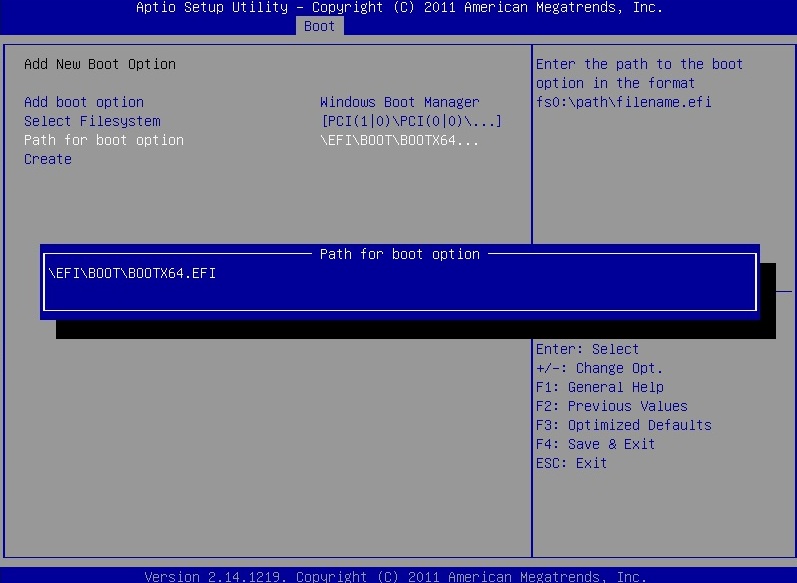
If your hdd isn't in "Select Filesystem", find an option in UEFI setup to restore default settings and hope your hdd reappears  .
Offline
#22 2017-12-16 20:34:21
- nicolodo93
- Member
- Registered: 2016-12-20
- Posts: 47
Re: boot from uefi of mb with refind
oh, if i inserti the path how you indicate, refind show me two options of boot grub and vmlinuz
it's ok...but when i restart the pc the path that i have indicate diseappear...maybe it's a battery cmos problem?
Howewer there are some problems after the boot...i must start xfce manually and don't appear log-in windows, but this problems I will deal with them later
Offline
#23 2017-12-17 07:58:16
- nl6720
- The Evil Wiki Admin
- Registered: 2016-07-02
- Posts: 718
Re: boot from uefi of mb with refind
Restoring default settings in UEFI might be worth a shot, the issue you had at the begging is better than the current one.
I probably should have asked this sooner, but post the output of:
# lsblk -f
# fdisk -l
Offline
#24 2017-12-18 15:59:11
- nicolodo93
- Member
- Registered: 2016-12-20
- Posts: 47
Re: boot from uefi of mb with refind
so if i save the settings in the bios with the new start option /EFI/BOOT/BOOTx64.efi
the pc works but the same problem remains:
if I turn off the pc and remove the hd and then turning on the pc without hd, I turn it off again and put the hd the new boot option just created disappears and obviously the pc don't boot.
this is the output of fdisk
Disk /dev/sda: 596.2 GiB, 640135028736 bytes, 1250263728 sectors
Units: sectors of 1 * 512 = 512 bytes
Sector size (logical/physical): 512 bytes / 512 bytes
I/O size (minimum/optimal): 512 bytes / 512 bytes
Disklabel type: gpt
Disk identifier: D5CA188D-C3F7-4B6C-B125-89A7D29B3786

Device         Start       End   Sectors   Size Type
/dev/sda1       2048 322570239 322568192 153.8G Linux filesystem
/dev/sda2  322570240 323594239   1024000   500M EFI System
/dev/sda3  323594240 340275199  16680960     8G Linux filesystem


Disk /dev/loop0: 365.4 MiB, 383094784 bytes, 748232 sectors
Units: sectors of 1 * 512 = 512 bytes
Sector size (logical/physical): 512 bytes / 512 bytes
I/O size (minimum/optimal): 512 bytes / 512 bytes
this is the output of lsblk
NAME  MAJ:MIN RM   SIZE RO TYPE MOUNTPOINT
loop0   7:0    0 365.4M  1 loop /run/archiso/sfs/airootfs
sda     8:0    0 596.2G  0 disk
sda1    8:1    0 153.8G  0 part
sda2    8:2    0   500M  0 part
sda3    8:3    0     8G  0 part
sr0    11:0    1   476M  0 rom  /run/archiso/bootmnt
sr1    11:1    1  30.8M  0 rom
Last edited by nicolodo93 (2017-12-18 16:09:19)
Offline
#25 2017-12-18 16:22:32
- nl6720
- The Evil Wiki Admin
- Registered: 2016-07-02
- Posts: 718
Re: boot from uefi of mb with refind
Your lsblk shows that ESP is not mounted... 
Sorry, but I don't think it will be possible to stop the boot entry disappearing when you remove the hdd. The UEFI most likely sees that the disk is gone and removes all boot entries with it. You can try checking if there is a update available for your firmware, maybe that'll help.
The fact that "/EFI/BOOT/BOOTx64.efi" doesn't work without a boot entry in NVRAM is not good. If you really want to keep a bootable system even after removing the hdd, the last and most horrible option would be to place rEFInd in Windows boot directory (mvrefind(8) has instructions). Better to just not remove the hdd.
Last edited by nl6720 (2017-12-18 16:23:09)
Offline