You are not logged in.
- Topics: Active | Unanswered
#1 2019-01-22 10:19:15
- tesla135
- Member
- Registered: 2013-06-27
- Posts: 76
[SOLVED]Nvidia-settings unable to init server
I want to use nvidia driver (instead of basic Xorg), my video card is GeForce GTX 670M, my desktop environment is Mate. The reason I want to switch to nvidia is because on my virtualbox Windows 7 I cannot enable direct3d acceleration.
So I Installed nvidia driver, then
sudo nvidia-xconfigthen
nvidia-settings --load config-onlyOutputs
Unable to init server: Could not connect: Connection refused
Error: The control display is undefined; please run `nvidia-settings --help` for usage information
Last edited by tesla135 (2019-01-23 11:08:47)
Offline
#2 2019-01-22 10:34:36
- V1del
- Forum Moderator

- Registered: 2012-10-16
- Posts: 25,427
Re: [SOLVED]Nvidia-settings unable to init server
There's no need to run any of the commands you are running, why do you think you need them? Also you should be installing the nvidia-390xx variants of packages. FWIW as it is almost guaranteed to run you into issues remove that generated xorg config and instead read and follow https://wiki.archlinux.org/index.php/NVIDIA_Optimus (though on some googling that might be within the line of cards that can be used as a dedicated one, so if you've ensured within the BIOS/UEFI that you are actually running on the dedicated chip, you may ignore this link)
Even if all of that is said and done, there's absolutely no guarantee that this will help you in any shape or form with your virtualbox problem, whose 3D support is - at least to my knowledge - quite subpar regardless of your host systems driver.
FWIW I'm smelling a XY what is your end goal, which specific program do you intend to run on your Windows system?
Last edited by V1del (2019-01-22 10:43:41)
Offline
#3 2019-01-22 10:51:20
- tesla135
- Member
- Registered: 2013-06-27
- Posts: 76
Re: [SOLVED]Nvidia-settings unable to init server
There's no need to run any of the commands you are running, why do you think you need them?
Well after I installed nvidia, on reboot, the font-size increased(a good sign), but mate was not launched, I usually start my mate with startx.
Even if all of that is said and done, there's absolutely no guarantee that this will help you in any shape or form with your virtualbox problem, whose 3D support is - at least to my knowledge - quite subpar regardless of your host systems driver.
FWIW I'm smelling a XY what is your end goal, which specific program do you intend to run on your Windows system?
The program is WeDo 2.0 software (lego education), It works on a different laptop with host arch linux, because I enabled the 3d acceleration.
Offline
#4 2019-01-22 11:41:18
- V1del
- Forum Moderator
- Registered: 2012-10-16
- Posts: 25,427
Re: [SOLVED]Nvidia-settings unable to init server
As mentioned, remove the xorg.conf that got generated and try without it, if it still doesn't work post a xorg.log
Offline
#5 2019-01-23 06:37:40
- tesla135
- Member
- Registered: 2013-06-27
- Posts: 76
Re: [SOLVED]Nvidia-settings unable to init server
With basic nvidia driver
/var/log/Xorg.0.log
[    38.652] (WW) Failed to open protocol names file lib/xorg/protocol.txt
[    38.653]
X.Org X Server 1.20.3
X Protocol Version 11, Revision 0
[    38.654] Build Operating System: Linux Arch Linux
[    38.656] Current Operating System: Linux 127.0.0.1localhost 4.20.1-arch1-1-ARCH #1 SMP PREEMPT Wed Jan 9 20:25:43 UTC 2019 x86_64
[    38.656] Kernel command line: BOOT_IMAGE=/boot/vmlinuz-linux root=UUID=49dbdc78-7830-4838-8dc9-382d3ba3a643 rw quiet
[    38.658] Build Date: 25 October 2018  04:42:32PM
[    38.658]
[    38.659] Current version of pixman: 0.36.0
[    38.660] 	Before reporting problems, check http://wiki.x.org
	to make sure that you have the latest version.
[    38.660] Markers: (--) probed, (**) from config file, (==) default setting,
	(++) from command line, (!!) notice, (II) informational,
	(WW) warning, (EE) error, (NI) not implemented, (??) unknown.
[    38.664] (==) Log file: "/var/log/Xorg.0.log", Time: Tue Jan 22 15:13:00 2019
[    38.714] (==) Using system config directory "/usr/share/X11/xorg.conf.d"
[    38.749] (==) No Layout section.  Using the first Screen section.
[    38.749] (==) No screen section available. Using defaults.
[    38.749] (**) |-->Screen "Default Screen Section" (0)
[    38.749] (**) |   |-->Monitor "<default monitor>"
[    38.761] (==) No monitor specified for screen "Default Screen Section".
	Using a default monitor configuration.
[    38.761] (==) Automatically adding devices
[    38.761] (==) Automatically enabling devices
[    38.761] (==) Automatically adding GPU devices
[    38.761] (==) Automatically binding GPU devices
[    38.761] (==) Max clients allowed: 256, resource mask: 0x1fffff
[    38.804] (WW) The directory "/usr/share/fonts/misc" does not exist.
[    38.804] 	Entry deleted from font path.
[    38.833] (WW) The directory "/usr/share/fonts/OTF" does not exist.
[    38.833] 	Entry deleted from font path.
[    38.833] (WW) The directory "/usr/share/fonts/Type1" does not exist.
[    38.833] 	Entry deleted from font path.
[    38.833] (WW) The directory "/usr/share/fonts/100dpi" does not exist.
[    38.833] 	Entry deleted from font path.
[    38.833] (WW) The directory "/usr/share/fonts/75dpi" does not exist.
[    38.833] 	Entry deleted from font path.
[    38.833] (==) FontPath set to:
	/usr/share/fonts/TTF
[    38.833] (==) ModulePath set to "/usr/lib/xorg/modules"
[    38.833] (II) The server relies on udev to provide the list of input devices.
	If no devices become available, reconfigure udev or disable AutoAddDevices.
[    38.833] (II) Module ABI versions:
[    38.833] 	X.Org ANSI C Emulation: 0.4
[    38.833] 	X.Org Video Driver: 24.0
[    38.833] 	X.Org XInput driver : 24.1
[    38.833] 	X.Org Server Extension : 10.0
[    38.835] (++) using VT number 1

[    38.839] (II) systemd-logind: took control of session /org/freedesktop/login1/session/_31
[    38.842] (--) PCI:*(1@0:0:0) 10de:1213:1179:fb18 rev 161, Mem @ 0xd0000000/33554432, 0xc0000000/134217728, 0xc8000000/67108864, I/O @ 0x00003000/128, BIOS @ 0x????????/131072
[    38.843] (WW) Open ACPI failed (/var/run/acpid.socket) (No such file or directory)
[    38.843] (II) LoadModule: "glx"
[    38.886] (II) Loading /usr/lib/xorg/modules/extensions/libglx.so
[    38.965] (II) Module glx: vendor="X.Org Foundation"
[    38.965] 	compiled for 1.20.3, module version = 1.0.0
[    38.965] 	ABI class: X.Org Server Extension, version 10.0
[    38.965] (==) Matched nouveau as autoconfigured driver 0
[    38.965] (==) Matched nv as autoconfigured driver 1
[    38.965] (==) Matched modesetting as autoconfigured driver 2
[    38.965] (==) Matched fbdev as autoconfigured driver 3
[    38.965] (==) Matched vesa as autoconfigured driver 4
[    38.965] (==) Assigned the driver to the xf86ConfigLayout
[    38.965] (II) LoadModule: "nouveau"
[    38.993] (WW) Warning, couldn't open module nouveau
[    38.993] (EE) Failed to load module "nouveau" (module does not exist, 0)
[    38.993] (II) LoadModule: "nv"
[    38.993] (WW) Warning, couldn't open module nv
[    38.993] (EE) Failed to load module "nv" (module does not exist, 0)
[    38.993] (II) LoadModule: "modesetting"
[    38.993] (II) Loading /usr/lib/xorg/modules/drivers/modesetting_drv.so
[    39.033] (II) Module modesetting: vendor="X.Org Foundation"
[    39.033] 	compiled for 1.20.3, module version = 1.20.3
[    39.033] 	Module class: X.Org Video Driver
[    39.033] 	ABI class: X.Org Video Driver, version 24.0
[    39.033] (II) LoadModule: "fbdev"
[    39.033] (WW) Warning, couldn't open module fbdev
[    39.033] (EE) Failed to load module "fbdev" (module does not exist, 0)
[    39.033] (II) LoadModule: "vesa"
[    39.033] (WW) Warning, couldn't open module vesa
[    39.033] (EE) Failed to load module "vesa" (module does not exist, 0)
[    39.033] (II) modesetting: Driver for Modesetting Kernel Drivers: kms
[    39.034] (EE) open /dev/dri/card0: No such file or directory
[    39.034] (WW) Falling back to old probe method for modesetting
[    39.034] (EE) open /dev/dri/card0: No such file or directory
[    39.034] (EE) Screen 0 deleted because of no matching config section.
[    39.034] (II) UnloadModule: "modesetting"
[    39.034] (EE) Device(s) detected, but none match those in the config file.
[    39.034] (EE)
Fatal server error:
[    39.034] (EE) no screens found(EE)
[    39.034] (EE)
Please consult the The X.Org Foundation support
	 at http://wiki.x.org
 for help.
[    39.034] (EE) Please also check the log file at "/var/log/Xorg.0.log" for additional information.
[    39.034] (EE)
[    39.053] (EE) Server terminated with error (1). Closing log file.
But on nvidia-390xx startx worked this time, but in Windows 7 still no direct3d acceleration.
Last edited by tesla135 (2019-01-23 06:38:19)
Offline
#6 2019-01-23 08:38:14
- V1del
- Forum Moderator
- Registered: 2012-10-16
- Posts: 25,427
Re: [SOLVED]Nvidia-settings unable to init server
The nvidia xorg ddx isn't loaded...
pacman -Qs nvidiaDid you enable acceleration in VirtualBox's settings? Also that hostname looks wonky, you might want to properly set that
Last edited by V1del (2019-01-23 08:41:49)
Offline
#7 2019-01-23 09:23:18
- tesla135
- Member
- Registered: 2013-06-27
- Posts: 76
Re: [SOLVED]Nvidia-settings unable to init server
local/libvdpau 1.1.1+3+ga21bf7a-1
    Nvidia VDPAU library
local/libxnvctrl 415.25-1
    NVIDIA NV-CONTROL X extension
local/nvidia-390xx 390.87-26
    NVIDIA drivers for linux, 390xx legacy branch
local/nvidia-390xx-utils 390.87-1
    NVIDIA drivers utilities
local/nvidia-settings 415.25-1
    Tool for configuring the NVIDIA graphics driver
Yes I enabled acceleration in virtualbox
https://i.postimg.cc/63gxL7yV/Screenshot.jpg
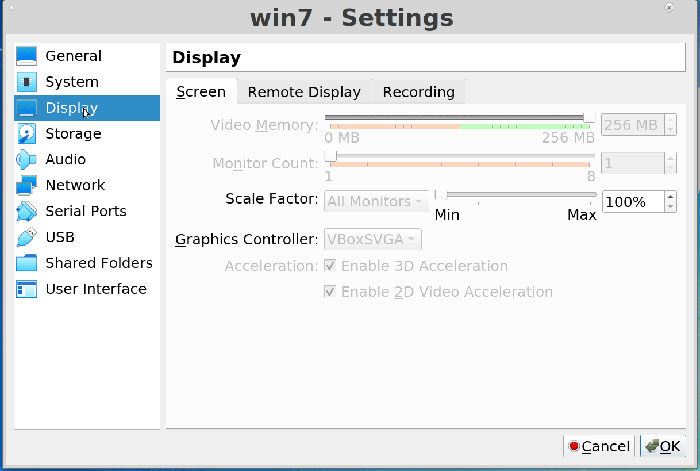
I fixed the hostname
LE: I switched from VBoxSVGA to VBoxVGA and It worked
moderator edit -- replaced oversized image with link.
Pasting pictures and code
Last edited by 2ManyDogs (2019-01-23 14:30:00)
Offline