You are not logged in.
- Topics: Active | Unanswered
#1 2019-03-11 06:16:23
- Hamish
- Member

- From: Rural Alberta, Canada
- Registered: 2013-02-26
- Posts: 46
- Website
(SOLVED) xfdesktop - how to restore old icon text backgrounds?
After upgrading to xfdesktop 4.13.3-1 I no longer have the previously default icon text backgrounds.
Old / New: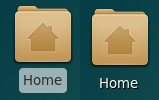
I know I seem to be in the minority on this, but I actually preferred the old look and would like to restore it if possible.
In the past it was possible to control the icon text background by having a custom gtkrc-2.0 as documented here:
https://docs.xfce.org/xfce/xfdesktop/advanced
But since the most recent version is based on GTK3 I can no longer see how this would be possible. I previously modified the gtkrc file that came with my Zukitwo theme in order to maintain the default icon text backgrounds.
Am I just going to have to get used to the new look or is it still possible to restore the old default behaviour?
Last edited by Hamish (2019-03-11 16:14:29)
Thank you,
Hamish Paul Wilson
Offline
#2 2019-03-11 11:03:13
- toz
- Member
- Registered: 2011-10-28
- Posts: 513
Re: (SOLVED) xfdesktop - how to restore old icon text backgrounds?
Try a gtk snippet like this (add it to ~/.config/gtk-3.0/gtk.css - create the file if it doesn't exist):
/* xfdesktop GTK3 theming */
/* default view */
XfdesktopIconView.view {
  background: #9bb1b3;
  color: #3c3f3f;
  text-shadow: 0 0px 0px black;
  text-decoration-color: black;
  border-radius: 5px; }

/* view when icon selected */
XfdesktopIconView.view:active {
  background: rgba(60, 69, 70, 0.3);
  text-shadow: 0 1px 1px black; }

/* label when icon selected */
XfdesktopIconView.label:active {
	background-color: rgba(255,255,255,0.3);
	color: white;}

/* drag box */
XfdesktopIconView.view .rubberband {
   border-color: #9bb1b3;
   background-color: rgba(60, 69, 70, 0.5);
  border-radius: 0; }
Adjust the colors as required.
Last edited by toz (2019-03-11 11:04:10)
Offline
#3 2019-03-11 16:15:20
- Hamish
- Member
- From: Rural Alberta, Canada
- Registered: 2013-02-26
- Posts: 46
- Website
Re: (SOLVED) xfdesktop - how to restore old icon text backgrounds?
Cheers toz, that worked perfectly. Thanks for the help. 
Thank you,
Hamish Paul Wilson
Offline