You are not logged in.
- Topics: Active | Unanswered
#1 2019-09-17 04:52:07
- big_A
- Member
- Registered: 2019-09-15
- Posts: 5
Mounting LUKS on external USB SSD in Plasma for rw and regular users
Dear Arch Linux Community,
I've been using Linux and Arch in particular for a while now. I was constantly supported by the extensive documentation and help this forum and the community provides. Now I've decided to join and create an account myself, so hello to all fellow Arch Users!
My problem statement
I've installed Arch with KDE Plasma on my new ThinkPad T490. To share files between Linux and Windows machine I've partitioned my external USB Samsung T5 SSD with two partitions, one regular 100GB NTFS Partition for compatibility and one LUKS formatted ext4 partition for Linux. This is my partition table:
Device     Boot     Start        End    Sectors   Size Id Type

/dev/sda1            2048  209776639  209774592   100G  7 HPFS/NTFS/exFAT

/dev/sda2       209777535 1953525167 1743747633 831.5G 83 Linux
When plugging the drive in, I get a notification by Plasma that two drives are detected and how I'd like to proceed. Mounting the NTFS partition for read and write was possible after adding myself to the storage group. When I click on the encrypted volume, I am prompted with the password window. After entering it, I get the message in the tray stating: "You are not authorized to mount this device". The drive shows up in Dolphin, I can read files but not write. I can write files as root via Terminal though. After a few seconds the description changes to "Accessing...". I've attached screenshots.
https://ibin.co/4vHyjStWX430.png
https://ibin.co/4vHypOggH8KI.png
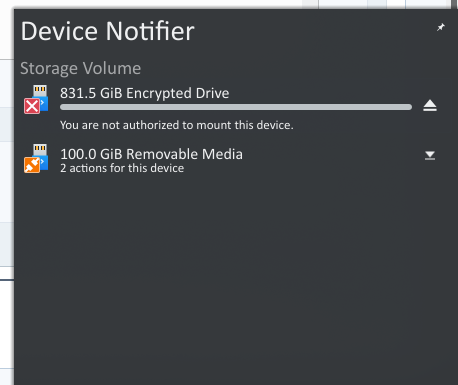
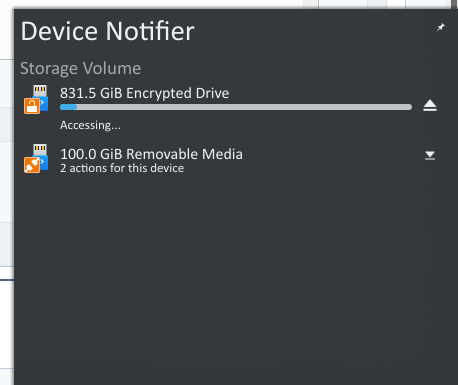
Relevant output from the mount-command is the following:
/dev/mapper/luks-xxx on /run/media/USER/xxx type ext4 (rw,nosuid,nodev,relatime,stripe=8191,uhelper=udisks2)

/dev/sda1 on /run/media/USER/XXX type fuseblk (rw,nosuid,nodev,relatime,user_id=0,group_id=0,default_permissions,allow_other,blksize=4096,uhelper=udisks2)
So I feel like I'm missing the user_id and group_id in the mount parameters.
Progress so far
After googling and reading the Wiki Pages for Mounting and LUKS Volumes I've stumbled upon polkit and udisks2 which seem to facilitate the automount process. I've followed the instructions of
https://github.com/coldfix/udiskie/wiki/Permissions and
https://bbs.archlinux.org/viewtopic.php?id=151954
in order to get it to work. I've created a file with permissions 644 in /etc/polkit-1/rules.d/ and named it "50-udiskie.rules", as it didn't work, renamed it to "10-udisks2.rules", without success. I just copied the content from the first page, following:
polkit.addRule(function(action, subject) {

  var YES = polkit.Result.YES;

  // NOTE: there must be a comma at the end of each line except for the last:

  var permission = {

    // required for udisks1:

    "org.freedesktop.udisks.filesystem-mount": YES,

    "org.freedesktop.udisks.luks-unlock": YES,

    "org.freedesktop.udisks.drive-eject": YES,

    "org.freedesktop.udisks.drive-detach": YES,

    // required for udisks2:

    "org.freedesktop.udisks2.filesystem-mount": YES,

    "org.freedesktop.udisks2.encrypted-unlock": YES,

    "org.freedesktop.udisks2.eject-media": YES,

    "org.freedesktop.udisks2.power-off-drive": YES,

    // required for udisks2 if using udiskie from another seat (e.g. systemd):

    "org.freedesktop.udisks2.filesystem-mount-other-seat": YES,

    "org.freedesktop.udisks2.filesystem-unmount-others": YES,

    "org.freedesktop.udisks2.encrypted-unlock-other-seat": YES,

    "org.freedesktop.udisks2.eject-media-other-seat": YES,

    "org.freedesktop.udisks2.power-off-drive-other-seat": YES

  };

  if (subject.isInGroup("storage")) {

    return permission[action.id];

  }

});
The output of "pkaction | grep encrypt" lists:
org.freedesktop.udisks2.encrypted-change-passphrase

org.freedesktop.udisks2.encrypted-change-passphrase-system

org.freedesktop.udisks2.encrypted-lock-others

org.freedesktop.udisks2.encrypted-unlock

org.freedesktop.udisks2.encrypted-unlock-crypttab

org.freedesktop.udisks2.encrypted-unlock-other-seat

org.freedesktop.udisks2.encrypted-unlock-system
so I suppose I'm not missing any entries.
I am member of the following groups (including "storage"):
bumblebee users video storage optical input disk audio wheelI tried chowning and chmodding 777 the mount point.
Questions
Am I right in assuming that I need to further config polkit or udisks2?
How can I have my second partition mounted for r/w as effortlessly as the first one?
I hope I provided you with all the necessary information.
Thank you and best regards
Last edited by jasonwryan (2019-09-17 04:55:52)
Offline
#2 2019-09-17 04:56:16
- jasonwryan
- Anarchist

- From: .nz
- Registered: 2009-05-09
- Posts: 30,426
- Website
Re: Mounting LUKS on external USB SSD in Plasma for rw and regular users
Read the Code of Conduct and only post thumbnails http://wiki.archlinux.org/index.php/Cod … s_and_code
If the udiskie demon is running, you can add an entry to the conf file for that device and have it automounted and decrypted using a keyfile. Otherwise, you can type the password in your file managers dialog prompt.
Offline