You are not logged in.
- Topics: Active | Unanswered
Pages: 1
#1 2020-01-02 14:41:21
- doomguy84
- Member

- Registered: 2018-05-09
- Posts: 49
Graphical boot
which packages i need to install and what kind of configuration i need to do to have a graphical boot screen like this on UEFI system??
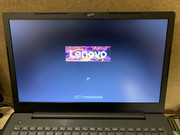
obviously with "Arch" word instead of "Tumbleweed"
Offline
#2 2020-01-02 14:45:10
- Head_on_a_Stick
- Member

- From: The Wirral
- Registered: 2014-02-20
- Posts: 9,003
- Website
Offline
#3 2020-01-02 15:39:15
- quimkaos
- Member
- Registered: 2014-09-27
- Posts: 59
Re: Graphical boot
every time i tried Plymouth it didn't work...
there is another way, that is in use by distros like manjaro and alike, and involves using a kernel module. You can find packages in the AUR:
https://aur.archlinux.org/packages/?O=0 … bootsplash
the problem is i think that this AUR will downgrade your kernel to 5.22
other option is to find the module and compile by yourself
Offline
#4 2020-01-02 15:47:56
- doomguy84
- Member
- Registered: 2018-05-09
- Posts: 49
Re: Graphical boot
thanks quimkaos, i will try that
i tried Plymouth yet but like you it didn't work... :
Offline
#5 2020-01-02 15:52:36
- CarbonChauvinist
- Member

- Registered: 2012-06-16
- Posts: 413
- Website
Re: Graphical boot
With these settings the vendor logo will be retained while booting, all you'll see is logo + the spinning circle during the boot until your DM is started.
Last edited by CarbonChauvinist (2020-01-02 15:53:56)
"the wind-blown way, wanna win? don't play"
Offline
#6 2020-01-02 16:23:03
- doomguy84
- Member
- Registered: 2018-05-09
- Posts: 49
Re: Graphical boot
With these settings the vendor logo will be retained while booting, all you'll see is logo + the spinning circle during the boot until your DM is started.
wow this is great!!!
i got Intel and UEFI, yes
i tried your suggestion, the Lenovo logo now appear!!! but it is not full to gdm login, because after some seconds I see Network Manager... strings appear on screen 
Offline
#7 2020-01-02 16:26:20
- Slithery
- Administrator

- From: Norfolk, UK
- Registered: 2013-12-01
- Posts: 5,776
Re: Graphical boot
Offline
#8 2020-01-02 16:57:48
- doomguy84
- Member
- Registered: 2018-05-09
- Posts: 49
Re: Graphical boot
tried "rd.systemd.show_status=false" but again it always display: Network Manager Wait Online... and others strings before GDM.
linux /boot/vmlinuz-linux-zen root=UUID=8fe79483-14a7-4842-8004-ed8442994e25 rw i915.fastboot=1 quiet rd.systemd.show_status=false rd.udev.log_priority=3Offline
#9 2020-01-02 18:32:14
- CarbonChauvinist
- Member
- Registered: 2012-06-16
- Posts: 413
- Website
Re: Graphical boot
What are the messages you're seeing from NetworkManager? May shine some light on what's happening as they may be logged as a higher priority than what you're limiting to (i.e. log level 2 vs log level 3). Also are you using systemd init in mkinitcpio.conf?
^^^Looks like you should also include the 'loglevel=3' right after your quiet parameter in addition to the systemd stuff. i.e:
linux /boot/vmlinuz-linux-zen root=UUID=8fe79483-14a7-4842-8004-ed8442994e25 rw i915.fastboot=1 quiet loglevel=3 rd.systemd.show_status=false rd.udev.log_priority=3If that still doesn't work you could maybe try dropping down a level, i.e going from `loglevel=3` and `rd.udev.log_priority=3` to `loglevel=2` and `rd.udev.log_priority=2`(or even force all the way 0 as a brute force method), at least as a test to see if that gets you to a completely silent boot.
Just in case for ease of reference:
loglevel=       All Kernel Messages with a loglevel smaller than the
                    console loglevel will be printed to the console. It can
                    also be changed with klogd or other programs. The
                    loglevels are defined as follows:

                    0 (KERN_EMERG)          system is unusable
                    1 (KERN_ALERT)          action must be taken immediately
                    2 (KERN_CRIT)           critical conditions
                    3 (KERN_ERR)            error conditions
                    4 (KERN_WARNING)        warning conditions
                    5 (KERN_NOTICE)         normal but significant condition
                    6 (KERN_INFO)           informational
                    7 (KERN_DEBUG)          debug-level messages
"the wind-blown way, wanna win? don't play"
Offline
Pages: 1