You are not logged in.
- Topics: Active | Unanswered
Pages: 1
#1 2020-04-22 16:04:33
- DONofDESTROY
- Member
- Registered: 2020-04-15
- Posts: 17
Microphone is not working"or it is"
Hi everyone
my microphone is not working
lspci| grep -i audio returns
00:1b.0 Audio device: Intel Corporation 7 Series/C216 Chipset Family High Definition Audio Controller (rev 04)and
arecord -l returns
**** List of CAPTURE Hardware Devices ****
card 0: PCH [HDA Intel PCH], device 0: ALC269VC Analog [ALC269VC Analog]
  Subdevices: 1/1
  Subdevice #0: subdevice #0
however I have internal mic and mic(unplugged) even if it is plugged in in pavucontrol
i find that internal mic is not working in alsamixer(when loopback is turned on)
and mic is working when loopback is turned on
however when i record some thing with arecord -d 5 test-mic.wav
nothing is recorded actually(except noise)
this is my alsamixer setup that i can hear my voice through mic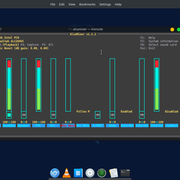
and
pulse audio conifg
#!/usr/bin/pulseaudio -nF
#
# This file is part of PulseAudio.
#
# PulseAudio is free software; you can redistribute it and/or modify it
# under the terms of the GNU Lesser General Public License as published by
# the Free Software Foundation; either version 2 of the License, or
# (at your option) any later version.
#
# PulseAudio is distributed in the hope that it will be useful, but
# WITHOUT ANY WARRANTY; without even the implied warranty of
# MERCHANTABILITY or FITNESS FOR A PARTICULAR PURPOSE. See the GNU
# General Public License for more details.
#
# You should have received a copy of the GNU Lesser General Public License
# along with PulseAudio; if not, see <http://www.gnu.org/licenses/>.

# This startup script is used only if PulseAudio is started per-user
# (i.e. not in system mode)

.fail

### Automatically restore the volume of streams and devices
load-module module-device-restore
load-module module-stream-restore
load-module module-card-restore

### Automatically augment property information from .desktop files
### stored in /usr/share/application
load-module module-augment-properties

### Should be after module-*-restore but before module-*-detect
load-module module-switch-on-port-available

### Load audio drivers statically
### (it's probably better to not load these drivers manually, but instead
### use module-udev-detect -- see below -- for doing this automatically)
#load-module module-alsa-sink
#load-module module-alsa-source device=hw:0,0
#load-module module-oss device="/dev/dsp" sink_name=output source_name=input
#load-module module-oss-mmap device="/dev/dsp" sink_name=output source_name=input
#load-module module-null-sink
#load-module module-pipe-sink

### Automatically load driver modules depending on the hardware available
.ifexists module-udev-detect.so
load-module module-udev-detect
.else
### Use the static hardware detection module (for systems that lack udev support)
load-module module-detect
.endif

### Automatically connect sink and source if JACK server is present
.ifexists module-jackdbus-detect.so
.nofail
load-module module-jackdbus-detect channels=2
.fail
.endif

### Automatically load driver modules for Bluetooth hardware
.ifexists module-bluetooth-policy.so
load-module module-bluetooth-policy
.endif

.ifexists module-bluetooth-discover.so
load-module module-bluetooth-discover
.endif

### Load several protocols
load-module module-dbus-protocol
.ifexists module-esound-protocol-unix.so
load-module module-esound-protocol-unix
.endif
load-module module-native-protocol-unix

### Network access (may be configured with paprefs, so leave this commented
### here if you plan to use paprefs)
#load-module module-esound-protocol-tcp
#load-module module-native-protocol-tcp
#load-module module-zeroconf-publish

### Load the RTP receiver module (also configured via paprefs, see above)
#load-module module-rtp-recv

### Load the RTP sender module (also configured via paprefs, see above)
#load-module module-null-sink sink_name=rtp format=s16be channels=2 rate=44100 sink_properties="device.description='RTP Multicast Sink'"
#load-module module-rtp-send source=rtp.monitor

### Load additional modules from GSettings. This can be configured with the paprefs tool.
### Please keep in mind that the modules configured by paprefs might conflict with manually
### loaded modules.
.ifexists module-gsettings.so
.nofail
load-module module-gsettings
.fail
.endif


### Automatically restore the default sink/source when changed by the user
### during runtime
### NOTE: This should be loaded as early as possible so that subsequent modules
### that look up the default sink/source get the right value
load-module module-default-device-restore

### Automatically move streams to the default sink if the sink they are
### connected to dies, similar for sources
load-module module-rescue-streams

### Make sure we always have a sink around, even if it is a null sink.
load-module module-always-sink

### Honour intended role device property
load-module module-intended-roles

### Automatically suspend sinks/sources that become idle for too long
load-module module-suspend-on-idle

### If autoexit on idle is enabled we want to make sure we only quit
### when no local session needs us anymore.
.ifexists module-console-kit.so
load-module module-console-kit
.endif
.ifexists module-systemd-login.so
load-module module-systemd-login
.endif

### Enable positioned event sounds
load-module module-position-event-sounds

### Cork music/video streams when a phone stream is active
load-module module-role-cork

### Modules to allow autoloading of filters (such as echo cancellation)
### on demand. module-filter-heuristics tries to determine what filters
### make sense, and module-filter-apply does the heavy-lifting of
### loading modules and rerouting streams.
load-module module-filter-heuristics
load-module module-filter-apply

### Make some devices default
#set-default-sink output
#set-default-source input
thanks
Last edited by DONofDESTROY (2020-04-22 16:06:17)
Offline
#2 2020-04-22 16:23:02
- V1del
- Forum Moderator

- Registered: 2012-10-16
- Posts: 25,381
Re: Microphone is not working"or it is"
Are you sure that your actual mic starts working just because loopback is enabled? The purpose of that control is to feed mic input into your output speaker (or feed computer audio output as an input) and should usually not have an inherent relevance on which mic input that comes from.
FWIW from what we see in that alsamixer excerpt you should not hear anything, as all (visible) controls related to capturing are muted.
FWIW to get some more actual information post
amixer -c1
pacmd list-cards
pacmd list-sources
#While recording
pacmd list-source-outputs
Last edited by V1del (2020-04-22 16:24:45)
Offline
#3 2020-04-23 07:55:49
- DONofDESTROY
- Member
- Registered: 2020-04-15
- Posts: 17
Re: Microphone is not working"or it is"
actuall i am not sure
but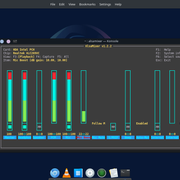
here is the setup that I can able to hear my voice in loopback with muting the internal mic(it doesnt do anything) and input form the mic(after the PCM)
amixer -c0 0 is my card number and it returns
Simple mixer control 'Master',0
  Capabilities: pvolume pvolume-joined pswitch pswitch-joined
  Playback channels: Mono
  Limits: Playback 0 - 87
  Mono: Playback 87 [100%] [0.00dB] [on]
Simple mixer control 'Headphone',0
  Capabilities: pvolume pswitch
  Playback channels: Front Left - Front Right
  Limits: Playback 0 - 87
  Mono:
  Front Left: Playback 87 [100%] [0.00dB] [on]
  Front Right: Playback 87 [100%] [0.00dB] [on]
Simple mixer control 'Speaker',0
  Capabilities: pvolume pswitch
  Playback channels: Front Left - Front Right
  Limits: Playback 0 - 87
  Mono:
  Front Left: Playback 0 [0%] [-65.25dB] [off]
  Front Right: Playback 0 [0%] [-65.25dB] [off]
Simple mixer control 'PCM',0
  Capabilities: pvolume
  Playback channels: Front Left - Front Right
  Limits: Playback 0 - 255
  Mono:
  Front Left: Playback 255 [100%] [0.00dB]
  Front Right: Playback 255 [100%] [0.00dB]
Simple mixer control 'Mic',0
  Capabilities: pvolume pswitch
  Playback channels: Front Left - Front Right
  Limits: Playback 0 - 31
  Mono:
  Front Left: Playback 31 [100%] [12.00dB] [on]
  Front Right: Playback 31 [100%] [12.00dB] [on]
Simple mixer control 'Mic Boost',0
  Capabilities: volume
  Playback channels: Front Left - Front Right
  Capture channels: Front Left - Front Right
  Limits: 0 - 3
  Front Left: 1 [33%] [10.00dB]
  Front Right: 1 [33%] [10.00dB]
Simple mixer control 'Mic Mute-LED Mode',0
  Capabilities: enum
  Items: 'On' 'Off' 'Follow Capture' 'Follow Mute'
  Item0: 'Follow Mute'
Simple mixer control 'IEC958',0
  Capabilities: pswitch pswitch-joined
  Playback channels: Mono
  Mono: Playback [off]
Simple mixer control 'Beep',0
  Capabilities: pvolume pswitch
  Playback channels: Front Left - Front Right
  Limits: Playback 0 - 31
  Mono:
  Front Left: Playback 0 [0%] [-34.50dB] [off]
  Front Right: Playback 0 [0%] [-34.50dB] [off]
Simple mixer control 'Capture',0
  Capabilities: cvolume cswitch
  Capture channels: Front Left - Front Right
  Limits: Capture 0 - 63
  Front Left: Capture 63 [100%] [30.00dB] [on]
  Front Right: Capture 63 [100%] [30.00dB] [on]
Simple mixer control 'Auto-Mute Mode',0
  Capabilities: enum
  Items: 'Disabled' 'Enabled'
  Item0: 'Enabled'
Simple mixer control 'Internal Mic',0
  Capabilities: pvolume pswitch
  Playback channels: Front Left - Front Right
  Limits: Playback 0 - 31
  Mono:
  Front Left: Playback 0 [0%] [-34.50dB] [off]
  Front Right: Playback 0 [0%] [-34.50dB] [off]
Simple mixer control 'Internal Mic Boost',0
  Capabilities: volume
  Playback channels: Front Left - Front Right
  Capture channels: Front Left - Front Right
  Limits: 0 - 3
  Front Left: 0 [0%] [0.00dB]
  Front Right: 0 [0%] [0.00dB]
Simple mixer control 'Loopback Mixing',0
  Capabilities: enum
  Items: 'Disabled' 'Enabled'
  Item0: 'Disabled'
and
pacmd list-cards
1 card(s) available.
    index: 0
        name: <alsa_card.pci-0000_00_1b.0>
        driver: <module-alsa-card.c>
        owner module: 6
        properties:
                alsa.card = "0"
                alsa.card_name = "HDA Intel PCH"
                alsa.long_card_name = "HDA Intel PCH at 0x90610000 irq 32"
                alsa.driver_name = "snd_hda_intel"
                device.bus_path = "pci-0000:00:1b.0"
                sysfs.path = "/devices/pci0000:00/0000:00:1b.0/sound/card0"
                device.bus = "pci"
                device.vendor.id = "8086"
                device.vendor.name = "Intel Corporation"
                device.product.id = "1e20"
                device.product.name = "7 Series/C216 Chipset Family High Definition Audio Controller"
                device.form_factor = "internal"
                device.string = "0"
                device.description = "Built-in Audio"
                module-udev-detect.discovered = "1"
                device.icon_name = "audio-card-pci"
        profiles:
                input:analog-stereo: Analog Stereo Input (priority 65, available: unknown)
                output:analog-stereo: Analog Stereo Output (priority 6500, available: unknown)
                output:analog-stereo+input:analog-stereo: Analog Stereo Duplex (priority 6565, available: unknown)
                output:hdmi-stereo: Digital Stereo (HDMI) Output (priority 5900, available: no)
                output:hdmi-stereo+input:analog-stereo: Digital Stereo (HDMI) Output + Analog Stereo Input (priority 5965, available: no)
                output:hdmi-surround: Digital Surround 5.1 (HDMI) Output (priority 800, available: no)
                output:hdmi-surround+input:analog-stereo: Digital Surround 5.1 (HDMI) Output + Analog Stereo Input (priority 865, available: no)
                output:hdmi-surround71: Digital Surround 7.1 (HDMI) Output (priority 800, available: no)
                output:hdmi-surround71+input:analog-stereo: Digital Surround 7.1 (HDMI) Output + Analog Stereo Input (priority 865, available: no)
                off: Off (priority 0, available: unknown)
        active profile: <output:analog-stereo+input:analog-stereo>
        sinks:
                alsa_output.pci-0000_00_1b.0.analog-stereo/#0: Built-in Audio Analog Stereo
        sources:
                alsa_output.pci-0000_00_1b.0.analog-stereo.monitor/#0: Monitor of Built-in Audio Analog Stereo
                alsa_input.pci-0000_00_1b.0.analog-stereo/#1: Built-in Audio Analog Stereo
        ports:
                analog-input-internal-mic: Internal Microphone (priority 8900, latency offset 0 usec, available: unknown)
                        properties:
                                device.icon_name = "audio-input-microphone"
                analog-input-mic: Microphone (priority 8700, latency offset 0 usec, available: no)
                        properties:
                                device.icon_name = "audio-input-microphone"
                analog-output-speaker: Speakers (priority 10000, latency offset 0 usec, available: no)
                        properties:
                                device.icon_name = "audio-speakers"
                analog-output-headphones: Headphones (priority 9900, latency offset 0 usec, available: yes)
                        properties:
                                device.icon_name = "audio-headphones"
                hdmi-output-0: HDMI / DisplayPort (priority 5900, latency offset 0 usec, available: no)
                        properties:
                                device.icon_name = "video-display"
pacmd list-sources
2 source(s) available.
    index: 0
        name: <alsa_output.pci-0000_00_1b.0.analog-stereo.monitor>
        driver: <module-alsa-card.c>
        flags: DECIBEL_VOLUME LATENCY DYNAMIC_LATENCY
        state: SUSPENDED
        suspend cause: IDLE
        priority: 1030
        volume: front-left: 65536 / 100% / 0.00 dB,   front-right: 65536 / 100% / 0.00 dB
                balance 0.00
        base volume: 65536 / 100% / 0.00 dB
        volume steps: 65537
        muted: no
        current latency: 0.00 ms
        max rewind: 0 KiB
        sample spec: s16le 2ch 44100Hz
        channel map: front-left,front-right
                     Stereo
        used by: 0
        linked by: 0
        configured latency: 0.00 ms; range is 0.50 .. 2000.00 ms
        monitor_of: 0
        card: 0 <alsa_card.pci-0000_00_1b.0>
        module: 6
        properties:
                device.description = "Monitor of Built-in Audio Analog Stereo"
                device.class = "monitor"
                alsa.card = "0"
                alsa.card_name = "HDA Intel PCH"
                alsa.long_card_name = "HDA Intel PCH at 0x90610000 irq 32"
                alsa.driver_name = "snd_hda_intel"
                device.bus_path = "pci-0000:00:1b.0"
                sysfs.path = "/devices/pci0000:00/0000:00:1b.0/sound/card0"
                device.bus = "pci"
                device.vendor.id = "8086"
                device.vendor.name = "Intel Corporation"
                device.product.id = "1e20"
                device.product.name = "7 Series/C216 Chipset Family High Definition Audio Controller"
                device.form_factor = "internal"
                device.string = "0"
                module-udev-detect.discovered = "1"
                device.icon_name = "audio-card-pci"
  * index: 1
        name: <alsa_input.pci-0000_00_1b.0.analog-stereo>
        driver: <module-alsa-card.c>
        flags: HARDWARE HW_MUTE_CTRL HW_VOLUME_CTRL DECIBEL_VOLUME LATENCY DYNAMIC_LATENCY
        state: SUSPENDED
        suspend cause: IDLE
        priority: 9039
        volume: front-left: 20726 /  32% / -30.00 dB,   front-right: 20726 /  32% / -30.00 dB
                balance 0.00
        base volume: 6554 /  10% / -60.00 dB
        volume steps: 65537
        muted: no
        current latency: 0.00 ms
        max rewind: 0 KiB
        sample spec: s16le 2ch 44100Hz
        channel map: front-left,front-right
                     Stereo
        used by: 0
        linked by: 0
        configured latency: 0.00 ms; range is 0.50 .. 2000.00 ms
        card: 0 <alsa_card.pci-0000_00_1b.0>
        module: 6
        properties:
                alsa.resolution_bits = "16"
                device.api = "alsa"
                device.class = "sound"
                alsa.class = "generic"
                alsa.subclass = "generic-mix"
                alsa.name = "ALC269VC Analog"
                alsa.id = "ALC269VC Analog"
                alsa.subdevice = "0"
                alsa.subdevice_name = "subdevice #0"
                alsa.device = "0"
                alsa.card = "0"
                alsa.card_name = "HDA Intel PCH"
                alsa.long_card_name = "HDA Intel PCH at 0x90610000 irq 32"
                alsa.driver_name = "snd_hda_intel"
                device.bus_path = "pci-0000:00:1b.0"
                sysfs.path = "/devices/pci0000:00/0000:00:1b.0/sound/card0"
                device.bus = "pci"
                device.vendor.id = "8086"
                device.vendor.name = "Intel Corporation"
                device.product.id = "1e20"
                device.product.name = "7 Series/C216 Chipset Family High Definition Audio Controller"
                device.form_factor = "internal"
                device.string = "front:0"
                device.buffering.buffer_size = "352800"
                device.buffering.fragment_size = "176400"
                device.access_mode = "mmap+timer"
                device.profile.name = "analog-stereo"
                device.profile.description = "Analog Stereo"
                device.description = "Built-in Audio Analog Stereo"
                alsa.mixer_name = "Realtek ALC269VC"
                alsa.components = "HDA:10ec0269,17aa5011,00100202 HDA:80862806,80860101,00100000"
                module-udev-detect.discovered = "1"
                device.icon_name = "audio-card-pci"
        ports:
                analog-input-internal-mic: Internal Microphone (priority 8900, latency offset 0 usec, available: unknown)
                        properties:
                                device.icon_name = "audio-input-microphone"
                analog-input-mic: Microphone (priority 8700, latency offset 0 usec, available: no)
                        properties:
                                device.icon_name = "audio-input-microphone"
        active port: <analog-input-internal-mic>
pacmd list-source-outputs
1 source output(s) available.
    index: 44
        driver: <protocol-native.c>
        flags:
        state: RUNNING
        source: 1 <alsa_input.pci-0000_00_1b.0.analog-stereo>
        volume: front-left: 65536 / 100% / 0.00 dB,   front-right: 65536 / 100% / 0.00 dB
                balance 0.00
        muted: no
        current latency: 0.00 ms
        requested latency: 24.99 ms
        sample spec: float32le 2ch 44100Hz
        channel map: front-left,front-right
                     Stereo
        resample method: copy
        owner module: 11
        client: 113 <ALSA plug-in [audacity]>
        properties:
                media.name = "ALSA Capture"
                application.name = "ALSA plug-in [audacity]"
                native-protocol.peer = "UNIX socket client"
                native-protocol.version = "33"
                application.process.id = "2311"
                application.process.user = "donofdestroy"
                application.process.host = "GIDEON"
                application.process.binary = "audacity"
                application.language = "C"
                window.x11.display = ":0"
                application.process.machine_id = "e739e90abd034f2fa297db4bd381e7af"
                application.process.session_id = "2"
                application.icon_name = "audacity"
                module-stream-restore.id = "source-output-by-application-name:ALSA plug-in [audacity]"
Last edited by DONofDESTROY (2020-04-23 13:23:01)
Offline
#4 2020-04-24 18:06:23
- DONofDESTROY
- Member
- Registered: 2020-04-15
- Posts: 17
Re: Microphone is not working"or it is"
any articles regarding this will be appreciated
Offline
Pages: 1