You are not logged in.
- Topics: Active | Unanswered
Pages: 1
#1 2020-06-10 10:45:19
- evan-hon
- Member
- Registered: 2020-05-15
- Posts: 7
[Solved]Application font display error
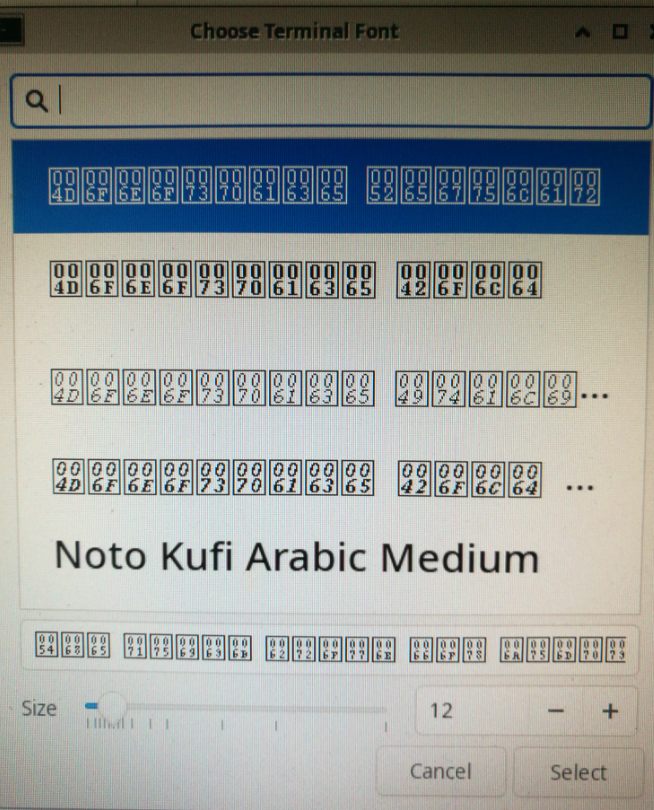
As shown,why my fonts display the square with some number?
the situation picture:
https://s1.ax1x.com/2020/06/10/tTh15n.png
Last edited by evan-hon (2020-06-10 16:45:54)
Offline
#2 2020-06-10 11:19:05
- Trilby
- Inspector Parrot

- Registered: 2011-11-29
- Posts: 30,518
- Website
Re: [Solved]Application font display error
Please remove the large image and see our community guidelines.
What fonts do you have installed? What's the output of `fc-match monospace`? What are your locale settings? (output of `localectl` and `locale -a`).
EDIT: After decoding the missing symbols, I'd suspect you just need to install a monospace font.
Last edited by Trilby (2020-06-10 11:23:13)
"UNIX is simple and coherent" - Dennis Ritchie; "GNU's Not Unix" - Richard Stallman
Offline
#3 2020-06-10 11:32:05
- evan-hon
- Member
- Registered: 2020-05-15
- Posts: 7
Re: [Solved]Application font display error
sorry,I didn't pay attention that I couldn't send a big picture,I will delete the picture later.
the fc-match monospace output:
courR12-ISO8859-1.pcf.gz:"Adobe Courier" "Regular"the locale -a output:
c
en_US.utf8
POSIX
zh_CN.utf8
the localectl output:
System Locale:LANG=en_US.UTF-8
VC keymap:n/a
X11 Layout:n/a
Last edited by evan-hon (2020-06-10 11:35:21)
Offline
#4 2020-06-10 11:44:19
- adamss
- Member
- Registered: 2020-06-06
- Posts: 20
Re: [Solved]Application font display error
do you have the package `noto-fonts`
if not install it
pacman -S noto-fontsEdit: oh I can see that the font render on the rest of the UI so you probably already have a font like noto
you don't need to install noto
Last edited by adamss (2020-06-10 11:47:29)
Offline
#5 2020-06-10 12:25:56
- evan-hon
- Member
- Registered: 2020-05-15
- Posts: 7
Re: [Solved]Application font display error
Yes, I had installed noto-fonts.
Offline
#6 2020-06-10 13:19:48
- seth
- Member

- From: Won't reply 2 private help req
- Registered: 2012-09-03
- Posts: 77,789
Re: [Solved]Application font display error
https://bbs.archlinux.org/viewtopic.php?id=248032
Install some non-pcf monospace font (you want Source Code Pro, though MS new monospace font "cascadia code", iirc. looks promising as well) and select that as your monospace default, eg. ~/.config/fontconfig/conf.d/99-monospace.conf
<?xml version="1.0"?><!DOCTYPE fontconfig SYSTEM "fonts.dtd">
<fontconfig>
    <alias>
        <family>monospace</family>
        <prefer><family>Source Code Pro</family></prefer>
    </alias>
</fontconfig>Offline
#7 2020-06-10 14:50:31
- evan-hon
- Member
- Registered: 2020-05-15
- Posts: 7
Re: [Solved]Application font display error
https://bbs.archlinux.org/viewtopic.php?id=248032
Install some non-pcf monospace font (you want Source Code Pro, though MS new monospace font "cascadia code", iirc. looks promising as well) and select that as your monospace default, eg. ~/.config/fontconfig/conf.d/99-monospace.conf
<?xml version="1.0"?><!DOCTYPE fontconfig SYSTEM "fonts.dtd">
<fontconfig>
    <alias>
        <family>monospace</family>
        <prefer><family>Source Code Pro</family></prefer>
    </alias>
</fontconfig>
thank you very much!
As you say,I solve my problem.
Offline
#8 2020-06-10 14:57:54
- seth
- Member
- From: Won't reply 2 private help req
- Registered: 2012-09-03
- Posts: 77,789
Re: [Solved]Application font display error
Great.
Please always remember to mark resolved threads by editing your initial posts subject - so others will know that there's no task left, but maybe a solution to find.
Thanks.
Offline
Pages: 1