You are not logged in.
Pages: 1
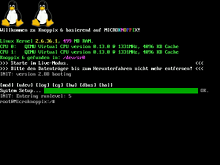
Hello, I have recently compiled a kernel with the option to display 224-colour penguins enabled, but it does not display them on boot and I'm certain that I did the compilation right, as I have done it before. Can anybody help me with this?
Pic of how it should look: https://knopper.net/knoppix/knoppix64-booting2.png
Thank you and forgive me if I did the URL wrong, I only created my forum account today.
Last edited by MFHKiwi (2020-07-05 01:52:10)
Offline
Please post the config options you enabled to display the logo. What kernel version did you build and how did you install it?
What was displayed instead of the logo? Could the logo have scrolled off screen?
Offline
I enabled:
Device Drivers --> Graphics support --> Bootup Logo --> Standard 224-color Linux logoI compiled version 5.7.7 using the Kernel/Traditional compilation page on the wiki, the display remained unchanged from the vanilla kernel and I'm not sure about it rolling off the screen, although it seems unlikely since I have configured it the same as when I played with Gentoo, which worked as expected.
Edit: output of 'zcat /proc/config.gz | grep LOGO', if it's of any relevance:
 CONFIG_LOGO=y
# CONFIG_LOGO_LINUX_MONO is not set
# CONFIG_LOGO_LINUX_VGA16 is not set
CONFIG_LOGO_LINUX_CLUT224=y
Last edited by MFHKiwi (2020-07-05 05:58:59)
Offline
Pages: 1