You are not logged in.
- Topics: Active | Unanswered
#1 2020-07-08 16:39:24
- jpaz
- Member
- Registered: 2020-07-08
- Posts: 5
[SOLVED] GRUB breaks everytime I USB boot another OS
Hi! Every now and then I live boot some other Linux distro from a USB drive, everything works fine until I reboot and my GRUB breaks.
It's a weird problem that just happens in this situation.
As I have no idea how to work that GRUB shell, I've managed to fix it everytime by booting Arch live, mounting my system and reinstalling GRUB but that just fixes GRUB, not the problem itself.
I'm using GRUB 2.04 in UEFI with an Arch and Windows dual boot.
If you need more information, feel free to ask.
Thanks
Last edited by jpaz (2020-07-10 00:14:53)
Offline
#2 2020-07-08 17:12:33
- Scimmia
- Fellow

- Registered: 2012-09-01
- Posts: 13,729
Re: [SOLVED] GRUB breaks everytime I USB boot another OS
What breaks? What do you see?
Offline
#3 2020-07-08 17:37:14
- jpaz
- Member
- Registered: 2020-07-08
- Posts: 5
Re: [SOLVED] GRUB breaks everytime I USB boot another OS
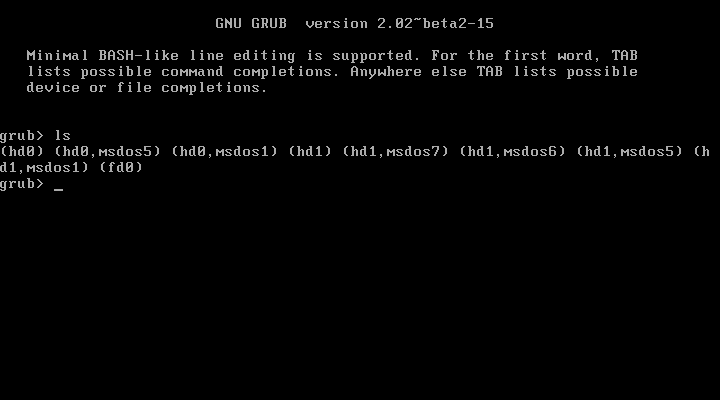
GRUB does. When I try to boot my Arch it goes straight into GRUB shell (got this picture from Google, it's similar to my screen).
Last edited by jpaz (2020-07-08 17:37:55)
Offline
#4 2020-07-08 20:09:26
- Head_on_a_Stick
- Member

- From: The Wirral
- Registered: 2014-02-20
- Posts: 9,003
- Website
Re: [SOLVED] GRUB breaks everytime I USB boot another OS
The "grub>" prompt means that the configuration file can't be found, use the set command to see where GRUB is looking for it.
I'm guessing that the NVRAM entry is being lost and you're booting from an old entry that's pointing to a non-existent grub.cfg, use 'efibootmgr -v' to list all of the NVRAM entries and their associated EFI loaders.
Jin, Jîyan, Azadî
Offline
#5 2020-07-08 23:14:36
- jpaz
- Member
- Registered: 2020-07-08
- Posts: 5
Re: [SOLVED] GRUB breaks everytime I USB boot another OS
Broken GRUB shows the following:
 grub> set
check_signature=no
cmdpath=(hd1,gpt1)/EFI/Boot
[...]
grub_cpu=x86_64
grub_plataform=efi
[...]
package_version=2.04-1ubuntu26
pager=
prefix=(hd1,gpt1)/EFI/ubuntu
pxe_default_server-
root=hd1,gpt1
secondary_locale_dir=
I've omitted some parts that i thought weren't important.
The funny thing I got in this was that ubuntu path right there, could this be because of a past Ubuntu install that wasn't deleted right and how could I fix that?
Working GRUB shows this:
 grub> set
?=0
cmdpath=(hd0,gpt6)/EFI/arch.grub
[...]
grub_cpu=x86_64
grub_plataform=efi
[...]
pager=
prefix=(hd0,gpt8)/boot/grub
root=hd0, gpt8
secondary_locale_dir=
efibootmgr shows this:
 $ efibootmgr -v
BootCurrent: 000B
Timeout: 0 seconds
BootOrder: 000B,0004,0005,2001,2003,0000,0001,0003,0002,2002
Boot0000* WDC WD10SPZX-24Z10              	BBS(HD,WDC WD10SPZX-24Z10              ,0x500)................-...........A.......................................|..
Boot0001* SAMSUNG HM500JI                 	BBS(HD,SAMSUNG HM500JI                 ,0x500)................-...........A.......................................|..
Boot0002* Realtek PXE B01 D00	BBS(128,Realtek PXE B01 D00,0x0).......................................................................
Boot0003* hp      v165w           	BBS(HD,hp      v165w           ,0x500)..................d.......b...f...................................S.|..
Boot0004* Linpus lite	HD(1,GPT,8f7d43f3-fbfe-4573-b55c-ad9fc0f2e9c2,0x800,0x82000)/File(\EFI\Boot\grubx64.efi)RC
Boot0005* Windows Boot Manager	HD(1,GPT,8f7d43f3-fbfe-4573-b55c-ad9fc0f2e9c2,0x800,0x82000)/File(\EFI\Microsoft\Boot\bootmgfw.efi)RC
Boot0006* EFI USB Device (hp      v165w)	PciRoot(0x0)/Pci(0x14,0x0)/USB(0,0)/HD(2,MBR,0x18c28049,0xf26300,0x10000)RC
Boot0007* EFI Network 0 for IPv4 (64-1C-67-A3-D8-85) 	PciRoot(0x0)/Pci(0x1c,0x0)/Pci(0x0,0x0)/MAC(641c67a3d885,0)/IPv4(0.0.0.00.0.0.0,0,0)RC
Boot0008* EFI Network 0 for IPv6 (64-1C-67-A3-D8-85) 	PciRoot(0x0)/Pci(0x1c,0x0)/Pci(0x0,0x0)/MAC(641c67a3d885,0)/IPv6([::]:<->[::]:,0,0)RC
Boot0009* Unknow Device	BBS(0,Unknow Device,0x0)..U.........{..........................................................
Boot000A* Windows Boot Manager	HD(1,GPT,8f7d43f3-fbfe-4573-b55c-ad9fc0f2e9c2,0x800,0x82000)/File(\EFI\Microsoft\Boot\bootmgfw.efi)WINDOWS.........x...B.C.D.O.B.J.E.C.T.=.{.9.d.e.a.8.6.2.c.-.5.c.d.d.-.4.e.7.0.-.a.c.c.1.-.f.3.2.b.3.4.4.d.4.7.9.5.}...e................
Boot000B* arch_grub	HD(6,GPT,7bc98087-6fd4-7042-9500-565d3af12e0b,0x33f11800,0x100000)/File(\EFI\arch_grub\grubx64.efi)
Boot2001* EFI USB Device	RC
Boot2002* EFI DVD/CDROM	RC
Boot2003* EFI Network	RC
Which is a lot but just so you know:
- WDC is my main HDD, containing both Arch and Windows
- SAMSUNG is my second HDD, just media and backups
- hp v165w is my USB flash drive
Last edited by jpaz (2020-07-09 02:26:01)
Offline
#6 2020-07-09 00:12:55
- jpaz
- Member
- Registered: 2020-07-08
- Posts: 5
Re: [SOLVED] GRUB breaks everytime I USB boot another OS
I'm guessing that the NVRAM entry is being lost and you're booting from an old entry that's pointing to a non-existent grub.cfg, use 'efibootmgr -v' to list all of the NVRAM entries and their associated EFI loaders.
I think you're right and also think this entry is the one causing trouble:
Boot0004* Linpus lite HD(1,GPT,8f7d43f3-fbfe-4573-b55c-ad9fc0f2e9c2,0x800,0x82000)/File(\EFI\Boot\grubx64.efi)RC
Offline
#7 2020-07-09 17:48:52
- Head_on_a_Stick
- Member
- From: The Wirral
- Registered: 2014-02-20
- Posts: 9,003
- Website
Re: [SOLVED] GRUB breaks everytime I USB boot another OS
See the EXAMPLES section of efibootmgr(8) for a way to delete individual entries. My ThinkPad will regenerate entries that show up in the firmware ("BIOS") boot menu even if the NVRAM entry itself is deleted so also check there and make sure the offending entry is removed from that list.
Jin, Jîyan, Azadî
Offline
#8 2020-07-10 00:12:47
- jpaz
- Member
- Registered: 2020-07-08
- Posts: 5
Re: [SOLVED] GRUB breaks everytime I USB boot another OS
Alright, I deleted the entries I didn't know and that did the trick!
Thanks for your help man, I appreciate it
Offline