You are not logged in.
- Topics: Active | Unanswered
#1 2020-08-12 13:06:10
- anwellcoleman
- Member

- From: Portugal, Europe
- Registered: 2020-08-12
- Posts: 3
KDE Plasma 5.19 - Problems with System Language and Sublime Text 3
Hello everyone, so I've been searching around and trying to fix this annoying problem but for now I had no luck.
When I open Sublime Text 3 I get this window: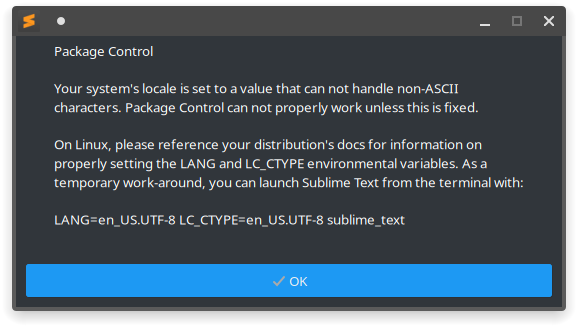
Also if I change the Region Format to Portuguese it changes my whole system language and KDE won't allow me to "Add languages...". The only language I have available is American English (en_US.UTF-8) but it changes to European Portuguese if I change my region to there.

My /etc/locale.conf
/etc/locale.conf
LANG=en_US.UTF-8
In /etc/locale.gen I only have this two uncommented:
/etc/locale.gen
en_US.UTF-8 UTF-8
pt_PT.UTF-8 UTF-8
I tried running Sublime Text like it tells me but the error repeats
$ LANG=en_US.UTF-8 LC_CTYPE=en_US.UTF-8 subl
bash: warning: setlocale: LC_CTYPE: cannot change locale (en_US.UTF-8)
And changed sublime-text.desktop to this:
/usr/share/applications/sublime_text.desktop
[Desktop Entry]
Version=1.0
Type=Application
Name=Sublime Text
GenericName=Text Editor
Comment=Sophisticated text editor for code, markup and prose
Exec=bash -c "LANG=en_US.UTF-8 LC_CTYPE=en_US.UTF-8 /opt/sublime_text/sublime_text %F"
Terminal=false
MimeType=text/plain;
Icon=sublime-text
Categories=TextEditor;Development;
StartupNotify=true
Actions=Window;Document;

[Desktop Action Window]
Name=New Window
Exec=bash -c "LANG=en_US.UTF-8 LC_CTYPE=en_US.UTF-8 /opt/sublime_text/sublime_text -n"
OnlyShowIn=Unity;

[Desktop Action Document]
Name=New File
Exec= bash -c "LANG=en_US.UTF-8 LC_CTYPE=en_US.UTF-8 /opt/sublime_text/sublime_text --command new_file"
OnlyShowIn=Unity;
I also changed my settings in ~/.config/plasma, even tried deleting it. Right now it looks like this:
~/.config/plasma-localerc
[Formats]
LANG=en_US.UTF-8
I used to have a lot more options here but I reverted everything, hoping to fix the problem because this only started when I changed my Region, I also reverted this to United States (en_US) but to no avail.
Running locale gives me all this:
$ locale
locale: Cannot set LC_CTYPE to default locale: No such file or directory
locale: Cannot set LC_MESSAGES to default locale: No such file or directory
locale: Cannot set LC_ALL to default locale: No such file or directory
LANG=en_US.UTF-8
LC_CTYPE="en_US.UTF-8"
LC_NUMERIC="en_US.UTF-8"
LC_TIME="en_US.UTF-8"
LC_COLLATE="en_US.UTF-8"
LC_MONETARY="en_US.UTF-8"
LC_MESSAGES="en_US.UTF-8"
LC_PAPER="en_US.UTF-8"
LC_NAME="en_US.UTF-8"
LC_ADDRESS="en_US.UTF-8"
LC_TELEPHONE="en_US.UTF-8"
LC_MEASUREMENT="en_US.UTF-8"
LC_IDENTIFICATION="en_US.UTF-8"
LC_ALL=
locale -a
$ locale -a
locale: Cannot set LC_CTYPE to default locale: No such file or directory
locale: Cannot set LC_MESSAGES to default locale: No such file or directory
locale: Cannot set LC_COLLATE to default locale: No such file or directory
C
POSIX
localectl:
$ localectl
System Locale: LANG=en_US.UTF-8
       VC Keymap: pt-latin1
      X11 Layout: n/a
And at last, locale-gen gives me this:
$ locale-gen
Generating locales...
  en_US.UTF-8...failed to set locale!
[error] cannot open locale definition file `en_GB': No such file or directory
Last edited by anwellcoleman (2020-08-12 20:25:09)
Offline
#2 2020-08-12 20:20:02
- Lone_Wolf
- Administrator

- From: Netherlands, Europe
- Registered: 2005-10-04
- Posts: 15,388
Re: KDE Plasma 5.19 - Problems with System Language and Sublime Text 3
locale-gen needs to be run with root rights .
Verify the uncommented entries in /etc/locale.gen look exactly like
en_US.UTF-8 UTF-8
pt_PT.UTF-8 UTF-8
then re-run locale-gen .
Disliking systemd intensely, but not satisfied with alternatives so focusing on taming systemd.
clean chroot building not flexible enough ?
Try clean chroot manager by graysky
Offline
#3 2020-08-12 20:31:17
- anwellcoleman
- Member
- From: Portugal, Europe
- Registered: 2020-08-12
- Posts: 3
Re: KDE Plasma 5.19 - Problems with System Language and Sublime Text 3
locale-gen needs to be run with root rights .
Verify the uncommented entries in /etc/locale.gen look exactly like
en_US.UTF-8 UTF-8
pt_PT.UTF-8 UTF-8
then re-run locale-gen .
I forgot to add here the 2nd UTF-8, running as root gives me the same error. I even deleted everything, just left there en_US.UTF-8 UTF-8 and pt_PT.UTF-8 UTF-8.
$ cat /etc/locale.gen
en_US.UTF-8 UTF-8
pt_PT.UTF-8 UTF-8

$ sudo locale-gen
Generating locales...
  en_US.UTF-8...failed to set locale!
[error] cannot open locale definition file `en_GB': No such file or directory
Offline
#4 2020-08-12 20:41:06
- Lone_Wolf
- Administrator
- From: Netherlands, Europe
- Registered: 2005-10-04
- Posts: 15,388
Re: KDE Plasma 5.19 - Problems with System Language and Sublime Text 3
That error could still result from running with insufficient rights .
Please run locale-gen from a console terminal where you are logged in as root or use su --login + root password to switch a terminal from normal user to root
Disliking systemd intensely, but not satisfied with alternatives so focusing on taming systemd.
clean chroot building not flexible enough ?
Try clean chroot manager by graysky
Offline
#5 2020-08-13 18:28:29
- anwellcoleman
- Member
- From: Portugal, Europe
- Registered: 2020-08-12
- Posts: 3
Re: KDE Plasma 5.19 - Problems with System Language and Sublime Text 3
So... I messed up my partition while working on windows, had to install arch linux again. I followed the wiki more thoroughly and now everything seems fine, it even fixed the System Language problem it seems.
Thanks for the help anyways.
Offline