You are not logged in.
- Topics: Active | Unanswered
#1 2020-12-23 13:23:58
- EgidioCaprino
- Member
- Registered: 2016-03-13
- Posts: 106
Okular can't print only even sheets
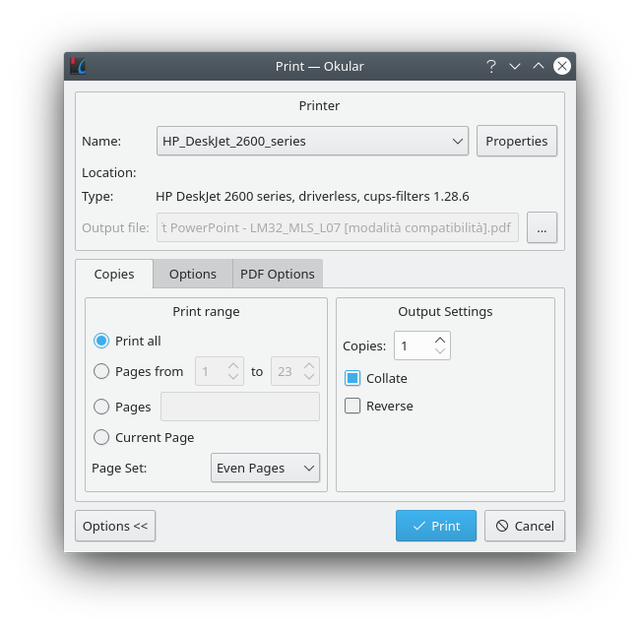
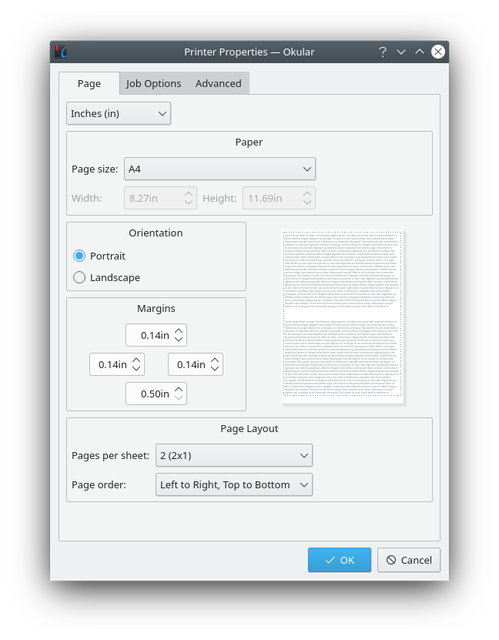
I switched recently from Gnome to KDE. Now I have a PDF document and I want to print 2 pages per sheet and print even sheets first, so that later I can reverse them and print odds on the other side. I used to do that with Evince. I'm trying to do the same with Okular but I get this error:
https://i.ibb.co/w0KVppK/image.png

This is how I set up the printing:
https://i.ibb.co/mR9Lbhx/image.png
https://i.ibb.co/BPGTDGg/image.png
Do you know how I could manage to print 2 pages per sheet while printing only odds/even sheets?
moderator edit -- replaced oversized images with links.
Pasting pictures and code
Last edited by 2ManyDogs (2020-12-23 13:31:00)
Offline
#2 2020-12-24 16:39:05
- ilsensine
- Member
- Registered: 2013-03-26
- Posts: 33
Re: Okular can't print only even sheets
I can suggest you a workaround. Print the document in 2 steps.
First, install the cups-pdf driver (configuration and usage details are shown during the installation by pacman) and print your document in 2-in-1 pages mode using this driver.
It will produce a pdf document that you can open and process with the odd/even printing.
Note that you *need* the cups-pdf virtual printer, as the builtin kde pdf printer is not able to print 2 pages in 1 (welcome to kde world -- it's not so bad, but...what the hell!).
Let me know if it solves your problem. I didn't test the final result on real paper.
Offline
#3 2020-12-26 14:20:13
- EgidioCaprino
- Member
- Registered: 2016-03-13
- Posts: 106
Re: Okular can't print only even sheets
I tried that but I ended up with a PDF with the same number of pages. These are the settings:


EDIT: actually, I found the PDF in the /var/spool/cups-pdf/username folder, but the pages are reversed.
Last edited by EgidioCaprino (2020-12-26 14:23:35)
Offline