You are not logged in.
- Topics: Active | Unanswered
Pages: 1
#1 2021-01-25 18:31:30
- tigerjack
- Member
- Registered: 2017-08-20
- Posts: 99
Var partition seems corrupted
I experienced a problem today which I don't know how to solve.
Basically, my laptop started lagging while simply opening new shells. So I decided to shutdown it. While doing so, the system hanged for quite a lot of time, while showing a failure message related to journald. I decided to just force the shutdown.
When I rebooted, the startup process was stuck for a while after GRUB. In the end I always got this message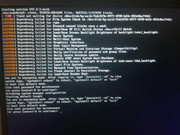
The first thing to notice is that the blkid of /var partition changed. Even better, the partition has now only a PARTUUID and no UUID.
#> blkid | grep nvme0n1p6
/dev/nvme0n1p6: PARTLABEL="Var" PARTUUID="664e29c0-b9b3-4b05-a5af-f79ebff968f1"
Therefore, I changed the corresponding entry in /etc/fstab using directly /dev/nvme0n1p6. However, after a restart, I was always hitting new error messages.
I tried to also mount directly the partition in another location, but I got a message related to bad VFAT (don't have any picture though). So I decided to just comment out the entry in the fstab file.
At this point, I could finally log in. Trying to mount again the var partition, I get this message
>sudo mount -t ext4 /dev/nvme0n1p6 /mnt/tmp
mount: /mnt/tmp: wrong fs type, bad option, bad superblock on /dev/nvme0n1p6, missing codepage or helper program, or other error
I suspect that the whole problem was related to a full partition. That's what I can get from the partition now
>sudo fdisk -l | grep nvme0n1p6
/dev/nvme0n1p6  274950144  327378943  52428800    25G Linux filesystem
>sudo parted /dev/nvme0n1 print
Model: SAMSUNG MZVLQ512HALU-00000 (nvme)
Disk /dev/nvme0n1: 512GB
Sector size (logical/physical): 512B/512B
Partition Table: gpt
Disk Flags:

Number  Start   End     Size    File system     Name                          Flags
 6      141GB   168GB   26.8GB                  Var
However, it shows that it's unable to detect the filesystem.
My final question is: is there any way to recover the old var directory?
EDIT: both fsck and e2fsck report an invalid superblock.
EDIT2: I ended up with using e2fsck with all the superblocks returned by
sudo mke2fs -n /dev/nvme0n1p6. However, all the inodes got deleted. Now I can mount the partition, but it doesn't contain anything apart the lost+found directory with a bunch of files in it that I don't know how to recover (and if it's worth it).
Last edited by tigerjack (2021-01-25 18:57:41)
Offline
#2 2021-01-28 03:21:17
- fire100265
- Member
- Registered: 2020-10-05
- Posts: 95
Re: Var partition seems corrupted
I think the only solution you have is to reformat that partition. I don't think you have a better option. /var mostly contains cache and logs so a full system reinstall should set it straight.
Offline
#3 2021-01-28 08:11:22
- tigerjack
- Member
- Registered: 2017-08-20
- Posts: 99
Re: Var partition seems corrupted
Cache and logs are not a big deal (I think). The main problem was to rebuild the pacman database. I didn't want to do a full reinstall. For now it seems to work fine. Let's hope.
Offline
Pages: 1