You are not logged in.
How to make keyboard shortcut for take screenshot of selection?
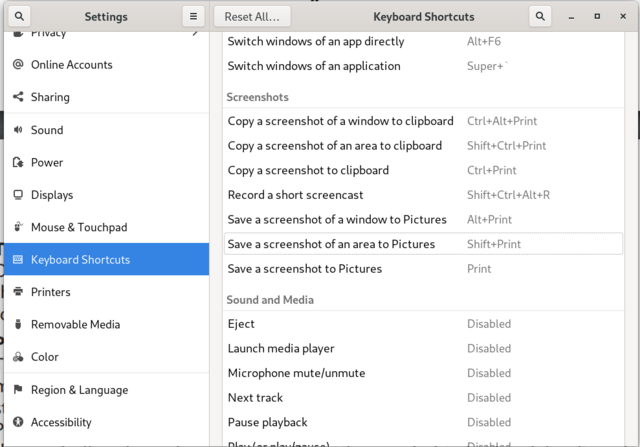
I am using Gnome and have the following setting for screenshot of an area. PrintScr takes a screenshot of the whole screen but SHIFT+PrintScr does nothing.
https://i.postimg.cc/1zQJKYSM/settingsgnome.png
How can I set SHIFT+Print to take screenshot of selected area.
moderator edit -- replaced oversized image with link.
Pasting pictures and code
Last edited by 2ManyDogs (2021-02-06 13:19:08)
Offline
Getting back to my question.
Is there any way to setup a keyboard shortcut to take a screenshot of selected area?
(I am using Gnome Budgie but not sure if this is DE related thing at all.)
Offline
I don't know gnome, you'll have to see to that. To take a screenshot of a selected area, I bound some key combos to scrot in my WM config files. I used the print scr key.
#Capture desktop
Print :Exec scrot

#Capture Focused window
Mod4 Print :Exec sleep 3 && scrot -u

#Capture Select area
Control Print :Exec fbrun -text "scrot -s"
https://wiki.archlinux.org/index.php/Xbindkeys
https://wiki.archlinux.org/index.php/GNOME
Offline