You are not logged in.
- Topics: Active | Unanswered
#1 2021-03-09 21:18:26
- alfalfa
- Member

- Registered: 2017-06-30
- Posts: 63
- Website
[SOLVED] Unconsistent, huge font when changing display
I use a Thinkpad laptop with a docking station, so I use either the builtin screen or a larger display. Recently, after being docked some apps are scaled up (see screenshot). The scaling effect remain once the laptop is removed from the dock.
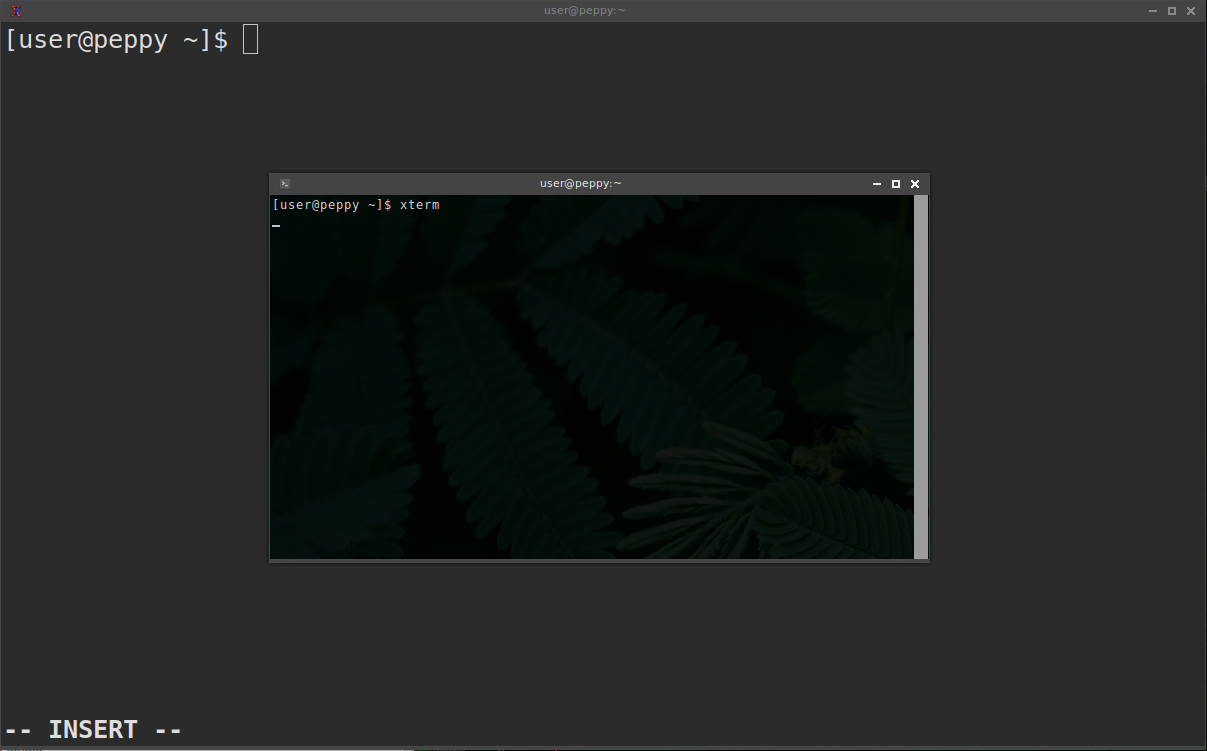
I use Openbox with lightdm, and I've never set the DPI manually. It mostly affect Qt apps, but also xterm and some others. From the wiki I tried setting some variables xinitrc but they that made no change;
export QT_AUTO_SCREEN_SCALE_FACTOR=0
export QT_SCALE_FACTOR=1
export GDK_SCALE=1
export GDK_DPI_SCALE=1
Would appreciate some clues of what to look for.
$ inxi -Fxy

System:
  Kernel: 5.4.97-1-lts x86_64 bits: 64 compiler: gcc v: 10.2.1
  Desktop: Openbox 3.6.1 Distro: Arch Linux
Machine:
  Type: Laptop System: LENOVO product: 20CM0048US v: ThinkPad X250
  serial: <filter>
  Mobo: LENOVO model: 20CM0048US v: SDK0E50510 WIN serial: <filter>
  UEFI: LENOVO v: N10ET59W (1.38 ) date: 08/15/2019
Battery:
  ID-1: BAT0 charge: 13.2 Wh condition: 18.2/23.5 Wh (78%)
  model: LGC 45N1113 status: Charging
  ID-2: BAT1 charge: 0.9 Wh condition: 17.5/23.5 Wh (74%) model: LGC 45N1127
  status: Unknown
CPU:
  Info: Dual Core model: Intel Core i7-5600U bits: 64 type: MT MCP
  arch: Broadwell rev: 4 L2 cache: 4 MiB
  flags: avx avx2 lm nx pae sse sse2 sse3 sse4_1 sse4_2 ssse3 vmx
  bogomips: 20752
  Speed: 799 MHz min/max: 500/3200 MHz Core speeds (MHz): 1: 799 2: 798
  3: 798 4: 800
Graphics:
  Device-1: Intel HD Graphics 5500 vendor: Lenovo driver: i915 v: kernel
  bus ID: 00:02.0
  Device-2: Acer Integrated Camera type: USB driver: uvcvideo bus ID: 2-8:4
  Display: x11 server: X.Org 1.20.10 driver: loaded: intel
  unloaded: modesetting resolution: 3440x1440~50Hz
  OpenGL: renderer: Mesa Intel HD Graphics 5500 (BDW GT2) v: 4.6 Mesa 20.3.4
  direct render: Yes
Audio:
  Device-1: Intel Broadwell-U Audio vendor: Lenovo driver: snd_hda_intel
  v: kernel bus ID: 00:03.0
  Device-2: Intel Wildcat Point-LP High Definition Audio vendor: Lenovo
  driver: snd_hda_intel v: kernel bus ID: 00:1b.0
  Device-3: Logitech QuickCam Communicate Deluxe/S7500 type: USB
  driver: snd-usb-audio,uvcvideo bus ID: 2-3.2:42
  Sound Server: ALSA v: k5.4.97-1-lts
Network:
  Device-1: Intel Ethernet I218-LM vendor: Lenovo driver: e1000e v: 3.2.6-k
  port: 3080 bus ID: 00:19.0
  IF: enp0s25 state: down mac: <filter>
  Device-2: Intel Wireless 7265 driver: iwlwifi v: kernel port: efa0
  bus ID: 03:00.0
  IF: wlp3s0 state: up mac: <filter>
Bluetooth:
  Device-1: Intel Bluetooth wireless interface type: USB driver: btusb
  v: 0.8 bus ID: 2-7:3
  Message: Required tool hciconfig not installed. Check --recommends
Drives:
  Local Storage: total: 922.21 GiB used: 722.12 GiB (78.3%)
  ID-1: /dev/sda vendor: Seagate model: ST750LM022 HN-M750MBB
  size: 698.64 GiB
  ID-2: /dev/sdb model: SB2 size: 223.57 GiB
Partition:
  ID-1: / size: 219.44 GiB used: 148.19 GiB (67.5%) fs: ext4 dev: /dev/sdb3
  ID-2: /boot size: 511 MiB used: 99.6 MiB (19.5%) fs: vfat dev: /dev/sdb1
Swap:
  ID-1: swap-1 type: file size: 2 GiB used: 0 KiB (0.0%) file: /swapfile
Sensors:
  System Temperatures: cpu: 52.0 C mobo: 0.0 C
  Fan Speeds (RPM): cpu: 4134
Info:
  Processes: 173 Uptime: 2d 50m Memory: 7.68 GiB used: 2.17 GiB (28.3%)
  Init: systemd Compilers: gcc: 10.2.0 clang: 11.0.1 Packages: 1258
  Shell: Bash v: 5.1.4 inxi: 3.3.01
Last edited by alfalfa (2021-03-10 03:46:07)
Offline
#2 2021-03-09 22:03:07
- seth
- Member

- From: Won't reply 2 private help req
- Registered: 2012-09-03
- Posts: 77,552
Re: [SOLVED] Unconsistent, huge font when changing display
Please use code tags, not quote tags.
xrandr -q # for internal and external output
xdpyinfo | grep resolution
The resolution is probably auto-selected, but not updated w/ the dock.
"xrandr -dpi 96" will set it to 96DPI.
Notice: that this will only impact clients started after that change (it's possible to handle that event, but in reality, no client/toolkit does)
Offline
#3 2021-03-10 03:45:41
- alfalfa
- Member
- Registered: 2017-06-30
- Posts: 63
- Website
Re: [SOLVED] Unconsistent, huge font when changing display
Solved by adding --dpi to xrandr (xplugd-git);
~/.xplugrc
#!/bin/sh
internal()
{
  xrandr --output DP2-1 --off
  xrandr --output eDP1 --primary --mode 1366x768 --pos 0x0 --rotate normal --dpi 96x96
  feh --bg-fill '/home/user/.local/share/wallpapers/select/wallpaper-996797.jpg'
  sleep 2
  xset s on
  xset +dpms
}

external()
{
  xrandr --output eDP1 --off
  xrandr --output DP2-1 --primary --mode 3440x1440 --pos 0x0 --rotate normal --dpi 102x102
  feh --bg-fill '/home/user/.local/share/wallpapers/select/mimosa.jpg'
  sleep 2
  xset s off
  xset -dpms
}

type=$1
device=$2
status=$3
monitor=DP2-1

case "$type,$device,$status" in
  display,$monitor,connected)
    external;;
  display,$monitor,disconnected)
    internal;;
esac
It is still unclear why, but the excessive DPI only occured after the laptop was docked twice. I've been using the same setup for few months and this is a new behavior. xrandr sets the DPI to 102 first, then 203. As you suggested, the original resolution was not restored when removed from the docking station. Fortunately, manually setting the DPI fixed it.
Offline