You are not logged in.
- Topics: Active | Unanswered
Pages: 1
#1 2006-09-26 09:14:58
- brazzmonkey
- Member

- From: between keyboard and chair
- Registered: 2006-03-16
- Posts: 818
hardware upgrade - how to update ?
hi everyone,
as i told in some other thread, my mobo and PSU recently failed. so i took the opportunity to upgrade my faulty hardware. eventually i'll upgrade my system a bit more than i first planned sot there should be quite some changes involved. amongst them :
- mobo upgrade (via kt133 to nvidia nforce3 250)
- cpu upgrade (duron 1300 to athlon64 3700+)
- new sound device (sblive to 7.1 realtek integrated to mobo)
- new nic (i don't recall the specs)
- new memory (sdram pc133 to ddr pc3200)
(not really cutting-edge, but still...)
i never upgraded hardware since i've been using linux, but i expect a kernel recompilation should be sufficient (i mainly use a custom kernel). am i right ?
here are a few more questions :
- should this works properly ? i mean, i hope this hardware will be linux-compatible... if i boot a generic arch kernel, will it be able to detect all new hardware properly (wihtout further configuring) ?
- is there any point for me to switch to arch64 ? can i do this from an existing 32-bit installation ?
- should i enable smp ?
- any other stuff i should take care of ?
tia !
what goes up must come down
Offline
#2 2006-09-26 09:40:52
- chrismortimore
- Member
- From: Edinburgh, UK
- Registered: 2006-07-15
- Posts: 655
Re: hardware upgrade - how to update ?
i never upgraded hardware since i've been using linux, but i expect a kernel recompilation should be sufficient (i mainly use a custom kernel). am i right ?
Should do. You might need to change some hardware-dependant configs for software, like lm_sensors and possibly alsa, but nothing too taxing.
- should this works properly ? i mean, i hope this hardware will be linux-compatible... if i boot a generic arch kernel, will it be able to detect all new hardware properly (wihtout further configuring) ?
The arch kernel will do everything for you, it autodetects all your hardware on boot and Just Works (tm). At least it's meant to...
- is there any point for me to switch to arch64 ? can i do this from an existing 32-bit installation ?
Depends, I found 64bit isn't worth the hassle yet, because of things like win32codecs not working without a chroot environment, and browser plugin issues. Might be worth it for you though, I'm sure there is a wiki about it. And you'll need to reinstall.
- should i enable smp ?
No, you have a uni-core processor.
- any other stuff i should take care of ?
Well, I could go a sandwich just now.... 
Desktop: AMD Athlon64 3800+ Venice Core, 2GB PC3200, 2x160GB Maxtor DiamondMax 10, 2x320GB WD Caviar RE, Nvidia 6600GT 256MB
Laptop: Intel Pentium M, 512MB PC2700, 60GB IBM TravelStar, Nvidia 5200Go 64MB
Offline
#3 2006-09-26 09:59:40
- brazzmonkey
- Member
- From: between keyboard and chair
- Registered: 2006-03-16
- Posts: 818
Re: hardware upgrade - how to update ?
brazzmonkey wrote:- should i enable smp ?
No, you have a uni-core processor.
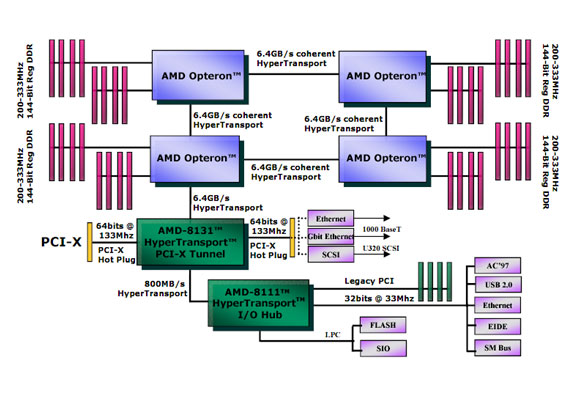
oh, i though this amd hypertransport thing was just like intel's hyperthreading... looks like it's not actually.
thanks chrismortimore ! and bon appétit !
what goes up must come down
Offline
#4 2006-09-26 10:03:15
- chrismortimore
- Member
- From: Edinburgh, UK
- Registered: 2006-07-15
- Posts: 655
Re: hardware upgrade - how to update ?
This is hypertransport: http://www.x86-secret.com/pics/cpu/k8-2/httex.jpg
And don't even get me started on hyperthreading 
Desktop: AMD Athlon64 3800+ Venice Core, 2GB PC3200, 2x160GB Maxtor DiamondMax 10, 2x320GB WD Caviar RE, Nvidia 6600GT 256MB
Laptop: Intel Pentium M, 512MB PC2700, 60GB IBM TravelStar, Nvidia 5200Go 64MB
Offline
#5 2006-09-26 10:21:42
- brazzmonkey
- Member
- From: between keyboard and chair
- Registered: 2006-03-16
- Posts: 818
Re: hardware upgrade - how to update ?
i get error 403. what's wrong with hyperthreading ?
what goes up must come down
Offline
#6 2006-09-26 12:59:17
- Snarkout
- Member

- Registered: 2005-11-13
- Posts: 542
Re: hardware upgrade - how to update ?
I upgraded from an athlon 3200+ to a pentium D 945 on Friday night, replacing (obviously) the mobo and a few other things as well. The only thing I did to prepare for this was remove my sensorsd stuff from rc.local and re-run sensors-detect when I rebooted. Everything else "Just Worked" without my input. Frankly I was amazed - I was expecting at least *some* hassle. I imagine your upgrade would be much the same, but do your backups just the same 
Unthinking respect for authority is the greatest enemy of truth.
-Albert Einstein
Offline
#7 2006-09-26 13:08:29
- chrismortimore
- Member
- From: Edinburgh, UK
- Registered: 2006-07-15
- Posts: 655
Re: hardware upgrade - how to update ?
what's wrong with hyperthreading ?
I'll do the condensed rant
Basically, I found that instead of improving performance, it slowed everything down. I tweaked as much as I possibly could think of, and couldn't get it to behave, so gave up. Luckily it wasn't my box, it was a borrowed box, so not my problem
The image is from this page: http://www.x86-secret.com/articles/cpu/k8-2/a64-2.htm
I pointed you to the one at the bottom. Sadly, my french isn't good enough to understand the rest of the page... 
Desktop: AMD Athlon64 3800+ Venice Core, 2GB PC3200, 2x160GB Maxtor DiamondMax 10, 2x320GB WD Caviar RE, Nvidia 6600GT 256MB
Laptop: Intel Pentium M, 512MB PC2700, 60GB IBM TravelStar, Nvidia 5200Go 64MB
Offline
#8 2006-09-26 13:24:45
- brazzmonkey
- Member
- From: between keyboard and chair
- Registered: 2006-03-16
- Posts: 818
Re: hardware upgrade - how to update ?
alrighty then !
thanks both of you for your feedback. i should be ready by tomorrow evening if everything goes smoothly.
what goes up must come down
Offline
Pages: 1