You are not logged in.
- Topics: Active | Unanswered
#1 2021-04-22 11:56:07
- Xwang
- Member
- From: EU
- Registered: 2012-05-14
- Posts: 414
Different free space reported by dh, dolphin and flielight
Hi,
when I read the free space left on one of my disk (an SSD which is mounted as /home), I see that df, dolphin and filelight report different values as you can see from this image: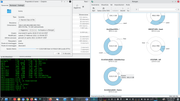
Moreover if I sum the used and free space of each hard disk as reported by df, that value is always around the 95% of the disk dimension reported by df itself (first column).
/dev/sdb1 and /dev/sdc1 are both 1TB drives which is 931GiB as reported by Gparted.
df says that they are 917G and maybe the difference is the space taken by the ext4 filesystem.
So even if 917G is correct why the sum of the other two columns does not give 917G?
Gparted says that /dev/sdb1 is 931.51GiB, with 632.39GiB used space and 299.12GiB free space, whereas /dev/sdc1 is still 931.51 GiB with 766.02GiB used space and 165.49 free space.
Those values are different than dh and dolphin ones and match the ones of filelight.
What are the correct ones?
Does the same happens to you?
Offline
#2 2021-04-22 12:17:15
- Slithery
- Administrator

- From: Norfolk, UK
- Registered: 2013-12-01
- Posts: 5,776
Re: Different free space reported by dh, dolphin and flielight
For the 5% see...
https://wiki.archlinux.org/index.php/Ex … ved_blocks
As to the rest are you sure the utilities are using matching units (GB vs GiB)?
Offline
#3 2021-04-22 13:07:53
- Xwang
- Member
- From: EU
- Registered: 2012-05-14
- Posts: 414
Re: Different free space reported by dh, dolphin and flielight
Thank you very much. It is true that "you never stop learning!"
The utilities are using matching units, but filelight and gparted seem to consider the 5% as available space.
df and dolphin, instead consider that space as not avilable.
Anyway since those disks contain /home and backups and since they are big (1TB), I've reduced the reserved space on them to 1% (I suppose that about 10GB of space available on each to avoid fragmentation and "allow root-owned daemons to continue to function correctly after non-privileged processes are prevented from writing to the filesystem" is enough. Isn't it?).
The /dev/sdb1 contains backups made with backintime, so even if snapshots are taken every 4 hours, the vast majority of files are unmodified and so only hard links are added or deleted. Moreover on both disks I'm way below 90% of percentage use.
Last edited by Xwang (2021-04-22 13:08:45)
Offline