You are not logged in.
- Topics: Active | Unanswered
Pages: 1
#1 2021-04-24 04:23:40
- FenrisUltra
- Member
- Registered: 2021-04-08
- Posts: 9
Visual Boot Sequence
When I load debian, as you boot it up you get a screen looking like this:
https://www.tecmint.com/wp-content/uplo … zation.png
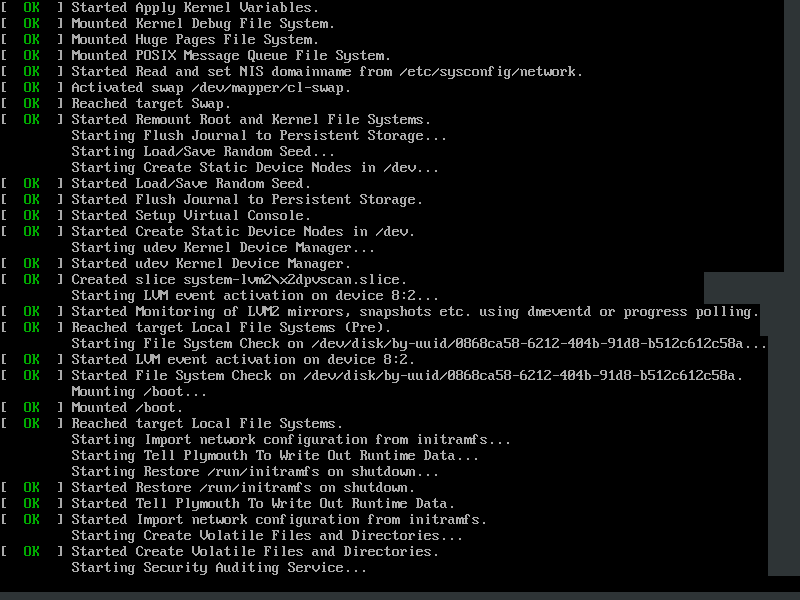
First of all, I don't even know what you call that, but...I want it. I like seeing what goes on with my Linux start up sequences, so if something is wrong i'm not seeing a blank boot screen.
Can this be done in Arch just before the desktop manager loads up? If so, how do you do it?
Because I don't know what this is called, I can't seem to properly find out more about this.
moderator edit -- replaced oversized image with link.
Pasting pictures and code
Last edited by 2ManyDogs (2021-04-24 12:55:48)
Offline
#2 2021-04-24 04:33:58
- skunktrader
- Member
- From: Brisbane, Australia
- Registered: 2010-02-14
- Posts: 1,680
Re: Visual Boot Sequence
Do you have quiet on your kernel command line? What is your loglevel set to?
Offline
#3 2021-04-24 04:41:48
- tucuxi
- Member
- From: Switzerland
- Registered: 2020-03-08
- Posts: 291
Re: Visual Boot Sequence
Unless you tweak your system with any of the things described in https://wiki.archlinux.org/index.php/Silent_boot, that is pretty much what the boot looks like in Arch.
Last edited by tucuxi (2021-04-24 04:42:58)
Offline
#4 2021-04-24 05:42:19
- FenrisUltra
- Member
- Registered: 2021-04-08
- Posts: 9
Re: Visual Boot Sequence
Do you have quiet on your kernel command line? What is your loglevel set to?
I don't know how to find that out
Unless you tweak your system with any of the things described in https://wiki.archlinux.org/index.php/Silent_boot, that is pretty much what the boot looks like in Arch.
It can't be completely blank, there has to be at the very least a percentage indicator to show you it's not hung or something.
Offline
#5 2021-04-24 06:02:29
- jasonwryan
- Anarchist

- From: .nz
- Registered: 2009-05-09
- Posts: 30,426
- Website
Re: Visual Boot Sequence
It can't be completely blank, there has to be at the very least a percentage indicator to show you it's not hung or something.
Thats what "quiet" means...
Please read the Code of Conduct and only post thumbnails http://wiki.archlinux.org/index.php/Cod … s_and_code
Offline
#6 2021-04-24 06:58:28
- tucuxi
- Member
- From: Switzerland
- Registered: 2020-03-08
- Posts: 291
Re: Visual Boot Sequence
What distribution are you using and how did you install it?
Offline
Pages: 1