You are not logged in.
- Topics: Active | Unanswered
#1 2021-05-18 00:04:06
- firekage
- Member
- From: Eastern Europe, Poland
- Registered: 2013-06-30
- Posts: 628
[SOLVED] Samba no visible shares - have to enter ip address
Hello.
I'd to ask for your help and support. I've been struggling with Samba for past week. I'm trying to figure out why i need to enter ip address to Dolphin to enter my own shares while the same Dolphin and the Same samba sees my other machines without needint to enter ip address. All of them have the same configuration. I'v been reading a lot for the past week, tried to find similar problem across all distros, like Ubuntu, Arch, Fedora and so on and i just lost. Please, could you help me?
I post screenshot of the problem.
My Arch named 8200 is the one that i need to enter ip, while te rest are visible just opening Dolphin and network > smb.
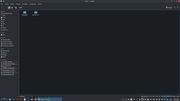
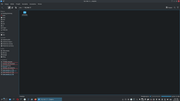
all of them have the same setup, and on 2 it works, on one does not. Not know why.
Help  Not even home directory
Last edited by firekage (2021-05-18 16:38:13)
Offline
#2 2021-05-18 02:40:03
- jonno2002
- Member
- Registered: 2016-11-21
- Posts: 892
Re: [SOLVED] Samba no visible shares - have to enter ip address
if i understand that correctly you are trying to access your own shares on the machine your on, not a remote machine ?
if so have you made sure your hostname and hosts file are configured correctly as per the arch install guide:
https://wiki.archlinux.org/title/Instal … figuration
specifically the line in the hosts file that resolves your hostname to 127.0.1.1
Offline
#3 2021-05-18 10:50:11
- firekage
- Member
- From: Eastern Europe, Poland
- Registered: 2013-06-30
- Posts: 628
Re: [SOLVED] Samba no visible shares - have to enter ip address
if i understand that correctly you are trying to access your own shares on the machine your on, not a remote machine ?
if so have you made sure your hostname and hosts file are configured correctly as per the arch install guide:
https://wiki.archlinux.org/title/Instal … figuration
specifically the line in the hosts file that resolves your hostname to 127.0.1.1
That's the problem. My other machine, named E1-531 and named 7500uATX does not have configured hosts and it works, whie the third machine, has the same setup, no hosts configured (plain text) and does not work.
Yes, it is not remonte machine, by my own desktop. Also, what is being suggested: name resolve order in case of Arch linux and Samga does not work because even if a add it to te smb.conf when i run testparm -sv it is still default one. I write bcast but testparm -sv shows all the time that it is lmhosts!
BTW, one thing
/etc/hosts
127.0.0.1	localhost
::1		localhost
127.0.1.1	myhostname.localdomain	myhostname
also i don't know what should be after 127.0.1.1 so i added
127.0.0.1
::1
127.0.1.1 HP8200
Is this ok?
Last edited by firekage (2021-05-18 11:18:05)
Offline
#4 2021-05-18 11:24:06
- jonno2002
- Member
- Registered: 2016-11-21
- Posts: 892
Re: [SOLVED] Samba no visible shares - have to enter ip address
try using nmblookup to see if it resolves an ip address:
nmblookup E1-531nmblookup 7500uATX etc
i can run that command on all my machines and it returns their correct ip address
EDIT:
this is how i would do it
127.0.1.1 HP8200.localdomain HP8200Last edited by jonno2002 (2021-05-18 11:27:01)
Offline
#5 2021-05-18 12:48:39
- firekage
- Member
- From: Eastern Europe, Poland
- Registered: 2013-06-30
- Posts: 628
Re: [SOLVED] Samba no visible shares - have to enter ip address
nmblookup 7500uATX I tried it, it works on all my machines, for an example:
[firekage@7500 ~]$ nmblookup 7500
192.168.1.6 7500<00>
[firekage@7500 ~]$
EDIT:
this is how i would do it127.0.1.1 HP8200.localdomain HP8200
Thank you for explanation. One thins: one vids from youtube about Arch has different settings, not 127.0.1.1 but 127.0.0.1 and one youtube user asked about this because in Arch man and Archwiki there is 1.1 and the gyu said that correct version is 0.1!?
I did what you suggested above:
[firekage@7500 ~]$ cat /etc/hosts
# Static table lookup for hostnames.
# See hosts(5) for details.

127.0.0.1 localhost
::1       localhost
127.0.1.1 7500.localdomain 7500
[firekage@7500 ~]$
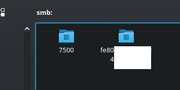
And as soon as i did it, rebooted now on my 2 machine that i could enter samba via names, it does not work, i need to enter ip.
In Doplinh, with terminal look i see this:
0.0.29.76 timeout on server
bash: cd: /run/user/1000/kio-fuse-rWzTfP/smb/7500.kio-discovery-wsd:
and even if the folders in Dolphin > Network > SMB are listed, i can't enter them, also, one of them (E1-531) is changed name from its own to something like MacAddress name.
Samba, KDE is a pain in my 4 letters, it never works like the man says, when configured.
Last edited by firekage (2021-05-18 12:52:54)
Offline
#6 2021-05-18 13:17:04
- jonno2002
- Member
- Registered: 2016-11-21
- Posts: 892
Re: [SOLVED] Samba no visible shares - have to enter ip address
can you post your samba config ?
grep -v ";\|#\|^$" /etc/samba/smb.confOffline
#7 2021-05-18 13:28:23
- firekage
- Member
- From: Eastern Europe, Poland
- Registered: 2013-06-30
- Posts: 628
Re: [SOLVED] Samba no visible shares - have to enter ip address
Yes.
[global]
   workgroup = WORKGROUP
   server string = Samba Server
   server role = standalone server
log file = /var/lib/samba/%m.log
   max log size = 50
   dns proxy = no
[homes]
   comment = Home Directories
   browseable = yes
   writable = yes
[printers]
   comment = All Printers
   path = /usr/spool/samba
   browseable = no
   guest ok = no
   writable = no
   printable = yes
[7500]
comment = 7500
path = /mnt/
public = yes
writable = yes
printable = no
valid users = firekage
[firekage@7500 ~]$
also
[firekage@7500 ~]$ testparm -sv | grep "name resolve order"
Load smb config files from /etc/samba/smb.conf
Loaded services file OK.
Weak crypto is allowed
Server role: ROLE_STANDALONE

        name resolve order = lmhosts wins host bcast
[firekage@7500 ~]$
and even if i rearrange order and place bcast as the first one, testparm -sv shows that lmhosts is first again.
btw, cant share home directory...it does not see it.
Last edited by firekage (2021-05-18 13:58:44)
Offline
#8 2021-05-18 13:39:43
- firekage
- Member
- From: Eastern Europe, Poland
- Registered: 2013-06-30
- Posts: 628
Re: [SOLVED] Samba no visible shares - have to enter ip address
Also
[firekage@7500 ~]$ smbtree
Enter WORKGROUP\firekage's password:
smbXcli_negprot_smb1_done: No compatible protocol selected by server.
Offline
#9 2021-05-18 14:04:46
- jonno2002
- Member
- Registered: 2016-11-21
- Posts: 892
Re: [SOLVED] Samba no visible shares - have to enter ip address
you can try adding these lines to the global section of your smb.conf
        client min protocol = NT1
        server min protocol = NT1
Last edited by jonno2002 (2021-05-18 14:22:49)
Offline
#10 2021-05-18 14:12:40
- firekage
- Member
- From: Eastern Europe, Poland
- Registered: 2013-06-30
- Posts: 628
Re: [SOLVED] Samba no visible shares - have to enter ip address
you can try adding this line to the global section of your smb.conf
min protocol = NT1
Hass sometihg been changed? Earlier it was client/server and i add client min protocol = NT1 but still, Dolphin cant access shares with names, only when i enter ip.
Last edited by firekage (2021-05-18 14:14:05)
Offline
#11 2021-05-18 14:26:54
- jonno2002
- Member
- Registered: 2016-11-21
- Posts: 892
Re: [SOLVED] Samba no visible shares - have to enter ip address
sorry messed that post up badly, i have fixed it.
please try adding both lines to all your machines configs and try that.
all it does is use the NT1 protocol to browse shares, then uses the more secure smb3 protocol to mount shares.
Offline
#12 2021-05-18 15:36:17
- firekage
- Member
- From: Eastern Europe, Poland
- Registered: 2013-06-30
- Posts: 628
Re: [SOLVED] Samba no visible shares - have to enter ip address
you can try adding these lines to the global section of your smb.conf
        client min protocol = NT1
        server min protocol = NT1
Does not work, and now i cant even enter E1-531 shares from 7500 desktop. Dont know if this is samba problem, Dolphin problem, KDE problem or what. I can enter only when i hit IP address into SMB Dophin: smb//192.168.1.3 for an example and im at E1-531 shares. Cant do the same by "autoscan" when entering Dolphin > Netowork > SMB
Last edited by firekage (2021-05-18 15:40:11)
Offline
#13 2021-05-18 15:42:41
- jonno2002
- Member
- Registered: 2016-11-21
- Posts: 892
Re: [SOLVED] Samba no visible shares - have to enter ip address
but does smbtree work now ? or smbclient -NL pc-name ?
Offline
#14 2021-05-18 15:45:27
- firekage
- Member
- From: Eastern Europe, Poland
- Registered: 2013-06-30
- Posts: 628
Re: [SOLVED] Samba no visible shares - have to enter ip address
but does smbtree work now ? or smbclient -NL pc-name ?
[root@7500 firekage]# smbtree
Enter WORKGROUP\firekage's password:
smb_signing_good: BAD SIG: seq 1
smb_signing_good: BAD SIG: seq 3
HOME
smb_signing_good: BAD SIG: seq 1
smb_signing_good: BAD SIG: seq 3
got no contact to IPC$
smbc_opendir: Operation not permitted
if i hit just enter without password
Enter WORKGROUP\firekage's password:
HOME
        \\NETIASPOTDRIVE                Netia Spot
                \\NETIASPOTDRIVE\IPC$                   IPC Service (Netia Spot)
WORKGROUP
        \\7500
mbclient -NL 7500
do_connect: Connection to 7500 failed (Error NT_STATUS_IO_TIMEOUT)
[root@7500 firekage]# Offline
#15 2021-05-18 16:01:05
- jonno2002
- Member
- Registered: 2016-11-21
- Posts: 892
Re: [SOLVED] Samba no visible shares - have to enter ip address
yip smbtree does the same for me unless i use the -N (no password) option, smbclient appears to be failing to connect via NT protocol, did you make the changes to ALL your machines. the client and server both need to be able to use the NT1 protocol.
Offline
#16 2021-05-18 16:12:48
- firekage
- Member
- From: Eastern Europe, Poland
- Registered: 2013-06-30
- Posts: 628
Re: [SOLVED] Samba no visible shares - have to enter ip address
Yes, all of them have NT1. Before configuring /etc/hosts machines could be browsed, now only via ip and even if i delete /etc/hosts, still the same.
Offline
#17 2021-05-18 16:30:20
- jonno2002
- Member
- Registered: 2016-11-21
- Posts: 892
Re: [SOLVED] Samba no visible shares - have to enter ip address
well im sorry im out of ideas, thats exactly how i have all my machines setup and it works fine for me. i dont use KDE though but that shouldnt make a difference, i use a mix of gvfs-smb on some machines and a script i wrote for browsing/mounting samba shares on the others.
maybe someone who uses KDE can shed some light on this problem.
Offline
#18 2021-05-18 16:37:52
- firekage
- Member
- From: Eastern Europe, Poland
- Registered: 2013-06-30
- Posts: 628
Re: [SOLVED] Samba no visible shares - have to enter ip address
well im sorry im out of ideas, thats exactly how i have all my machines setup and it works fine for me. i dont use KDE though but that shouldnt make a difference, i use a mix of gvfs-smb on some machines and a script i wrote for browsing/mounting samba shares on the others.
maybe someone who uses KDE can shed some light on this problem.
Thank you for your suggestion and time.
I solved it just now. Wanted to check two things and the first one did not helped, but the other did the job done:
https://wiki.archlinux.org/title/Avahi
Now it works like it should.
Offline