You are not logged in.
- Topics: Active | Unanswered
Pages: 1
#1 2021-06-09 11:34:56
- dsch
- Member
- Registered: 2015-10-05
- Posts: 36
[SOLVED] Free/Used Disk Space Issue
Hello,
I am experiencing a strange issue with free/used space on one of my drives, where around 20GBs are reported as used, although they are not.
ncud -x / reports used space to be 60.7GiB:
ncdu 1.15.1 ~ Use the arrow keys to navigate, press ? for help
--- / --------------------------------------------------------------------
   41.2 GiB [##########] /home
.  10.8 GiB [##        ] /usr
.   6.5 GiB [#         ] /var
.   2.2 GiB [          ] /opt
   95.5 MiB [          ] /boot
.  10.2 MiB [          ] /etc
!  16.0 KiB [          ] /lost+found
   12.0 KiB [          ] /srv
!   4.0 KiB [          ] /root
    4.0 KiB [          ] /mnt
e   4.0 KiB [          ] /backup
@   0.0   B [          ]  snap
@   0.0   B [          ]  sbin
@   0.0   B [          ]  lib64
@   0.0   B [          ]  lib
@   0.0   B [          ]  bin
>   0.0   B [          ] /tmp
>   0.0   B [          ] /sys
>   0.0   B [          ] /run
>   0.0   B [          ] /proc
>   0.0   B [          ] /dev

 Total disk usage:  60.7 GiB  Apparent size:  59.5 GiB  Items: 659860
df -h reports used space under root to be 82G:
Filesystem      Size  Used Avail Use% Mounted on
dev              16G     0   16G   0% /dev
run              16G  1.7M   16G   1% /run
/dev/nvme0n1p2  110G   82G   27G  76% /
tmpfs            16G  198M   16G   2% /dev/shm
tmpfs            16G   14M   16G   1% /tmp
/dev/sda1       2.7T  2.4T  177G  94% /mnt/toshiba_3tb
/dev/loop0       99M   99M     0 100% /var/lib/snapd/snap/core/11081
/dev/loop2      100M  100M     0 100% /var/lib/snapd/snap/core/11167
/dev/loop1      294M  294M     0 100% /var/lib/snapd/snap/wps-office-multilang/x1
tmpfs           3.2G   80K  3.2G   1% /run/user/1000
I am on KDE and Filelight show the same thing:
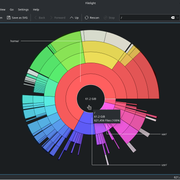
Any ideas where are those 20+ GBs?
I already did fsck on the root partition, but it did not report any issues.
Last edited by dsch (2021-06-09 12:33:59)
Offline
#2 2021-06-09 12:01:31
- seth
- Member

- From: Won't reply 2 private help req
- Registered: 2012-09-03
- Posts: 77,443
Re: [SOLVED] Free/Used Disk Space Issue
Lost in one of the mountpoints (eg. if you wrote anything to /mnt/toshiba_3tb w/o having the drive mounted there)?
Inaccessible? (Did you run ncud as root)?
Offline
#3 2021-06-09 12:02:34
- V1del
- Forum Moderator

- Registered: 2012-10-16
- Posts: 25,331
Re: [SOLVED] Free/Used Disk Space Issue
You are likely running at least partially into the 5% root safety provision of ext4: https://wiki.archlinux.org/title/Ext4#Reserved_blocks
Last edited by V1del (2021-06-09 12:09:36)
Offline
#4 2021-06-09 12:23:05
- dsch
- Member
- Registered: 2015-10-05
- Posts: 36
Re: [SOLVED] Free/Used Disk Space Issue
Lost in one of the mountpoints (eg. if you wrote anything to /mnt/toshiba_3tb w/o having the drive mounted there)?
Inaccessible? (Did you run ncud as root)?
Thank seth!
Running ncdu as root indeed revealed the problem:
ncdu 1.15.1 ~ Use the arrow keys to navigate, press ? for help
--- /var/lib/lxd/disks ---------------------------------------------------
                         /..
   19.6 GiB [##########]  default.img
I use a single snap, but after quick search on Google, it appears that lxd defaults to 20% of available free space and that's how this img ended up to be so large.
I have no idea how to resize it, so I will need to do some digging.
Offline
#5 2021-06-09 12:29:56
- seth
- Member
- From: Won't reply 2 private help req
- Registered: 2012-09-03
- Posts: 77,443
Re: [SOLVED] Free/Used Disk Space Issue
https://github.com/lxc/lxd/issues/5069 ?
Please always remember to mark resolved threads by editing your initial posts subject - so others will know that there's no task left, but maybe a solution to find.
Thanks.
Offline
Pages: 1