You are not logged in.
- Topics: Active | Unanswered
#1 2021-06-16 13:55:53
- Rafa18
- Member
- Registered: 2021-06-16
- Posts: 10
[SOLVED] Upgrade linux to linux-lts: Reboot error.
Hello friends.
I recently changed the linux package to linux-lts
I am using an encrypted partition with LUKS and after rebooting I get the following error:
https://i.postimg.cc/vm8LxCGN/20210616-150126.jpg
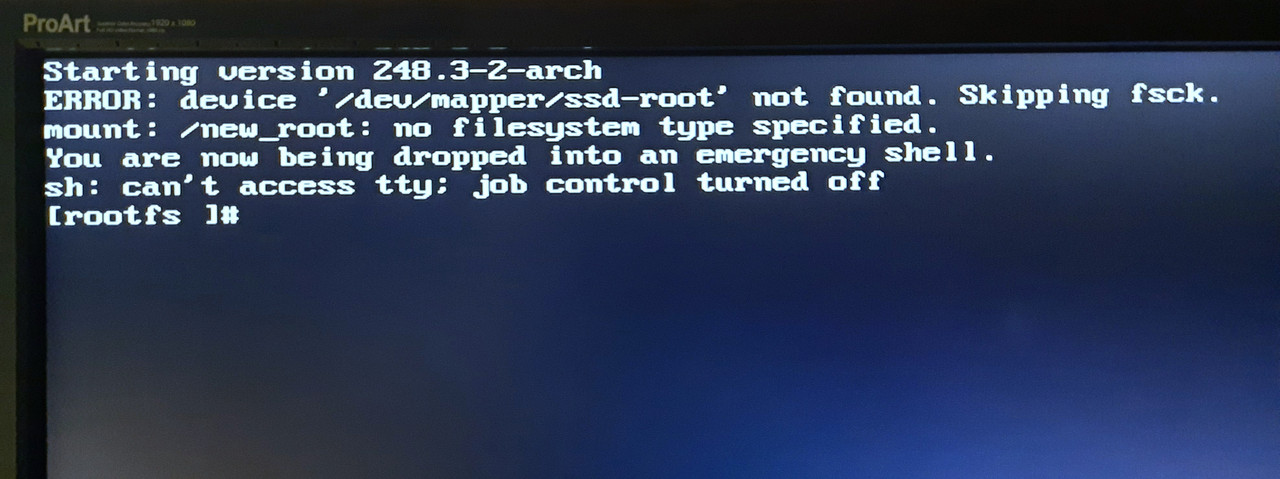
I don't know what I did wrong.
My archive grub.cfg is:
#
# DO NOT EDIT THIS FILE
#
# It is automatically generated by grub-mkconfig using templates
# from /etc/grub.d and settings from /etc/default/grub
#

### BEGIN /etc/grub.d/00_header ###
insmod part_gpt
insmod part_msdos
if [ -s $prefix/grubenv ]; then
  load_env
fi
if [ "${next_entry}" ] ; then
   set default="${next_entry}"
   set next_entry=
   save_env next_entry
   set boot_once=true
else
   set default="0"
fi

if [ x"${feature_menuentry_id}" = xy ]; then
  menuentry_id_option="--id"
else
  menuentry_id_option=""
fi

export menuentry_id_option

if [ "${prev_saved_entry}" ]; then
  set saved_entry="${prev_saved_entry}"
  save_env saved_entry
  set prev_saved_entry=
  save_env prev_saved_entry
  set boot_once=true
fi

function savedefault {
  if [ -z "${boot_once}" ]; then
    saved_entry="${chosen}"
    save_env saved_entry
  fi
}

function load_video {
  if [ x$feature_all_video_module = xy ]; then
    insmod all_video
  else
    insmod efi_gop
    insmod efi_uga
    insmod ieee1275_fb
    insmod vbe
    insmod vga
    insmod video_bochs
    insmod video_cirrus
  fi
}

if loadfont unicode ; then
  set gfxmode=auto
  load_video
  insmod gfxterm
  set locale_dir=$prefix/locale
  set lang=en_US
  insmod gettext
fi
terminal_input console
terminal_output gfxterm
if [ x$feature_timeout_style = xy ] ; then
  set timeout_style=menu
  set timeout=5
# Fallback normal timeout code in case the timeout_style feature is
# unavailable.
else
  set timeout=5
fi
### END /etc/grub.d/00_header ###

### BEGIN /etc/grub.d/10_linux ###
menuentry 'Arch Linux' --class arch --class gnu-linux --class gnu --class os $menuentry_id_option 'gnulinux-simple-7c76bb30-11d4-4e97-bb84-1c2ab1b538de' {
	load_video
	set gfxpayload=keep
	insmod gzio
	insmod part_msdos
	insmod ext2
	set root='hd1,msdos1'
	if [ x$feature_platform_search_hint = xy ]; then
	  search --no-floppy --fs-uuid --set=root --hint-bios=hd1,msdos1 --hint-efi=hd1,msdos1 --hint-baremetal=ahci1,msdos1  92fa12c7-55e8-4cf1-b8fb-d1eadcfd6d1e
	else
	  search --no-floppy --fs-uuid --set=root 92fa12c7-55e8-4cf1-b8fb-d1eadcfd6d1e
	fi
	echo	'Loading Linux linux-lts ...'
	linux	/vmlinuz-linux-lts root=/dev/mapper/ssd-root rw cryptdevice=/dev/sdb2:root quiet resume=/dev/mapper/ssd-root resume_offset=116736
	echo	'Loading initial ramdisk ...'
	initrd	/intel-ucode.img /initramfs-linux-lts.img
}
submenu 'Advanced options for Arch Linux' $menuentry_id_option 'gnulinux-advanced-7c76bb30-11d4-4e97-bb84-1c2ab1b538de' {
	menuentry 'Arch Linux, with Linux linux-lts' --class arch --class gnu-linux --class gnu --class os $menuentry_id_option 'gnulinux-linux-lts-advanced-7c76bb30-11d4-4e97-bb84-1c2ab1b538de' {
		load_video
		set gfxpayload=keep
		insmod gzio
		insmod part_msdos
		insmod ext2
		set root='hd1,msdos1'
		if [ x$feature_platform_search_hint = xy ]; then
		  search --no-floppy --fs-uuid --set=root --hint-bios=hd1,msdos1 --hint-efi=hd1,msdos1 --hint-baremetal=ahci1,msdos1  92fa12c7-55e8-4cf1-b8fb-d1eadcfd6d1e
		else
		  search --no-floppy --fs-uuid --set=root 92fa12c7-55e8-4cf1-b8fb-d1eadcfd6d1e
		fi
		echo	'Loading Linux linux-lts ...'
		linux	/vmlinuz-linux-lts root=/dev/mapper/ssd-root rw cryptdevice=/dev/sdb2:root quiet resume=/dev/mapper/ssd-root resume_offset=116736
		echo	'Loading initial ramdisk ...'
		initrd	/intel-ucode.img /initramfs-linux-lts.img
	}
	menuentry 'Arch Linux, with Linux linux-lts (fallback initramfs)' --class arch --class gnu-linux --class gnu --class os $menuentry_id_option 'gnulinux-linux-lts-fallback-7c76bb30-11d4-4e97-bb84-1c2ab1b538de' {
		load_video
		set gfxpayload=keep
		insmod gzio
		insmod part_msdos
		insmod ext2
		set root='hd1,msdos1'
		if [ x$feature_platform_search_hint = xy ]; then
		  search --no-floppy --fs-uuid --set=root --hint-bios=hd1,msdos1 --hint-efi=hd1,msdos1 --hint-baremetal=ahci1,msdos1  92fa12c7-55e8-4cf1-b8fb-d1eadcfd6d1e
		else
		  search --no-floppy --fs-uuid --set=root 92fa12c7-55e8-4cf1-b8fb-d1eadcfd6d1e
		fi
		echo	'Loading Linux linux-lts ...'
		linux	/vmlinuz-linux-lts root=/dev/mapper/ssd-root rw cryptdevice=/dev/sdb2:root quiet resume=/dev/mapper/ssd-root resume_offset=116736
		echo	'Loading initial ramdisk ...'
		initrd	/intel-ucode.img /initramfs-linux-lts-fallback.img
	}
	menuentry 'Arch Linux, with Linux linux' --class arch --class gnu-linux --class gnu --class os $menuentry_id_option 'gnulinux-linux-advanced-7c76bb30-11d4-4e97-bb84-1c2ab1b538de' {
		load_video
		set gfxpayload=keep
		insmod gzio
		insmod part_msdos
		insmod ext2
		set root='hd1,msdos1'
		if [ x$feature_platform_search_hint = xy ]; then
		  search --no-floppy --fs-uuid --set=root --hint-bios=hd1,msdos1 --hint-efi=hd1,msdos1 --hint-baremetal=ahci1,msdos1  92fa12c7-55e8-4cf1-b8fb-d1eadcfd6d1e
		else
		  search --no-floppy --fs-uuid --set=root 92fa12c7-55e8-4cf1-b8fb-d1eadcfd6d1e
		fi
		echo	'Loading Linux linux ...'
		linux	/vmlinuz-linux root=/dev/mapper/ssd-root rw cryptdevice=/dev/sdb2:root quiet resume=/dev/mapper/ssd-root resume_offset=116736
		echo	'Loading initial ramdisk ...'
		initrd	/intel-ucode.img /initramfs-linux.img
	}
}

### END /etc/grub.d/10_linux ###

### BEGIN /etc/grub.d/20_linux_xen ###
### END /etc/grub.d/20_linux_xen ###

### BEGIN /etc/grub.d/30_os-prober ###
### END /etc/grub.d/30_os-prober ###

### BEGIN /etc/grub.d/30_uefi-firmware ###
### END /etc/grub.d/30_uefi-firmware ###

### BEGIN /etc/grub.d/40_custom ###
# This file provides an easy way to add custom menu entries.  Simply type the
# menu entries you want to add after this comment.  Be careful not to change
# the 'exec tail' line above.
### END /etc/grub.d/40_custom ###

### BEGIN /etc/grub.d/41_custom ###
if [ -f  ${config_directory}/custom.cfg ]; then
  source ${config_directory}/custom.cfg
elif [ -z "${config_directory}" -a -f  $prefix/custom.cfg ]; then
  source $prefix/custom.cfg
fi
### END /etc/grub.d/41_custom ###
And my defalut grug.cfg is:
# GRUB boot loader configuration

GRUB_DEFAULT=0
GRUB_TIMEOUT=5
GRUB_DISTRIBUTOR="Arch"
# GRUB_CMDLINE_LINUX_DEFAULT="quiet resume=/dev/disk/by-uuid/5fc5b57c-4ff5-9ab4-278fbd3b8581"
# GRUB_CMDLINE_LINUX_DEFAULT="quiet"
GRUB_CMDLINE_LINUX_DEFAULT="quiet resume=/dev/mapper/ssd-root resume_offset=116736"

GRUB_CMDLINE_LINUX="cryptdevice=/dev/sdb2:root"
#GRUB_CMDLINE_LINUX="cryptdevice=/dev/disk/by-uuid/7c76bb30-11d4-4e97-bb84-1c2ab1b538de:root"

# Preload both GPT and MBR modules so that they are not missed
GRUB_PRELOAD_MODULES="part_gpt part_msdos"

# Uncomment to enable booting from LUKS encrypted devices
#GRUB_ENABLE_CRYPTODISK=y

# Uncomment to enable Hidden Menu, and optionally hide the timeout count
#GRUB_HIDDEN_TIMEOUT=5
#GRUB_HIDDEN_TIMEOUT_QUIET=true

# Uncomment to use basic console
GRUB_TERMINAL_INPUT=console

# Uncomment to disable graphical terminal
#GRUB_TERMINAL_OUTPUT=console

# The resolution used on graphical terminal
# note that you can use only modes which your graphic card supports via VBE
# you can see them in real GRUB with the command `vbeinfo'
GRUB_GFXMODE=auto

# Uncomment to allow the kernel use the same resolution used by grub
GRUB_GFXPAYLOAD_LINUX=keep

# Uncomment if you want GRUB to pass to the Linux kernel the old parameter
# format "root=/dev/xxx" instead of "root=/dev/disk/by-uuid/xxx"
GRUB_DISABLE_LINUX_UUID=true

# Uncomment to disable generation of recovery mode menu entries
GRUB_DISABLE_RECOVERY=true

# Uncomment and set to the desired menu colors.  Used by normal and wallpaper
# modes only.  Entries specified as foreground/background.
#GRUB_COLOR_NORMAL="light-blue/black"
#GRUB_COLOR_HIGHLIGHT="light-cyan/blue"

# Uncomment one of them for the gfx desired, a image background or a gfxtheme
#GRUB_BACKGROUND="/path/to/wallpaper"
#GRUB_THEME="/path/to/gfxtheme"

# Uncomment to get a beep at GRUB start
#GRUB_INIT_TUNE="480 440 1"

# Uncomment to make GRUB remember the last selection. This requires to
# set 'GRUB_DEFAULT=saved' above.
#GRUB_SAVEDEFAULT="true"
Please. Can anyone help me?
Currently I can only access from live and chroot so I can't use my computer normally.
Thanks.
Last edited by Rafa18 (2021-06-18 11:47:49)
Offline
#2 2021-06-16 18:14:30
- philo
- Member
- Registered: 2015-01-26
- Posts: 275
Re: [SOLVED] Upgrade linux to linux-lts: Reboot error.
# Uncomment to enable booting from LUKS encrypted devices
#GRUB_ENABLE_CRYPTODISK=y
Uncommenting might help.
Offline
#3 2021-06-16 20:35:38
- schard
- Forum Moderator

- From: Hannover
- Registered: 2016-05-06
- Posts: 2,678
- Website
Re: [SOLVED] Upgrade linux to linux-lts: Reboot error.
Why do you tell the dm-crypt subsystem to name the decrypted root partition "root" but then pass "ssd-root" as root partition to the kernel?
Decide on one name, e.g.
GRUB_CMDLINE_LINUX="cryptdevice=/dev/sdb2:ssd-root"Inofficial first vice president of the Rust Evangelism Strike Force
Offline
#4 2021-06-16 21:25:17
- Rafa18
- Member
- Registered: 2021-06-16
- Posts: 10
Re: [SOLVED] Upgrade linux to linux-lts: Reboot error.
Rafa18 wrote:# Uncomment to enable booting from LUKS encrypted devices
#GRUB_ENABLE_CRYPTODISK=yUncommenting might help.
I tried what you tell me but no luck.
Thanks anyway.
Why do you tell the dm-crypt subsystem to name the decrypted root partition "root" but then pass "ssd-root" as root partition to the kernel?
Decide on one name, e.g.GRUB_CMDLINE_LINUX="cryptdevice=/dev/sdb2:ssd-root"
I made the change you mentioned but it didn't work either. I have the same error in both cases.
I really don't know why that file is like that, I don't remember it. I haven't touched this configuration file in years.
If I do "lsblk" I get:
https://i.postimg.cc/zqXpHmvk/20210616-224529.jpg

Where "ssd" is the name of the volume group of my SSD disk. I know, I have a poor imagination, "root" is the name of my Arch Linux system partition and "sdb1" is the boot partition.
Finally "sdc" are my Windows X partitions
.
Offline
#5 2021-06-16 21:32:06
- Rafa18
- Member
- Registered: 2021-06-16
- Posts: 10
Re: [SOLVED] Upgrade linux to linux-lts: Reboot error.
As a curiosity:
Before installing linux-lts the system booted normally with the configuration shown in the first post using the "generic linux kernel".
Offline
#6 2021-06-17 00:15:37
- schard
- Forum Moderator
- From: Hannover
- Registered: 2016-05-06
- Posts: 2,678
- Website
Re: [SOLVED] Upgrade linux to linux-lts: Reboot error.
I made the change you mentioned but it didn't work either. I have the same error in both cases.
Did you re-generate the grub config after that?
Note that grub-mkconfig will use the currently mapped name of the root disk to determine the respective parameter.
So, if you repair your system in a live environment and manually decrypt the root volume, be sure to let cryptsetup map it to the same name.
Last edited by schard (2021-06-17 00:19:42)
Inofficial first vice president of the Rust Evangelism Strike Force
Offline
#7 2021-06-17 08:33:35
- philo
- Member
- Registered: 2015-01-26
- Posts: 275
Re: [SOLVED] Upgrade linux to linux-lts: Reboot error.
Re-installing linux-lts and then running mkinitcpio -p linux-lts cannot do any harm.
Offline
#8 2021-06-17 08:49:22
- schard
- Forum Moderator
- From: Hannover
- Registered: 2016-05-06
- Posts: 2,678
- Website
Re: [SOLVED] Upgrade linux to linux-lts: Reboot error.
I just noticed by looking at our screenshot that you use LVM on LUKS.
This might explain as to why you passed "root" instead of "ssd-root".
We need to see your /etc/initcpio.conf and the listing of the LVs of the VG on the dm-crypt container labelled "ssd-root".
Inofficial first vice president of the Rust Evangelism Strike Force
Offline
#9 2021-06-17 11:03:47
- Rafa18
- Member
- Registered: 2021-06-16
- Posts: 10
Re: [SOLVED] Upgrade linux to linux-lts: Reboot error.
Did you re-generate the grub config after that?
Note that grub-mkconfig will use the currently mapped name of the root disk to determine the respective parameter.
So, if you repair your system in a live environment and manually decrypt the root volume, be sure to let cryptsetup map it to the same name.
Yes, of course. After making the changes I am running
grup-mkconfig - o /boot/grub.cfg
Re-installing linux-lts and then running mkinitcpio -p linux-lts cannot do any harm.
Yes, that would be logical. I have a second computer and had no problems making the same switch to linux-lts but in this computer I don't use encrypted partitions.
It is evident that there is something wrong with the configuration and fail during the update grub process. Probably caused by some change to the .pacsave of grub configuration files that I would not do correctly.
...and the listing of the LVs of the VG on the dm-crypt container labelled "ssd-root".
Sorry but How can I do to give you this information?
The whole installation process I was done following indications that I found on the internet.
I don't really understand much about this.
Last edited by Rafa18 (2021-06-17 11:06:24)
Offline
#10 2021-06-17 12:15:52
- philo
- Member
- Registered: 2015-01-26
- Posts: 275
Re: [SOLVED] Upgrade linux to linux-lts: Reboot error.
The whole installation process was done following indications that I found on the internet.
I don't really understand much about this.
IIn that case, go frist through the Arch Linux wikis for solutions, not "on the internet".
Last edited by philo (2021-06-17 12:18:01)
Offline
#11 2021-06-17 12:37:09
- WorMzy
- Administrator

- From: Scotland
- Registered: 2010-06-16
- Posts: 13,635
- Website
Re: [SOLVED] Upgrade linux to linux-lts: Reboot error.
Indeed, installs resulting from random third-party guides are not supported here.
Closing, for deletion.
Last edited by WorMzy (2021-06-17 22:54:02)
Sakura:-
Mobo: MSI MAG X570S TORPEDO MAX // Processor: AMD Ryzen 9 5950X @4.9GHz // GFX: AMD Radeon RX 5700 XT // RAM: 32GB (4x 8GB) Corsair DDR4 (@ 3000MHz) // Storage: 1x 3TB HDD, 6x 1TB SSD, 2x 120GB SSD, 1x 275GB M2 SSD
Making lemonade from lemons since 2015.
Offline
#12 2021-06-17 22:54:53
- WorMzy
- Administrator
- From: Scotland
- Registered: 2010-06-16
- Posts: 13,635
- Website
Re: [SOLVED] Upgrade linux to linux-lts: Reboot error.
Reopening on appeal. You imply that you followed the ArchWiki during the initial setup many years ago and have since forgotten most of the details. I am prepared to believe that, and suspect that your unfortunate choice of wording was caused by a language barrier.
Sakura:-
Mobo: MSI MAG X570S TORPEDO MAX // Processor: AMD Ryzen 9 5950X @4.9GHz // GFX: AMD Radeon RX 5700 XT // RAM: 32GB (4x 8GB) Corsair DDR4 (@ 3000MHz) // Storage: 1x 3TB HDD, 6x 1TB SSD, 2x 120GB SSD, 1x 275GB M2 SSD
Making lemonade from lemons since 2015.
Offline
#13 2021-06-18 06:46:59
- seth
- Member

- From: Won't reply 2 private help req
- Registered: 2012-09-03
- Posts: 77,445
Re: [SOLVED] Upgrade linux to linux-lts: Reboot error.
The sda/b/c… order is not deterministic, use the UUID.
Online
#14 2021-06-18 11:30:25
- Rafa18
- Member
- Registered: 2021-06-16
- Posts: 10
Re: [SOLVED] Upgrade linux to linux-lts: Reboot error.
Reopening on appeal. You imply that you followed the ArchWiki during the initial setup many years ago and have since forgotten most of the details. I am prepared to believe that, and suspect that your unfortunate choice of wording was caused by a language barrier.
I am Spanish and my english level is not very good. I am sorry for that.
Last edited by Rafa18 (2021-06-18 11:30:54)
Offline
#15 2021-06-18 11:34:32
- seth
- Member
- From: Won't reply 2 private help req
- Registered: 2012-09-03
- Posts: 77,445
Re: [SOLVED] Upgrade linux to linux-lts: Reboot error.
Online
#16 2021-06-18 11:47:10
- Rafa18
- Member
- Registered: 2021-06-16
- Posts: 10
Re: [SOLVED] Upgrade linux to linux-lts: Reboot error.
...We need to see your /etc/initcpio.conf and the listing of the LVs of the VG on the dm-crypt container labelled "ssd-root".
I found the problem.
For some strange reason my /etc/mkinitcpio.conf appears with default settings.
I edited that file and added the necessary HOOKS, then I reinstalled linux-lts and now everything is working normally again.
As it is something I never change I didn't think it could have been accidentally modified and I didn't think to check it before.
I think it must have been a bad manual update of the corresponding pacsave file.
Thanks to all for your help.
Offline