You are not logged in.
- Topics: Active | Unanswered
#1 2021-06-18 15:14:41
- Rafa18
- Member
- Registered: 2021-06-16
- Posts: 10
[SOLVED] White stripe in Firefox
Hello everybody.
I have a problem with the latest version of firefox.
It turns out that a white stripe appears along the top of the window, in all websites I visit:
https://i.postimg.cc/qk02tc1b/Capture-17-04-18.png
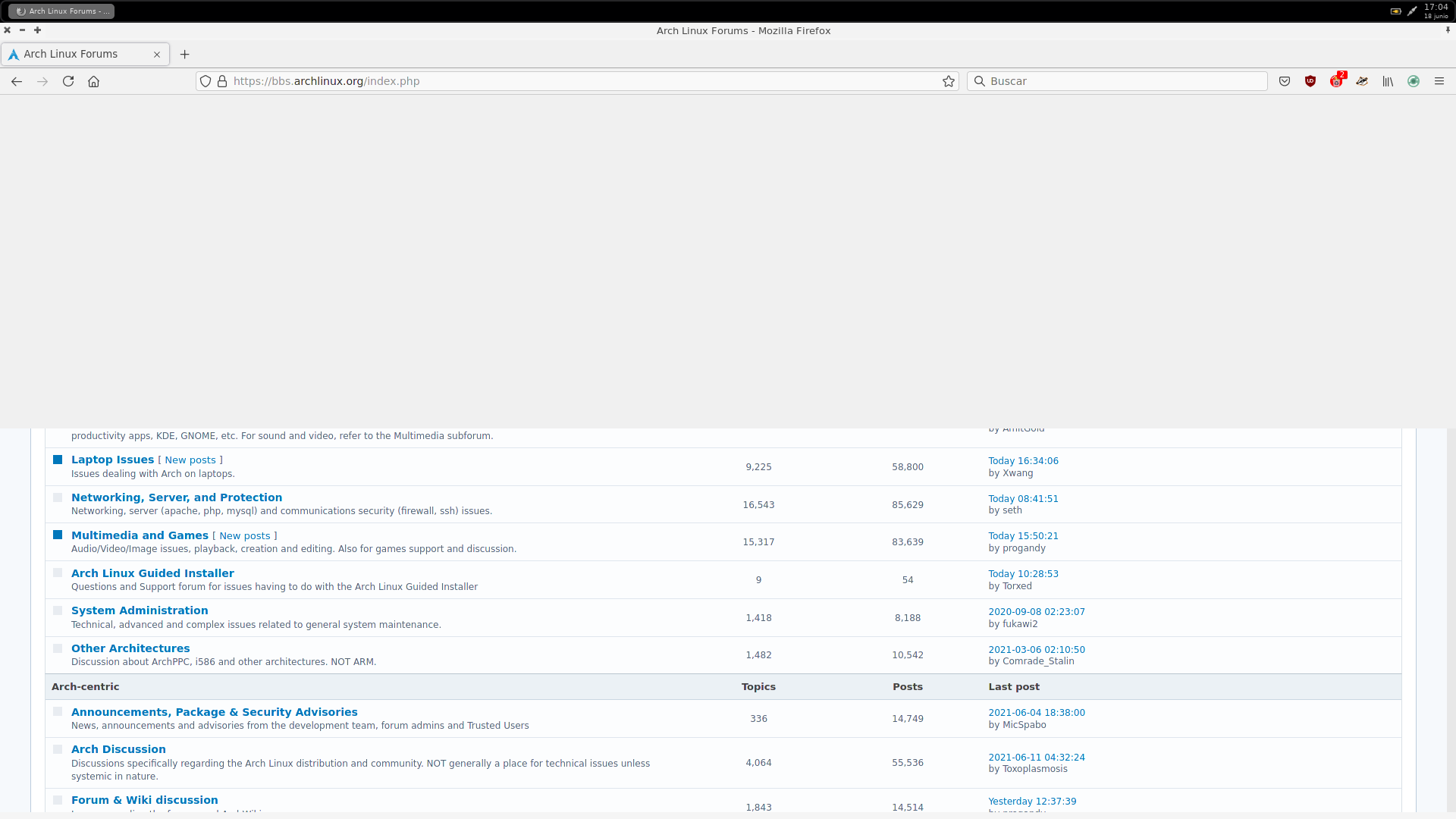
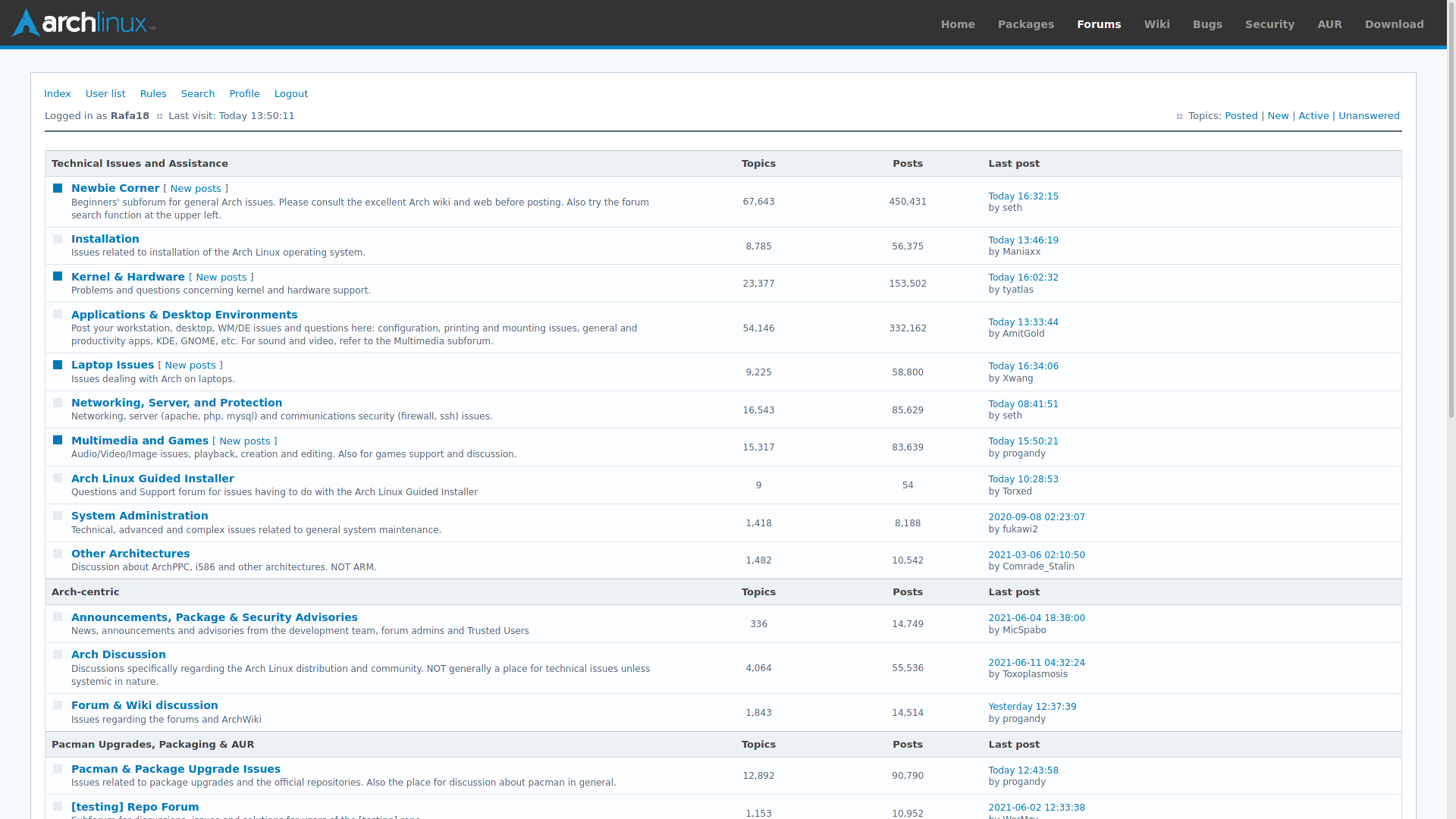
Which disappears when I go into full screen mode by pressing the F11 key:
https://i.postimg.cc/Hp2XbJKp/Capture-17-04-23.png
Uninstalling all program extensions did not solve the problem. In other way in an attempt to solve the problem I have deleted the ~/.mozilla folder and the program returns to factory settings but the problem continues.
I have the computer completely upgraded and it is the only program that gives me this problem.
I do not know what it can be.
Last edited by Rafa18 (2021-06-19 17:53:31)
Offline
#2 2021-06-18 15:45:39
- Rafa18
- Member
- Registered: 2021-06-16
- Posts: 10
Re: [SOLVED] White stripe in Firefox
If I downgrade the firefox package, it gives me an error in the user database so I would lose all the configuration, at now is the only way.
It might work if I didn't mind losing program settings, bookmarks, certificates, extensions, etc. but I don't like the idea of having to do it because the problem reappears when I update the system and therefore firefox too.
Another way can be block the program update indefinitely and asume reconfigure all but does not seem right to me.
Last edited by Rafa18 (2021-06-18 15:46:31)
Offline
#3 2021-06-18 18:56:00
- seth
- Member

- From: Won't reply 2 private help req
- Registered: 2012-09-03
- Posts: 78,236
Re: [SOLVED] White stripe in Firefox
Offline
#4 2021-06-19 07:30:27
- Rafa18
- Member
- Registered: 2021-06-16
- Posts: 10
Re: [SOLVED] White stripe in Firefox
Well, toggle gfx.webrender.force-disabled from false to true in about:config solved the problem but I have also upgraded/switched fluxbox to fluxbox-git as commented in the thread and now I have a new problem:
The taskbar does not display correctly, it stays a little below the edge of the screen.
Here you can see you can see the maximize, full screen, etc. buttons above the taskbar.:
https://i.postimg.cc/hgX330cQ/Capture-09-04-37.png
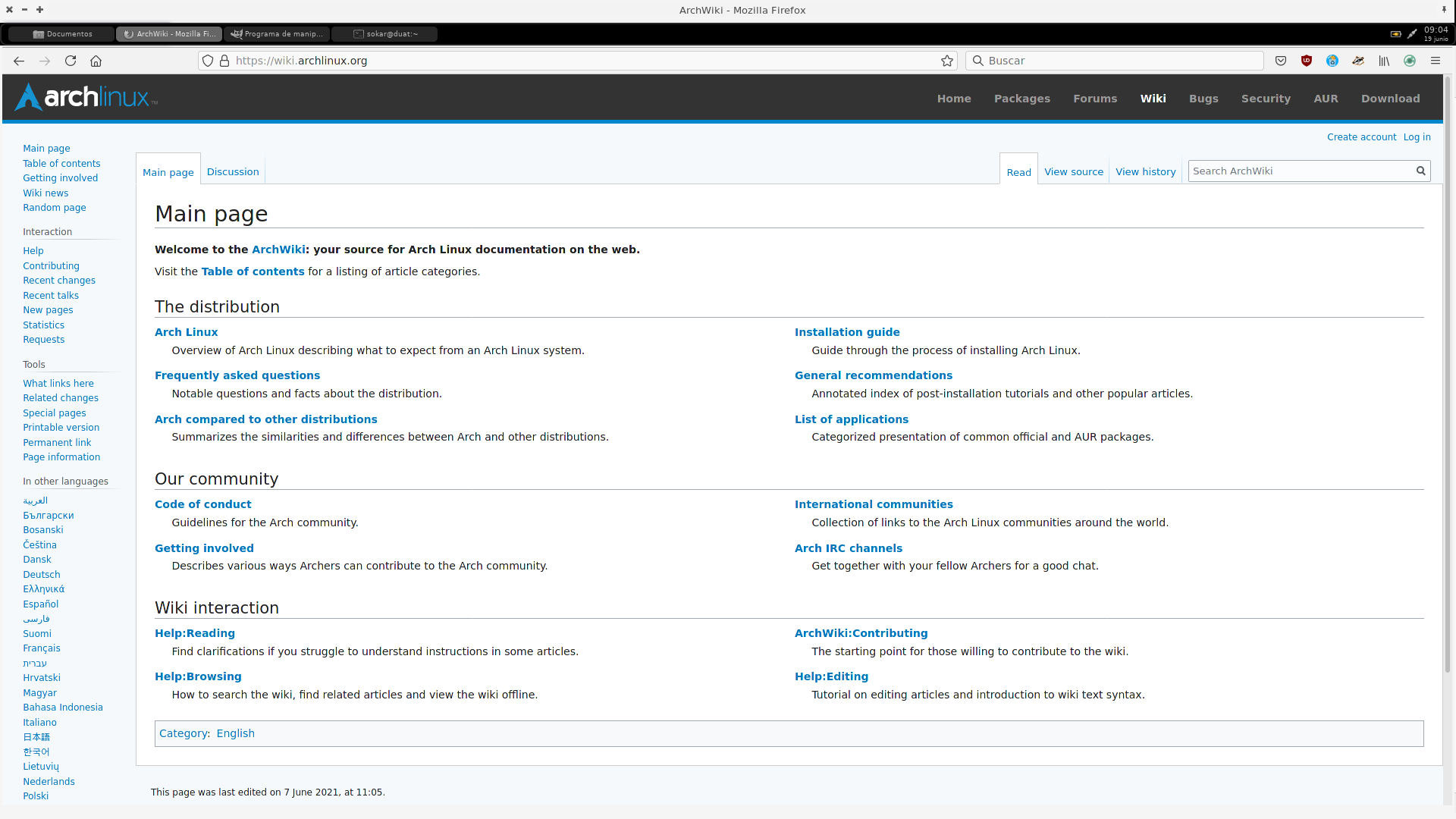
And I can't find a way to place it correctly.
My fluxbox init file is:
session.screen0.tab.placement:	TopLeft
session.screen0.tab.width:	66
session.screen0.clientMenu.usePixmap:	true
session.screen0.titlebar.left:	Close Minimize Maximize
session.screen0.titlebar.right:	Stick
session.screen0.window.focus.alpha:	255
session.screen0.window.unfocus.alpha:	255
session.screen0.iconbar.iconTextPadding:	10
session.screen0.iconbar.usePixmap:	true
session.screen0.iconbar.iconWidth:	128
session.screen0.iconbar.alignment:	Relative
session.screen0.iconbar.mode:	{static groups} (workspace)
session.screen0.menu.alpha:	255
session.screen0.toolbar.maxOver:	false
session.screen0.toolbar.widthPercent:	100
session.screen0.toolbar.autoHide:	false
session.screen0.toolbar.placement:	TopCenter
session.screen0.toolbar.height:	0
session.screen0.toolbar.layer:	Normal
session.screen0.toolbar.autoRaise:	false
session.screen0.toolbar.visible:	false
session.screen0.toolbar.tools:	prevworkspace, workspacename, nextworkspace, iconbar, clock
session.screen0.toolbar.alpha:	255
session.screen0.toolbar.onhead:	1
session.screen0.slit.autoRaise:	false
session.screen0.slit.maxOver:	false
session.screen0.slit.acceptKdeDockapps:	true
session.screen0.slit.autoHide:	false
session.screen0.slit.onhead:	0
session.screen0.slit.layer:	Dock
session.screen0.slit.placement:	LeftTop
session.screen0.slit.alpha:	255
session.screen0.tabs.usePixmap:	false
session.screen0.tabs.maxOver:	true
session.screen0.tabs.intitlebar:	true
session.screen0.tooltipDelay:	250
session.screen0.focusModel:	ClickFocus
session.screen0.maxDisableResize:	false
session.screen0.opaqueMove:	false
session.screen0.windowMenu:	~/.fluxbox/windowmenu
session.screen0.focusNewWindows:	true
session.screen0.workspacewarpingverticaloffset:	1
session.screen0.workspaceNames:	Escritorio 1,Escritorio 2,Escritorio 3,Escritorio 4,
session.screen0.maxDisableMove:	false
session.screen0.allowRemoteActions:	false
session.screen0.edgeResizeSnapThreshold:	0
session.screen0.colPlacementDirection:	TopToBottom
session.screen0.fullMaximization:	false
session.screen0.noFocusWhileTypingDelay:	0
session.screen0.workspacewarping:	false
session.screen0.tabFocusModel:	ClickToTabFocus
session.screen0.maxIgnoreIncrement:	true
session.screen0.strftimeFormat:	%a, %d %b  %H:%M
session.screen0.defaultDeco:	NORMAL
session.screen0.clickRaises:	true
session.screen0.rowPlacementDirection:	LeftToRight
session.screen0.workspacewarpingvertical:	true
session.screen0.focusSameHead:	false
session.screen0.autoRaise:	true
session.screen0.edgeSnapThreshold:	15
session.screen0.showwindowposition:	false
session.screen0.menuDelay:	200
session.screen0.windowPlacement:	RowMinOverlapPlacement
session.screen0.workspaces:	4
session.keyFile:	~/.fluxbox/keys
session.configVersion:	13
session.appsFile:	~/.fluxbox/apps
session.slitlistFile:	~/.fluxbox/slitlist
session.ignoreBorder:	false
session.styleOverlay:	~/.fluxbox/overlay
session.cacheLife:	5
session.colorsPerChannel:	6
session.styleFile:	~/.fluxbox/styles/Intuition
session.tabsAttachArea:	Window
session.doubleClickInterval:	150
session.cacheMax:	500
session.menuSearch:	itemstart
session.menuFile:	~/.fluxbox/menu
session.tabPadding:	0
session.forcePseudoTransparency:	false
session.autoRaiseDelay:	10
Apparently everything is correct and as far as I know fluxbox does not have any option to place the taskbar away from the edge of the screen..
Any idea what might be wrong with this?
And another thing, once fluxbox-git is installed, changing gfx.webrender.force-disabled back to false makes the problem with Firefox reappear.
So changing from fluxbox to fluxbox-git does not solve the problem with Firefox but How can I fix the problem with fluxbox-git?
Last edited by Rafa18 (2021-06-19 07:39:47)
Offline
#5 2021-06-19 11:10:41
- seth
- Member
- From: Won't reply 2 private help req
- Registered: 2012-09-03
- Posts: 78,236
Re: [SOLVED] White stripe in Firefox
And another thing, once fluxbox-git is installed, changing gfx.webrender.force-disabled back to false makes the problem with Firefox reappear.
Wasn't suspected - the original problem is entirely within the realm of the Proton UI.
The fluxbox toolbar looks suspiciously embedded into the firefox window - what does it look like when FF isn't maximized?
Offline
#6 2021-06-19 17:49:11
- Rafa18
- Member
- Registered: 2021-06-16
- Posts: 10
Re: [SOLVED] White stripe in Firefox
No, the fluxbox taskbar is not embedded in the firefox windows, the taskbar it is displayed above the windows just in that position.
It doesn't matter which program I use, any program stays below the taskbar and if I move any window them I can see them move in that space between the taskbar and the edge of the screen.
I have decided to forget this and reinstall the package fluxbox "no git version" then set gfx.webrender.force-disabled to true in Firefox about:config and thus terminate the problem.
Everything works fine this way and I don't want any more complications with this.
Thank you for your help.
Last edited by Rafa18 (2021-06-19 17:52:45)
Offline
#7 2021-06-19 18:45:03
- seth
- Member
- From: Won't reply 2 private help req
- Registered: 2012-09-03
- Posts: 78,236
Re: [SOLVED] White stripe in Firefox
You got it from here: https://github.com/fluxbox/fluxbox ?
session.screen0.toolbar.height:	0
…
session.screen0.toolbar.visible:	false
Looks rather wrong, and I assume the mapping state of the window diverges from FBs internal opinion on that why it's placed "somewhere" and also doesn't strut (ie. keep the maximized window away from it)
If you want to try it again (you could simply copy the compiled fluxbox binary to /usr/bin/fluxbox-git and select them in your xinitrc or however you start the session), I'd try to simply hide and re-show the toolbar and see whether that "fixes" it, but why the window would start out being mapped is puzzling.
Could be because of some systray icon…
Offline