You are not logged in.
- Topics: Active | Unanswered
#1 2021-09-12 01:42:04
- musasabi
- Member

- From: Chicago, IL
- Registered: 2011-06-23
- Posts: 63
[SOLVED] numactl and lstopo report different NUMA node composition
Hey everyone,
I’m rebuilding my W10 guest VM under my Arch host and doing my best to eek out the performance where possible. To that end, of course, I’m trying to isolate the VM’s RAM and CPU cores to the same NUMA node as the GPU that’s being passed through to the guest.
However, I believe I’ve got some contradictory information here. numactl says:
[patrick@manifold-arch ~]$ numactl --hardware
available: 2 nodes (0-1)
node 0 cpus: 0 1 2 3 4 5 6 7 16 17 18 19 20 21 22 23
node 0 size: 16094 MB
node 0 free: 141 MB
node 1 cpus: 8 9 10 11 12 13 14 15 24 25 26 27 28 29 30 31
node 1 size: 16075 MB
node 1 free: 11648 MB
node distances:
node   0   1
  0:  10  16
  1:  16  10
While lstopo says: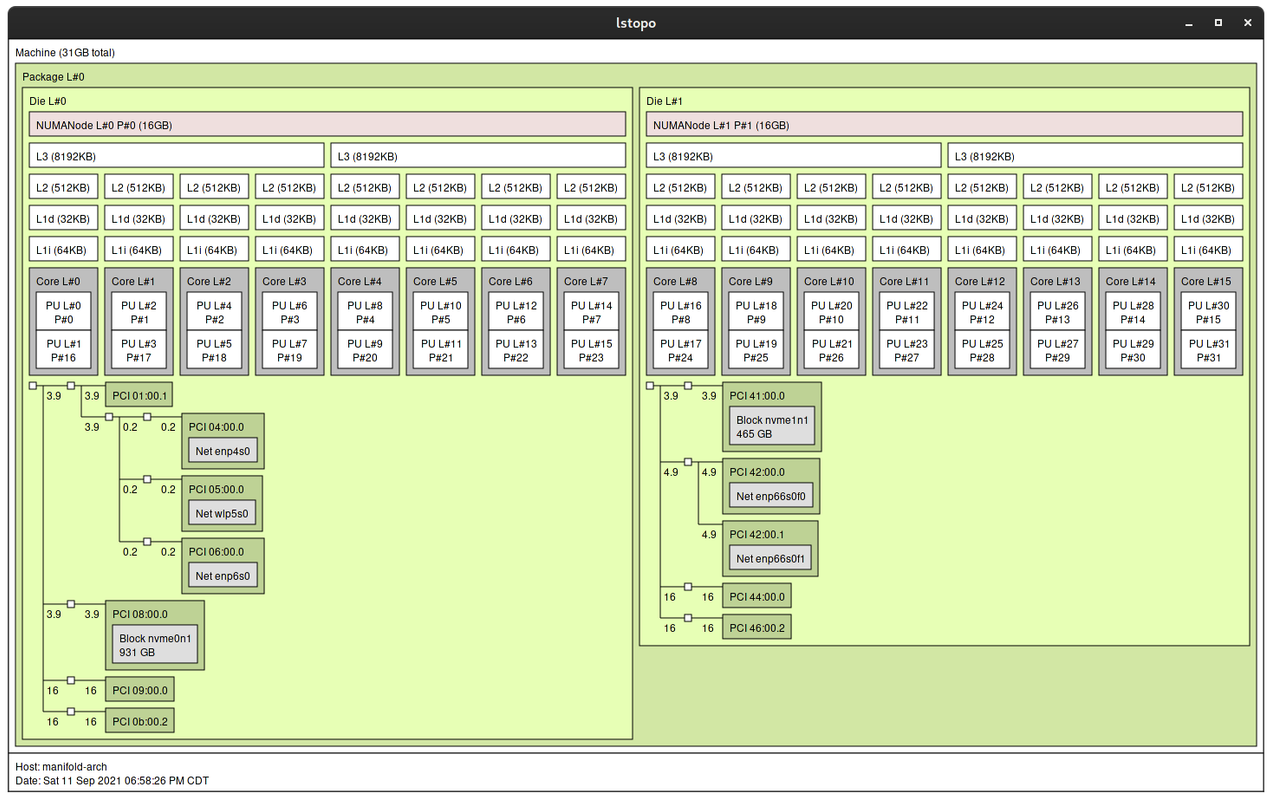
The extremely low free memory in node zero is from huge pages allocated at boot time, so that’s to be expected.
However, if I’m reading this right, lstopo is saying CCX0 and CCX1 are in NUMA node 0 while CCX2 and CCX3 are in NUMA node 1. That makes sense, except that numactl then claims CCX0 and CCX2 make up node 0 while CCX1 and CCX4 are node 1.
Who do I believe? The last time I had a VM setup like this, lstopo had a different CPU number ordering altogether, but I have no idea if that was an update to the application or if my CPU is reporting differently now. The latter would lead me to expect numactl to reflect the differences too, though…
Any ideas are appreciated. 
Last edited by musasabi (2021-09-12 13:19:42)
Offline
#2 2021-09-12 12:17:14
- Lone_Wolf
- Administrator

- From: Netherlands, Europe
- Registered: 2005-10-04
- Posts: 15,472
Re: [SOLVED] numactl and lstopo report different NUMA node composition
Neither of those outputs mentions CCX numbers, but looking at core numbers numactl and lstopo seem to match .
Node 0 has cpu 0-7 , 16-23
Node 1 has cpu 8-15, 24-31 .
lstopo does show 0-7 , 16-23 on Die #L0 , while 8-15, 24-31 are on Die #L1 .
On my threadripper 1920x (12 / 24 ) the output is very similar : 0-5, 12-17 on node 0 / Die #L0 and 6-11, 18-23 on node 1 / Die #L1 .
Please clarify wat conflict you are seeing .
Last edited by Lone_Wolf (2021-09-12 12:17:44)
Disliking systemd intensely, but not satisfied with alternatives so focusing on taming systemd.
clean chroot building not flexible enough ?
Try clean chroot manager by graysky
Offline
#3 2021-09-12 13:19:21
- musasabi
- Member
- From: Chicago, IL
- Registered: 2011-06-23
- Posts: 63
Re: [SOLVED] numactl and lstopo report different NUMA node composition
Well, aren't I some kinda novice. XD
Turns out, if you call lstopo -l (logical) it sorts out the numbering. I mean... of course it does, but it would appear I threw that flag on there willy nilly and got thrown off. When I went to take the screenshot, I fired it up again without the flag, so the more-or-less expected numbering returned. Only thing is, I didn't double check my screenshot. Haha.
Thankya! Also, thanks to a good night's rest. *eyeroll*
Offline