You are not logged in.
- Topics: Active | Unanswered
#1 2021-11-13 00:52:27
- aksilarch
- Member

- Registered: 2021-09-15
- Posts: 51
[SOLVED] Changing xfce4 desktop icon style (text)
I'm trying to see how I can fiddle with my arch appearance (w/ xfce4 desktop environment), I can't find a .gtkrc2.0 file to edit, when I created it and applied some style lines, nothing happened.
What I'm trying to achieve is change this for example: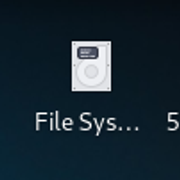
To this:
Without having to click on the icon to see the full name of the file. I just want to show the full name of the file at all times for all files.
Thanks in advance. 
Last edited by aksilarch (2021-11-13 02:04:34)
archlinux cures my depression.
Offline
#2 2021-11-13 01:51:22
- toz
- Member
- Registered: 2011-10-28
- Posts: 513
Re: [SOLVED] Changing xfce4 desktop icon style (text)
Add the following to ~/.config/gtk-3.0/gtk.css:
XfdesktopIconView.view { -XfdesktopIconView-ellipsize-icon-labels: 0; }and restart xfdesktop.
Offline
#3 2021-11-13 02:04:09
- aksilarch
- Member
- Registered: 2021-09-15
- Posts: 51
Re: [SOLVED] Changing xfce4 desktop icon style (text)
Add the following to ~/.config/gtk-3.0/gtk.css:
XfdesktopIconView.view { -XfdesktopIconView-ellipsize-icon-labels: 0; }and restart xfdesktop.
The file didn't exist, so I created it and added the line to it, worked so thanks but I'm wondering if there is another location where those style settings are stored?
Marking this thread as solved.
archlinux cures my depression.
Offline
#4 2021-11-13 02:14:26
- toz
- Member
- Registered: 2011-10-28
- Posts: 513
Re: [SOLVED] Changing xfce4 desktop icon style (text)
but I'm wondering if there is another location where those style settings are stored?
Unfortunately no. There is no gui setting for this. Its a hidden setting/property.
Offline