You are not logged in.
- Topics: Active | Unanswered
#1 2021-11-15 21:59:40
- T-matze
- Member
- Registered: 2019-12-22
- Posts: 3
Qemu/KVM not providing IP for Windows guest, but for Linux guest
Good evening,
I've been searching for some time for a solution without result that fitted completely, so I hope you can point me to my mistake and to the solution.
On my son's laptop
Linux arch-HP 5.10.79-1-lts #1 SMP Fri, 12 Nov 2021 19:04:00 +0000 x86_64 GNU/LinuxI set up Qemu and KVM and use Virtual Machine Manager to install/manage the guests. One guest is Windows10, which installed fine, exept for it not having an internet connection. I activated NAT, but it provides no IP address to the guest.
<interface type="network">
  <mac address="52:54:00:aa:7b:f7"/>
  <source network="default"/>
  <model type="e1000e"/>
  <address type="pci" domain="0x0000" bus="0x01" slot="0x00" function="0x0"/>
</interface>
$ lsmod | grep kvm
kvm_intel 331776 0
kvm 933888 1 kvm_intel
irqbypass 16384 1 kvm"lsmod | grep virtio" gives no output, but that's the same on my machine.
I installed Kali Linux as a guest which picked up an IP address right away.
qemu-arch-extra is installed also.
I can't find the difference to the installation on my own laptop (exept for me running not the lts-version of arch). On my laptop, the windows guest has an IP and working internet.
Where do I have to search? Which output do you need to clarify this?
Thank you for your help.
t_matze
Last edited by T-matze (2021-11-15 22:07:53)
Offline
#2 2021-11-26 11:26:34
- Nazdravi
- Member
- Registered: 2003-03-20
- Posts: 12
Re: Qemu/KVM not providing IP for Windows guest, but for Linux guest
Hi all,
same problem here. I have set up a host-side bridge and use tap network devices for the guests. Program versions are qemu 6.1.0-5 and virtio 0.1.208.1-1 (windows guest driver). On Linux and W2012R2 Server guests with e1000 and virtio virtual network cards DHCP and communication is functional. Newer Windows versions (2016S, 2019S, 2022S and 10 21H1) don't get DHCP and can't communicate - neither with virtual e1000 nor with virtio NIC. So I assume it is not a virtio problem.
This effect persists with all these different qemu parameter variants:
-net nic,model=virtio-net,macaddr=$macaddr -net tap,ifname=$IFACE
-nic tap,model=virtio-net-pci,mac=$macaddr,ifname=$IFACE
-netdev tap,id=n4,ifname=$IFACE -device virtio-net,netdev=n4,mac=$macaddr
-netdev tap,id=vnet4,ifname=$IFACE,script=no,downscript=no -device virtio-net,netdev=vnet4,mac=$macaddr
Any ideas to resolve this?
Thanks and Regards
Nazdravi
Offline
#3 2021-11-26 12:06:25
- jsoy9pQbYVNu5nfU
- Member
- Registered: 2013-04-19
- Posts: 108
Re: Qemu/KVM not providing IP for Windows guest, but for Linux guest
Capture traffic on the bridge with Wireshark and check what's going on with the DHCP, then go from there. Alternatively, set up virt-manager, import the install to there and check out which network setting libvirt applies behind the available presets (Win7, Win10, ...) in bridge network mode.
Offline
#4 2021-11-26 17:03:02
- archuser1
- Member
- Registered: 2021-11-24
- Posts: 11
Re: Qemu/KVM not providing IP for Windows guest, but for Linux guest
Hi,
here's my small VM guide and how to get IP under Windows:
installation: sudo pacman -S libvirt virt-manager qemu bridge-utils dnsmasq
virt-manager - If only LXC in virt-manager is available, start virt-manager using sudo virt-manager to get access to QEMU/KVM.
	"Unable to connect to libvirt lxc:///."
		$ sudo systemctl enable libvirtd virtlogd dnsmasq && $ sudo systemctl start libvirtd virtlogd dnsmasq
For internet access:
	1.) Create a bridge (if you use wlan, <Deactivate> the wlan connection first):
		$ sudo nmtui
			1. Edit a connection > <Add> > "Bridge" > "<Create>" (enter bridge name, let's assume it's called "nm-bridge") > "Ethernet" > "<Create>" > "<OK>"
			2. Delete old Connection: Edit a connection -> Ethernet-Connection > "<Delete>"
			3. After a few seconds your interface (see $ ip addr) will not show an IP anymore and instead your just created new bridge will get the IP.
		List devices: nmcli connection show
	2.) In virt-manager go to the VM you want to allow the internet access, go to NIC, select "Bridge device...", then under "Device name:" type "nm-bridge", change model to "virtio" and Apply.
	For Windows guests:
		Download virtio-win-0.1.208.iso, go to SATA CDROM 1, select the .iso and install the drivers from the guest OS.
		Some minor but important thing: After installation, you might need to go to Device manager, and just disable and reenable the device. Now internet access should be working.
It then looks something like:
$ ip a; ip r
1: lo: <LOOPBACK,UP,LOWER_UP> mtu 65536 qdisc noqueue state UNKNOWN group default qlen 1000
    link/loopback 00:00:00:00:00:00 brd 00:00:00:00:00:00
    inet 127.0.0.1/8 scope host lo
       valid_lft forever preferred_lft forever
    inet6 ::1/128 scope host
       valid_lft forever preferred_lft forever
2: enp4s0: <BROADCAST,MULTICAST,UP,LOWER_UP> mtu 1500 qdisc fq_codel master nm-bridge state UP group default qlen 1000
    link/ether 2c:f0:5d:d9:8a:72 brd ff:ff:ff:ff:ff:ff
3: nm-bridge: <BROADCAST,MULTICAST,UP,LOWER_UP> mtu 1500 qdisc noqueue state UP group default qlen 1000
    link/ether ce:e3:a1:e4:83:5d brd ff:ff:ff:ff:ff:ff
    inet 192.168.0.100/24 brd 192.168.0.255 scope global noprefixroute nm-bridge
       valid_lft forever preferred_lft forever
    inet6 2003:c0:3715:b400:e0e6:298d:3efc:dfb9/64 scope global dynamic noprefixroute
       valid_lft 6774sec preferred_lft 1374sec
    inet6 fe80::4762:db96:cfe3:4e6f/64 scope link noprefixroute
       valid_lft forever preferred_lft forever
default via 192.168.0.1 dev nm-bridge proto static metric 425
192.168.0.0/24 dev nm-bridge proto kernel scope link src 192.168.0.100 metric 425
Last edited by archuser1 (2021-12-08 13:13:16)
Offline
#5 2021-11-29 21:06:25
- Nazdravi
- Member
- Registered: 2003-03-20
- Posts: 12
Re: Qemu/KVM not providing IP for Windows guest, but for Linux guest
Hi and thanks for your replies,
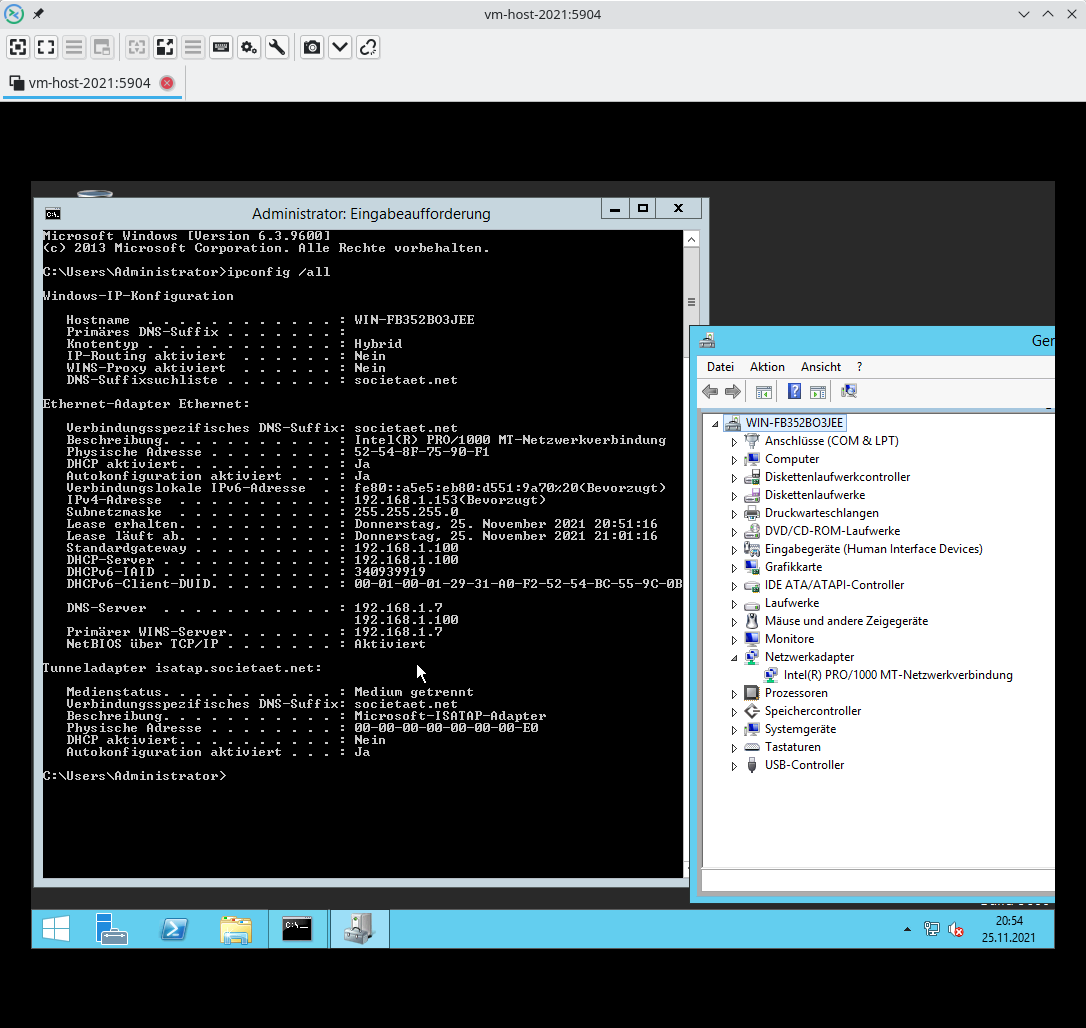
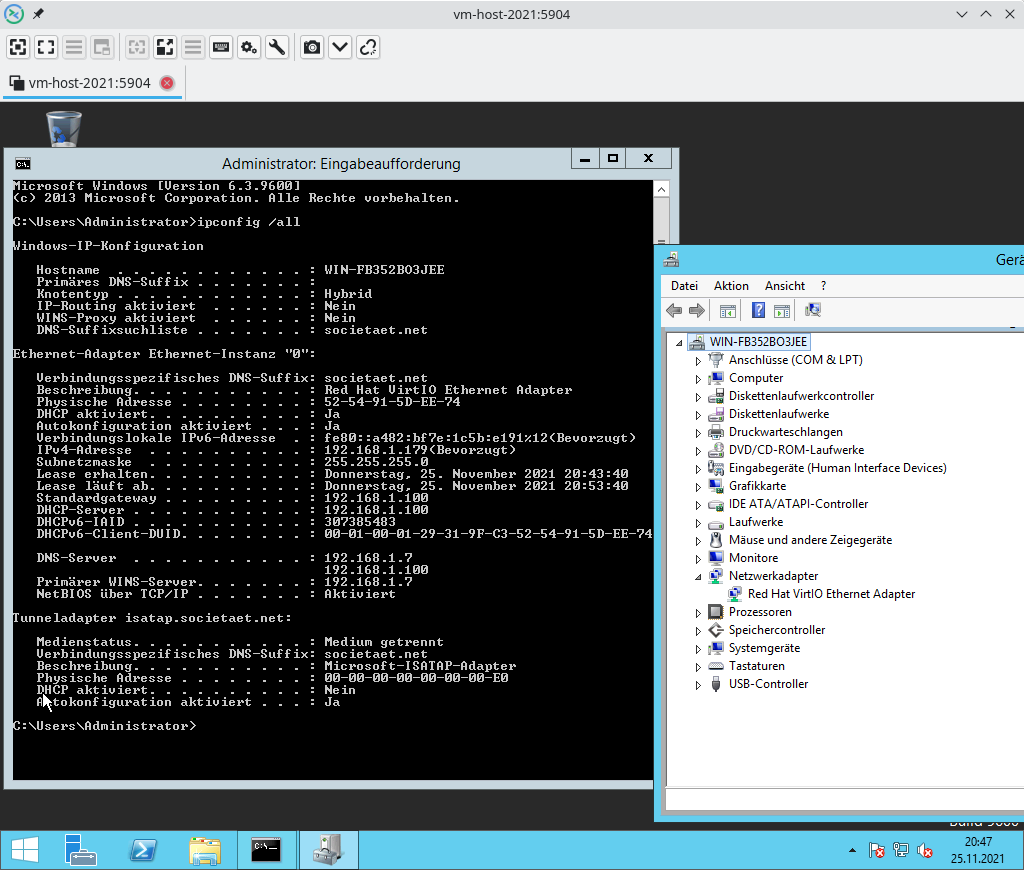
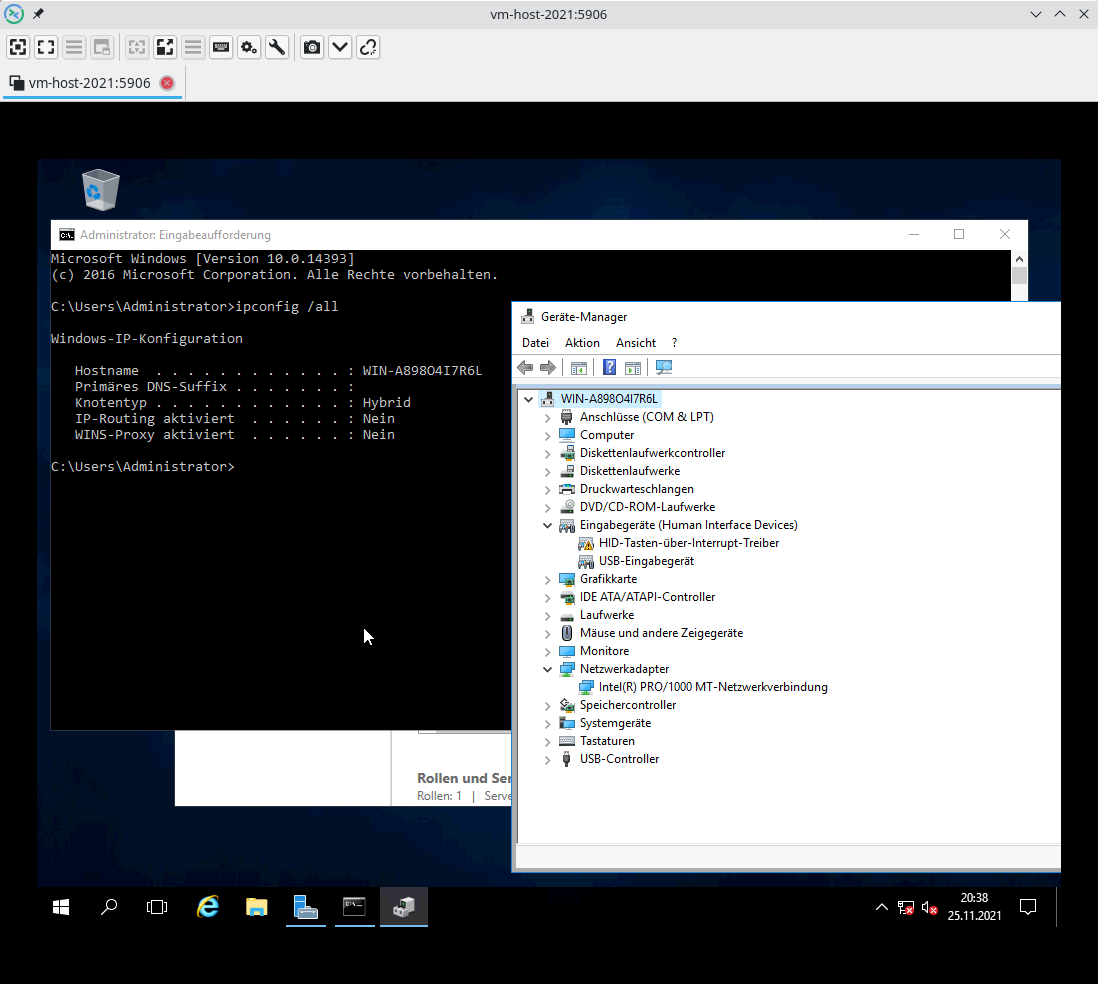
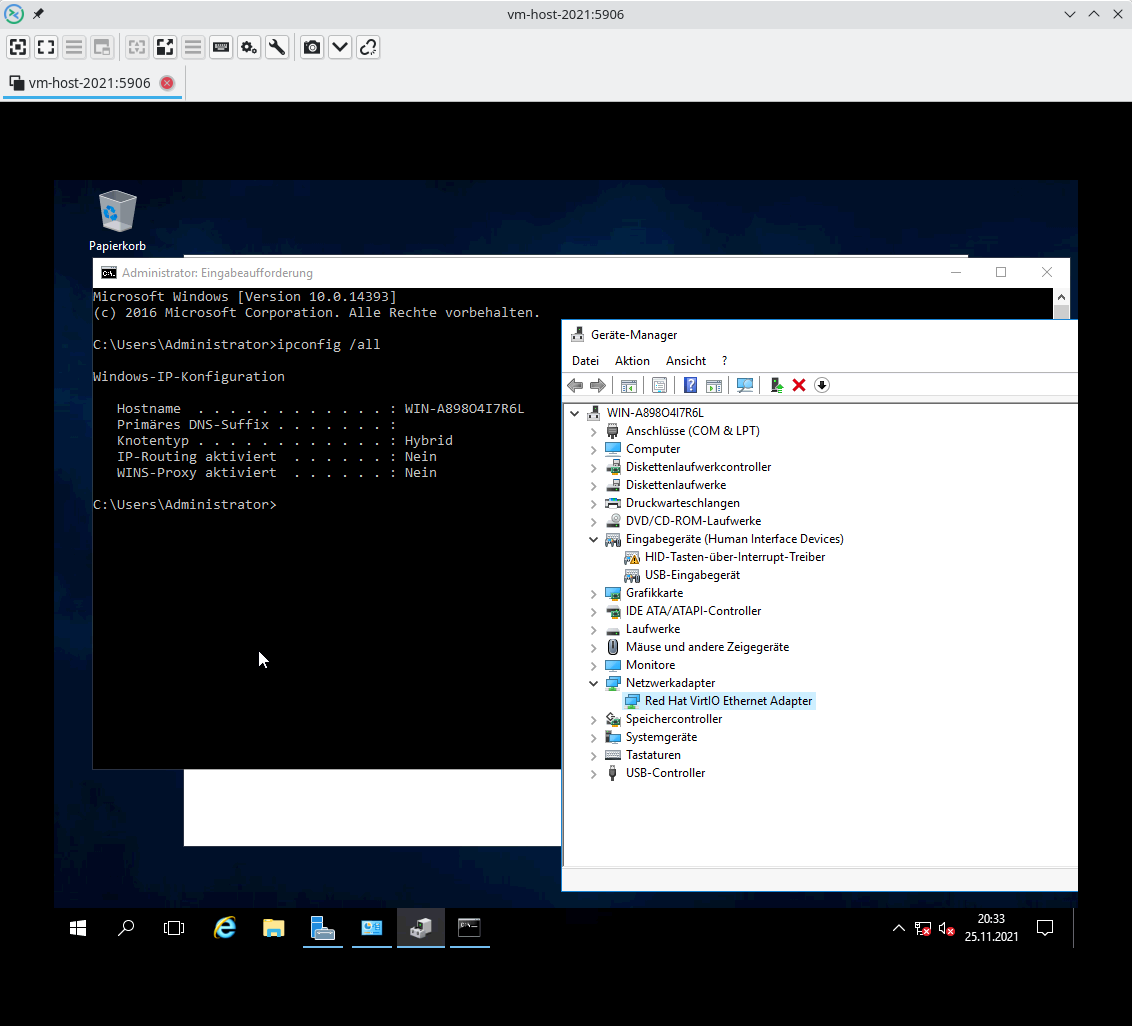
after your recommendation I installed virt-manager and configured the W2016S guest with "bridge"/br0 netdev. But this guest also doesn't get connected to the network. Below you find some screenshots from working (W2012R2) and failing (W2016) configurations. In the failing cases "ipconfig /all" doesn't show any network interface. That's why I did not trace DHCP and further (since we do not have an interface). Am I possibly missing some driver installation (TUN/TAP?) in the guest?
Thanks and Regards
Nazdravi
Offline
#6 2021-12-04 14:57:42
- archuser1
- Member
- Registered: 2021-11-24
- Posts: 11
Re: Qemu/KVM not providing IP for Windows guest, but for Linux guest
I'm not sure what you mean by '"bridge"/br0 netdev', but I see you used the .iso, so far so good. Did you create a bridge using sudo nmtui? For me creating a bridge using sudo nmtui works, but not using NetworkManager GUI in Cinnamon (I may try the GUI sometime later but as nmtui works, and it's a cmd tool, maybe I won't even bother). If I remember correctly, "br0" does sound like the default, non-working, bridge. Make sure you create a new bridge on your host [using sudo nmtui]. My working setup: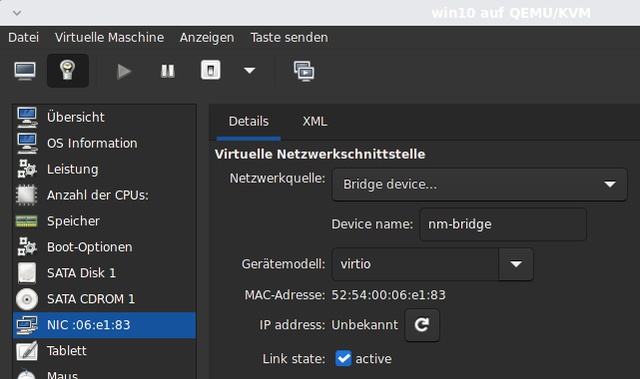

Offline
#7 2021-12-11 20:18:30
- Nazdravi
- Member
- Registered: 2003-03-20
- Posts: 12
Re: Qemu/KVM not providing IP for Windows guest, but for Linux guest
The network bridge on host side should be ok, because it is functional with guests with other installed operating systems (e.g. W20212R2).
[root@vm-host-2021 ~]# brctl show
bridge name     bridge id               STP enabled     interfaces
br0             8000.3cecef74081d       no              eno1np0
                                                        eno2np1
                                                        enp69s0f0np0
                                                        enp69s0f1np1
                                                        tap0
For the guest setup I tried different parametrizations (with virt-install, virt-manager and direct qemu arguments), but with finally no luck under W2016 and 2022. E.g. (virt-install ... --network bridge=br0 ...):
virt-install --connect qemu:///system --name=W2022S.Eval180.vi --ram=8192 --cpu host --hvm --vcpus=4 --os-type=windows --os-variant=win2k22 --disk W2022S.Eval180.vi.qcow2,size=100$DISK_OPTS --cdrom /misc/BACKUP-2016-VMs/ISO-Images/20348.169.210806-2348.fe_release_svc_refresh_SERVER_EVAL_x64FRE_de-de.iso --disk /misc/BACKUP-2016-VMs/ISO-Images/virtio-win-0.1.208-1.iso,device=cdrom --network bridge=br0,model=virtio --graphics vnc,listen=0.0.0.0,port=5905,keymap=local --check all=off --boot cdromMy post from november 26th contains some other variants, which showed the same results.
Kind regards
Nazdravi
Offline
#8 2021-12-19 18:38:26
- Nazdravi
- Member
- Registered: 2003-03-20
- Posts: 12
Re: Qemu/KVM not providing IP for Windows guest, but for Linux guest
In the end it turns out that this effect occurs only on a localized Windows installation version (german in my case). German installation media from 2k16 onward show this effect on AMD and Intel CPUs. So this is presumably not an Arch Linux specific problem and also not a virtio driver problem since an e1000 nic also suffers from this effect.
If someone had an idea to get over this problem this would be highly appreciated.
Kind regards
Nazdravi
Offline