You are not logged in.
- Topics: Active | Unanswered
Pages: 1
#1 2022-03-04 12:27:27
- arnuld
- Member

- From: INDIA
- Registered: 2005-12-19
- Posts: 220
- Website
[SOLVED] Wi-Fi is Super Slow
My wired internet on desktop works great but wireless does not:
- desktop wifi speed = 3.6 mbps
- laptop wifi speed = 50 mbps
- mobile wifi speed = 50 mbps
All 3 have these speeds for the same distance from the router. This is my desktop hardware:
[arnuld@arch64 ~]$ lspci -nnk | grep -iA4 net
21:00.0 Network controller [0280]: Intel Corporation Wireless-AC 9260 [8086:2526] (rev 29)
	DeviceName: Broadcom 5762
	Subsystem: Intel Corporation Device [8086:0014]
	Kernel driver in use: iwlwifi
	Kernel modules: iwlwifi
22:00.0 Ethernet controller [0200]: Intel Corporation I211 Gigabit Network Connection [8086:1539] (rev 03)
	Subsystem: Micro-Star International Co., Ltd. [MSI] Device [1462:7b85]
	Kernel driver in use: igb
	Kernel modules: igb
These are the services running:
[arnuld@arch64 ~]$ sudo systemctl --type=service
[sudo] password for arnuld:
  UNIT                                                  LOAD   ACTIVE SUB     DESCRIPTION
  accounts-daemon.service                               loaded active running Accounts Service
  alsa-restore.service                                  loaded active exited  Save/Restore Sound Card State
  colord.service                                        loaded active running Manage, Install and Generate Color Profiles
  dbus.service                                          loaded active running D-Bus System Message Bus
  deluged.service                                       loaded active running Deluge Bittorrent Client Daemon
  dhcpcd.service                                        loaded active running dhcpcd on all interfaces
  docker.service                                        loaded active running Docker Application Container Engine
  gdm.service                                           loaded active running GNOME Display Manager
  geoclue.service                                       loaded active running Location Lookup Service
  kmod-static-nodes.service                             loaded active exited  Create List of Static Device Nodes
  lm_sensors.service                                    loaded active exited  Initialize hardware monitoring sensors
  lvm2-monitor.service                                  loaded active exited  Monitoring of LVM2 mirrors, snapshots etc. using dmeventd or progress polling
  NetworkManager-wait-online.service                    loaded active exited  Network Manager Wait Online
  NetworkManager.service                                loaded active running Network Manager
  ntpd.service                                          loaded active running Network Time Service
  polkit.service                                        loaded active running Authorization Manager
  power-profiles-daemon.service                         loaded active running Power Profiles daemon
  rtkit-daemon.service                                  loaded active running RealtimeKit Scheduling Policy Service
  systemd-fsck@dev-disk-by\x2duuid-AF75\x2d5C52.service loaded active exited  File System Check on /dev/disk/by-uuid/AF75-5C52
  systemd-journal-flush.service                         loaded active exited  Flush Journal to Persistent Storage
  systemd-journald.service                              loaded active running Journal Service
  systemd-logind.service                                loaded active running User Login Management
  systemd-modules-load.service                          loaded active exited  Load Kernel Modules
  systemd-random-seed.service                           loaded active exited  Load/Save Random Seed
  systemd-remount-fs.service                            loaded active exited  Remount Root and Kernel File Systems
  systemd-resolved.service                              loaded active running Network Name Resolution
  systemd-sysctl.service                                loaded active exited  Apply Kernel Variables
  systemd-tmpfiles-setup-dev.service                    loaded active exited  Create Static Device Nodes in /dev
  systemd-tmpfiles-setup.service                        loaded active exited  Create Volatile Files and Directories
  systemd-udev-trigger.service                          loaded active exited  Coldplug All udev Devices
  systemd-udevd.service                                 loaded active running Rule-based Manager for Device Events and Files
  systemd-update-utmp.service                           loaded active exited  Record System Boot/Shutdown in UTMP
  systemd-user-sessions.service                         loaded active exited  Permit User Sessions
  udisks2.service                                       loaded active running Disk Manager
  upower.service                                        loaded active running Daemon for power management
  user-runtime-dir@1000.service                         loaded active exited  User Runtime Directory /run/user/1000
  user@1000.service                                     loaded active running User Manager for UID 1000
  vnstat.service                                        loaded active running vnStat network traffic monitor
  wpa_supplicant.service                                loaded active running WPA supplicant
Last edited by arnuld (2022-03-05 11:57:16)
Offline
#2 2022-03-04 12:38:42
- V1del
- Forum Moderator

- Registered: 2012-10-16
- Posts: 25,403
Re: [SOLVED] Wi-Fi is Super Slow
just from that, dhcpcd should not be active while using NetworkManager and this can lead to all sorts of trouble so definitely disable that reboot and recheck before we do anything else.
Offline
#3 2022-03-04 16:03:42
- ewaller
- Administrator

- From: Pasadena, CA
- Registered: 2009-07-13
- Posts: 20,702
Re: [SOLVED] Wi-Fi is Super Slow
After V1del's advice, if things are still slow, please post the output of iwconfig .
Nothing is too wonderful to be true, if it be consistent with the laws of nature -- Michael Faraday
The shortest way to ruin a country is to give power to demagogues.— Dionysius of Halicarnassus
---
How to Ask Questions the Smart Way
Offline
#4 2022-03-04 16:56:05
- arnuld
- Member
- From: INDIA
- Registered: 2005-12-19
- Posts: 220
- Website
Re: [SOLVED] Wi-Fi is Super Slow
There is no change even after disabling dhcpcd.service and rebooting. It says, dhcpcd.service is inactive (dead). Here is output of iwconfig:
[arnuld@arch64 ~]$ iwconfig
lo        no wireless extensions.

enp34s0   no wireless extensions.

wlan0     IEEE 802.11  ESSID:"ZTE-FsZCpt"
          Mode:Managed  Frequency:2.432 GHz  Access Point: E4:47:B3:80:A0:0E
          Bit Rate=2 Mb/s   Tx-Power=22 dBm
          Retry short limit:7   RTS thr:off   Fragment thr:off
          Power Management:on
          Link Quality=26/70  Signal level=-84 dBm
          Rx invalid nwid:0  Rx invalid crypt:0  Rx invalid frag:0
          Tx excessive retries:2  Invalid misc:477   Missed beacon:0

br-3163c434f972  no wireless extensions.

docker0   no wireless extensions.
[arnuld@arch64 ~]$
Last edited by arnuld (2022-03-04 16:58:44)
Offline
#5 2022-03-04 19:34:48
- seth
- Member

- From: Won't reply 2 private help req
- Registered: 2012-09-03
- Posts: 78,102
Re: [SOLVED] Wi-Fi is Super Slow
Signal level=-84 dBm
That's rather poor. Did you forget to attach the antenna?
Offline
#6 2022-03-04 19:42:45
- ewaller
- Administrator
- From: Pasadena, CA
- Registered: 2009-07-13
- Posts: 20,702
Re: [SOLVED] Wi-Fi is Super Slow
Your signal level is awful. My signal level is -39dBm. You are 45 dB below mine. That means, if the telemetry is to believed, you have about 0.5% power at the receiver as do I.
I have a hunch there is something wrong with your antenna configuration. There have been cases where there are multiple RF inputs to a chip, and the driver is selecting the wrong one. I would have to research this some -- in the mean time you might try chasing this down as well.
Edit: Snaked by Seth 
Last edited by ewaller (2022-03-04 19:43:33)
Nothing is too wonderful to be true, if it be consistent with the laws of nature -- Michael Faraday
The shortest way to ruin a country is to give power to demagogues.— Dionysius of Halicarnassus
---
How to Ask Questions the Smart Way
Offline
#7 2022-03-05 02:08:15
- arnuld
- Member
- From: INDIA
- Registered: 2005-12-19
- Posts: 220
- Website
Re: [SOLVED] Wi-Fi is Super Slow
Your signal level is awful. My signal level is -39dBm. You are 45 dB below mine. That means, if the telemetry is to believed, you have about 0.5% power at the receiver as do I.
I have a hunch there is something wrong with your antenna configuration. There have been cases where there are multiple RF inputs to a chip, and the driver is selecting the wrong one. I would have to research this some -- in the mean time you might try chasing this down as well.
Edit: Snaked by Seth
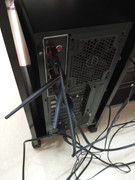
Wait, don't research. I don't have antennas attached I think. I removed them while shifting from one place to another and forgot to attach it. My bad. Let me find where they are and then get back to you before you spend time researching
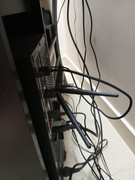
UPDATE: After attaching antennas, speed went to whooping 100 Mbps :-D . Also, I had frequent disconnections. After disabling dhcpcd.service, those went away too. Many thanks for the help. What I am still wondering about is laptop does not have any external antennas but it still gives same speed. How it does that?
...
Last edited by arnuld (2022-03-05 12:01:55)
Offline
Pages: 1