You are not logged in.
- Topics: Active | Unanswered
#1 2022-03-14 10:08:05
- Lysanleo
- Member
- Registered: 2022-03-14
- Posts: 9
[SOLVED]Screen tearing in Gnome with Intel Graphics
Screen tearing in Gnome with Intel Graphics
Condition:
Gnome3+Wayland
Intel Graphics(Iris Xe 96EU)
I've tried Archwiki#Tearing
More specific Description:
At first I'm using gnome with nv, but once I started installing I found tearing/Flikering/Black.
I thought it was nv's driver problem, so I disabled nv card now. But the problem still exists. Now, only intel graphics working.
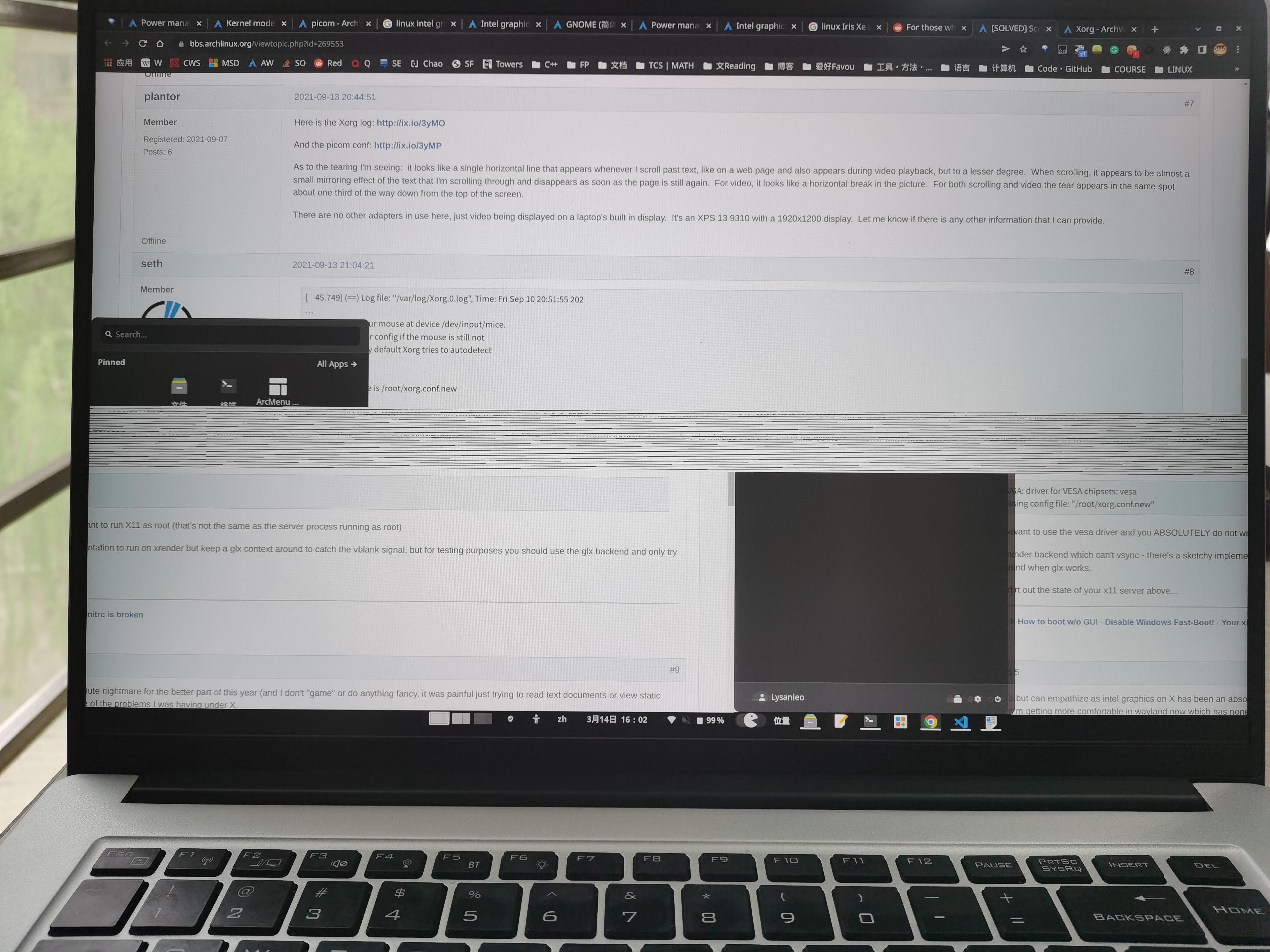
I can't confirm if this is a flikering or a tear, so I'm posting a picture here
https://s3.bmp.ovh/imgs/2022/03/f0c2ae17fab35fc0.jpg
Here is my inxi -G output:
Graphics:
  Device-1: Intel Alder Lake-P Integrated Graphics driver: i915 v: kernel
  Display: wayland server: X.Org v: 1.22.1 with: Xwayland v: 22.1.0
    compositor: gnome-shell v: 41.4 driver: gpu: i915
    resolution: 2560x1600~120Hz
  OpenGL: renderer: Mesa Intel Graphics (ADL GT2) v: 4.6 Mesa 21.3.7
My /etc/X11/xorg.conf.d/20-intel.conf file:
Section "Module"
  Load "dri2"
EndSection

Section "Device"
  Identifier "Intel Graphics"
  Driver "i915"
  Option "TripleBuffer" "true"
  Option "DRI" "2"
  Option "TearFree" "true"
EndSection
My ~/drirc file:
<device screen="0" driver="dri2">
	<application name="Default">
		<option name="vblank_mode" value="0"/>
	</application>
</device>
Problem:
The flickering/tearing still occuring when I'm using Application on gnome(Included: chrome/gnome-relate and so on).
I'm not so sure where the problems sourced, Driver / Driver config / Wayland / Xwayland.
Exception:
No tearing/flickering/black occurs.
Looking for any that helps.
Tell me I lacking any information needed or language that not so proper
Last edited by Lysanleo (2022-03-15 07:43:44)
Offline
#2 2022-03-14 11:23:11
- V1del
- Forum Moderator

- Registered: 2012-10-16
- Posts: 25,396
Re: [SOLVED]Screen tearing in Gnome with Intel Graphics
Please don't embed huge images like that directly. This isn't tearing but some corruption of the buffer. Doing these kind of Xorg configs will have little effect on a Wayland session, and it's technically incorrect anyway, so remove the /etc/X11/xorg.conf.d/20-intel.conf and your drirc file.
Some suggestions here would be doing
i915.enable_psr=0 i915.enable_fbc=0on the kernel command line, if that helps try removing one or the other till you've singled out which parameter helps. Also since this is a pretty new chip, make sure you're on the linux and not the LTS kernel or so. You might also want to check whether it's a gnome wayland issue by explicitly testing a xorg session. Also to preempt this, if xf86-video-intel is installed remove it.
Last edited by V1del (2022-03-14 11:24:05)
Offline
#3 2022-03-15 00:48:03
- Lysanleo
- Member
- Registered: 2022-03-14
- Posts: 9
Re: [SOLVED]Screen tearing in Gnome with Intel Graphics
Please don't embed huge images like that directly. This isn't tearing but some corruption of the buffer. Doing these kind of Xorg configs will have little effect on a Wayland session, and it's technically incorrect anyway, so remove the /etc/X11/xorg.conf.d/20-intel.conf and your drirc file.
Some suggestions here would be doing
i915.enable_psr=0 i915.enable_fbc=0on the kernel command line, if that helps try removing one or the other till you've singled out which parameter helps. Also since this is a pretty new chip, make sure you're on the linux and not the LTS kernel or so. You might also want to check whether it's a gnome wayland issue by explicitly testing a xorg session. Also to preempt this, if xf86-video-intel is installed remove it.
Thanks for your help!
Following your suggestions, the problem is solved.
I've updated my kernel from 515 to 517rc and added two parameters to my kernel parameter, then uninstalled xf86-video-intel.
And finally keep enable_psr=0, so I think the psr helps.
P.S. I apologize for accidentally using REPORT to respond to your reply the first time. And also that big inserted image.
Offline
#4 2022-03-15 06:55:40
- seth
- Member

- From: Won't reply 2 private help req
- Registered: 2012-09-03
- Posts: 78,024
Re: [SOLVED]Screen tearing in Gnome with Intel Graphics
Please always remember to mark resolved threads by editing your initial posts subject - so others will know that there's no task left, but maybe a solution to find.
Thanks.
Online
#5 2022-03-15 07:40:41
- Lysanleo
- Member
- Registered: 2022-03-14
- Posts: 9
Re: [SOLVED]Screen tearing in Gnome with Intel Graphics
Please always remember to mark resolved threads by editing your initial posts subject - so others will know that there's no task left, but maybe a solution to find.
Thanks.
Ok, I'll remember that. THX
Offline