You are not logged in.
- Topics: Active | Unanswered
Pages: 1
#1 2022-03-31 10:13:06
- Archlin
- Member
- Registered: 2018-05-09
- Posts: 67
Urxvt does not show icons/glyphs
I try to setup urxvt, but it does not work like I expected.
What I expect: 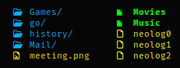
What I get: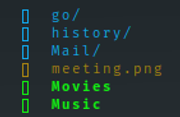
I mis the icons
Some outputs
Check the terminal
> echo $TERM                                                                               ~
rxvt-unicode-256color
Check locale
> locale                                                                                        ~
LANG=en_US.UTF-8
LC_CTYPE=en_US.UTF-8
LC_NUMERIC=nl_NL.UTF-8
LC_TIME=nl_NL.UTF-8
LC_COLLATE=en_US.UTF-8
LC_MONETARY=nl_NL.UTF-8
LC_MESSAGES=en_US.UTF-8
LC_PAPER=nl_NL.UTF-8
LC_NAME=en_US.UTF-8
LC_ADDRESS=en_US.UTF-8
LC_TELEPHONE=en_US.UTF-8
LC_MEASUREMENT=nl_NL.UTF-8
LC_IDENTIFICATION=en_US.UTF-8
LC_ALL=
and
> locale -a                                                                       ~
C
en_US.utf8
nl_NL.utf8
POSIX
.Xresources
> cat .Xresources
!! Colorscheme

! special
*.foreground: #93a1a1
*.background: #141c21
*.cursorColor: #afbfbf

! black
*.color0: #263640
*.color8: #4a697d

! red
*.color1: #d12f2c
*.color9: #fa3935

! green
*.color2: #819400
*.color10: #a4bd00

! yellow
*.color3: #b08500
*.color11: #d9a400

! blue
*.color4: #2587cc
*.color12: #2ca2f5

! magenta
*.color5: #696ebf
*.color13: #8086e8

! cyan
*.color6: #289c93
*.color14: #33c5ba

! white
*.color7: #bfbaac
*.color15: #fdf6e3

!! URxvt Appearance

URxvt*font: xft:Fira Code:size=8,xft:Consolas:size=9,xft:DejaVu Sans:size=6,xft:FontAwesome:size=6
URxvt.boldFont: xft:Fira Code:style=Bold:size=8
URxvt.italicFont: xft:Fira Code:style=Italic:size=8
URxvt.boldItalicFont: xft:Fira Code:style=Bold Italic:size=8
URxvt.letterSpace: 0
URxvt.lineSpace: 0
URxvt.geometry: 92x24
URxvt.internalBorder: 24
URxvt.cursorBlink: true
URxvt.cursorUnderline: false
URxvt.saveline: 2048
URxvt.scrollBar: false
URxvt.scrollBar_right: false
URxvt.urgentOnBell: true
URxvt.depth: 24
URxvt.iso14755: false

!Needs some work
 URxvt.perl-ext-common:      default,clipboard,url-select,keyboard-select
 URxvt.url-select.launcher:  chromium
 URxvt.url-select.underline: true
 URxvt.keysym.M-u:           perl:url-select:select_next
 URxvt.keysym.M-Escape:      perl:keyboard-select:activate
 URxvt.keysym.M-s:           perl:keyboard-select:search

!! Xft Antialiasing
Xft.autohint: 0
Xft.lcdfilter: lcddefault
Xft.hintstyle: hintslight
Xft.hinting: 1
Xft.antialias: 1
Xft.rgba: rgb
Xft.dpi: 96
!! Set basic cursor
xcursor.theme: Vanilla-DMZ
the fonts are installed (see fc-match)
> fc-match "Fira Code"                                                                    ~
FiraCode-Regular.ttf: "Fira Code" "Regular"
> fc-match "FontAwesome"                                                                           ~
fontawesome-regular.ttf: "FontAwesome" "Regular"
> fc-match "consolas-powerline"                                                                    ~
consola.ttf: "Consolas" "Regular
> fc-match "Dejavu Sans"                                                                           ~
DejaVuSans.ttf: "DejaVu Sans" "Book"
Also tried with an empty .Xresources and only the font tag, but that also did not show the glyphs and icons
Also changing the font sizes did not help.
What do I mis?
Offline
#2 2022-03-31 12:39:57
- seth
- Member

- From: Won't reply 2 private help req
- Registered: 2012-09-03
- Posts: 76,696
Re: Urxvt does not show icons/glyphs
What codepoint is the missing glyph? (utf-8 hex)
Also, is it escaped to be bold (where you have only Fira Code and no substitute list)?
urxvt has a peculiar behavior when the resolved glyph doesn't fit inside the glyph box, you might want to try whether
URxvt*font: xft:Fira Code:size=16,xft:Consolas:size=9,xft:DejaVu Sans:size=6,xft:FontAwesome:size=6let's you see the glyphs (don't forget to merge the xrdb!)
Alternatively try eg. https://aur.archlinux.org/packages/rxvt … wideglyphs or https://aur.archlinux.org/packages/rxvt … ide-glyphs
Offline
#3 2022-03-31 15:05:44
- Archlin
- Member
- Registered: 2018-05-09
- Posts: 67
Re: Urxvt does not show icons/glyphs
f1c5 for instance
Offline
#4 2022-03-31 15:14:32
- frabjous
- Member

- Registered: 2010-07-13
- Posts: 367
Re: Urxvt does not show icons/glyphs
I don't know why it isn't working as is, though I've heard of similar reports. You might try installing FiraCode Nerd Font and set it as your urxvt font in .Xresources, since then those glyphs would be in your main font.
Offline
#5 2022-03-31 15:16:44
- othersamo_
- Member
- From: Braislava
- Registered: 2020-10-26
- Posts: 161
Re: Urxvt does not show icons/glyphs
may i ask what happens if you simply try pasting a character similar to the ones you find on fontawesome?
"Why join the navy if you can be a pirate?"
- Steve Jobs
Offline
#6 2022-03-31 15:20:01
- Archlin
- Member
- Registered: 2018-05-09
- Posts: 67
Re: Urxvt does not show icons/glyphs
Played a bit with the fonts and did set
URxvt.font: xft:Source Code Pro:pixelsize=12,xft:DejaVuSansMono Nerd Font:size=6 Now it does show the glyphs/icons....
Just needed to find the right font
Called to soon only a few show but most dont
Last edited by Archlin (2022-03-31 17:38:03)
Offline
#7 2022-03-31 19:20:24
- seth
- Member
- From: Won't reply 2 private help req
- Registered: 2012-09-03
- Posts: 76,696
Re: Urxvt does not show icons/glyphs
fc-list ':charset=f1c5'
fc-match -s ':charset=f1c5'
But since the variable width fonts will have glyphs at all sizes, you'll run into varying size incompatibilities - since that's likely the only cause, try one of the patched urxvt versions I linked before.
Offline
Pages: 1