You are not logged in.
- Topics: Active | Unanswered
Pages: 1
#1 2019-12-15 02:12:13
- jv2112
- Member

- Registered: 2011-07-23
- Posts: 160
Missing Disk Space [Solved]
When I search my directories using du or run disk analyzer or run ncdu -x / I come up with about 40 gig used.
However when I run df I get 10 fold at about 407 Gig...
drive of concern -- /dev/nvme0n1p3
Any suggestions ?
I have set the reserved blocks to 5% grabbing 14 + gig , Cleared Out Cache's , Removed Orphans , Removed some old packages....
Not sure where this space is being eaten up or I am just missing something.
Any Help is much appreciated.
Thank You
Filesystem     Type  Size  Used Avail Use% Mounted on
/dev/nvme0n1p3 ext4  453G  407G   37G  92% /
/dev/nvme0n1p1 vfat  350M  392K  349M   1% /boot/efi
/dev/sdb       ext4  1.8T  1.4T  349G  80% /mnt/E-Space
/dev/sda       ext4  4.6T  2.0T  2.4T  45% /mnt/Archive
total          -     6.8T  3.7T  2.8T  58% -
Image of Analyzer Output --
https://i.postimg.cc/ZRW7G841/2019-12-14-20-50-36.png
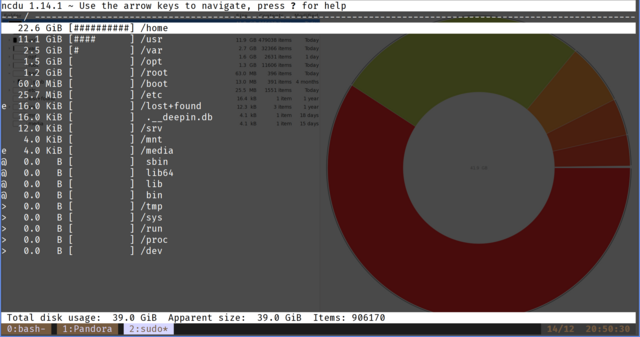
Last edited by jv2112 (2019-12-15 13:12:49)
Life is pleasant. Death is peaceful. It's the transition that's troublesome. Isaac Asimov - / -
Offline
#2 2019-12-15 09:23:10
- seth
- Member

- From: Won't reply 2 private help req
- Registered: 2012-09-03
- Posts: 76,696
Re: Missing Disk Space [Solved]
* leaking inodes, "df -hi"
* mounted into a non-empty path (boot some live distro, mount /dev/nvme0n1p3 and check the drive usage w/o any submounts like /home or /media etc.)
* space occupied in paths unavailable to to user, try "sudo ncdu"
Offline
#3 2019-12-15 11:18:06
- jv2112
- Member
- Registered: 2011-07-23
- Posts: 160
Re: Missing Disk Space [Solved]
Thanks for the reply Seth.
I took a look at the inodes , checked the mount points ,ran ncdu under sudo and ran a disk analyzer but no luck.
I also tried running the find command to search for potential images I forgot about but the results were cumulatively under 1G.
I am at loss for what to do next except format & start over ... but I like environment as is & don't really have the time to dig in...

 --- I have been on Arch for 8+ Years / Linux for 12 ... Never had this mystery.....
All Feedback is Appreciated !!!!!
Find Command Efforts -- Total Output < 1G
sudo find / -iname *.img -exec ls -lh {} \;
sudo find / -iname *.hd -exec ls -lh {} \;
sudo find / -iname *.iso -exec ls -lh {} \;
df -hi
Filesystem     Type Inodes IUsed IFree IUse% Mounted on
/dev/nvme0n1p3 ext4    29M  864K   28M    3% /
/dev/sdb       ext4   117M  218K  117M    1% /mnt/E-Space
/dev/nvme0n1p1 vfat      0     0     0     - /boot/efi
/dev/sda       ext4   146M  329K  146M    1% /mnt/Archive
/dev/sdc1      vfat      0     0     0     - /run/media/joe/Data
total          -      291M  1.4M  290M    1% -
/etc/fstab
# <file system> <mount point>   <type>  <options>       <dump>  <pass>
#Boot
UUID=9BEA-6ED0 /boot/efi vfat defaults,relatime 0 0

# Swap
UUID=424fe97f-9b3f-4c38-901d-3fa32b7e70a1 swap swap defaults 0 0

# OS Drive  - /  -- nvme drive  -- ########       drive of concern....  ##################
UUID=4b1e61f0-71e9-49e8-9862-5c8f6d7bb653 / ext4 defaults,relatime,data=ordered 0 1

# Secondary Storage 2T Firecuda
LABEL=E-Space /mnt/E-Space ext4 defaults	0 0

# Freenas Mount from Laptop
10.0.0.250:/mnt/Server/Media/ /mnt/E-Space/Plex-Media/ nfs nofail,defaults,timeo=900,retrans=5 0 0

# /dev/sdc --> LABEL="Archive" | USB Seagate Drive
UUID=2189051e-2d34-497e-bb6e-9f28ee176a27 /mnt/Archive/ ext4 auto,nofail,noatime,rw,user    0   0
sudo ncdu -- -- About 40G --- Where is the 360G ?
https://i.postimg.cc/8cDwLwHg/ncdu-2019 … -40-05.png
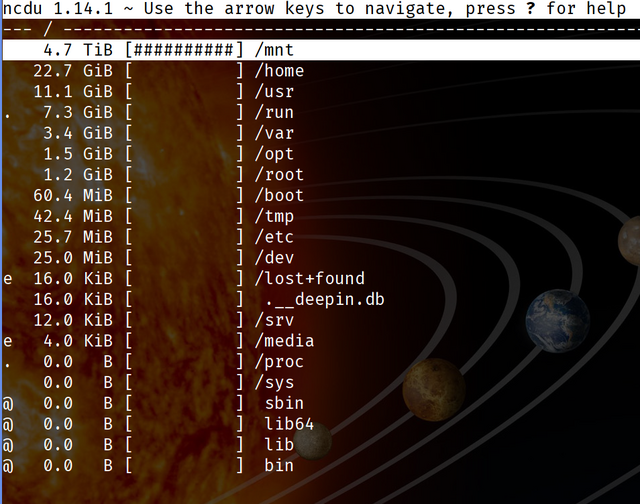
Disk Analyzer -- About 40G --- Where is the 360G ?
https://i.postimg.cc/J4rPn60b/Folder-Su … -38-45.png
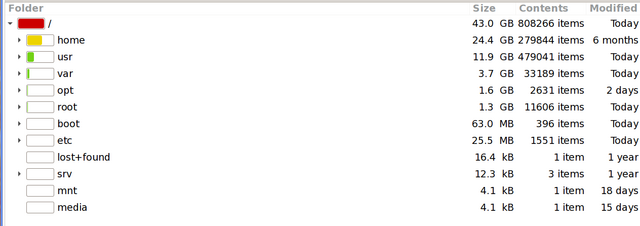
output df -
Filesystem     Type  Size  Used Avail Use% Mounted on
/dev/nvme0n1p3 ext4  453G  408G   36G  92% /
/dev/sdb       ext4  1.8T  1.4T  342G  81% /mnt/E-Space
/dev/nvme0n1p1 vfat  350M  392K  349M   1% /boot/efi
/dev/sda       ext4  4.6T  2.0T  2.4T  45% /mnt/Archive
/dev/sdc1      vfat   29G  7.4G   22G  26% /run/media/joe/Data
total          -     6.8T  3.7T  2.8T  58% -
Last edited by jv2112 (2019-12-15 11:19:08)
Life is pleasant. Death is peaceful. It's the transition that's troublesome. Isaac Asimov - / -
Offline
#4 2019-12-15 11:20:37
- Slithery
- Administrator

- From: Norfolk, UK
- Registered: 2013-12-01
- Posts: 5,776
Offline
#5 2019-12-15 12:53:00
- jv2112
- Member
- Registered: 2011-07-23
- Posts: 160
Re: Missing Disk Space [Solved]
Thanks
I read that suggestion wrong. I went into a live usb to review & found out I am a moron.....
I wrote a script to back up from a Plex Server to a USB drive connected to my laptop as a secondary back up.
It is set to run every 45 minutes. So when I disconnect the drive to use the computer somewhere else in my house the script still runs and rsync creates a directory in the same mount point adding the files to my drive. However it is masked when the drive is connected as they have the same naming conventions.
I need to figure out how to script it so it only runs when connected.
Any suggestions ?
#! /bin/bash
clear

# NAS 10.0.0.250:/mnt/Server/Media->  Oryx: 10.0.0.248:/mnt/Archive/Media/


echo -e "\n\e[37;104m ------------------------------------------------------------------------ \e[00m\n "
figlet " * Free Nas Back Up *"
echo -e "\n\e[37;104m ------------------------------------------------------------------------ \e[00m\n "


echo "------------------------------------------------------------------------------------------------------"
figlet "Media"
echo "------------------------------------------------------------------------------------------------------"

rsync -rvuz --chmod=ugo=rwx -e ssh --delete  joe@10.0.0.250:/mnt/Server/Media/ /mnt/Archive/Media/
Fixed for now / until my error gets me ....
Filesystem     Type  Size  Used Avail Use% Mounted on
/dev/nvme0n1p3 ext4  453G   41G  404G  10% /
/dev/sda       ext4  1.8T  1.4T  346G  81% /mnt/E-Space
/dev/sdb       ext4  4.6T  2.0T  2.4T  45% /mnt/Archive
/dev/nvme0n1p1 vfat  350M  392K  349M   1% /boot/efi
total          -     6.8T  3.4T  3.2T  52% -
Life is pleasant. Death is peaceful. It's the transition that's troublesome. Isaac Asimov - / -
Offline
#6 2019-12-15 13:11:36
- jv2112
- Member
- Registered: 2011-07-23
- Posts: 160
Re: Missing Disk Space [Solved]
It Works !!
Figure it out.
Thanks for all the help !!

#! /bin/bash
clear

# NAS 10.0.0.250:/mnt/Server/Media->  Oryx: 10.0.0.248:/run/media/joe/Archive


echo -e "\n\e[37;104m ------------------------------------------------------------------------ \e[00m\n "
figlet " * Free Nas Back Up *"
echo -e "\n\e[37;104m ------------------------------------------------------------------------ \e[00m\n "


echo "------------------------------------------------------------------------------------------------------"
figlet "Media"
echo "------------------------------------------------------------------------------------------------------"

if mountpoint  /mnt/Archive/ ; then
figlet "Drive is Mounted"
rsync -rvuz --chmod=ugo=rwx -e ssh --delete  joe@10.0.0.250:/mnt/Server/Media/ /mnt/Archive/Media/

else
figlet "Not Mounted"
figlet "...Aborting.."
fi
Life is pleasant. Death is peaceful. It's the transition that's troublesome. Isaac Asimov - / -
Offline
#7 2019-12-15 13:12:53
- Slithery
- Administrator
- From: Norfolk, UK
- Registered: 2013-12-01
- Posts: 5,776
Re: Missing Disk Space [Solved]
I usually create an empty file in the unmounted directory. Then a simple 'if file exists' statement can let you know whether or not it's mounted.
Another option would be to parse the output of mount.
Offline
#8 2022-04-02 05:37:30
- banool
- Member
- Registered: 2022-04-02
- Posts: 1
Re: Missing Disk Space [Solved]
Dang I too am a moron, thanks @jv2112, you're a life saver.
Offline
Pages: 1