You are not logged in.
- Topics: Active | Unanswered
#1 2022-04-12 09:45:13
- he3als
- Member

- Registered: 2022-04-12
- Posts: 2
- Website
'xcape' is slow on XFCE - Whisker menu
Hello, I am trying to find a good way to launch Whisker Menu on XFCE with the super/Windows/command key. I followed a tutorial from the wiki (https://wiki.archlinux.org/title/Xfce#U … _shortcuts), but I have an issue with it. There is noticeable latency from me pressing the super key and it actually showing the menu, around 1.3 seconds as an estimate. I have also found that pressing the super key in quick succession (so opening then quickly closing Whisker menu) does not work correctly and it seems like a 50% chance of it actually closing the menu or not. Using the default XFCE keyboard shortcuts has less delay, but it breaks all other keyboard shortcuts which use super. I did not have this issue on KDE Plasma.
Is there any other way of launching the Whisker menu without a noticeable delay and without breaking other super shortcuts?
Last edited by he3als (2022-04-12 14:04:37)
Offline
#2 2022-04-12 13:29:32
- robson75
- Member

- From: Poland
- Registered: 2020-06-28
- Posts: 144
Re: 'xcape' is slow on XFCE - Whisker menu
You may have added a wrong name to the hotkeys, the correct command is `xfce4-popup-whiskermenu`.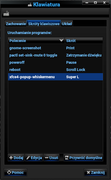
Arch Linux Xfce - 64Bit Linux User #621110
Offline
#3 2022-04-12 13:51:29
- he3als
- Member
- Registered: 2022-04-12
- Posts: 2
- Website
Re: 'xcape' is slow on XFCE - Whisker menu
I have the correct command binded to Alt + F1, there's no other command to open the Whisker menu. I am not having an issue with actually getting the keybind to work, my issue is that there's a delay.
Offline
#4 2022-04-12 16:32:06
- robson75
- Member
- From: Poland
- Registered: 2020-06-28
- Posts: 144
Re: 'xcape' is slow on XFCE - Whisker menu
I am not using xcape on my Xfce4, and everything works fine.
EDIT.
And go to the Accessibility settings and check if you have this item marked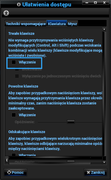
Last edited by robson75 (2022-04-12 16:43:29)
Arch Linux Xfce - 64Bit Linux User #621110
Offline
#5 2022-04-12 16:49:46
- toz
- Member
- Registered: 2011-10-28
- Posts: 513
Re: 'xcape' is slow on XFCE - Whisker menu
I have the correct command binded to Alt + F1, there's no other command to open the Whisker menu. I am not having an issue with actually getting the keybind to work, my issue is that there's a delay.
Do you get the same delay if you use Alt+F1?
Do you still get a delay if you change your Appearance (GTK) theme? Maybe try with the default Adwaita theme.
Offline
#6 2022-04-13 19:19:31
- pbrane0
- Member
- Registered: 2019-05-17
- Posts: 1
Re: 'xcape' is slow on XFCE - Whisker menu
I am using xcape and followed the tutorial you posted. I have no issue, but I did notice that the super key is only activated when you release it. Not on the press but the release.
Last edited by pbrane0 (2022-04-13 19:19:55)
Offline