You are not logged in.
- Topics: Active | Unanswered
Pages: 1
#1 2022-04-25 12:14:09
- MRAAGH
- Member
- Registered: 2022-02-15
- Posts: 10
Dual GPU low performance
I am using two GPUs (RX-560 and RX-550) in order to be able to connect a lot of screens. This worked fine when I had the i3-8100 cpu and asus prime Z370-P motherboard.
I Recently upgraded to the i5-12400F cpu and asus prime B660-plus d4 motherboard. However, in this new setup, I noticed that dual GPU performance is much worse than single GPU performance.
Specifically, if both GPUs are being utilized by the xorg session, and I start any graphically intensive software, I experience horrible stuttering in all windows on all screens. This does not occur if only one GPU is being utilized by the xorg session (I tested single-gpu performance for each of my two cards, and in each of the two PCIe slots. All single-gpu setups work fine).
This surprises me greatly, because the PCIe layout is identical: in both setups, my RX-560 is in a PCIex16 slot in x16 mode, and my RX-550 is in a PCIex16 slot in x4 mode.
Is there some difference between these motherboards that prevents me from using dual GPU at nominal performance?
Is there something I need to configure in-software to make this work properly?
Any ideas how I could properly test/debug a problem like this?
EDIT: I read the manual for asus prime B660-plus d4 again, and it explicitly states: "This motherboard supports two PCIe x16 graphics cards". So I don't think I'm lacking hardware support.
Last edited by MRAAGH (2022-04-25 13:16:15)
Offline
#2 2022-04-25 13:37:54
- seth
- Member

- From: Won't reply 2 private help req
- Registered: 2012-09-03
- Posts: 76,687
Re: Dual GPU low performance
How are you combining the GPUs?
Please post the xorg log and output of "glxinfo -B" w/ the dual GPU setup, https://wiki.archlinux.org/title/Xorg#General
Is the CPU load high when there's "stutter"?
Offline
#3 2022-04-25 14:20:10
- MRAAGH
- Member
- Registered: 2022-02-15
- Posts: 10
Re: Dual GPU low performance
Thank you seth for offering some leads!
How are you combining the GPUs?
I inserted them in their respective pcie slots. Currently I'm using 4 screens (3 on the RX-560 and 1 on the RX-550). I assign the screens using this command:
xrandr --output DP-1 --primary --pos 0x0 --output HDMI-1 --pos 1920x0 --output DVI-D-1 --pos 3840x0 --rotate right --output DP-1-2 --mode 1920x1080 --pos 4920x0 --rotate leftI did not do any configuration beyond that. This is what worked flawlessly with my previous cpu and motherboard.
Please post the xorg log and output of "glxinfo -B" w/ the dual GPU setup, https://wiki.archlinux.org/title/Xorg#General
Xorg log: https://files.mazie.rocks/Xorg.0_W9jmv.log
maze@bread ~ glxinfo -B
name of display: :0
display: :0  screen: 0
direct rendering: Yes
Extended renderer info (GLX_MESA_query_renderer):
    Vendor: AMD (0x1002)
    Device: AMD Radeon RX 560 Series (polaris11, LLVM 13.0.1, DRM 3.44, 5.17.4-arch1-1) (0x67ef)
    Version: 22.0.1
    Accelerated: yes
    Video memory: 4096MB
    Unified memory: no
    Preferred profile: core (0x1)
    Max core profile version: 4.6
    Max compat profile version: 4.6
    Max GLES1 profile version: 1.1
    Max GLES[23] profile version: 3.2
Memory info (GL_ATI_meminfo):
    VBO free memory - total: 3246 MB, largest block: 3246 MB
    VBO free aux. memory - total: 4039 MB, largest block: 4039 MB
    Texture free memory - total: 3246 MB, largest block: 3246 MB
    Texture free aux. memory - total: 4039 MB, largest block: 4039 MB
    Renderbuffer free memory - total: 3246 MB, largest block: 3246 MB
    Renderbuffer free aux. memory - total: 4039 MB, largest block: 4039 MB
Memory info (GL_NVX_gpu_memory_info):
    Dedicated video memory: 4096 MB
    Total available memory: 8192 MB
    Currently available dedicated video memory: 3246 MB
OpenGL vendor string: AMD
OpenGL renderer string: AMD Radeon RX 560 Series (polaris11, LLVM 13.0.1, DRM 3.44, 5.17.4-arch1-1)
OpenGL core profile version string: 4.6 (Core Profile) Mesa 22.0.1
OpenGL core profile shading language version string: 4.60
OpenGL core profile context flags: (none)
OpenGL core profile profile mask: core profile

OpenGL version string: 4.6 (Compatibility Profile) Mesa 22.0.1
OpenGL shading language version string: 4.60
OpenGL context flags: (none)
OpenGL profile mask: compatibility profile

OpenGL ES profile version string: OpenGL ES 3.2 Mesa 22.0.1
OpenGL ES profile shading language version string: OpenGL ES GLSL ES 3.20
I noticed that the RX-550 is not mentioned in the above output at all? I should probably revert to my previous cpu and motherboard and try this there, for comparison.
Is the CPU load high when there's "stutter"?
I was able to watch htop over ssh even when my local screens freeze. And there does not seem to be additional overhead (beyond the cpu usage by the game I was using for graphical load).
Offline
#4 2022-04-25 14:43:10
- seth
- Member
- From: Won't reply 2 private help req
- Registered: 2012-09-03
- Posts: 76,687
Re: Dual GPU low performance
You're using reverse prime redirection.
There're some outputs w/ interlaced modes and invalid refresh rates.
xrandr -qEdit: did you use xf86-video-amdgpu on the other board? I assume you updated/changed/reinstalled the system after the board switch?
Last edited by seth (2022-04-25 14:43:46)
Offline
#5 2022-04-25 14:51:40
- MRAAGH
- Member
- Registered: 2022-02-15
- Posts: 10
Re: Dual GPU low performance
You're using reverse prime redirection.
There're some outputs w/ interlaced modes and invalid refresh rates.xrandr -qEdit: did you use xf86-video-amdgpu on the other board? I assume you updated/changed/reinstalled the system after the board switch?
Output of xrandr -q: https://files.mazie.rocks/xrandr-q_output_9dV6h
I have never used xf86-video-amdgpu. After I changed the cpu and board, I did not do any reinstallation (I only installed the EFI bootloader). I did update the system since then, but the system update was not the cause of this issue. I experienced it immediately after changing my hardware.
Offline
#6 2022-04-25 15:00:16
- seth
- Member
- From: Won't reply 2 private help req
- Registered: 2012-09-03
- Posts: 76,687
Re: Dual GPU low performance
No weird modelines - but rotated outputs.
Does the system behave better when you run all outputs as clones (all displaying the same 1920x1080+0+0, no rotation)?
Offline
#7 2022-04-25 15:07:44
- MRAAGH
- Member
- Registered: 2022-02-15
- Posts: 10
Re: Dual GPU low performance
With this simple configuration: https://files.mazie.rocks/simple_xrandr-q_output_Lm4Kq
I am still encountering the same issue. I did notice that the graphical load (the game) needs to be visible on screen in order for the issue to occur.
Offline
#8 2022-04-25 15:19:19
- MRAAGH
- Member
- Registered: 2022-02-15
- Posts: 10
Re: Dual GPU low performance
A few additional things I thought I would mention:
To upgrade my system, I first tried the motherboard GIGABYTE B660 DS3H, and I experienced this same issue, but a more extreme version (more lag/stutter/freezing). Once I learned that the PCIe x16 slots on that motherboard run in x1 mode, I concluded this must be the cause of the issue. asus prime B660-plus d4 is my second attempt at getting this system to work, however the issue is still somewhat present and very annoying.
Intel i5-12400F is a processor with no integrated graphics. Could this possibly be causing my issue, even though I am not utilizing the video outputs on the motherboard?
Offline
#9 2022-04-25 19:45:03
- seth
- Member
- From: Won't reply 2 private help req
- Registered: 2012-09-03
- Posts: 76,687
Re: Dual GPU low performance
If the board promotes two PCIe x16 I don't think that's the problem (though you might look out for a BIOS update)
Is this really a problem with "graphically intensive software" or OpenGL or vulcan specifically?
Does glxgears cause the same issue?
Other things:
Do you use a compositor?
Is prime sync enabled (check "xrandr --props")?
Offline
#10 2022-04-25 21:49:01
- MRAAGH
- Member
- Registered: 2022-02-15
- Posts: 10
Re: Dual GPU low performance
I noticed that the RX-550 is not mentioned in the above output at all? I should probably revert to my previous cpu and motherboard and try this there, for comparison.
I switched back to my previous CPU and motherboard, where everything works fine, so I can test this for comparison. Here is the output of glxinfo -B on my flawless dual-gpu setup. There are no meaningful differences from the earlier result; so this unfortunately does not reveal any details about the issue.
name of display: :0
display: :0  screen: 0
direct rendering: Yes
Extended renderer info (GLX_MESA_query_renderer):
    Vendor: AMD (0x1002)
    Device: AMD Radeon RX 560 Series (polaris11, LLVM 13.0.1, DRM 3.44, 5.17.4-arch1-1) (0x67ef)
    Version: 22.0.1
    Accelerated: yes
    Video memory: 4096MB
    Unified memory: no
    Preferred profile: core (0x1)
    Max core profile version: 4.6
    Max compat profile version: 4.6
    Max GLES1 profile version: 1.1
    Max GLES[23] profile version: 3.2
Memory info (GL_ATI_meminfo):
    VBO free memory - total: 2748 MB, largest block: 2748 MB
    VBO free aux. memory - total: 4030 MB, largest block: 4030 MB
    Texture free memory - total: 2748 MB, largest block: 2748 MB
    Texture free aux. memory - total: 4030 MB, largest block: 4030 MB
    Renderbuffer free memory - total: 2748 MB, largest block: 2748 MB
    Renderbuffer free aux. memory - total: 4030 MB, largest block: 4030 MB
Memory info (GL_NVX_gpu_memory_info):
    Dedicated video memory: 4096 MB
    Total available memory: 8192 MB
    Currently available dedicated video memory: 2748 MB
OpenGL vendor string: AMD
OpenGL renderer string: AMD Radeon RX 560 Series (polaris11, LLVM 13.0.1, DRM 3.44, 5.17.4-arch1-1)
OpenGL core profile version string: 4.6 (Core Profile) Mesa 22.0.1
OpenGL core profile shading language version string: 4.60
OpenGL core profile context flags: (none)
OpenGL core profile profile mask: core profile

OpenGL version string: 4.6 (Compatibility Profile) Mesa 22.0.1
OpenGL shading language version string: 4.60
OpenGL context flags: (none)
OpenGL profile mask: compatibility profile

OpenGL ES profile version string: OpenGL ES 3.2 Mesa 22.0.1
OpenGL ES profile shading language version string: OpenGL ES GLSL ES 3.20If the board promotes two PCIe x16 I don't think that's the problem (though you might look out for a BIOS update)
hmm, is it possible that BIOS is outdated on a brand new motherboard of the latest generation? I will check just in case.
Is this really a problem with "graphically intensive software" or OpenGL or vulcan specifically?
Yes, this really is a problem only when the graphics are under load. While running the game, the intensity of the stutter/freezing changes depending on the graphics settings and game window size (how many pixels need to be rendered). In fact, if I set the game to lowest graphics settings, the issue goes away altogether.
Does glxgears cause the same issue?
glxgears does not cause the issue.
Do you use a compositor?
No compositor, just plain AwesomeWM. But I am using redshift.
EDIT: Problem also occurs without redshift.
Is prime sync enabled (check "xrandr --props")?
For now, I was only able to test this on my OLD motherboard (where everything WORKS).
In the output, I see that prime sync is mentioned for each output port on the second GPU.
Only one of those ports is actually connected to a screen. It lists PRIME Synchronization: 0
The other two ports list PRIME Synchronization: 1
Here is the full output: https://files.mazie.rocks/xrandr--props_output_Vw6vd
EDIT: I repeated xrandr --props on the system that IS experiencing the issue. The result seems to be the same.
Here is the full output: https://files.mazie.rocks/xrandr--props_output2_D24rT
Thank you for all the suggestions, seth. I would not have thought to check all of this. And hey, maybe we can figure something out, so I won't need to replace this motherboard with a different one. Or at least get a better idea for what I should replace it with.
Last edited by MRAAGH (2022-04-26 00:22:08)
Offline
#11 2022-04-26 13:23:08
- MRAAGH
- Member
- Registered: 2022-02-15
- Posts: 10
Re: Dual GPU low performance
I updated the BIOS to the latest version. This did not fix the problem. No difference
Offline
#12 2022-04-26 15:54:32
- Lone_Wolf
- Administrator

- From: Netherlands, Europe
- Registered: 2005-10-04
- Posts: 15,205
Re: Dual GPU low performance
Those two motherboards DO NOT have identical pcie setups .
Prime B660-plus D4
 Expansion Slots
Intel® 12th Gen Processors
1 x PCIe 4.0 x16 slot
Intel® B660 Chipset*
1 x PCIe 3.0 x16 slot (supports x4 mode)
2 x PCIe 3.0 x1 slots
* Supports Intel® Optane Memory H Series on PCH-attached PCIe slot
Prime Z370
1 x PCI Express 3.0/2.0 x16 slot (support x16, x8/x4+x4*)
1 x PCI Express 3.0/2.0 x16 slot (max. at x4 mode, compatible with PCIe x1, x2
and x4 devices)
4 x PCI Express 3.0/2.0 x1 slots
As root please run
journalctl -b | curl -F 'f:1=<-' ix.io and post the link it shows (may take some time depending on your network connection speed)
Disliking systemd intensely, but not satisfied with alternatives so focusing on taming systemd.
clean chroot building not flexible enough ?
Try clean chroot manager by graysky
Offline
#13 2022-04-26 22:29:38
- MRAAGH
- Member
- Registered: 2022-02-15
- Posts: 10
Re: Dual GPU low performance
Thank you Lone_Wolf, I did not look deep enough in the PCIe slot specification.
I did not realize PCIe ports may be wired to the motherboard chipset rather than the CPU, which seems to be the case on the B660 board.
My bottleneck might be the B660 chipset or its link to the CPU.
In this case, the solution would be to get a motherboard where both PCIe slots link to the CPU, such as the Asrock B660M Pro RS.
For the record, both my GPUs have a full x16 set of physical pins: https://files.mazie.rocks/IMG_20220426_230352_MN3kB.jpg (1013KB)
(this is not proof that all the pins are actually funcitonal)
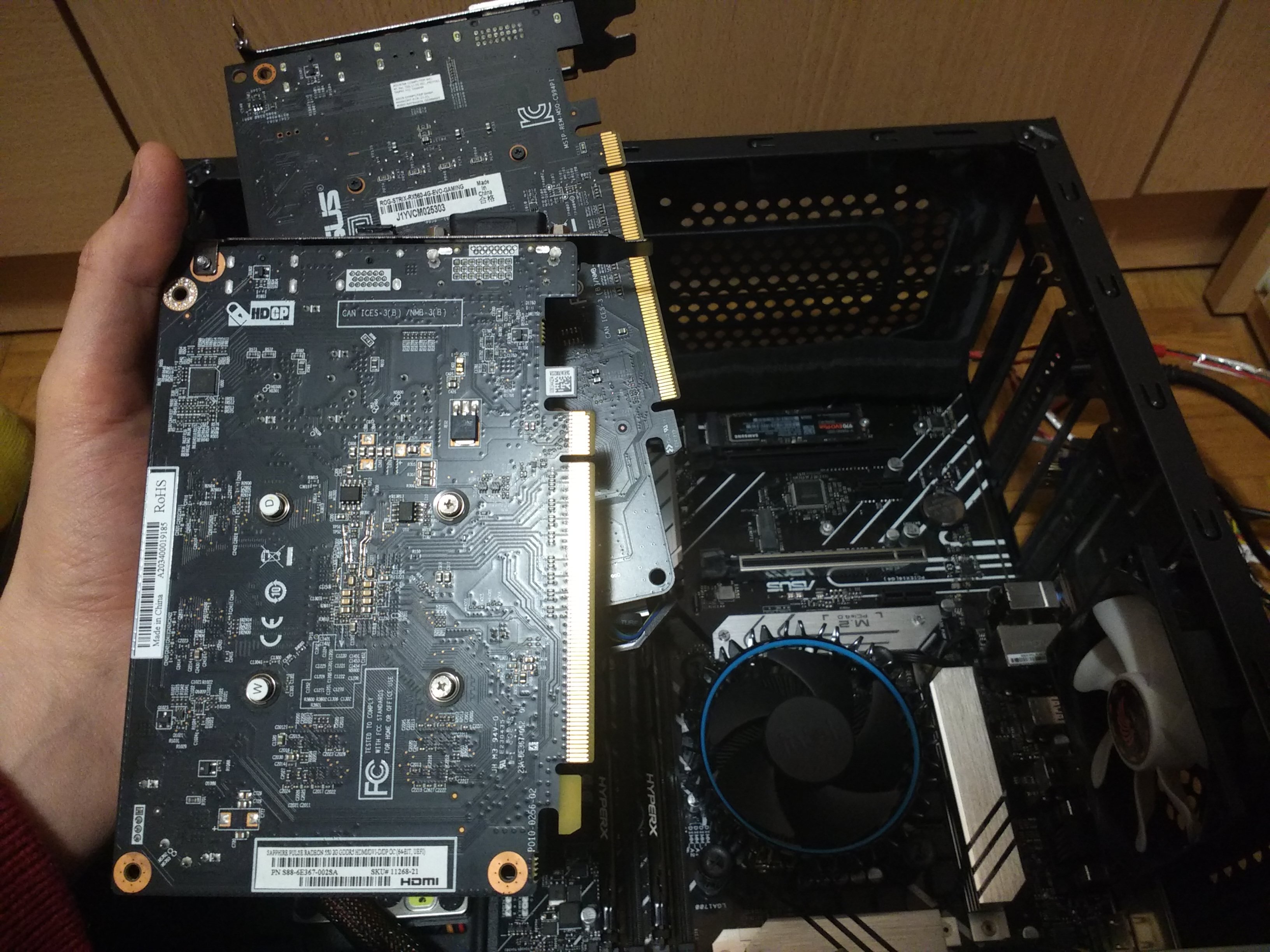
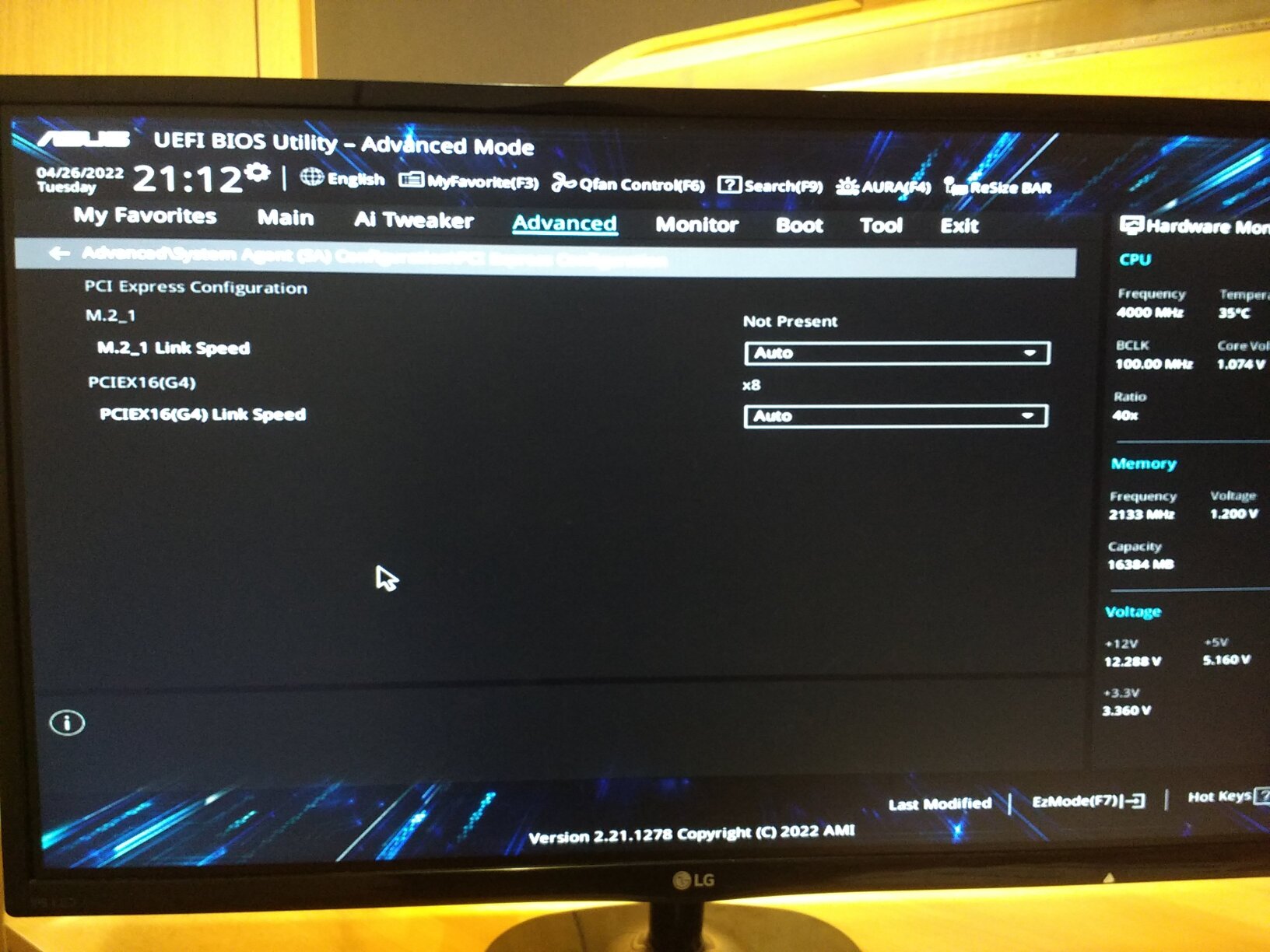
Taking a look in BIOS,
RX-560 in the top x16 slot running in x8 mode: https://files.mazie.rocks/IMG_20220426_231201_nsnF6.jpg
RX-550 in the second x16 slot running in x4 mode: https://files.mazie.rocks/IMG_20220426_231335_d6S5Z.jpg
(PCIe Generation is set to Auto; I assume it picks the appropriate speed automatically.)
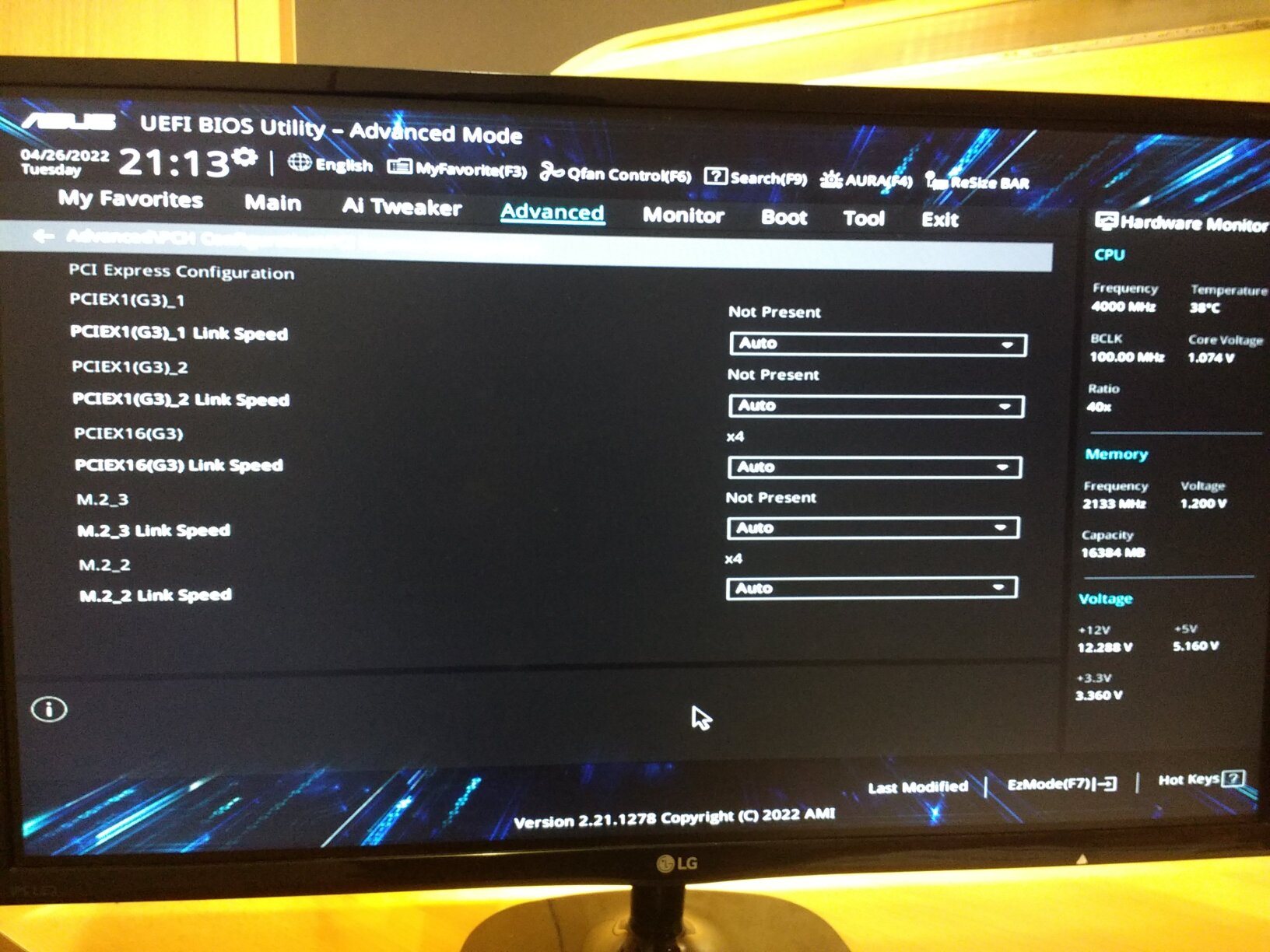
Full output of journalctl -b after reproducing the issue on a fresh boot: https://files.mazie.rocks/journalctl-b_output_JK45D
Offline
#14 2022-04-26 23:28:42
- loqs
- Member
- Registered: 2014-03-06
- Posts: 18,968
Re: Dual GPU low performance
In this case, the solution would be to get a motherboard where both PCIe slots link to the CPU, such as the Asrock B660M Pro RS.
https://www.asrock.com/mb/Intel/B660M%2 … cification
Slots
CPU:
- 1 x PCIe 4.0 x16 Slot (PCIE1), supports x16 mode*
Chipset:
- 1 x PCIe 3.0 x16 Slot (PCIE3), supports x4 mode*
- 1 x PCIe 3.0 x1 Slot (PCIE2)*
- 1 x M.2 Socket (Key E), supports type 2230 WiFi/BT PCIe WiFi module and Intel® CNVi (Integrated WiFi/BT)- Supports AMD CrossFire™
*Supports NVMe SSD as boot disks
That reads to me as only having one slot linked to the CPU.
Offline
#15 2022-04-27 00:45:41
- MRAAGH
- Member
- Registered: 2022-02-15
- Posts: 10
Re: Dual GPU low performance
That reads to me as only having one slot linked to the CPU.
I misread the spec (again!)
I can't thank you enough for correcting me, loqs. You've just saved me an unnecessary purchase.
It appears linking multiple PCIe slots to the CPU has become a rarity.
The only suitable LGA1700 motherboards are Z690 DDR5 boards. Those are both unaffordable and overkill for a couple weak GPUs like mine.
So I am sticking with what I have. Worst case, I will have to disable my 4th screen while playing games.
Offline
Pages: 1