You are not logged in.
- Topics: Active | Unanswered
#1 2022-06-03 09:42:24
- luser
- Member
- Registered: 2016-08-27
- Posts: 115
[RESOLVED] How do I get rid of this paused printer?
I seem to have two instances of the same model printer, but one is permanently paused. When I try to print something, the dialog box has the paused printer selected, and I have to choose the second one every time in order to print, because simply choosing the first one looks like it will work, but nothing happens, because it seems to be permanently paused.
The printers appear as:
Canon_MG3600_series
and
Canon_MG3600_series_
I'd like to get rid of the first one.
$ lpinfo -v
network dnssd://Canon%20MG3600%20series._ipp._tcp.local/?uuid=00000000-0000-1000-8000-F8A26D01EF0D
network ipps://Canon%20MG3600%20series._ipps._tcp.local/
network dnssd://Canon%20MG3600%20series._printer._tcp.local/?uuid=00000000-0000-1000-8000-F8A26D01EF0D
I think I want to remove:
network ipps://Canon%20MG3600%20series._ipps._tcp.local/
I've tried:
lpadmin x "network ipps://Canon%20MG3600%20series._ipps._tcp.local/"
and variations of that, but i get responses:
lpadmin: Printer name can only contain printable characters
or
lpadmin: The printer or class does not exist
Under printers in KDE system settings I see:
Canon_MG3600_series
  Paused
Canon_MG3600_series_
  Idle
Note the latter one has an underscore at the end.
I've tried pressing the Remove Printer button for the paused one, but it doesn't work. Nothing happens.
When I look at
http://localhost:631/printers/?I only see Canon_MG3600_series_
How do I get rid of the useless one?
Last edited by luser (2022-06-08 01:22:25)
luser: an epithet applied by Windows users to linux users
Offline
#2 2022-06-03 12:59:59
- seth
- Member

- From: Won't reply 2 private help req
- Registered: 2012-09-03
- Posts: 77,256
Re: [RESOLVED] How do I get rid of this paused printer?
Did you check /etc/cups/ppd/ ?
Offline
#3 2022-06-07 06:38:28
- luser
- Member
- Registered: 2016-08-27
- Posts: 115
Re: [RESOLVED] How do I get rid of this paused printer?
There were two files there, one named Canon_MG3600_series.ppd, and the other named Canon_MG3600_series_.ppd.O. The latter was an older file, which I removed, but it didn't make any difference. The remaining file is Canon_MG3600_series.ppd which looks like this:
*PPD-Adobe: "4.3"
*FormatVersion: "4.3"
*FileVersion: "1.28.15"
*LanguageVersion: English
*LanguageEncoding: ISOLatin1
*PSVersion: "(3010.000) 0"
*LanguageLevel: "3"
*FileSystem: False
*PCFileName: "drvless.ppd"
*Manufacturer: "Canon"
*ModelName: "Canon MG3600 series"
*Product: "(Canon MG3600 series)"
*NickName: "Canon MG3600 series, driverless, cups-filters 1.28.15"
*ShortNickName: "Canon MG3600 series"
*DefaultOutputOrder: Normal
*ColorDevice: True
*cupsVersion: 2.4
*cupsSNMPSupplies: False
*cupsLanguages: "en"
*APSupplies: "http://MG3620.local./index.html?page=PAGE_AAP"
*cupsFilter2: "image/urf image/urf 0 -"
*cupsFilter2: "image/pwg-raster image/pwg-raster 10 -"
*cupsFilter2: "image/jpeg image/jpeg 0 -"
*cupsManualCopies: True
*OpenUI *PageSize/Media Size: PickOne
*OrderDependency: 10 AnySetup *PageSize
*DefaultPageSize: Letter
*PageSize 3.5x5/3.5 x 5″: "<</PageSize[252 360]>>setpagedevice"
*PageSize 3.5x5.Borderless/3.5 x 5″ (Borderless): "<</PageSize[252 360]>>setpagedevice"
*PageSize 4x6/4 x 6″: "<</PageSize[288 432]>>setpagedevice"
*PageSize 4x6.Borderless/4 x 6″ (Borderless): "<</PageSize[288 432]>>setpagedevice"
*PageSize 5x7/5 x 7″: "<</PageSize[360 504]>>setpagedevice"
*PageSize 5x7.Borderless/5 x 7″ (Borderless): "<</PageSize[360 504]>>setpagedevice"
*PageSize 8x10/8 x 10″: "<</PageSize[576 720]>>setpagedevice"
*PageSize 8x10.Borderless/8 x 10″ (Borderless): "<</PageSize[576 720]>>setpagedevice"
*PageSize A4/A4: "<</PageSize[595.275590551181 841.889763779528]>>setpagedevice"
*PageSize A4.Borderless/A4 (Borderless): "<</PageSize[595.275590551181 841.889763779528]>>setpagedevice"
*PageSize A5/A5: "<</PageSize[419.527559055118 595.275590551181]>>setpagedevice"
*PageSize A5.Borderless/A5 (Borderless): "<</PageSize[419.527559055118 595.275590551181]>>setpagedevice"
*PageSize B5/JIS B5: "<</PageSize[515.905511811024 728.503937007874]>>setpagedevice"
*PageSize B5.Borderless/JIS B5 (Borderless): "<</PageSize[515.905511811024 728.503937007874]>>setpagedevice"
*PageSize Env10/Envelope #10: "<</PageSize[296.985826771654 684]>>setpagedevice"
*PageSize Env10.Borderless/Envelope #10 (Borderless): "<</PageSize[296.985826771654 684]>>setpagedevice"
*PageSize EnvDL/Envelope DL: "<</PageSize[311.811023622047 623.622047244094]>>setpagedevice"
*PageSize EnvDL.Borderless/Envelope DL (Borderless): "<</PageSize[311.811023622047 623.622047244094]>>setpagedevice"
*PageSize Legal/US Legal: "<</PageSize[612 1008]>>setpagedevice"
*PageSize Legal.Borderless/US Legal (Borderless): "<</PageSize[612 1008]>>setpagedevice"
*PageSize Letter/US Letter: "<</PageSize[612 792]>>setpagedevice"
*PageSize Letter.Borderless/US Letter (Borderless): "<</PageSize[612 792]>>setpagedevice"
*PageSize Postcard/Hagaki: "<</PageSize[283.464566929134 419.527559055118]>>setpagedevice"
*PageSize Postcard.Borderless/Hagaki (Borderless): "<</PageSize[283.464566929134 419.527559055118]>>setpagedevice"
*CloseUI: *PageSize
*OpenUI *PageRegion/Media Size: PickOne
*OrderDependency: 10 AnySetup *PageRegion
*DefaultPageRegion: Letter
*PageRegion 3.5x5/3.5 x 5″: "<</PageSize[252 360]>>setpagedevice"
*PageRegion 3.5x5.Borderless/3.5 x 5″ (Borderless): "<</PageSize[252 360]>>setpagedevice"
*PageRegion 4x6/4 x 6″: "<</PageSize[288 432]>>setpagedevice"
*PageRegion 4x6.Borderless/4 x 6″ (Borderless): "<</PageSize[288 432]>>setpagedevice"
*PageRegion 5x7/5 x 7″: "<</PageSize[360 504]>>setpagedevice"
*PageRegion 5x7.Borderless/5 x 7″ (Borderless): "<</PageSize[360 504]>>setpagedevice"
*PageRegion 8x10/8 x 10″: "<</PageSize[576 720]>>setpagedevice"
*PageRegion 8x10.Borderless/8 x 10″ (Borderless): "<</PageSize[576 720]>>setpagedevice"
*PageRegion A4/A4: "<</PageSize[595.275590551181 841.889763779528]>>setpagedevice"
*PageRegion A4.Borderless/A4 (Borderless): "<</PageSize[595.275590551181 841.889763779528]>>setpagedevice"
*PageRegion A5/A5: "<</PageSize[419.527559055118 595.275590551181]>>setpagedevice"
*PageRegion A5.Borderless/A5 (Borderless): "<</PageSize[419.527559055118 595.275590551181]>>setpagedevice"
*PageRegion B5/JIS B5: "<</PageSize[515.905511811024 728.503937007874]>>setpagedevice"
*PageRegion B5.Borderless/JIS B5 (Borderless): "<</PageSize[515.905511811024 728.503937007874]>>setpagedevice"
*PageRegion Env10/Envelope #10: "<</PageSize[296.985826771654 684]>>setpagedevice"
*PageRegion Env10.Borderless/Envelope #10 (Borderless): "<</PageSize[296.985826771654 684]>>setpagedevice"
*PageRegion EnvDL/Envelope DL: "<</PageSize[311.811023622047 623.622047244094]>>setpagedevice"
*PageRegion EnvDL.Borderless/Envelope DL (Borderless): "<</PageSize[311.811023622047 623.622047244094]>>setpagedevice"
*PageRegion Legal/US Legal: "<</PageSize[612 1008]>>setpagedevice"
*PageRegion Legal.Borderless/US Legal (Borderless): "<</PageSize[612 1008]>>setpagedevice"
*PageRegion Letter/US Letter: "<</PageSize[612 792]>>setpagedevice"
*PageRegion Letter.Borderless/US Letter (Borderless): "<</PageSize[612 792]>>setpagedevice"
*PageRegion Postcard/Hagaki: "<</PageSize[283.464566929134 419.527559055118]>>setpagedevice"
*PageRegion Postcard.Borderless/Hagaki (Borderless): "<</PageSize[283.464566929134 419.527559055118]>>setpagedevice"
*CloseUI: *PageRegion
*DefaultImageableArea: Letter
*DefaultPaperDimension: Letter
*ImageableArea 3.5x5: "9.637795275591 14.173228346457 242.362204724409 345.826771653543"
*PaperDimension 3.5x5: "252 360"
*ImageableArea 3.5x5.Borderless: "0 0 252 360"
*PaperDimension 3.5x5.Borderless: "252 360"
*ImageableArea 4x6: "9.637795275591 14.173228346457 278.362204724409 417.826771653543"
*PaperDimension 4x6: "288 432"
*ImageableArea 4x6.Borderless: "0 0 288 432"
*PaperDimension 4x6.Borderless: "288 432"
*ImageableArea 5x7: "9.637795275591 14.173228346457 350.362204724409 489.826771653543"
*PaperDimension 5x7: "360 504"
*ImageableArea 5x7.Borderless: "0 0 360 504"
*PaperDimension 5x7.Borderless: "360 504"
*ImageableArea 8x10: "9.637795275591 14.173228346457 566.362204724409 705.826771653543"
*PaperDimension 8x10: "576 720"
*ImageableArea 8x10.Borderless: "0 0 576 720"
*PaperDimension 8x10.Borderless: "576 720"
*ImageableArea A4: "9.637795275591 14.173228346457 585.637795275591 827.716535433071"
*PaperDimension A4: "595.275590551181 841.889763779528"
*ImageableArea A4.Borderless: "0 0 595.275590551181 841.889763779528"
*PaperDimension A4.Borderless: "595.275590551181 841.889763779528"
*ImageableArea A5: "9.637795275591 14.173228346457 409.889763779528 581.102362204724"
*PaperDimension A5: "419.527559055118 595.275590551181"
*ImageableArea A5.Borderless: "0 0 419.527559055118 595.275590551181"
*PaperDimension A5.Borderless: "419.527559055118 595.275590551181"
*ImageableArea B5: "9.637795275591 14.173228346457 506.267716535433 714.330708661417"
*PaperDimension B5: "515.905511811024 728.503937007874"
*ImageableArea B5.Borderless: "0 0 515.905511811024 728.503937007874"
*PaperDimension B5.Borderless: "515.905511811024 728.503937007874"
*ImageableArea Env10: "15.874015748031 82.204724409449 281.111811023622 661.322834645669"
*PaperDimension Env10: "296.985826771654 684"
*ImageableArea Env10.Borderless: "0 0 296.985826771654 684"
*PaperDimension Env10.Borderless: "296.985826771654 684"
*ImageableArea EnvDL: "15.874015748031 82.204724409449 295.937007874016 600.944881889764"
*PaperDimension EnvDL: "311.811023622047 623.622047244094"
*ImageableArea EnvDL.Borderless: "0 0 311.811023622047 623.622047244094"
*PaperDimension EnvDL.Borderless: "311.811023622047 623.622047244094"
*ImageableArea Legal: "18.141732283465 14.173228346457 594.141732283465 993.826771653543"
*PaperDimension Legal: "612 1008"
*ImageableArea Legal.Borderless: "0 0 612 1008"
*PaperDimension Legal.Borderless: "612 1008"
*ImageableArea Letter: "18.141732283465 14.173228346457 594.141732283465 777.826771653543"
*PaperDimension Letter: "612 792"
*ImageableArea Letter.Borderless: "0 0 612 792"
*PaperDimension Letter.Borderless: "612 792"
*ImageableArea Postcard: "9.637795275591 14.173228346457 273.826771653543 405.354330708661"
*PaperDimension Postcard: "283.464566929134 419.527559055118"
*ImageableArea Postcard.Borderless: "0 0 283.464566929134 419.527559055118"
*PaperDimension Postcard.Borderless: "283.464566929134 419.527559055118"
*HWMargins: "0 0 0 0"
*ParamCustomPageSize Width: 1 points 252 612
*ParamCustomPageSize Height: 2 points 360 1916.220472440945
*ParamCustomPageSize WidthOffset: 3 points 0 0
*ParamCustomPageSize HeightOffset: 4 points 0 0
*ParamCustomPageSize Orientation: 5 int 0 3
*CustomPageSize True: "pop pop pop <</PageSize[5 -2 roll]/ImagingBBox null>>setpagedevice"
*OpenUI *InputSlot/Media Source: PickOne
*OrderDependency: 10 AnySetup *InputSlot
*DefaultInputSlot: Main
*InputSlot Auto/Automatic: "<</MediaPosition 0>>setpagedevice"
*InputSlot Main/Main: "<</MediaPosition 1>>setpagedevice"
*CloseUI: *InputSlot
*OpenUI *MediaType/Media Type: PickOne
*OrderDependency: 10 AnySetup *MediaType
*DefaultMediaType: Stationery
*MediaType Stationery/Stationery: "<</MediaType(Stationery)>>setpagedevice"
*MediaType Photographic/Photo Paper: "<</MediaType(Photographic)>>setpagedevice"
*MediaType Envelope/Envelope: "<</MediaType(Envelope)>>setpagedevice"
*CloseUI: *MediaType
*% ColorModel from urf-supported
*OpenUI *ColorModel/Print Color Mode: PickOne
*OrderDependency: 10 AnySetup *ColorModel
*ColorModel RGB/Color: "<</cupsColorSpace 19/cupsBitsPerColor 8/cupsColorOrder 0/cupsCompression 0>>setpagedevice"
*ColorModel Gray/Monochrome: "<</cupsColorSpace 18/cupsBitsPerColor 8/cupsColorOrder 0/cupsCompression 0>>setpagedevice"
*DefaultColorModel: RGB
*CloseUI: *ColorModel
*OpenUI *Duplex/2-Sided Printing: PickOne
*OrderDependency: 10 AnySetup *Duplex
*DefaultDuplex: None
*Duplex None/Off: "<</Duplex false>>setpagedevice"
*Duplex DuplexNoTumble/On (Portrait): "<</Duplex true/Tumble false>>setpagedevice"
*Duplex DuplexTumble/On (Landscape): "<</Duplex true/Tumble true>>setpagedevice"
*CloseUI: *Duplex
*cupsBackSide: Rotated
*OpenUI *OutputBin/Output Tray: PickOne
*OrderDependency: 10 AnySetup *OutputBin
*DefaultOutputBin: FaceUp
*OutputBin FaceUp/Face Up: ""
*PageStackOrder FaceUp: Normal
*CloseUI: *OutputBin
*DefaultResolution: 600dpi
*OpenUI *cupsPrintQuality/Print Quality: PickOne
*OrderDependency: 10 AnySetup *cupsPrintQuality
*DefaultcupsPrintQuality: Normal
*cupsPrintQuality Normal/Normal: "<</HWResolution[600 600]>>setpagedevice"
*cupsPrintQuality High/High: "<</HWResolution[600 600]>>setpagedevice"
*CloseUI: *cupsPrintQuality
*OpenUI *print-scaling/Print Scaling: PickOne
*OrderDependency: 10 AnySetup *print-scaling
*Defaultprint-scaling: auto
*print-scaling none/None: ""
*print-scaling fill/Fill: ""
*print-scaling fit/Fit: ""
*print-scaling auto-fit/Auto-fit: ""
*print-scaling auto/Automatic: ""
*CloseUI: *print-scaling
http://localhost:631/admin looks like 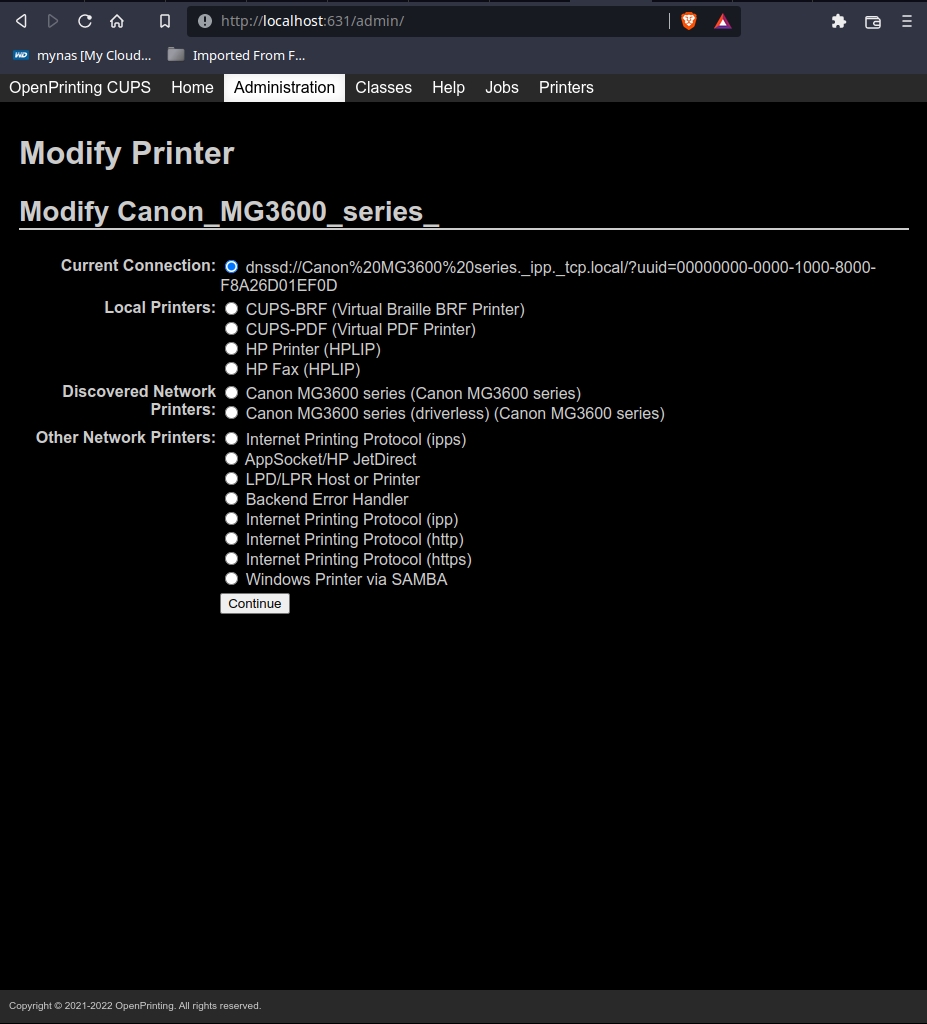 .
.
Any other things I should check?
Last edited by luser (2022-06-07 06:57:40)
luser: an epithet applied by Windows users to linux users
Offline
#4 2022-06-07 06:52:14
- seth
- Member
- From: Won't reply 2 private help req
- Registered: 2012-09-03
- Posts: 77,256
Re: [RESOLVED] How do I get rid of this paused printer?
The latter was an older file, which I removed
Did you restart cups afterwards?
Offline
#5 2022-06-07 09:04:50
- Lone_Wolf
- Administrator

- From: Netherlands, Europe
- Registered: 2005-10-04
- Posts: 15,284
Re: [RESOLVED] How do I get rid of this paused printer?
Paused often indicates that cups tried to contact a printer but failed.
Check your /etc/cups/printers.conf (needs root rights to view/edit ) .
It will have (atleast) 2 entries for canon that look very similar, but are not exactly the same.
- backup the file (Just In Case)
-figure out which one corresponds to the paused printer
- stop cups
- remove the faulty one from printers.conf
- restart cups and check
- if the wrong printer was removed, restore printers.conf from the backup
This could be done using cups web UI also, but in my experience the manual method has a much lower chance of removing the wrong printer then the web UI.
Disliking systemd intensely, but not satisfied with alternatives so focusing on taming systemd.
clean chroot building not flexible enough ?
Try clean chroot manager by graysky
Offline
#6 2022-06-07 22:46:06
- luser
- Member
- Registered: 2016-08-27
- Posts: 115
Re: [RESOLVED] How do I get rid of this paused printer?
Did you restart cups afterwards?
I rebooted the machine, so yes.
One of the printer choices looks like this: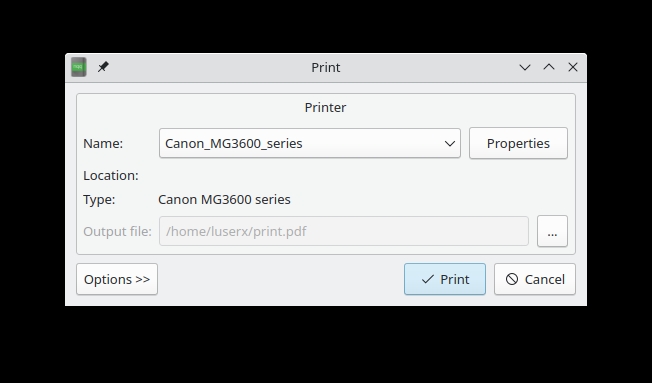
The other one like this:
luser: an epithet applied by Windows users to linux users
Offline
#7 2022-06-07 23:33:47
- luser
- Member
- Registered: 2016-08-27
- Posts: 115
Re: [RESOLVED] How do I get rid of this paused printer?
printers.conf looks like this:
# Printer configuration file for CUPS v2.4.2
# Written by cupsd
# DO NOT EDIT THIS FILE WHEN CUPSD IS RUNNING
NextPrinterId 12
<DefaultPrinter Canon_MG3600_series_>
PrinterId 10
UUID urn:uuid:7d57ca64-cf18-390e-49d0-806c6fd4bc73
AuthInfoRequired none
Info Canon MG3600 series
Location Kitchen
MakeModel Canon MG3600 series, driverless, cups-filters 1.28.15
DeviceURI dnssd://Canon%20MG3600%20series._ipp._tcp.local/?uuid=00000000-0000-1000-8000-F8A26D01EF0D
State Idle
StateTime 1654243183
ConfigTime 1654242598
Type 36892
Accepting Yes
Shared No
JobSheets none none
QuotaPeriod 0
PageLimit 0
KLimit 0
AllowUser userx
AllowUser root
OpPolicy default
ErrorPolicy stop-printer
Attribute marker-colors \#39D2E7#D945DD#DFD31D,#101010
Attribute marker-levels 60,100
Attribute marker-low-levels 15,15
Attribute marker-high-levels 100,100
Attribute marker-names Color,Black
Attribute marker-types inkCartridge,inkCartridge
Attribute marker-change-time 1654243156
</DefaultPrinter>
What do you think I should edit?
There is also a file named printers.conf.0 in the folder, but I couldn't open it or copy it, and yes, cups.service was stopped at the time:
userx@random /etc/cups $ ls -la
total 132
drwxr-xr-x   4 root cups  4096 Jun  7 16:18 .
drwxr-xr-x 111 root root 12288 Jun  7 15:18 ..
-rw-------   1 root cups   111 Apr 20  2021 classes.conf
-rw-------   1 root cups   111 Apr  6  2021 classes.conf.O
-rw-r--r--   1 root cups 30850 Apr 12 05:12 cups-browsed.conf
-rw-r-----   1 root cups  6566 May 26 03:48 cupsd.conf
-rw-r-----   1 root cups  6566 May 26 03:48 cupsd.conf.default
-rw-r-----   1 root cups  4562 Feb 25  2020 cupsd.conf.O
-rw-r-----   1 root cups  2726 May 26 03:48 cups-files.conf
-rw-r-----   1 root cups  2726 May 26 03:48 cups-files.conf.default
-rw-r--r--   1 root cups 10750 Apr  6  2021 cups-pdf.conf
drwxr-xr-x   2 root cups  4096 Jun  7 16:14 ppd
-rw-------   1 root cups   975 Jun  7 16:17 printers.conf
-rw-------   1 root cups  1013 Jun  7 16:16 printers.conf.O
-rw-r-----   1 root cups   142 May 26 03:48 snmp.conf
-rw-r-----   1 root cups   142 May 26 03:48 snmp.conf.default
drwx------   2 root cups  4096 Apr  6  2021 ssl
-rw-r-----   1 root cups  1393 Jun  7 16:18 subscriptions.conf
-rw-r-----   1 root cups  1393 Jun  7 16:17 subscriptions.conf.O
userx@random /etc/cups $ s[img=series]https://www.nfsmith.net/forum/MG3600_series.jpg[/img]udo cp printers.conf.0 ~/Documents/scratch
cp: cannot stat 'printers.conf.0': No such file or directory
Do you think printers.conf.0 could be the problem?
http://localhost:631/printers/? only shows one printer.
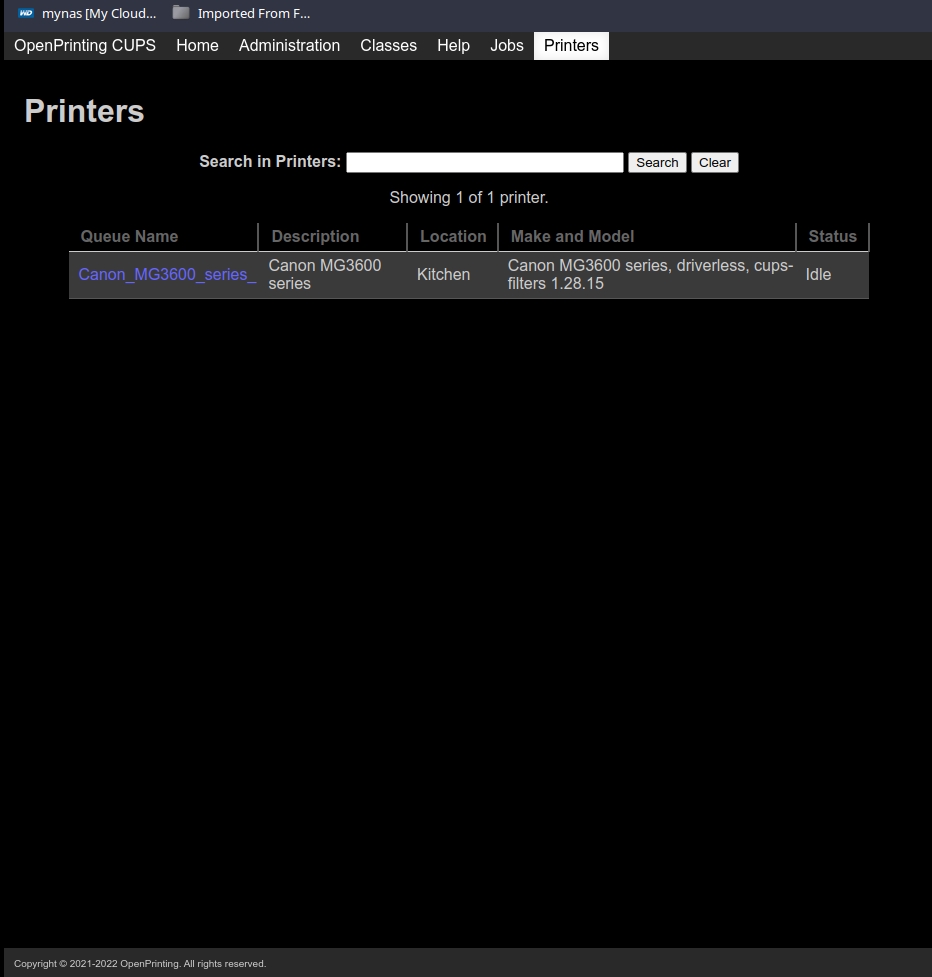
edited for clarity
Last edited by luser (2022-06-08 00:02:14)
luser: an epithet applied by Windows users to linux users
Offline
#8 2022-06-08 01:21:40
- luser
- Member
- Registered: 2016-08-27
- Posts: 115
Re: [RESOLVED] How do I get rid of this paused printer?
OK, this seems to be resolved now. I used the web interface at http://localhost:631/printers to add a second printer. I chose the first of the network printers shown in my second post. Then used the same interface to delete the dnssd printer. Now I only show one printer when I start to print something.
luser: an epithet applied by Windows users to linux users
Offline