You are not logged in.
- Topics: Active | Unanswered
#1 2022-06-25 03:40:24
- jcguu95
- Member
- Registered: 2020-03-03
- Posts: 3
VGA not detected, External projector no display
I try to connect a projector to my thinkpad x220 running arch. My
laptop only has a VGA port, while the projector only has HDMI. So
I purchased an adapter and connect them. However, the projector
does not seem to sense the laptop, saying "no signal".
I've also tried it on a TV monitor. After connecting, the TV did
not even let me select HDMI as display method, as if it thinks
the HDMI port is not occupied.
What else can I try? Is it more likely a problem with archlinux,
or because my laptop is too old (man. around 2011)?
---
Below are some information.
$ uname -r
 5.15.49-1-lts
$ sudo dmesg | grep -i vga
[ 0.575975] pci 0000:00:02.0: vgaarb: setting as boot VGA device
[ 0.575975] pci 0000:00:02.0: vgaarb: VGA device added: decodes=io+mem,owns=io+mem,locks=none
[ 0.575975] pci 0000:00:02.0: vgaarb: bridge control possible
[ 0.575975] vgaarb: loaded
[ 0.836871] fb0: VESA VGA frame buffer device
[ 3.685047] fb0: switching to i915 from VESA VGA
[ 3.685355] i915 0000:00:02.0: vgaarb: deactivate vga console$ lspci | grep -i VGA
00:02.0 VGA compatible controller: Intel Corporation 2nd Generation Core Processor Family Integrated Graphics Controller (rev 09)$ xrandr --listproviders
Providers: number : 1
Provider 0: id: 0x48 cap: 0xf, Source Output, Sink Output, Source Offload, Sink Offload crtcs: 2 outputs: 8 associated providers: 0 name:modesetting$ xrandr
Screen 0: minimum 320 x 200, current 1366 x 768, maximum 8192 x 8192
LVDS-1 connected primary 1366x768+0+0 (normal left inverted right x axis y axis) 277mm x 156mm
1366x768 60.00*+
1280x720 60.00 59.99 59.86 59.74
1024x768 60.04 60.00
960x720 60.00
928x696 60.05
896x672 60.01
1024x576 59.95 59.96 59.90 59.82
960x600 59.93 60.00
960x540 59.96 59.99 59.63 59.82
800x600 60.00 60.32 56.25
840x525 60.01 59.88
864x486 59.92 59.57
700x525 59.98
800x450 59.95 59.82
640x512 60.02
700x450 59.96 59.88
640x480 60.00 59.94
720x405 59.51 58.99
684x384 59.88 59.85
640x400 59.88 59.98
640x360 59.86 59.83 59.84 59.32
512x384 60.00
512x288 60.00 59.92
480x270 59.63 59.82
400x300 60.32 56.34
432x243 59.92 59.57
320x240 60.05
360x202 59.51 59.13
320x180 59.84 59.32
VGA-1 connected 800x600+241+84 (normal left inverted right x axis y axis) 0mm x 0mm
   1024x768      60.00
   800x600       60.32*   56.25
848x480 60.00
640x480 59.94
HDMI-1 disconnected (normal left inverted right x axis y axis)
DP-1 disconnected (normal left inverted right x axis y axis)
HDMI-2 disconnected (normal left inverted right x axis y axis)
HDMI-3 disconnected (normal left inverted right x axis y axis)
DP-2 disconnected (normal left inverted right x axis y axis)
DP-3 disconnected (normal left inverted right x axis y axis)$ xrandr --verbose
Screen 0: minimum 320 x 200, current 1366 x 768, maximum 8192 x 8192
LVDS-1 connected primary 1366x768+0+0 (0x49) normal (normal left inverted right x axis y axis) 277mm x 156mm
Identifier: 0x40
Timestamp: 3277427
Subpixel: horizontal rgb
Gamma: 0.97:1.0:0.98
Brightness: 0.98
Clones:
CRTC: 0
CRTCs: 0 1
Transform: 1.000000 0.000000 0.000000
0.000000 1.000000 0.000000
0.000000 0.000000 1.000000
filter:
EDID:
00ffffffffffff0030e4d30200000000
00150103801c1078ea10a59658578f28
20505400000001010101010101010101
010101010101381d56d4500016303020
2500159c1000001b0000000000000000
00000000000000000000000000fe004c
4720446973706c61790a2020000000fe
004c503132355748322d544c423100f7
scaling mode: Full aspect
supported: Full, Center, Full aspect
link-status: Good
supported: Good, Bad
CONNECTOR_ID: 61
supported: 61
non-desktop: 0
range: (0, 1)
1366x768 (0x49) 74.800MHz +HSync -VSync *current +preferred
h: width 1366 start 1414 end 1446 total 1578 skew 0 clock 47.40KHz
v: height 768 start 770 end 775 total 790 clock 60.00Hz
(((...)))
320x180 (0x82) 9.000MHz -HSync +VSync DoubleScan
h: width 320 start 332 end 360 total 400 skew 0 clock 22.50KHz
v: height 180 start 181 end 184 total 188 clock 59.84Hz
320x180 (0x83) 8.875MHz +HSync -VSync DoubleScan
h: width 320 start 344 end 360 total 400 skew 0 clock 22.19KHz
v: height 180 start 181 end 184 total 187 clock 59.32Hz
VGA-1 connected 800x600+283+84 (0x5e) normal (normal left inverted right x axis y axis) 0mm x 0mm
Identifier: 0x41
Timestamp: 3277427
Subpixel: unknown
Gamma: 0.97:1.0:0.98
Brightness: 0.98
Clones:
CRTC: 1
CRTCs: 0 1
Transform: 1.000000 0.000000 0.000000
0.000000 1.000000 0.000000
0.000000 0.000000 1.000000
filter:
link-status: Good
supported: Good, Bad
CONNECTOR_ID: 64
supported: 64
non-desktop: 0
range: (0, 1)
1024x768 (0x4f) 65.000MHz -HSync -VSync
h: width 1024 start 1048 end 1184 total 1344 skew 0 clock 48.36KHz
v: height 768 start 771 end 777 total 806 clock 60.00Hz
800x600 (0x5e) 40.000MHz +HSync +VSync *current
h: width 800 start 840 end 968 total 1056 skew 0 clock 37.88KHz
v: height 600 start 601 end 605 total 628 clock 60.32Hz
800x600 (0x5f) 36.000MHz +HSync +VSync
h: width 800 start 824 end 896 total 1024 skew 0 clock 35.16KHz
v: height 600 start 601 end 603 total 625 clock 56.25Hz
848x480 (0x84) 33.750MHz +HSync +VSync
h: width 848 start 864 end 976 total 1088 skew 0 clock 31.02KHz
v: height 480 start 486 end 494 total 517 clock 60.00Hz
640x480 (0x6b) 25.175MHz -HSync -VSync
h: width 640 start 656 end 752 total 800 skew 0 clock 31.47KHz
v: height 480 start 490 end 492 total 525 clock 59.94Hz
(((...)))Last edited by jcguu95 (2022-06-25 10:08:30)
Offline
#2 2022-06-25 06:42:37
- seth
- Member

- From: Won't reply 2 private help req
- Registered: 2012-09-03
- Posts: 76,569
Re: VGA not detected, External projector no display
VGA not detected
VGA-1 connected 800x600+241+84 (normal left inverted right x axis y axis) 0mm x 0mm
1024x768 60.00
800x600 60.32* 56.25 Yes it is.
This is gonna be the adapter, either the signal doesn't make it or the hdcp handshake fails - which model is it exactly?
my thinkpad x220 running arch. My laptop only has a VGA port
https://upload.wikimedia.org/wikipedia/ … o_x220.jpg
The third port is DisplayPort (shows up as the DP and HDMI outputs in your xrandr) and I'll just postulate that you'll have a much higher chance w/ a DP-HDMI connector.
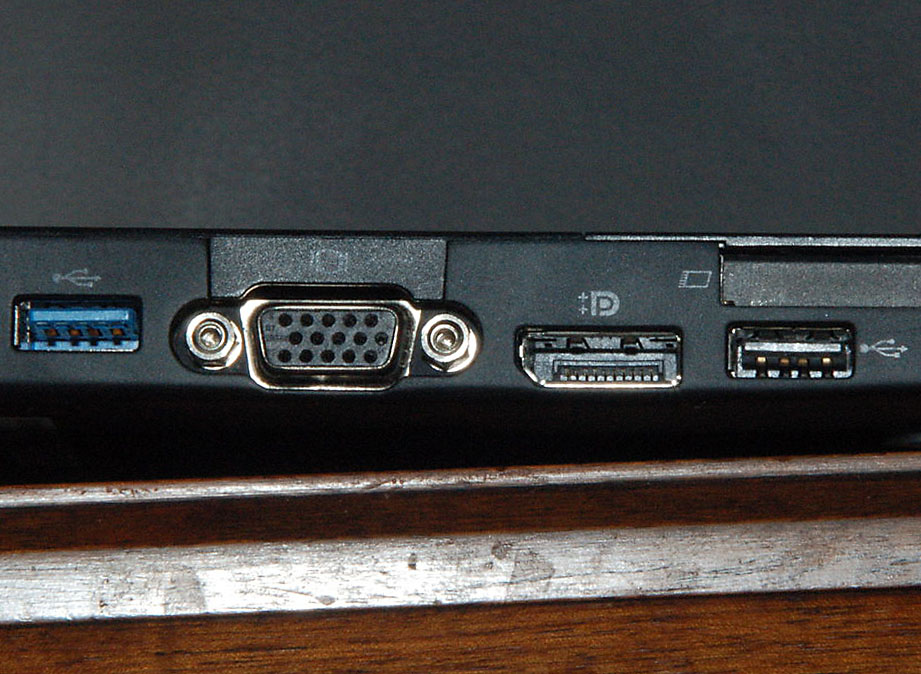
Offline
#3 2022-06-25 10:10:00
- jcguu95
- Member
- Registered: 2020-03-03
- Posts: 3
Re: VGA not detected, External projector no display
It does have a DP, and the left side of my laptop looks the same
as in your picture. I'm not sure how to check the model though.
There's a sticker at the bottom of the laptop which reads
TYPE 4287-2VU S/N R9-H30WV 11/10
PRODUCT ID: 42872VU
I do not have a DP-HDMI connector though, but I can buy one if
that's worth trying (let me know please).
What can I do to test if it's a "hdcp handshake fails" problem?
Or to test if the signal makes it or not?
---
P.S. I've updated the original post by adding the partial output
of `xrandr --verbose`. Hopefully it's helpful.
Last edited by jcguu95 (2022-06-25 10:12:48)
Offline
#4 2022-06-25 14:39:55
- seth
- Member
- From: Won't reply 2 private help req
- Registered: 2012-09-03
- Posts: 76,569
Re: VGA not detected, External projector no display
There's a sticker at the bottom of the laptop
I meant the model of the adapter - it's pretty sure the failing link.
What can I do to test if it's a "hdcp handshake fails" problem?
Since this is between the adapter and the projector - probably not much.
Do you have some other device that you could test the adapter against?
The order of how you plug things might matter.
Offline