You are not logged in.
- Topics: Active | Unanswered
#1 2022-06-30 14:12:38
- difri84
- Member
- Registered: 2021-12-09
- Posts: 78
qbittorent large columns [solved]
for some reason, i cannot shrink the torrent detail columns more than a fixed width, and the fixed width is too large (4 columns take all my 1920px). I can enlarge them more, and shrink them until this fixed miminum.
does anyone have the same problem?
can anyone help me about this or should i just ask for help on the developer github page?
thank you
Last edited by difri84 (2022-07-01 20:58:20)
Offline
#2 2022-06-30 16:56:18
- robson75
- Member

- From: Poland
- Registered: 2020-06-28
- Posts: 144
Re: qbittorent large columns [solved]
Do you mean this column?
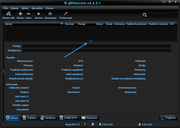
U can't normally move it.
Arch Linux Xfce - 64Bit Linux User #621110
Offline
#3 2022-06-30 18:01:23
- difri84
- Member
- Registered: 2021-12-09
- Posts: 78
Re: qbittorent large columns [solved]
I mean this
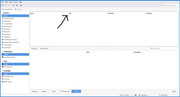
thank you for let me discover how to put pictures in the forum 
Last edited by difri84 (2022-06-30 18:01:48)
Offline
#4 2022-06-30 21:42:51
- robson75
- Member
- From: Poland
- Registered: 2020-06-28
- Posts: 144
Re: qbittorent large columns [solved]
You just have to point the mouse cursor over the line between the positions until the cursor changes shape and moves. I know that it is not very visible for you, I suggest you install qt6ct, and choose a dark theme.
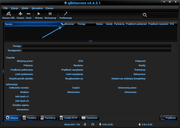
Arch Linux Xfce - 64Bit Linux User #621110
Offline
#5 2022-07-01 02:22:56
- difri84
- Member
- Registered: 2021-12-09
- Posts: 78
Re: qbittorent large columns [solved]
yeah i know, but the things is that it's not shriking more than that, i can make them larger, and bring back to the size shown in the pictures, but i cannot shrink them more than this. it's like there's a min width set somewhere
Last edited by difri84 (2022-07-01 02:23:49)
Offline
#6 2022-07-01 09:39:28
- robson75
- Member
- From: Poland
- Registered: 2020-06-28
- Posts: 144
Re: qbittorent large columns [solved]
Nothing in qbittorrent is hard-wired, normally you can resize as shown in my screenshots.
EDIT.
I remembered that it is possible to disable some elements, just right-click on the bar and uncheck unnecessary elements.
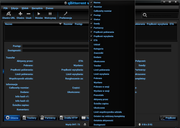
Last edited by robson75 (2022-07-01 10:26:11)
Arch Linux Xfce - 64Bit Linux User #621110
Offline
#7 2022-07-01 12:49:14
- difri84
- Member
- Registered: 2021-12-09
- Posts: 78
Re: qbittorent large columns [solved]
its less than 200kb video, you can see exaclty what i'm talking about here
Last edited by difri84 (2022-07-01 12:59:50)
Offline
#8 2022-07-01 14:57:41
- robson75
- Member
- From: Poland
- Registered: 2020-06-28
- Posts: 144
Re: qbittorent large columns [solved]
its less than 200kb video, you can see exaclty what i'm talking about here
I have to admit that your qbittorrent behaves very strangely. Unfortunately, I have no idea to say what is wrong.
Arch Linux Xfce - 64Bit Linux User #621110
Offline
#9 2022-07-01 20:57:51
- difri84
- Member
- Registered: 2021-12-09
- Posts: 78
Re: qbittorent large columns [solved]
i just deleted the .config/qBittorent folder and now everything is working correctly. Just the hussle to go through every setting again but still faster than debugging this
Offline