You are not logged in.
- Topics: Active | Unanswered
#1 2022-07-11 08:01:27
- cornibus
- Member

- Registered: 2021-10-19
- Posts: 9
SOLVED: "Save as..." dialog not working properly on selected browsers
Hey guys, I'm not really new in Arch but this is the first time I had this weird issue.
Whenever I try to save an image, for example, from Brave, Google Chrome, and Edge browsers (as well as the telegram-desktop app), whenever I right-click and "Save as" the file and try to rename it instead of renaming the file, the file manager is searching for the text I'm typing. It used to work before and I noticed it just yesterday. I also noticed the GUI is now in light mode and it looks a bit off. The save as dialog opens up behind the image overlay window in the telegram-desktop.
This is what the file manager looks like whenever I try to rename the file using the applications I mentioned above. Whenever I highlight the current filename to change it, it instead searches for the text I'm typing in instead of renaming the file.
https://i.postimg.cc/8z8dcCRG/Screensho … -15-50.png
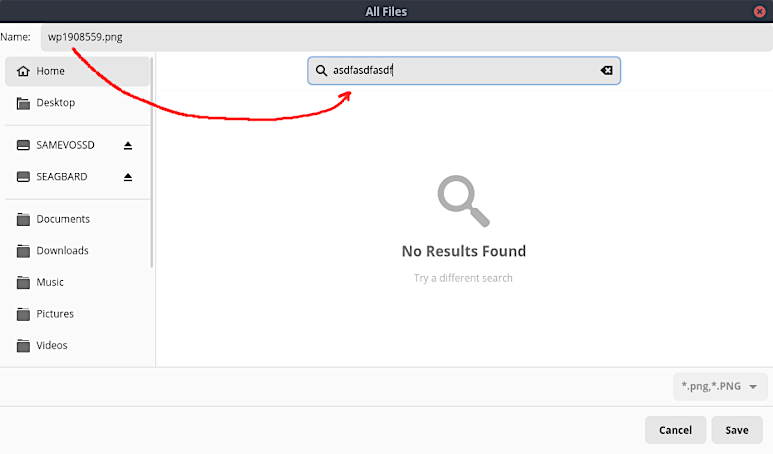
On my firefox browser though, everything works fine. This is what it looks like when I try to save normally.
https://i.postimg.cc/4dhpb7RB/Screensho … -33-00.png
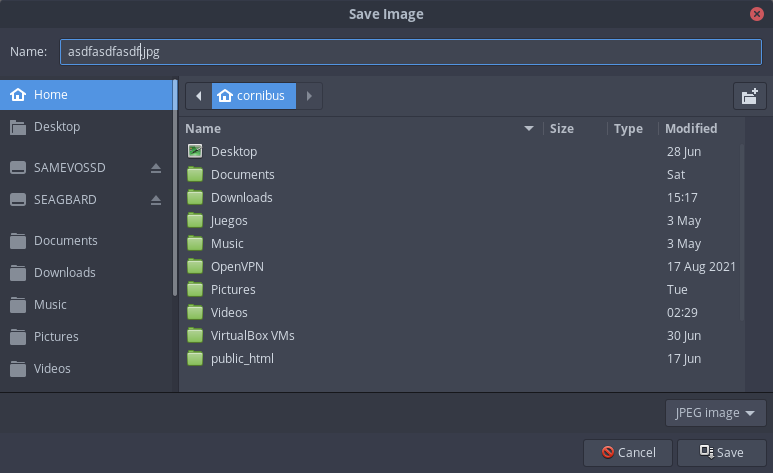
All other apps I mentioned above also worked like this before this happened. I really appreciate it if you guys can point me in the right direction. I tried to google this but to no avail.
My PC is up-to-date. I'm using Cinnamon DE. Thank you!
Last edited by cornibus (2022-07-12 05:00:42)
Offline
#2 2022-07-11 08:21:11
- seth
- Member

- From: Won't reply 2 private help req
- Registered: 2012-09-03
- Posts: 77,251
Re: SOLVED: "Save as..." dialog not working properly on selected browsers
Please remove the oversized imaged / replace them w/ links.
https://bbs.archlinux.org/viewtopic.php?id=276047
Offline
#3 2022-07-11 08:47:22
- cornibus
- Member
- Registered: 2021-10-19
- Posts: 9
Re: SOLVED: "Save as..." dialog not working properly on selected browsers
Please remove the oversized imaged / replace them w/ links.
https://bbs.archlinux.org/viewtopic.php?id=276047
Thank you for the link I really appreciate it. I think I get it now.
And I apologize for the oversized image. Again, thank you!
Offline
#4 2022-07-11 10:05:35
- cornibus
- Member
- Registered: 2021-10-19
- Posts: 9
Re: SOLVED: "Save as..." dialog not working properly on selected browsers
I was able to partially figure out what's causing my Save as.. dialog to stop working properly.
When I installed flatpak I selected xdg-desktop-portal-gnome from extra which is the default. After uninstalling flatpak and all its default dependencies, my Save as dialog went back to normal.
I then tried re-installing flatpak but this time I selected xdg-desktop-portal-gtk instead.
So far, my Save as dialog is now working as before. Everything works fine now...
Offline
#5 2022-07-11 12:53:23
- seth
- Member
- From: Won't reply 2 private help req
- Registered: 2012-09-03
- Posts: 77,251
Re: SOLVED: "Save as..." dialog not working properly on selected browsers
https://bbs.archlinux.org/viewtopic.php?id=275878
It's because portal-gnome moved to gtk4 where that bug ultimately is.
Please always remember to mark resolved threads by editing your initial posts subject - so others will know that there's no task left, but maybe a solution to find.
Thanks.
Offline
#6 2022-07-12 04:58:08
- cornibus
- Member
- Registered: 2021-10-19
- Posts: 9
Re: SOLVED: "Save as..." dialog not working properly on selected browsers
https://bbs.archlinux.org/viewtopic.php?id=275878
It's because portal-gnome moved to gtk4 where that bug ultimately is.
That's what I thought when I saw your first reply. Thank you for pointing me in the right direction. I really appreciate it.
Offline