You are not logged in.
- Topics: Active | Unanswered
#1 2022-09-20 08:56:37
- 0BADC0DE
- Member

- From: Regnum Utriusque Siciliae
- Registered: 2018-02-21
- Posts: 342
Wayland+KDE+2 monitors: displaced KDE menus
This is my current system:
Plasma Version : 5.25.5-2
KDE Version : 22.08.1-1
Frameworks Version : 5.98.0-1
Qt5 Version : 5.15.6+kde+r4-1
Wayland Version : 1.21.0-1
Mesa Version : 22.1.7-1
I have a second screen attached to a USB docking station w/ HDMI/DP output.
First screen is the one built into the laptop.
I have them configured as adjacent but with the builtin monitor a little bit lower than the external one.
All my KDE applications show displaced menus.
The displacement depends on whether the window is on the main screen (menu is below its "normal" position or on the secondary one (aligned to the right edge).
See screenshots.
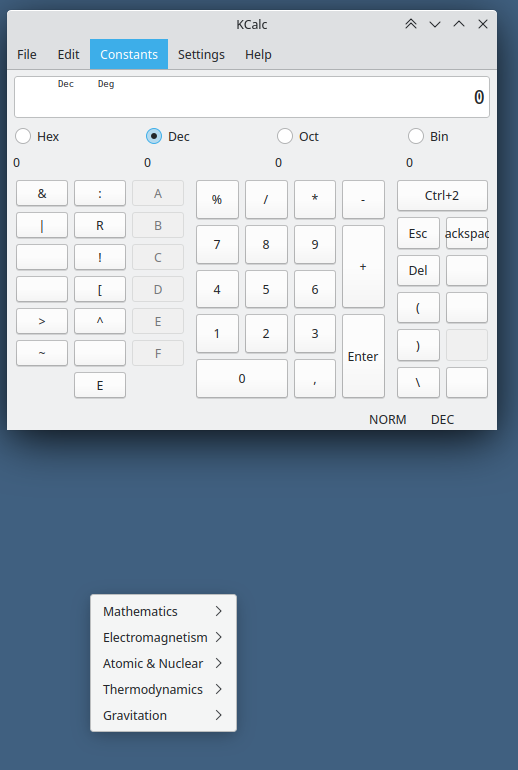
On the main screen
On the secondary screen
Everything works back to normal when in my multi-monitor config I align the monitors on either side (long or short).
This doesn't happen to non-KDE applications (chrome, vscode, firefox etc.)
I would like to file a bug, but have no idea which component is reponsible for this bug.
Any idea?
Maybe Computers Will Never Become As Intelligent
As Humans. Surely They Won't Ever Become So Stupid.
Offline
#2 2022-09-20 09:55:17
- V1del
- Forum Moderator

- Registered: 2012-10-16
- Posts: 25,300
Re: Wayland+KDE+2 monitors: displaced KDE menus
That's a weird Qt bug with "non-aligned" monitors. You can fix this by making both monitors aligned at the top in kscreen. Afaik there are actual bug reports floating around for this, but the easiest thing you yourself can do right now is to ensure both/all monitors are aligned at the top.
Edit: Ah wait you noticed that it fixes itself by adjusting the alignment. Yes that's currently the case see https://bugs.kde.org/show_bug.cgi?id=436016 and https://bugreports.qt.io/browse/QTBUG-85297
Last edited by V1del (2022-09-20 10:00:35)
Offline
#3 2022-09-20 10:49:05
- 0BADC0DE
- Member
- From: Regnum Utriusque Siciliae
- Registered: 2018-02-21
- Posts: 342
Re: Wayland+KDE+2 monitors: displaced KDE menus
That's a weird Qt bug with "non-aligned" monitors. You can fix this by making both monitors aligned at the top in kscreen. Afaik there are actual bug reports floating around for this, but the easiest thing you yourself can do right now is to ensure both/all monitors are aligned at the top.
Edit: Ah wait you noticed that it fixes itself by adjusting the alignment. Yes that's currently the case see https://bugs.kde.org/show_bug.cgi?id=436016 and https://bugreports.qt.io/browse/QTBUG-85297
Yup.
So, that's a kscreen bug.
Thanks a lot.
Maybe Computers Will Never Become As Intelligent
As Humans. Surely They Won't Ever Become So Stupid.
Offline
#4 2022-09-20 12:18:30
- V1del
- Forum Moderator
- Registered: 2012-10-16
- Posts: 25,300
Re: Wayland+KDE+2 monitors: displaced KDE menus
No it's a Qt bug and all Qt tools are affected. Apparently there's a fix in Qt6 but the backport is non trivial and plasma relies on the current behaviour, so a real fix for that is unlikely to be available soon in a general manner.
Offline
#5 2022-09-20 13:25:23
- 0BADC0DE
- Member
- From: Regnum Utriusque Siciliae
- Registered: 2018-02-21
- Posts: 342
Re: Wayland+KDE+2 monitors: displaced KDE menus
No it's a Qt bug and all Qt tools are affected. Apparently there's a fix in Qt6 but the backport is non trivial and plasma relies on the current behaviour, so a real fix for that is unlikely to be available soon in a general manner.
OK. Thanks.
Maybe Computers Will Never Become As Intelligent
As Humans. Surely They Won't Ever Become So Stupid.
Offline