You are not logged in.
- Topics: Active | Unanswered
#1 2022-10-14 14:29:22
- Cbhihe
- Member

- Registered: 2017-04-09
- Posts: 244
[SOLVED] FoxitReader duplicated launchers in Dash
In an up-to-date OS (6.0.1-arch2-1), I just installed FoxitReader 2.4.5.0727 from the AUR.
Problem is under Dash, I get two launch icons, one next to the other, per this screenshot. One is the standard FoxitReader icon, and the other is just a black place holder. Both launchers are functional, meaning they correctly point toward the executable.
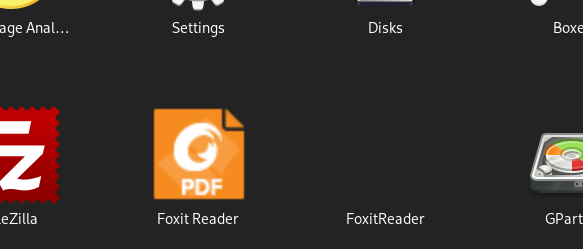
The desktop file seems ok.
> less /usr/share/applications/foxitreader.desktop
[Desktop Entry]
Name=Foxit Reader
Comment=View PDF documents
Keywords=pdf;ppdf;
StartupNotify=true
Terminal=false
Type=Application
Categories=Application;Office;Viewer;X-Red-Hat-Base;
MimeType=application/pdf;application/ppdf;
Icon=foxitreader
Exec=foxitreader %F
I'd like to get rid of the icon-less dupe and have not found anything relevant on how to proceed (beside posting a yet to be answered query on the AUR FoxitReader page).
Last edited by Cbhihe (2022-10-14 19:13:41)
I like strawberries, therefore I'm not a bot.
Offline
#2 2022-10-14 19:13:21
- Cbhihe
- Member
- Registered: 2017-04-09
- Posts: 244
Re: [SOLVED] FoxitReader duplicated launchers in Dash
A deep dive into the Desktop entries wiki, made me check both ~/.local/share/applications/ and /usr/share/applications/.
Noting that desktop files for /usr/bin/foxitreader were present in both locations, with different names:
- /usr/share/applications/foxitreader.desktop
- ~/.local/share/applications/FoxitReader.desktop
I diffed them and the main difference was:
> grep -i -e "Icon=" /usr/share/applications/foxitreader.desktop
Icon=foxitreader
> grep -i -e "Icon=" ~/.local/share/applications/FoxitReader.desktop
Icon=/home/USER/.local/share/icons/hicolor/64x64/apps/FoxitReader.png
I kept only /usr/share/applications/foxitreader.desktop and copied it (don't know if it is necessary) to ~/.local/share/applications/.
The spurious icon-less dupe immediately disappeared in the Dash. No reboot necessary.
[SOLVED]
Last edited by Cbhihe (2022-10-15 11:24:59)
I like strawberries, therefore I'm not a bot.
Offline