You are not logged in.
- Topics: Active | Unanswered
#1 2022-12-06 10:14:23
- geopardo
- Member

- From: Europe
- Registered: 2021-03-23
- Posts: 169
[SOLVED] no sound youtube, soundclound, mixcloud ect
I find myself with an annoying problem. I can not use the players of some sites, such as the title for example soundcloud. I also had trouble using audacity and vlc simultaneously. Resolved by making a change in the service, but not full working..
/usr/lib/systemd/system/alsa-state.serviceSurely my lack of experience and having chosen an audio server, rather than another created the problem. In other installations I did not have this problem, with this pipewire yes.
Last edited by geopardo (2022-12-06 14:30:13)
Some 'security people are f*cking morons' says Linus Torvalds..
Offline
#2 2022-12-06 10:30:50
- V1del
- Forum Moderator

- Registered: 2012-10-16
- Posts: 25,255
Re: [SOLVED] no sound youtube, soundclound, mixcloud ect
Can you post
sudo fuser -v /dev/snd/*
aplay -lL
pactl list sinks
pactl list sink-inputs
during this? What exactly did you change in that service? And what do you think it does? It probably doesn't do what you think it does and the change to the service was likely to be misguided... maybe also post
systemctl status alsa-state
systemctl cat alsa-state
so we see what you did there exactly.
Offline
#3 2022-12-06 10:50:04
- geopardo
- Member
- From: Europe
- Registered: 2021-03-23
- Posts: 169
Re: [SOLVED] no sound youtube, soundclound, mixcloud ect
Yes, sure..
$ sudo fuser -v /dev/snd/*
                     UTENTE      PID ACCESSO COMANDO
/dev/snd/controlC0:  root        488 f.... alsactl
                     greenman    987 F.... pulseaudio
                     greenman   1473 F.... wireplumber
/dev/snd/controlC1:  root        488 f.... alsactl
                     greenman    987 F.... pulseaudio
                     greenman   1473 F.... wireplumber
/dev/snd/seq:        greenman   1472 F.... pipewire
$ aplay -lL
null
Discard all samples (playback) or generate zero samples (capture)
lavrate
Rate Converter Plugin Using Libav/FFmpeg Library
samplerate
Rate Converter Plugin Using Samplerate Library
speexrate
Rate Converter Plugin Using Speex Resampler
jack
JACK Audio Connection Kit
oss
Open Sound System
pipewire
PipeWire Sound Server
pulse
PulseAudio Sound Server
speex
Plugin using Speex DSP (resample, agc, denoise, echo, dereverb)
upmix
Plugin for channel upmix (4,6,8)
vdownmix
Plugin for channel downmix (stereo) with a simple spacialization
default
Default ALSA Output (currently PulseAudio Sound Server)
sysdefault:CARD=MID
HDA Intel MID, VT1828S Analog
Default Audio Device
front:CARD=MID,DEV=0
HDA Intel MID, VT1828S Analog
Front output / input
surround21:CARD=MID,DEV=0
HDA Intel MID, VT1828S Analog
2.1 Surround output to Front and Subwoofer speakers
surround40:CARD=MID,DEV=0
HDA Intel MID, VT1828S Analog
4.0 Surround output to Front and Rear speakers
surround41:CARD=MID,DEV=0
HDA Intel MID, VT1828S Analog
4.1 Surround output to Front, Rear and Subwoofer speakers
surround50:CARD=MID,DEV=0
HDA Intel MID, VT1828S Analog
5.0 Surround output to Front, Center and Rear speakers
surround51:CARD=MID,DEV=0
HDA Intel MID, VT1828S Analog
5.1 Surround output to Front, Center, Rear and Subwoofer speakers
surround71:CARD=MID,DEV=0
HDA Intel MID, VT1828S Analog
7.1 Surround output to Front, Center, Side, Rear and Woofer speakers
hdmi:CARD=MID,DEV=0
HDA Intel MID, VT1828S Digital
HDMI Audio Output
usbstream:CARD=MID
HDA Intel MID
USB Stream Output
hdmi:CARD=NVidia,DEV=0
HDA NVidia, HDMI 0
HDMI Audio Output
hdmi:CARD=NVidia,DEV=1
HDA NVidia, HDMI 1
HDMI Audio Output
hdmi:CARD=NVidia,DEV=2
HDA NVidia, HDMI 2
HDMI Audio Output
hdmi:CARD=NVidia,DEV=3
HDA NVidia, HDMI 3
HDMI Audio Output
hdmi:CARD=NVidia,DEV=4
HDA NVidia, HDMI 4
HDMI Audio Output
usbstream:CARD=NVidia
HDA NVidia
USB Stream Output
**** List of PLAYBACK Hardware Devices ****
card 0: MID [HDA Intel MID], device 0: VT1828S Analog [VT1828S Analog]
Subdevices: 1/1
Subdevice #0: subdevice #0
card 0: MID [HDA Intel MID], device 2: VT1828S Alt Analog [VT1828S Alt Analog]
Subdevices: 1/1
Subdevice #0: subdevice #0
card 0: MID [HDA Intel MID], device 3: VT1828S Digital [VT1828S Digital]
Subdevices: 1/1
Subdevice #0: subdevice #0
card 1: NVidia [HDA NVidia], device 3: HDMI 0 [HDMI 0]
Subdevices: 1/1
Subdevice #0: subdevice #0
card 1: NVidia [HDA NVidia], device 7: HDMI 1 [HDMI 1]
Subdevices: 1/1
Subdevice #0: subdevice #0
card 1: NVidia [HDA NVidia], device 8: HDMI 2 [HDMI 2]
Subdevices: 1/1
Subdevice #0: subdevice #0
card 1: NVidia [HDA NVidia], device 9: HDMI 3 [HDMI 3]
Subdevices: 1/1
Subdevice #0: subdevice #0
card 1: NVidia [HDA NVidia], device 10: HDMI 4 [HDMI 4]
Subdevices: 1/1
Subdevice #0: subdevice #0$ pactl list sinks
Stato: SUSPENDED
Nome: alsa_output.pci-0000_00_1b.0.analog-surround-21
Descrizione: Audio interno Surround analogico 2.1
Driver: module-alsa-card.c
Specifica di campionamento: s16le ch 3 44100 Hz
Mappa dei canali: front-left,front-right,lfe
Modulo di appartenenza: 7
Muto: no
Volume: front-left: 26392 / 40% / -23,70 dB, front-right: 26392 / 40% / -23,70 dB, lfe: 27636 / 42% / -22,50 dB
bilanciamento 0,00
Volume base: 65536 / 100% / 0,00 dB
Monitor della sorgente: alsa_output.pci-0000_00_1b.0.analog-surround-21.monitor
Latenza: 0 usec, configurata 0 usec
Flag: HARDWARE HW_MUTE_CTRL HW_VOLUME_CTRL DECIBEL_VOLUME LATENCY
Proprietà:
alsa.resolution_bits = "16"
device.api = "alsa"
device.class = "sound"
alsa.class = "generic"
alsa.subclass = "generic-mix"
alsa.name = "VT1828S Analog"
alsa.id = "VT1828S Analog"
alsa.subdevice = "0"
alsa.subdevice_name = "subdevice #0"
alsa.device = "0"
alsa.card = "0"
alsa.card_name = "HDA Intel MID"
alsa.long_card_name = "HDA Intel MID at 0xf5ff8000 irq 43"
alsa.driver_name = "snd_hda_intel"
device.bus_path = "pci-0000:00:1b.0"
sysfs.path = "/devices/pci0000:00/0000:00:1b.0/sound/card0"
device.bus = "pci"
device.vendor.id = "8086"
device.vendor.name = "Intel Corporation"
device.product.id = "3b56"
device.product.name = "5 Series/3400 Series Chipset High Definition Audio"
device.form_factor = "internal"
device.string = "surround21:0"
device.buffering.buffer_size = "529200"
device.buffering.fragment_size = "264600"
device.access_mode = "mmap+timer"
device.profile.name = "analog-surround-21"
device.profile.description = "Surround analogico 2.1"
device.description = "Audio interno Surround analogico 2.1"
module-udev-detect.discovered = "1"
device.icon_name = "audio-card-pci"
Porte:
analog-output-lineout: Line Out (tipo: Line, priorità: 9000, disponibile)
Porta attiva: analog-output-lineout
Formati:
pcmpactl list sink-inputsdo nothing in this system, maybe is an issue..
there is a message that I had not noticed before, in the service log
$ systemctl status alsa-state
● alsa-state.service - Manage Sound Card State (restore and store)
     Loaded: loaded (/usr/lib/systemd/system/alsa-state.service; static)
     Active: active (running) since Mon 2022-12-05 09:51:47 CET; 1 day 1h ago
   Main PID: 488 (alsactl)
      Tasks: 1 (limit: 19122)
     Memory: 584.0K
        CPU: 26ms
     CGroup: /system.slice/alsa-state.service
             └─488 /usr/bin/alsactl -s -n 19 -c rdaemon

dic 05 09:51:47 hydracrab systemd[1]: Started Manage Sound Card State (restore and store).
dic 05 09:51:47 hydracrab alsactl[488]: alsactl 1.2.8 daemon started
dic 06 11:19:38 hydracrab systemd[1]: /usr/lib/systemd/system/alsa-state.service:9: ConditionPathExists= path is not absolute, ignoring: @daemonswitch@
$ systemctl cat alsa-state
# /usr/lib/systemd/system/alsa-state.service
#
# Note that two different ALSA card state management schemes exist and they
# can be switched using a file exist check - /etc/alsa/state-daemon.conf .
#
[Unit]
Description=Manage Sound Card State (restore and store)
#ConditionPathExists=/etc/alsa/state-daemon.conf
ConditionPathExists=@daemonswitch@
[Service]
Type=simple
ExecStart=-/usr/bin/alsactl -s -n 19 -c rdaemon
ExecStop=-/usr/bin/alsactl -s kill save_and_quitSome 'security people are f*cking morons' says Linus Torvalds..
Offline
#4 2022-12-06 10:56:36
- V1del
- Forum Moderator
- Registered: 2012-10-16
- Posts: 25,255
Re: [SOLVED] no sound youtube, soundclound, mixcloud ect
You are mixing wireplumber and pulseaudio and wireplumber will steal devices and audio streams from pulseaudio. If you want to use pulseaudio switch to pipewire-media-session instead of wireplumber, if you want to switch to pipewire completely switch to wireplumber and pipewire-{pulse,alsa} and remove pulseaudio and pulseaudio-alsa
Offline
#5 2022-12-06 11:06:21
- geopardo
- Member
- From: Europe
- Registered: 2021-03-23
- Posts: 169
Re: [SOLVED] no sound youtube, soundclound, mixcloud ect
Yes is a big caos. This problem arose because I'm trying to migrate out completely. What i have to do? for using pulseaudio. What package i need to remove to clean all?  I whant using pulseaudio wireplumber.
Some 'security people are f*cking morons' says Linus Torvalds..
Offline
#6 2022-12-06 11:36:20
- V1del
- Forum Moderator
- Registered: 2012-10-16
- Posts: 25,255
Re: [SOLVED] no sound youtube, soundclound, mixcloud ect
migrate out completely from where to where? I did outline both options, if you want to switch to pipewire you need to remove pulseaudio and pulseaudio-alsa e.g.
pacman -Rn pulseaudio-alsa
pacman -S pipewire-pulse pipewire-alsa
or if you want to stay on pulse you need to replace wireplumber with pipewire-media-session
pacman -S pipewire-media-sessionand answer yes to the relevant prompts
Offline
#7 2022-12-06 11:55:16
- geopardo
- Member
- From: Europe
- Registered: 2021-03-23
- Posts: 169
Re: [SOLVED] no sound youtube, soundclound, mixcloud ect
I used this solution, but all connections with soundclound servers turned out to be closed. I don't understand what this streaming issue is due to.
pacman -S pipewire-media-sessionSome 'security people are f*cking morons' says Linus Torvalds..
Offline
#8 2022-12-06 12:14:24
- geopardo
- Member
- From: Europe
- Registered: 2021-03-23
- Posts: 169
Re: [SOLVED] no sound youtube, soundclound, mixcloud ect
migrate out completely from where to where? I did outline both options, if you want to switch to pipewire you need to remove pulseaudio and pulseaudio-alsa e.g.
pacman -Rn pulseaudio-alsa
pacman -S pipewire-pulse pipewire-alsa
or if you want to stay on pulse you need to replace wireplumber with pipewire-media-session
pacman -S pipewire-media-sessionand answer yes to the relevant prompts
working solution... now all streams working.. but i need to fix audacity problem first to mark solved the issue.. 
Some 'security people are f*cking morons' says Linus Torvalds..
Offline
#9 2022-12-06 13:13:03
- V1del
- Forum Moderator
- Registered: 2012-10-16
- Posts: 25,255
Re: [SOLVED] no sound youtube, soundclound, mixcloud ect
For audacity you need to pick the "default" or the "pulse" device for playback to make it map over pulseaudio as well. Do not pick the devices that look like actual names or HDA Intel or so. Only one application can open the sound card at a time, if you intend audacity to operate concurrently with the rest of the system you need to route it's outputs to pulse as well.
Last edited by V1del (2022-12-06 13:14:30)
Offline
#10 2022-12-06 14:09:33
- geopardo
- Member
- From: Europe
- Registered: 2021-03-23
- Posts: 169
Re: [SOLVED] no sound youtube, soundclound, mixcloud ect
It looks like a busy resource. If I turn off VLC Audacity works and vice versa.
Some 'security people are f*cking morons' says Linus Torvalds..
Offline
#11 2022-12-06 14:12:51
- V1del
- Forum Moderator
- Registered: 2012-10-16
- Posts: 25,255
Re: [SOLVED] no sound youtube, soundclound, mixcloud ect
Yes which is completely expected, you need to make sure applications that natively support pulse (vlc does) use pulseaudio/pulse output options and applications that just support ALSA (like audacity) explicitly plays to the "pulse" ALSA audio device.
Last edited by V1del (2022-12-06 14:13:38)
Offline
#12 2022-12-06 14:29:19
- geopardo
- Member
- From: Europe
- Registered: 2021-03-23
- Posts: 169
Re: [SOLVED] no sound youtube, soundclound, mixcloud ect
Then I only need to configure VLC. Since Audacity only sees me ALSA. The playback device is busy at the moment. But I don't need any device reboot. I can mark fixed. I tried changing output module in VLC. The problem remains. I dont need reboot now. This is important... tnx
Some 'security people are f*cking morons' says Linus Torvalds..
Offline
#13 2022-12-06 14:40:27
- geopardo
- Member
- From: Europe
- Registered: 2021-03-23
- Posts: 169
Re: [SOLVED] no sound youtube, soundclound, mixcloud ect
https://i.postimg.cc/7hPs22J3/ksnip-20221206-153422.png
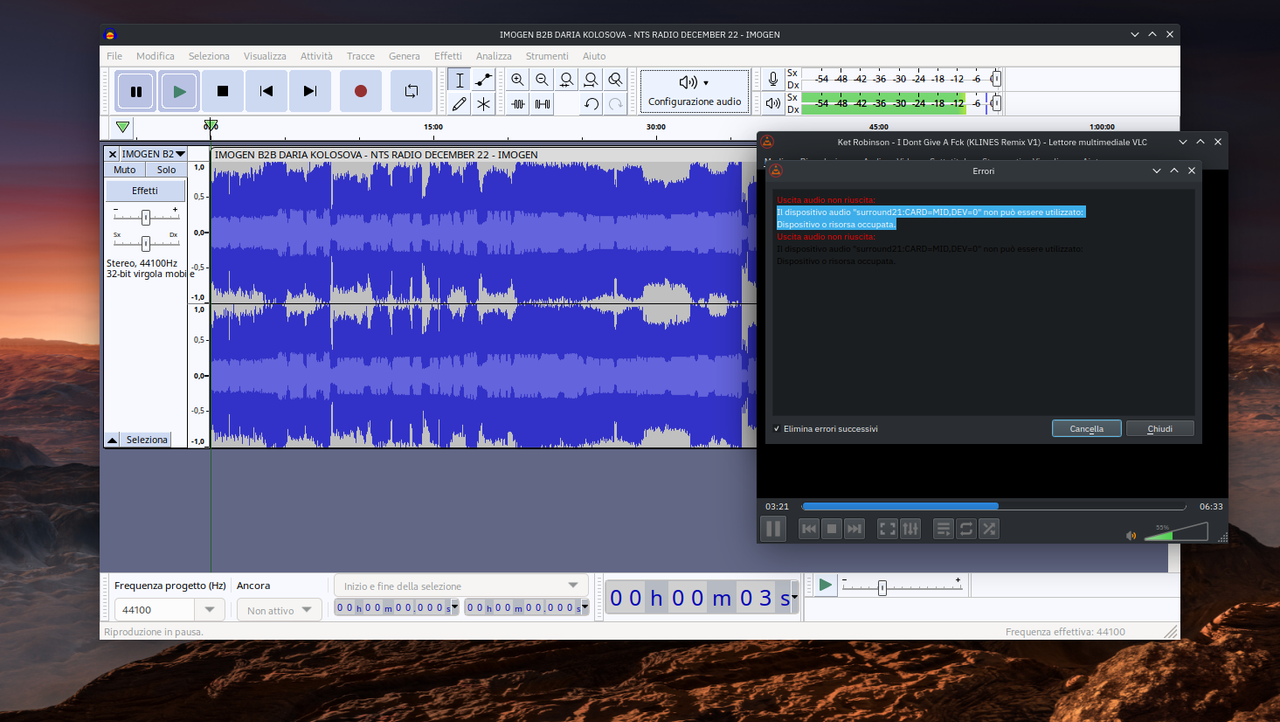
But now VLC say an error
Il dispositivo audio "surround21:CARD=MID,DEV=0" non può essere utilizzato:
Dispositivo o risorsa occupata.
Be..
The audio device "surround21:CARD=MID,DEV=0" cannot be used: The device or resource occupied.
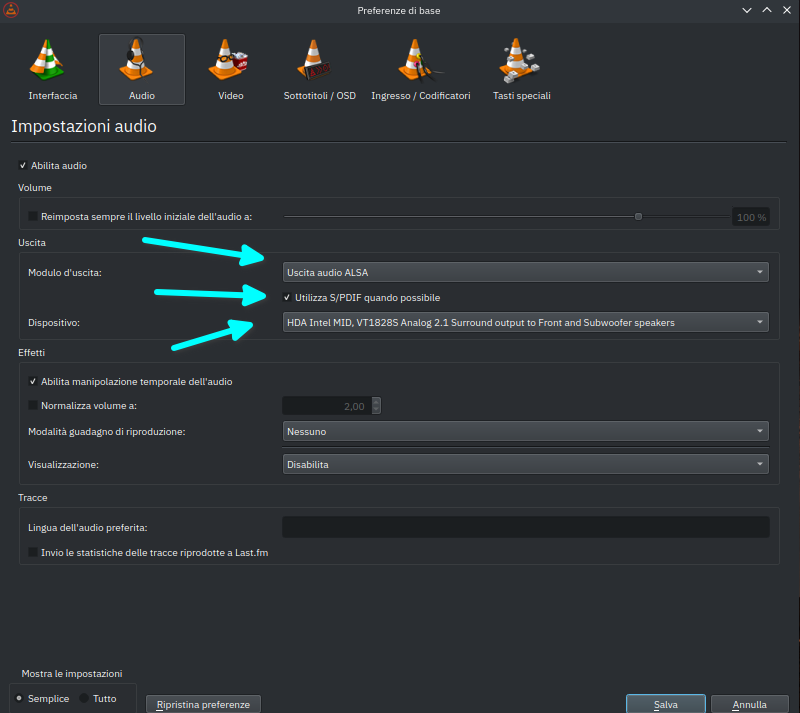
FULL SOLVED
using in VLC= ALSA audio output + Use S/PDIF when possible
https://i.postimg.cc/tgJ2pxnw/ksnip-20221206-154834.png
TNX 4 all! 
Last edited by geopardo (2022-12-06 15:02:17)
Some 'security people are f*cking morons' says Linus Torvalds..
Offline
#14 2022-12-06 15:03:02
- V1del
- Forum Moderator
- Registered: 2012-10-16
- Posts: 25,255
Re: [SOLVED] no sound youtube, soundclound, mixcloud ect
Not really, since this will now conflict with everything else using pulse again... but if you consider it fixed then that's fine by me.
Last edited by V1del (2022-12-06 15:03:48)
Offline
#15 2022-12-06 16:13:16
- geopardo
- Member
- From: Europe
- Registered: 2021-03-23
- Posts: 169
Re: [SOLVED] no sound youtube, soundclound, mixcloud ect
Actually, it is not really resolved. There is its own initial problem installing the audio server. Falls on all audio equipment
Some 'security people are f*cking morons' says Linus Torvalds..
Offline
#16 2023-03-16 16:37:30
- geopardo
- Member
- From: Europe
- Registered: 2021-03-23
- Posts: 169
Re: [SOLVED] no sound youtube, soundclound, mixcloud ect
Not really, since this will now conflict with everything else using pulse again... but if you consider it fixed then that's fine by me.
Yes very not really...
I cannot use two applications, or programs, simultaneously. For example, if I watch a video on youtube, the audio works and also the video, but VLC for example sends me a strange message, of busy resource. Viceversa, if I launch VLC, in the browser I can not see the video on youtube. Half solved, I look forward to solving the problem completely. Now that I have more time.
whit command this is the output..
 $ fuser -fv /dev/snd/* /dev/dsp*
Il file indicato /dev/dsp* non esiste.
                     UTENTE      PID ACCESSO COMANDO
/dev/snd/controlC0:  geopardo   1023 F.... pulseaudio
/dev/snd/controlC1:  geopardo   1023 F.... pulseaudio
this mean The file /dev/dsp* does not exist.
Someone resolved the problem in past adding this file in HOME :
.asoundrcBut since 2017.. Now there is..
pcm.!default {
    type hw
    card 1
}

ctl.!default {
    type hw
    card 1
}
Some 'security people are f*cking morons' says Linus Torvalds..
Offline
#17 2023-03-16 17:19:24
- V1del
- Forum Moderator
- Registered: 2012-10-16
- Posts: 25,255
Re: [SOLVED] no sound youtube, soundclound, mixcloud ect
Remove that and install pulseaudio-alsa
Offline
#18 2023-03-16 17:32:07
- geopardo
- Member
- From: Europe
- Registered: 2021-03-23
- Posts: 169
Re: [SOLVED] no sound youtube, soundclound, mixcloud ect
I remove .asoundrc ? pulseaudio-alsa is installed
Some 'security people are f*cking morons' says Linus Torvalds..
Offline
#19 2023-03-16 17:32:53
- V1del
- Forum Moderator
- Registered: 2012-10-16
- Posts: 25,255
Re: [SOLVED] no sound youtube, soundclound, mixcloud ect
Yes. And then configure VLC to use pulseaudio rather than ALSA for the audio output and then double check in pavucontrol or similar that VLC is playing to the device you want to play to.
Last edited by V1del (2023-03-16 17:33:44)
Offline
#20 2023-03-16 18:07:33
- geopardo
- Member
- From: Europe
- Registered: 2021-03-23
- Posts: 169
Re: [SOLVED] no sound youtube, soundclound, mixcloud ect
Working
Some 'security people are f*cking morons' says Linus Torvalds..
Offline
#21 2023-03-16 18:23:35
- geopardo
- Member
- From: Europe
- Registered: 2021-03-23
- Posts: 169
Re: [SOLVED] no sound youtube, soundclound, mixcloud ect
Now the command send this output
$ fuser -fv /dev/snd/* /dev/dsp*
Il file indicato /dev/dsp* non esiste.
                     UTENTE      PID ACCESSO COMANDO
/dev/snd/controlC0:  geopardo   1023 F.... pulseaudio
/dev/snd/controlC1:  geopardo   1023 F.... pulseaudio
/dev/snd/pcmC0D0p:   geopardo   1023 F...m pulseaudio
/dev/dsp* don't exist.. why?
Some 'security people are f*cking morons' says Linus Torvalds..
Offline
#22 2023-03-16 19:15:18
- V1del
- Forum Moderator
- Registered: 2012-10-16
- Posts: 25,255
Re: [SOLVED] no sound youtube, soundclound, mixcloud ect
It doesn't need to, why do you think you need it? That's only relevant for OSS applications which are pretty hard to encounter in the wild, should you encounter them anyway, start the given application with the padsp wrapper which will emulate it in pulseaudio.
Offline
#23 2023-03-17 13:20:40
- geopardo
- Member
- From: Europe
- Registered: 2021-03-23
- Posts: 169
Re: [SOLVED] no sound youtube, soundclound, mixcloud ect
It doesn't need to, why do you think you need it? That's only relevant for OSS applications which are pretty hard to encounter in the wild, should you encounter them anyway, start the given application with the padsp wrapper which will emulate it in pulseaudio.
so it's ok tnx
Some 'security people are f*cking morons' says Linus Torvalds..
Offline