You are not logged in.
- Topics: Active | Unanswered
#1 2022-12-11 06:16:50
- piperfw
- Member
- Registered: 2021-01-08
- Posts: 30
Unable to change cups-pdf default directory [SOLVED - Qt limitation]
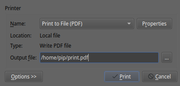
When attempting to print to PDF using cups and cups-pdf I am presented with a QT widget (see attached) with a default Output file ${HOME}/print.pdf. Does anyone know how to change the path appearing here? The Wiki states the location in which "PDF files are stored in" can be changed in /etc/cups/cups-pdf.conf, presumably with the Out directive, but changing the path here e.g. to ${HOME}/downloads/default.pdf appears to have no effect.
Last edited by piperfw (2022-12-11 14:42:02)
Offline
#2 2022-12-11 08:19:49
- seth
- Member

- From: Won't reply 2 private help req
- Registered: 2012-09-03
- Posts: 77,200
Re: Unable to change cups-pdf default directory [SOLVED - Qt limitation]
Cups doesn't present you w/ a Qt widget.
Did you restart cups after editing the file?
lp -d CUPS_PDF somefile.txtEdit: or maybe just
lp -d CUPS_PDF <<< "SNAFU"=> Where does that print end up in?
Last edited by seth (2022-12-11 08:21:12)
Offline
#3 2022-12-11 08:48:16
- piperfw
- Member
- Registered: 2021-01-08
- Posts: 30
Re: Unable to change cups-pdf default directory [SOLVED - Qt limitation]
Did you restart cups after editing the file?
Yes (although in fact the cups-pdf documentation states you don't need to restart any services for changes to take effect).
In your commands how can I find the destination corresponding to CUPS_PDF? lpinfo -v lists file cups-pdf:/ but this doesn't appear to be an accepted destination.
Offline
#4 2022-12-11 09:07:19
- seth
- Member
- From: Won't reply 2 private help req
- Registered: 2012-09-03
- Posts: 77,200
Re: Unable to change cups-pdf default directory [SOLVED - Qt limitation]
"lpstat -e", but "CUPS_PDF" is the default name for the cups pdf printer, you should™ be able to use that command literally.
Offline
#5 2022-12-11 09:12:12
- piperfw
- Member
- Registered: 2021-01-08
- Posts: 30
Re: Unable to change cups-pdf default directory [SOLVED - Qt limitation]
Thanks, I did try lpstat but it only returns my one physical computer (Brother_HL...). CUPS_PDF returns "lp: Error - The printer or class does not exist."
I have cups and cups-pdf installed. I can't see anything on the CUPS Wiki page (or Troubleshooting) which suggests additional configuration is needed.
Offline
#6 2022-12-11 09:34:06
- seth
- Member
- From: Won't reply 2 private help req
- Registered: 2012-09-03
- Posts: 77,200
Re: Unable to change cups-pdf default directory [SOLVED - Qt limitation]
http://localhost:631/printers/
Is there a PDF printer?
If not, add one in http://localhost:631/admin/
Offline
#7 2022-12-11 11:30:43
- Lone_Wolf
- Administrator

- From: Netherlands, Europe
- Registered: 2005-10-04
- Posts: 15,270
Re: Unable to change cups-pdf default directory [SOLVED - Qt limitation]
The screenshot shows "print to file (PDF) " as selected option .
That is NOT the cups_pdf printer but an option provided by the software you are trying to print from .
Disliking systemd intensely, but not satisfied with alternatives so focusing on taming systemd.
clean chroot building not flexible enough ?
Try clean chroot manager by graysky
Offline
#8 2022-12-11 13:44:31
- piperfw
- Member
- Registered: 2021-01-08
- Posts: 30
Re: Unable to change cups-pdf default directory [SOLVED - Qt limitation]
Thanks both for the input here.
@seth there wasn't a PDF printer. Adding one and using it with 'lp -d' the output goes to the correct location (i.e. specified by the config file), so that all appears to be working.
The path in the dialogue prompt is unchanged, but thanks to your and Lone_Wolf's comments I now understand this is separate from cups-pdf. This dialogue box is spawned by okular and some other KDE apps I use, so it sounds like I should post a question in the KDE forums instead.
Unless either of you happen to have suggestions on changing that dialogue box, I'll mark this thread as solved.
Last edited by piperfw (2022-12-11 13:44:51)
Offline
#9 2022-12-11 13:58:46
- seth
- Member
- From: Won't reply 2 private help req
- Registered: 2012-09-03
- Posts: 77,200
Re: Unable to change cups-pdf default directory [SOLVED - Qt limitation]
Found (outdated):
https://bugs.kde.org/show_bug.cgi?id=360849
https://bugreports.qt.io/browse/QTBUG-496
Doesn't look too promising 
Offline
#10 2022-12-11 14:40:48
- piperfw
- Member
- Registered: 2021-01-08
- Posts: 30
Re: Unable to change cups-pdf default directory [SOLVED - Qt limitation]
Found (outdated):
https://bugs.kde.org/show_bug.cgi?id=360849
https://bugreports.qt.io/browse/QTBUG-496Doesn't look too promising
Haha, time to reinstate this feature request from '07 
Offline