You are not logged in.
- Topics: Active | Unanswered
Pages: 1
#1 2023-01-04 08:29:22
- Utini
- Member
- Registered: 2015-09-28
- Posts: 481
- Website
I am lost in fonts
As I am currently trying to switch from Windows to Linux as my daily work/office system, I am currently looking and comparing at both quite often.
One thing I just can't get right are the font on Arch. I tried all kind of tutorials/guides/solutions and it gets better but still not there yet.
Currently I am also afraid of "over doing" things as in e.g. install that font, this package and then basically overwrite what might have been good once already.
What I did so far:
Installed packages/font from AUR:
fontconfig-ubuntu 2.13.1-4
ttf-ms-win11-auto 10.0.22621.525-1
ls -al /etc/fonts/conf.d/
total 68
drwxr-xr-x 2 root root 4096 Jan  4 09:13 .
drwxr-xr-x 3 root root 4096 Jan  4 07:31 ..
lrwxrwxrwx 1 root root   57 Mär 30  2021 10-hinting-slight.conf -> /usr/share/fontconfig/conf.default/10-hinting-slight.conf
lrwxrwxrwx 1 root root   61 Mär 30  2021 10-scale-bitmap-fonts.conf -> /usr/share/fontconfig/conf.default/10-scale-bitmap-fonts.conf
lrwxrwxrwx 1 root root   54 Jan  4 09:13 10-sub-pixel-rgb.conf -> /usr/share/fontconfig/conf.avail/10-sub-pixel-rgb.conf
lrwxrwxrwx 1 root root   58 Jan  4 08:52 11-lcdfilter-default.conf -> /usr/share/fontconfig/conf.avail/11-lcdfilter-default.conf
lrwxrwxrwx 1 root root   71 Mär 30  2021 20-unhint-small-dejavu-lgc-sans.conf -> /usr/share/fontconfig/conf.default/20-unhint-small-dejavu-lgc-sans.conf
lrwxrwxrwx 1 root root   76 Mär 30  2021 20-unhint-small-dejavu-lgc-sans-mono.conf -> /usr/share/fontconfig/conf.default/20-unhint-small-dejavu-lgc-sans-mono.conf
lrwxrwxrwx 1 root root   72 Mär 30  2021 20-unhint-small-dejavu-lgc-serif.conf -> /usr/share/fontconfig/conf.default/20-unhint-small-dejavu-lgc-serif.conf
lrwxrwxrwx 1 root root   67 Mär 30  2021 20-unhint-small-dejavu-sans.conf -> /usr/share/fontconfig/conf.default/20-unhint-small-dejavu-sans.conf
lrwxrwxrwx 1 root root   72 Mär 30  2021 20-unhint-small-dejavu-sans-mono.conf -> /usr/share/fontconfig/conf.default/20-unhint-small-dejavu-sans-mono.conf
lrwxrwxrwx 1 root root   68 Mär 30  2021 20-unhint-small-dejavu-serif.conf -> /usr/share/fontconfig/conf.default/20-unhint-small-dejavu-serif.conf
lrwxrwxrwx 1 root root   60 Mär 30  2021 20-unhint-small-vera.conf -> /usr/share/fontconfig/conf.default/20-unhint-small-vera.conf
lrwxrwxrwx 1 root root   57 Mär 30  2021 30-metric-aliases.conf -> /usr/share/fontconfig/conf.default/30-metric-aliases.conf
lrwxrwxrwx 1 root root   56 Mär 30  2021 30-win32-aliases.conf -> /usr/share/fontconfig/conf.default/30-win32-aliases.conf
lrwxrwxrwx 1 root root   51 Mär 30  2021 40-nonlatin.conf -> /usr/share/fontconfig/conf.default/40-nonlatin.conf
lrwxrwxrwx 1 root root   50 Mär 30  2021 45-generic.conf -> /usr/share/fontconfig/conf.default/45-generic.conf
lrwxrwxrwx 1 root root   48 Mär 30  2021 45-latin.conf -> /usr/share/fontconfig/conf.default/45-latin.conf
lrwxrwxrwx 1 root root   52 Mär 30  2021 46-noto-mono.conf -> /usr/share/fontconfig/conf.default/46-noto-mono.conf
lrwxrwxrwx 1 root root   52 Mär 30  2021 46-noto-sans.conf -> /usr/share/fontconfig/conf.default/46-noto-sans.conf
lrwxrwxrwx 1 root root   53 Mär 30  2021 46-noto-serif.conf -> /usr/share/fontconfig/conf.default/46-noto-serif.conf
lrwxrwxrwx 1 root root   52 Mär 30  2021 49-sansserif.conf -> /usr/share/fontconfig/conf.default/49-sansserif.conf
lrwxrwxrwx 1 root root   47 Mär 30  2021 50-user.conf -> /usr/share/fontconfig/conf.default/50-user.conf
lrwxrwxrwx 1 root root   48 Mär 30  2021 51-local.conf -> /usr/share/fontconfig/conf.default/51-local.conf
lrwxrwxrwx 1 root root   54 Mär 30  2021 57-dejavu-sans.conf -> /usr/share/fontconfig/conf.default/57-dejavu-sans.conf
lrwxrwxrwx 1 root root   59 Mär 30  2021 57-dejavu-sans-mono.conf -> /usr/share/fontconfig/conf.default/57-dejavu-sans-mono.conf
lrwxrwxrwx 1 root root   55 Mär 30  2021 57-dejavu-serif.conf -> /usr/share/fontconfig/conf.default/57-dejavu-serif.conf
lrwxrwxrwx 1 root root   58 Mär 30  2021 58-dejavu-lgc-sans.conf -> /usr/share/fontconfig/conf.default/58-dejavu-lgc-sans.conf
lrwxrwxrwx 1 root root   63 Mär 30  2021 58-dejavu-lgc-sans-mono.conf -> /usr/share/fontconfig/conf.default/58-dejavu-lgc-sans-mono.conf
lrwxrwxrwx 1 root root   59 Mär 30  2021 58-dejavu-lgc-serif.conf -> /usr/share/fontconfig/conf.default/58-dejavu-lgc-serif.conf
lrwxrwxrwx 1 root root   50 Mär 30  2021 60-generic.conf -> /usr/share/fontconfig/conf.default/60-generic.conf
lrwxrwxrwx 1 root root   48 Mär 30  2021 60-latin.conf -> /usr/share/fontconfig/conf.default/60-latin.conf
lrwxrwxrwx 1 root root   53 Mär 30  2021 65-droid-kufi.conf -> /usr/share/fontconfig/conf.default/65-droid-kufi.conf
lrwxrwxrwx 1 root root   53 Mär 30  2021 65-droid-sans.conf -> /usr/share/fontconfig/conf.default/65-droid-sans.conf
lrwxrwxrwx 1 root root   58 Mär 30  2021 65-droid-sans-mono.conf -> /usr/share/fontconfig/conf.default/65-droid-sans-mono.conf
lrwxrwxrwx 1 root root   54 Mär 30  2021 65-droid-serif.conf -> /usr/share/fontconfig/conf.default/65-droid-serif.conf
lrwxrwxrwx 1 root root   56 Mär 30  2021 65-fonts-persian.conf -> /usr/share/fontconfig/conf.default/65-fonts-persian.conf
lrwxrwxrwx 1 root root   51 Mär 30  2021 65-nonlatin.conf -> /usr/share/fontconfig/conf.default/65-nonlatin.conf
lrwxrwxrwx 1 root root   52 Mär 30  2021 66-noto-mono.conf -> /usr/share/fontconfig/conf.default/66-noto-mono.conf
lrwxrwxrwx 1 root root   52 Mär 30  2021 66-noto-sans.conf -> /usr/share/fontconfig/conf.default/66-noto-sans.conf
lrwxrwxrwx 1 root root   53 Mär 30  2021 66-noto-serif.conf -> /usr/share/fontconfig/conf.default/66-noto-serif.conf
lrwxrwxrwx 1 root root   50 Mär 30  2021 69-unifont.conf -> /usr/share/fontconfig/conf.default/69-unifont.conf
lrwxrwxrwx 1 root root   54 Mär 30  2021 69-urw-bookman.conf -> /usr/share/fontconfig/conf.default/69-urw-bookman.conf
lrwxrwxrwx 1 root root   51 Mär 30  2021 69-urw-c059.conf -> /usr/share/fontconfig/conf.default/69-urw-c059.conf
lrwxrwxrwx 1 root root   55 Mär 30  2021 69-urw-d050000l.conf -> /usr/share/fontconfig/conf.default/69-urw-d050000l.conf
lrwxrwxrwx 1 root root   65 Mär 30  2021 69-urw-fallback-backwards.conf -> /usr/share/fontconfig/conf.default/69-urw-fallback-backwards.conf
lrwxrwxrwx 1 root root   64 Mär 30  2021 69-urw-fallback-generics.conf -> /usr/share/fontconfig/conf.default/69-urw-fallback-generics.conf
lrwxrwxrwx 1 root root   65 Mär 30  2021 69-urw-fallback-specifics.conf -> /usr/share/fontconfig/conf.default/69-urw-fallback-specifics.conf
lrwxrwxrwx 1 root root   53 Mär 30  2021 69-urw-gothic.conf -> /usr/share/fontconfig/conf.default/69-urw-gothic.conf
lrwxrwxrwx 1 root root   61 Mär 30  2021 69-urw-nimbus-mono-ps.conf -> /usr/share/fontconfig/conf.default/69-urw-nimbus-mono-ps.conf
lrwxrwxrwx 1 root root   59 Mär 30  2021 69-urw-nimbus-roman.conf -> /usr/share/fontconfig/conf.default/69-urw-nimbus-roman.conf
lrwxrwxrwx 1 root root   58 Mär 30  2021 69-urw-nimbus-sans.conf -> /usr/share/fontconfig/conf.default/69-urw-nimbus-sans.conf
lrwxrwxrwx 1 root root   51 Mär 30  2021 69-urw-p052.conf -> /usr/share/fontconfig/conf.default/69-urw-p052.conf
lrwxrwxrwx 1 root root   66 Mär 30  2021 69-urw-standard-symbols-ps.conf -> /usr/share/fontconfig/conf.default/69-urw-standard-symbols-ps.conf
lrwxrwxrwx 1 root root   51 Mär 30  2021 69-urw-z003.conf -> /usr/share/fontconfig/conf.default/69-urw-z003.conf
lrwxrwxrwx 1 root root   40 Dez  9  2018 70-no-bitmaps.conf -> /etc/fonts/conf.avail/70-no-bitmaps.conf
lrwxrwxrwx 1 root root   51 Mär 30  2021 70-noto-cjk.conf -> /usr/share/fontconfig/conf.default/70-noto-cjk.conf
lrwxrwxrwx 1 root root   52 Mär 30  2021 80-delicious.conf -> /usr/share/fontconfig/conf.default/80-delicious.conf
lrwxrwxrwx 1 root root   52 Mär 30  2021 90-synthetic.conf -> /usr/share/fontconfig/conf.default/90-synthetic.conf
-rw-r--r-- 1 root root  978 Jan  4 07:30 README
ls -al /usr/share/fontconfig/conf.avail/
total 332
drwxr-xr-x 2 root root  4096 Jan  4 07:31 .
drwxr-xr-x 4 root root  4096 Mär 30  2021 ..
-rw-r--r-- 1 root root   706 Jan  4 07:30 10-autohint.conf
-rw-r--r-- 1 root root   692 Jan  4 07:30 10-hinting-full.conf
-rw-r--r-- 1 root root   696 Jan  4 07:30 10-hinting-medium.conf
-rw-r--r-- 1 root root   692 Jan  4 07:30 10-hinting-none.conf
-rw-r--r-- 1 root root   696 Jan  4 07:30 10-hinting-slight.conf
-rw-r--r-- 1 root root   723 Jan  4 07:30 10-no-sub-pixel.conf
-rw-r--r-- 1 root root  2228 Jan  4 07:30 10-scale-bitmap-fonts.conf
-rw-r--r-- 1 root root   748 Jan  4 07:30 10-sub-pixel-bgr.conf
-rw-r--r-- 1 root root   748 Jan  4 07:30 10-sub-pixel-rgb.conf
-rw-r--r-- 1 root root   758 Jan  4 07:30 10-sub-pixel-vbgr.conf
-rw-r--r-- 1 root root   758 Jan  4 07:30 10-sub-pixel-vrgb.conf
-rw-r--r-- 1 root root   701 Jan  4 07:30 10-unhinted.conf
-rw-r--r-- 1 root root   771 Jan  4 07:30 11-lcdfilter-default.conf
-rw-r--r-- 1 root root   768 Jan  4 07:30 11-lcdfilter-legacy.conf
-rw-r--r-- 1 root root   765 Jan  4 07:30 11-lcdfilter-light.conf
-rw-r--r-- 1 root root   893 Mär 28  2021 20-unhint-small-dejavu-lgc-sans.conf
-rw-r--r-- 1 root root   903 Mär 28  2021 20-unhint-small-dejavu-lgc-sans-mono.conf
-rw-r--r-- 1 root root   895 Mär 28  2021 20-unhint-small-dejavu-lgc-serif.conf
-rw-r--r-- 1 root root   885 Mär 28  2021 20-unhint-small-dejavu-sans.conf
-rw-r--r-- 1 root root   895 Mär 28  2021 20-unhint-small-dejavu-sans-mono.conf
-rw-r--r-- 1 root root   887 Mär 28  2021 20-unhint-small-dejavu-serif.conf
-rw-r--r-- 1 root root  1537 Jan  4 07:30 20-unhint-small-vera.conf
-rw-r--r-- 1 root root  3489 Jan  4 07:30 25-unhint-nonlatin.conf
-rw-r--r-- 1 root root 13393 Jan  4 07:30 30-metric-aliases.conf
-rw-r--r-- 1 root root   620 Nov 27 08:00 30-win32-aliases.conf
-rw-r--r-- 1 root root  5630 Jan  4 07:30 40-nonlatin.conf
-rw-r--r-- 1 root root  3543 Jan  4 07:30 45-generic.conf
-rw-r--r-- 1 root root  6697 Jan  4 07:30 45-latin.conf
-rw-r--r-- 1 root root   209 Sep 30 18:18 46-noto-mono.conf
-rw-r--r-- 1 root root   205 Sep 30 18:18 46-noto-sans.conf
-rw-r--r-- 1 root root   201 Sep 30 18:18 46-noto-serif.conf
-rw-r--r-- 1 root root   799 Jan  4 07:30 49-sansserif.conf
-rw-r--r-- 1 root root   911 Jan  4 07:30 50-user.conf
-rw-r--r-- 1 root root   423 Jan  4 07:30 51-local.conf
-rw-r--r-- 1 root root  1711 Mär 28  2021 57-dejavu-sans.conf
-rw-r--r-- 1 root root  1201 Mär 28  2021 57-dejavu-sans-mono.conf
-rw-r--r-- 1 root root  1357 Mär 28  2021 57-dejavu-serif.conf
-rw-r--r-- 1 root root  2063 Mär 28  2021 58-dejavu-lgc-sans.conf
-rw-r--r-- 1 root root  1545 Mär 28  2021 58-dejavu-lgc-sans-mono.conf
-rw-r--r-- 1 root root  1689 Mär 28  2021 58-dejavu-lgc-serif.conf
-rw-r--r-- 1 root root  2041 Jan  4 07:30 60-generic.conf
-rw-r--r-- 1 root root  2068 Jan  4 07:30 60-latin.conf
-rw-r--r-- 1 root root   348 Mär 26  2021 65-droid-kufi.conf
-rw-r--r-- 1 root root  7170 Mär 26  2021 65-droid-sans.conf
-rw-r--r-- 1 root root   345 Mär 26  2021 65-droid-sans-mono.conf
-rw-r--r-- 1 root root  1432 Mär 26  2021 65-droid-serif.conf
-rw-r--r-- 1 root root 10293 Jan  4 07:30 65-fonts-persian.conf
-rw-r--r-- 1 root root   464 Jan  4 07:30 65-khmer.conf
-rw-r--r-- 1 root root  8008 Jan  4 07:30 65-nonlatin.conf
-rw-r--r-- 1 root root   207 Sep 30 18:18 66-noto-mono.conf
-rw-r--r-- 1 root root   203 Sep 30 18:18 66-noto-sans.conf
-rw-r--r-- 1 root root   199 Sep 30 18:18 66-noto-serif.conf
-rw-r--r-- 1 root root   847 Jan  4 07:30 69-unifont.conf
-rw-r--r-- 1 root root  1021 Mär 25  2021 69-urw-bookman.conf
-rw-r--r-- 1 root root  1003 Mär 25  2021 69-urw-c059.conf
-rw-r--r-- 1 root root  1022 Mär 25  2021 69-urw-d050000l.conf
-rw-r--r-- 1 root root  3257 Mär 25  2021 69-urw-fallback-backwards.conf
-rw-r--r-- 1 root root  2727 Mär 25  2021 69-urw-fallback-generics.conf
-rw-r--r-- 1 root root  3777 Mär 25  2021 69-urw-fallback-specifics.conf
-rw-r--r-- 1 root root   913 Mär 25  2021 69-urw-gothic.conf
-rw-r--r-- 1 root root   899 Mär 25  2021 69-urw-nimbus-mono-ps.conf
-rw-r--r-- 1 root root   877 Mär 25  2021 69-urw-nimbus-roman.conf
-rw-r--r-- 1 root root  1572 Mär 25  2021 69-urw-nimbus-sans.conf
-rw-r--r-- 1 root root   975 Mär 25  2021 69-urw-p052.conf
-rw-r--r-- 1 root root  1061 Mär 25  2021 69-urw-standard-symbols-ps.conf
-rw-r--r-- 1 root root   865 Mär 25  2021 69-urw-z003.conf
-rw-r--r-- 1 root root   487 Jan  4 07:30 70-no-bitmaps.conf
-rw-r--r-- 1 root root  4904 Jan 27  2022 70-noto-cjk.conf
-rw-r--r-- 1 root root   487 Jan  4 07:30 70-yes-bitmaps.conf
-rw-r--r-- 1 root root   597 Jan  4 07:30 80-delicious.conf
-rw-r--r-- 1 root root  1917 Jan  4 07:30 90-synthetic.conf
KDE Fonts settings (GUI):
https://i.imgur.com/iaBIo2d.png

Konsole settings:
Iosevka Fixed 12ptFirefox Settings (same as Windows):
https://i.imgur.com/IjH4qAR.png

This is an example screenshot from Windows:
https://i.imgur.com/6IViObw.png

This is an example screenshot from Arch:
https://i.imgur.com/mPRCzIu.png

If you look closely to the "Y" in "You might not need lsp-zero" you will notice that it is smoother on Windows.
I believe my Arch-System fonts look fine so far but it is hard to know as I can't compare it with e.g. windows.
Any suggestions? :S Thanks!
moderator edit -- replaced oversized images with links.
Pasting pictures and code
Last edited by 2ManyDogs (2023-01-04 12:31:01)
Setup 1: Thinkpad T14s G3, 14" FHD - R7 6850U - 32GB RAM - 2TB Solidigm P44 Pro NVME
Setup 2: Thinkpad X1E G1, 15.6" FHD - i7-8850H - 32GB RAM - NVIDIA GTX 1050Ti - 2x 1TB Samsung 970 Pro NVME
Accessories: Filco Majestouch TKL MX-Brown Mini Otaku, Benq XL2420T (144Hz), Lo(w)gitech G400, Puretrak Talent, Sennheiser HD800S + Meier Daccord FF + Meier Classic FF
Offline
#2 2023-01-04 11:01:26
- Utini
- Member
- Registered: 2015-09-28
- Posts: 481
- Website
Re: I am lost in fonts
I have now removed the aur package "ttf-ms-win11-auto" and instead copied everything inside C:/Windows/Fonts/ from my Windows 11 Laptop to my Arch laptop.
That should ensure that I have the same baseline in terms of fonts.
Everything that differs now is related to the font configuration (fontconf / freetype)?
fontconfig-ubuntu should install a "better" font configuration than what comes out-of-the-box.
I believe I notice improvements, but still not as good as on my Windows 11 Laptop.
Interestingly is that in KDE's "Font Management" I have multiple Light-Fonts in "Segoe UI" and "Segoe UI Variable" that all look different?
Which one to choose then?! 
See screenshots:
https://i.imgur.com/bTKphjz.png
https://i.imgur.com/gCxHnZ5.png
https://i.imgur.com/Xkbgggs.png
https://i.imgur.com/3DFyfsQ.png


moderator edit -- replaced oversized images with links.
Pasting pictures and code
Last edited by 2ManyDogs (2023-01-04 12:25:11)
Setup 1: Thinkpad T14s G3, 14" FHD - R7 6850U - 32GB RAM - 2TB Solidigm P44 Pro NVME
Setup 2: Thinkpad X1E G1, 15.6" FHD - i7-8850H - 32GB RAM - NVIDIA GTX 1050Ti - 2x 1TB Samsung 970 Pro NVME
Accessories: Filco Majestouch TKL MX-Brown Mini Otaku, Benq XL2420T (144Hz), Lo(w)gitech G400, Puretrak Talent, Sennheiser HD800S + Meier Daccord FF + Meier Classic FF
Offline
#3 2023-01-04 12:24:48
- 2ManyDogs
- Forum Fellow
- Registered: 2012-01-15
- Posts: 4,648
Re: I am lost in fonts
Please read the General Guidelines and post only thumbnails or links to images.
Offline
#4 2023-01-04 15:44:30
- Head_on_a_Stick
- Member

- From: The Wirral
- Registered: 2014-02-20
- Posts: 9,003
- Website
Re: I am lost in fonts
Have you tried the alternative subpixel hinting modes for the TrueType interpreter?
Edit /etc/profile.d/freetype2.sh
Disclaimer: I am also lost in fonts :-)
Jin, Jîyan, Azadî
Offline
#5 2023-01-04 17:57:24
- Utini
- Member
- Registered: 2015-09-28
- Posts: 481
- Website
Re: I am lost in fonts
Not yet but I will give it a try tomorrow.
Smth I just found in github:
For font consistency, all applications should be set to use the serif, sans-serif, and monospace aliases, which are mapped to particular fonts by fontconfig.

Set your font settings to match above in your DE system settings.
Source: https://gist.github.com/luizmello/ccdd3 … 27a11a2454
I wonder if this is true what is meant with "aliases".
Setup 1: Thinkpad T14s G3, 14" FHD - R7 6850U - 32GB RAM - 2TB Solidigm P44 Pro NVME
Setup 2: Thinkpad X1E G1, 15.6" FHD - i7-8850H - 32GB RAM - NVIDIA GTX 1050Ti - 2x 1TB Samsung 970 Pro NVME
Accessories: Filco Majestouch TKL MX-Brown Mini Otaku, Benq XL2420T (144Hz), Lo(w)gitech G400, Puretrak Talent, Sennheiser HD800S + Meier Daccord FF + Meier Classic FF
Offline
#6 2023-01-04 18:03:32
- Head_on_a_Stick
- Member
- From: The Wirral
- Registered: 2014-02-20
- Posts: 9,003
- Website
Re: I am lost in fonts
https://wiki.archlinux.org/title/Fonts#Font_alias
Aliases are just a convenient way to achieve consistent fonts across the whole desktop.
EDIT: here are my settings:
$ cat /home/empty/.config/fontconfig/fonts.conf
<?xml version="1.0"?>
<!DOCTYPE fontconfig SYSTEM "fonts.dtd">
<fontconfig>
   <alias>
      <family>serif</family>
      <prefer><family>Times New Roman</family></prefer>
   </alias>
   <alias>
      <family>sans-serif</family>
      <prefer>
         <family>Arial</family>
         <family>Cantarell</family>
      </prefer>
   </alias>
   <alias>
      <family>monospace</family>
      <prefer><family>JetbrainsMono Nerd Font</family></prefer>
   </alias>
</fontconfig>
$
EDIT2: Cantarell is a fallback for sans-serif because Windows' Arial uses a colon for the ratio symbol, which is just wrong.
Last edited by Head_on_a_Stick (2023-01-04 18:07:55)
Jin, Jîyan, Azadî
Offline
#7 2023-01-04 18:08:55
- Awebb
- Member

- Registered: 2010-05-06
- Posts: 6,688
Re: I am lost in fonts
Disclaimer: I am also lost in fonts :-)
Like everyone who ever set a foot in that weird forest of wonders and horrors.
Offline
#8 2023-01-04 21:17:04
- Utini
- Member
- Registered: 2015-09-28
- Posts: 481
- Website
Re: I am lost in fonts
https://wiki.archlinux.org/title/Fonts#Font_alias
Aliases are just a convenient way to achieve consistent fonts across the whole desktop.
EDIT: here are my settings:
$ cat /home/empty/.config/fontconfig/fonts.conf
<?xml version="1.0"?>
<!DOCTYPE fontconfig SYSTEM "fonts.dtd">
<fontconfig>
   <alias>
      <family>serif</family>
      <prefer><family>Times New Roman</family></prefer>
   </alias>
   <alias>
      <family>sans-serif</family>
      <prefer>
         <family>Arial</family>
         <family>Cantarell</family>
      </prefer>
   </alias>
   <alias>
      <family>monospace</family>
      <prefer><family>JetbrainsMono Nerd Font</family></prefer>
   </alias>
</fontconfig>
$
EDIT2: Cantarell is a fallback for sans-serif because Windows' Arial uses a colon for the ratio symbol, which is just wrong.
So basically once I find a decent font, I will make sure its set as alias in the fonts.conf and make sure nothing can overwrite it? 
And I see that you are also using Times New Roman.
Although I think I would like to stick with Windows Segoe UI...but what ever looks decent lol. I think the main problem isn't the font but how its rendered.
Setup 1: Thinkpad T14s G3, 14" FHD - R7 6850U - 32GB RAM - 2TB Solidigm P44 Pro NVME
Setup 2: Thinkpad X1E G1, 15.6" FHD - i7-8850H - 32GB RAM - NVIDIA GTX 1050Ti - 2x 1TB Samsung 970 Pro NVME
Accessories: Filco Majestouch TKL MX-Brown Mini Otaku, Benq XL2420T (144Hz), Lo(w)gitech G400, Puretrak Talent, Sennheiser HD800S + Meier Daccord FF + Meier Classic FF
Offline
#9 2023-01-04 21:23:09
- seth
- Member

- From: Won't reply 2 private help req
- Registered: 2012-09-03
- Posts: 76,418
Re: I am lost in fonts
If you look closely to the "Y" in "You might not need lsp-zero" you will notice that it is smoother on Windows.
On a less close look, I notice that windows runs at a higher resolution?
Obviously that will have massive impact on antialiasing and sub-pixel hinting (which are mitigations for "low" display resolutions - if you had a 600 DPI output, you'd not require any antialiasing and typically people drop that a even 240 DPI for being mostly pointless)
Interestingly is that in KDE's "Font Management" I have multiple Light-Fonts in "Segoe UI" and "Segoe UI Variable" that all look different?
Which one to choose then?!
Adobe Source Pro
This is highly subjective and there's really no "right" choice to make here - you pick what you like best.
Scientifically, the adobe source family is the best font, though.
(Same sience figured that blue is the best color)
Firefox Settings (same as Windows):
nb. that the big browsers tend to ignore your local font configuration (partially or entirely) and do their own thing 
switch from Windows to Linux
https://wiki.archlinux.org/title/Font_c … eter_(BCI)
https://wiki.archlinux.org/title/Font_c … _rendering
Starting from FreeType 2.10.3, Arch Linux enables ClearType subpixel rendering by default
fontconfig-ubuntu should install a "better" font configuration than what comes out-of-the-box.
I believe I notice improvements, but still not as good as on my Windows 11 Laptop.
https://launchpad.net/ubuntu/+source/fo … 4.4ubuntu1
Afaics
- Add 04_ubuntu_monospace_lcd_filter_conf.patch:
+ Use legacy lcdfilter with smaller monospace fonts
- Add 05_ubuntu_add_antialiasing_confs.patch:
+ Add config file for antialiasing
are the only meaningful patches in this context and what they do is use the lcdlegacy ("harmony") filter for Bitstream Vera and DejaVu (which is essentially the same font)
Faith isn't a very good metric - you could take screenshots and overlay them in an image editor to see whether there are and what kind of differences.
I'll point out again that the pink elephant in the room is that your windows seems to run at a higher resolution (or you're configuring a bigger font)
Offline
#10 2023-01-04 21:47:22
- Trilby
- Inspector Parrot

- Registered: 2011-11-29
- Posts: 30,480
- Website
Re: I am lost in fonts
Is anyone not lost when it comes to fonts? While a lot can be said about which dials can be adjusted, there is no right answer to what they should be adjusted to. Case in point: your linux screenshot looks much better to me than the windows one - though how much of the difference I see is related to fonts themselves, font configuration, or just to different display resolutions is anyone's guess. But what you note as a problem in your linux configuration compared to windows looks more to me like a solution.
"UNIX is simple and coherent" - Dennis Ritchie; "GNU's Not Unix" - Richard Stallman
Offline
#11 2023-01-05 06:48:42
- Utini
- Member
- Registered: 2015-09-28
- Posts: 481
- Website
Re: I am lost in fonts
I'll point out again that the pink elephant in the room is that your windows seems to run at a higher resolution (or you're configuring a bigger font)
Thank you for all your answers. I will try to go through them step by step.
First of all:
The resolution of Windows / Arch is the same. What differs was the screen size. Which in the end results in different DPI. So after all, you are right!
I made more comparison shots and now I am amazed at that the external screen looks pretty much the same (when looking at the smoothness and details) on Arch / Win.
Windows: https://i.imgur.com/xzQ2Tnu.png
Arch: https://i.imgur.com/H3j0SiA.png


Adobe Source Pro:
I couldn't find any "science" behind the font on google. To me a font has to be good looking but most importantly, be healthy for my eyes.
With some fonts I notice that my eyes get tired a lot faster.
How ever, I will give Adobe Source Pro a try! May I ask how exactly you have set yours?
BCI and Subpixel Rendering:
I have set and played with those already. For me it was more convenient to do in the KDE Font GUI settings. Also this seems to overwrite the fonts.conf anyway.
I am with "RGB" in Sub-Pixel rendering and "Slight Hinting".
LCDdefault is enabled as well.
fontconfig-ubuntu:
I am more of a fan to configure everything on my own that installing some pre-patched stuff through the AUR.
If I understand you correctly I could just switch from lcdfilter legacy to harmony to get the same results as with fontconfig-ubuntu?
Is anyone not lost when it comes to fonts? While a lot can be said about which dials can be adjusted, there is no right answer to what they should be adjusted to. Case in point: your linux screenshot looks much better to me than the windows one - though how much of the difference I see is related to fonts themselves, font configuration, or just to different display resolutions is anyone's guess. But what you note as a problem in your linux configuration compared to windows looks more to me like a solution.
KDE Font Settings GUI has some simply "example screenshots" on how a text would look like with each option of Sub-Pixel rendering and Hinting.
I think Windows does this still a bit better and goes an extra step by guiding you through an interactive test where you get presented several different text examples and you click the one that looks the best to you.
You click through those examples until you have the best results for yourself and then Windows applies those settings.
Setup 1: Thinkpad T14s G3, 14" FHD - R7 6850U - 32GB RAM - 2TB Solidigm P44 Pro NVME
Setup 2: Thinkpad X1E G1, 15.6" FHD - i7-8850H - 32GB RAM - NVIDIA GTX 1050Ti - 2x 1TB Samsung 970 Pro NVME
Accessories: Filco Majestouch TKL MX-Brown Mini Otaku, Benq XL2420T (144Hz), Lo(w)gitech G400, Puretrak Talent, Sennheiser HD800S + Meier Daccord FF + Meier Classic FF
Offline
#12 2023-01-05 08:36:41
- seth
- Member
- From: Won't reply 2 private help req
- Registered: 2012-09-03
- Posts: 76,418
Re: I am lost in fonts
I couldn't find any "science" behind the font on google.
Same sience figured that blue is the best color
https://bbs.archlinux.org/viewtopic.php?id=267101
There's obviously no usable metric to scientifically determine either, the sicence part is
what you like best
I installed the font and globally use hintslight, but that's also very resolution/monitor/preference dependent.
If I understand you correctly I could just switch from lcdfilter legacy to harmony
No, the "lcdlegacy" filter is "harmony" (patent issues around cleartype) and ubuntu only sets it for the bitstream vera fonts (and its utf-8 derivate "deja vu")
Bitstream Vera was one of the first license free, quality, complete fonts available and has been the de facto linux standard in the early 2000s - ubuntu probably just seeks to maintain the original appearance for that particular font.
None of the other patches (there's some monospace handling and they disable bitmap fonts by default) stood out to me as relevant to your inquiry.
Offline
#13 2023-01-05 09:43:51
- Utini
- Member
- Registered: 2015-09-28
- Posts: 481
- Website
Re: I am lost in fonts
I made comparison shots with fontconfig vs fontconfig-ubuntu
Nothing was changed except installing/uninstall between those two packages.
Link: https://files.bestmail.ws/fontconfig-battle.png
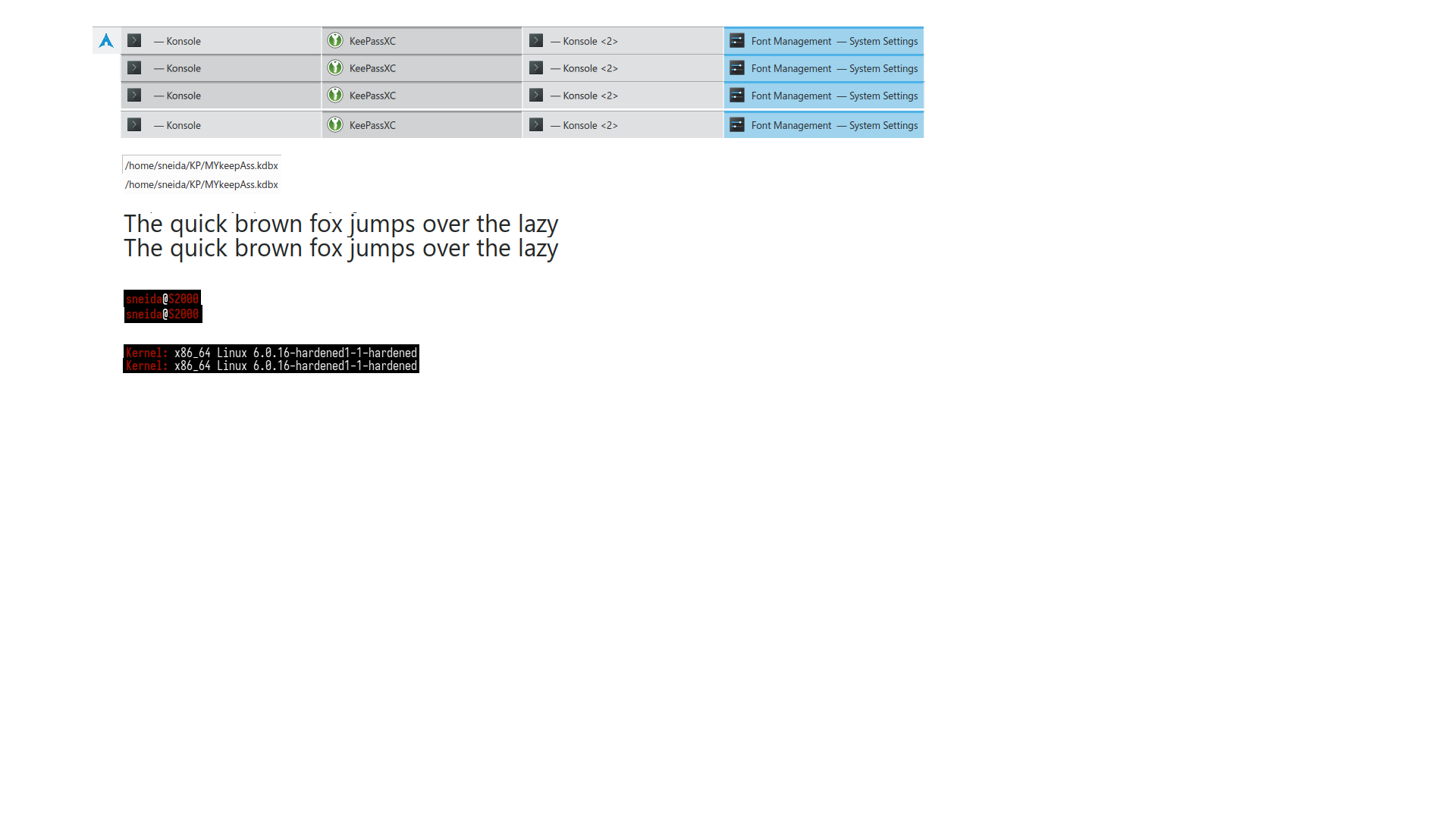
I see a difference, I think one looks better.
Look at the "e" e.g. in "KeePass" of that Taskbar (the image sequence on the top).
For the image sequences below, I don't really notice any difference.
Here is the same screenshot with the solution of which image snippet is from which package:
Link: https://files.bestmail.ws/fontconfig-ba … lution.png
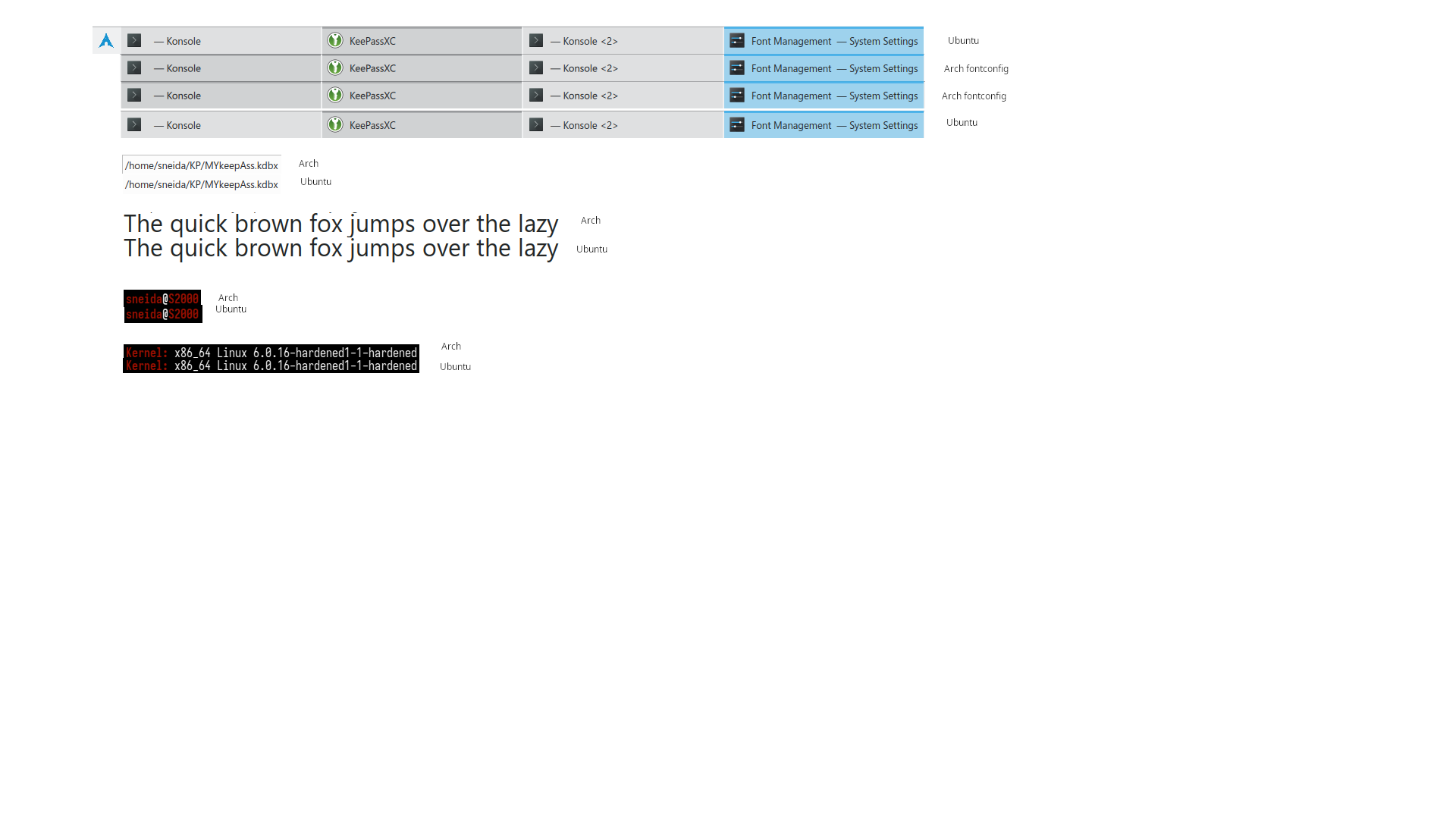
Setup 1: Thinkpad T14s G3, 14" FHD - R7 6850U - 32GB RAM - 2TB Solidigm P44 Pro NVME
Setup 2: Thinkpad X1E G1, 15.6" FHD - i7-8850H - 32GB RAM - NVIDIA GTX 1050Ti - 2x 1TB Samsung 970 Pro NVME
Accessories: Filco Majestouch TKL MX-Brown Mini Otaku, Benq XL2420T (144Hz), Lo(w)gitech G400, Puretrak Talent, Sennheiser HD800S + Meier Daccord FF + Meier Classic FF
Offline
#14 2023-01-05 14:24:59
- seth
- Member
- From: Won't reply 2 private help req
- Registered: 2012-09-03
- Posts: 76,418
Re: I am lost in fonts
That's something around the subpixel rendering and/or hinting setting.
Offline
Pages: 1