You are not logged in.
- Topics: Active | Unanswered
#1 2023-01-12 18:51:03
- bobkocisko
- Member
- Registered: 2023-01-12
- Posts: 7
Firefox seems to ignore autohint setting in fontconfig
(Background) Antialiased text on any operating system causes me eye fatigue and headaches, so throughout my career I've found myself mucking around with non-obvious font settings in Windows and many Linux distros to try to come up with a workable solution. So far the best thing I've found for font rendering customization has been fontconfig+(no DE)+i3+alacritty+qutebrowser, but after running that for a while I really missed a full-featured DE and so I'm trying to switch to Plasma. My results are generally quite good with the KDE apps but one piece is still missing: a mainstream web browser. Falkon is decent but I would really like to be able to run Firefox, since it has some important features for me, especially cross-operating system synchronization of my passwords/history/bookmarks.
But I'm having trouble getting Firefox to look as good as the other KDE apps in my Plasma desktop.
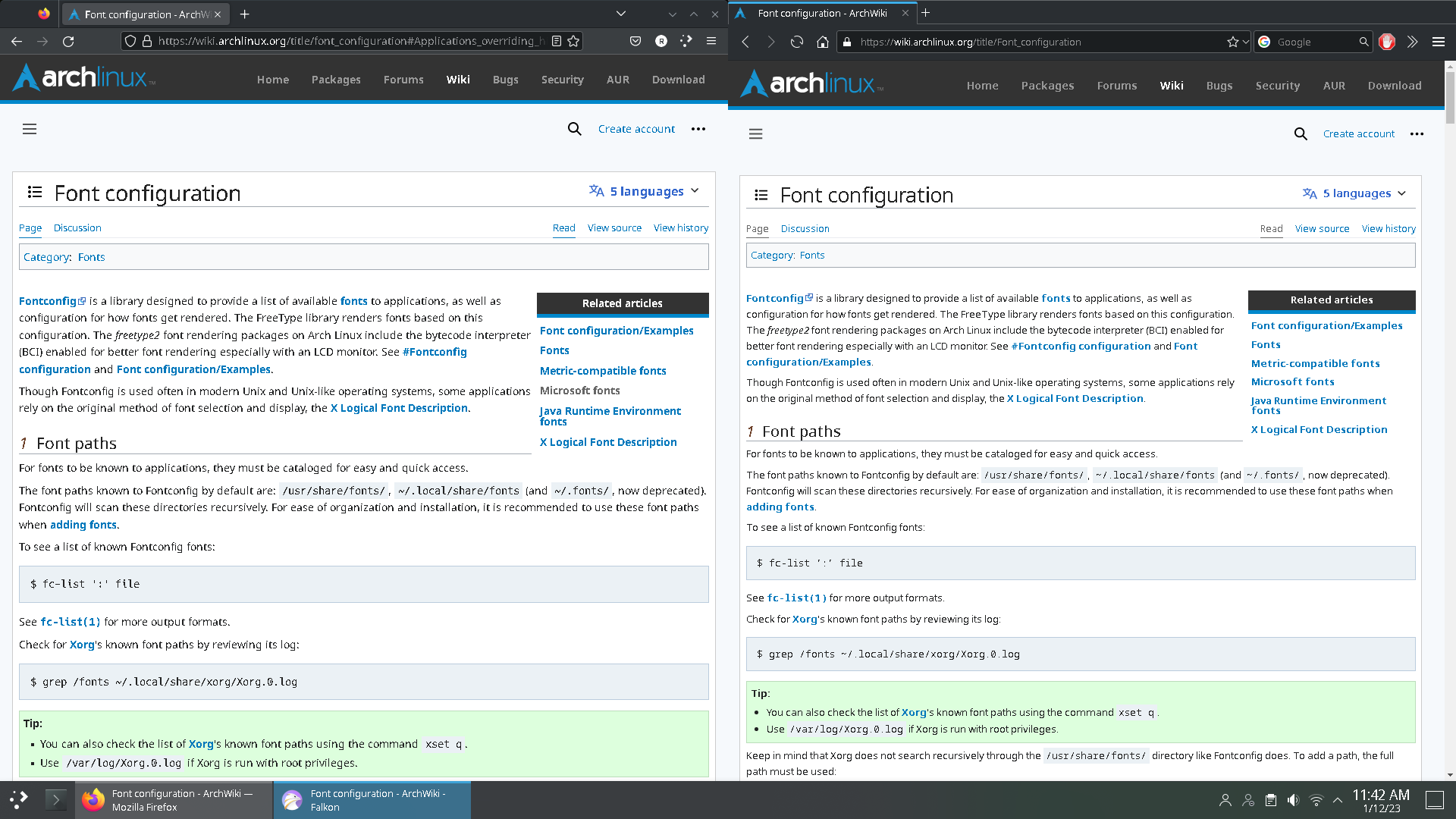
Here is Firefox and Falkon rendering the same page. Falkon is rendering nicely, taking autohinting into account. Firefox is just doing its own thing.
https://dl.dropboxusercontent.com/s/w9r … 114230.png
~/.config/fontconfig/fonts.conf:
...
 <match target="font">
  <edit mode="assign" name="rgba">
   <const>none</const>
  </edit>
 </match>
 <match target="font">
  <edit mode="assign" name="hinting">
   <bool>false</bool>
  </edit>
 </match>
 <match target="font">
  <edit mode="assign" name="hintstyle">
   <const>hintfull</const>
  </edit>
 </match>
 <dir>~/.fonts</dir>
 <match target="font">
  <edit mode="assign" name="antialias">
   <bool>false</bool>
  </edit>
 </match>
 <match target="font">
  <edit mode="assign" name="autohint">
   <bool>true</bool>
  </edit>
 </match>
</fontconfig>
Some things I've tried:
Set all the same settings via ~/.Xresources and then apply them at startup with .xprofile calling
xrdb -merge ~/.XresourcesSet the same settings in ~/.config/gtk-3.0/settings.ini
(desparate) Installing gnome-tweaks and setting font settings there (but you can't turn on autohinting there anyways)
(desparate) Beginning the process of recompiling freetype2 to force the settings I want following https://wiki.archlinux.org/title/Font_configuration#Advanced_LCD_filter_specification, but ultimately giving up when asp failed with a gpg error early in the process.
(desparate) Perusing the firefox source code to try to figure out what text rendering engine it is using in case perhaps it's not using FreeType2. It seems like it's using a patched version of cairo and I'm pretty sure that cairo uses FreeType2.
Part of the problem is I don't really know what GTK/Firefox are using for their font rendering engine. Is it FreeType2? Also I don't know if anyone in the stack (eg GTK 3) is filtering out certain settings like autohinting from ever reaching FreeType. Any light that anyone can shed would be helpful.
Mod edit: Replaced oversized image with link -- V1del
Last edited by V1del (2023-01-12 19:01:54)
Offline
#2 2023-01-12 18:55:05
- bobkocisko
- Member
- Registered: 2023-01-12
- Posts: 7
Re: Firefox seems to ignore autohint setting in fontconfig
I recommend opening up the image in its own tab and viewing it in its original resolution to see the problem I'm talking about
Offline
#3 2023-01-12 19:53:50
- mod24
- Member
- Registered: 2006-11-25
- Posts: 23
Re: Firefox seems to ignore autohint setting in fontconfig
Hi there,
i have the same issue and tried most of your approaches as well without any luck. I do have the same Problem in some Electron Apps (like Rocketchat)
Offline
#4 2023-01-12 20:14:23
- seth
- Member

- From: Won't reply 2 private help req
- Registered: 2012-09-03
- Posts: 77,164
Re: Firefox seems to ignore autohint setting in fontconfig
...
Please post the entire file.
FF uses it's own implementation to parse the fontconfig xml which we recently figured isn't as robust as the fontconfig one.
(The user had an illegal bash-style comment in a file which the default implementation glossed over, but that broke FF font rendering)
If you've more custom/3rd party font configs, you should inspect those as well.
Offline
#5 2023-01-12 21:06:44
- bobkocisko
- Member
- Registered: 2023-01-12
- Posts: 7
Re: Firefox seems to ignore autohint setting in fontconfig
Thanks! I went ahead and rebuilt the os from scratch (I've scripted most of the install) to make sure that all my experimentation didn't leave any stray config settings changed.
Here is the complete set of packages that I installed:
pacstrap /mnt base btrfs linux \
linux-headers linux-firmware intel-ucode \
sudo openssh thermald util-linux \
networkmanager grub os-prober \
reflector

# The following were individual pacman installation steps I took, each line another invocation of pacman:
vim htop lm_sensors
# (reboot)
git base-devel
nvidia plasma-meta man-pages konsole kate dolphin gwenview ark falkon kwallet
# ( reboot)
firefox
I also fixed a DPI issue by using an xorg config file to force-set the randr dpi to 96 x 96.
At this point I logged into Plasma, went to the Fonts section and disabled Antialiasing. This generated the fonts.conf file which I then proceeded to modify (the changed parts are what I listed in the original post). Here is the full file you requested.
<?xml version='1.0'?>
<!DOCTYPE fontconfig SYSTEM 'urn:fontconfig:fonts.dtd'>
<fontconfig>
 <!--
 Artificial oblique for fonts without an italic or oblique version
 -->
 <match target="font">
  <!-- check to see if the font is roman -->
  <test name="slant">
   <const>roman</const>
  </test>
  <!-- check to see if the pattern requested non-roman -->
  <test compare="not_eq" name="slant" target="pattern">
   <const>roman</const>
  </test>
  <!-- multiply the matrix to slant the font -->
  <edit name="matrix" mode="assign">
   <times>
    <name>matrix</name>
    <matrix>
     <double>1</double>
     <double>0.2</double>
     <double>0</double>
     <double>1</double>
    </matrix>
   </times>
  </edit>
  <!-- pretend the font is oblique now -->
  <edit name="slant" mode="assign">
   <const>oblique</const>
  </edit>
  <!-- and disable embedded bitmaps for artificial oblique -->
  <edit name="embeddedbitmap" mode="assign">
   <bool>false</bool>
  </edit>
 </match>
 <!--
 Synthetic emboldening for fonts that do not have bold face available
 -->
 <match target="font">
  <!-- check to see if the weight in the font is less than medium which possibly need emboldening -->
  <test compare="less_eq" name="weight">
   <const>medium</const>
  </test>
  <!-- check to see if the pattern requests bold -->
  <test compare="more_eq" name="weight" target="pattern">
   <const>bold</const>
  </test>
  <!--
                  set the embolden flag
                  needed for applications using cairo, e.g. gucharmap, gedit, ...
                -->
  <edit name="embolden" mode="assign">
   <bool>true</bool>
  </edit>
  <!--
                 set weight to bold
                 needed for applications using Xft directly, e.g. Firefox, ...
                -->
  <edit name="weight" mode="assign">
   <const>bold</const>
  </edit>
 </match>
 <match target="font">
  <edit mode="assign" name="rgba">
   <const>none</const>
  </edit>
 </match>
 <match target="font">
  <edit mode="assign" name="hinting">
   <bool>false</bool>
  </edit>
 </match>
 <match target="font">
  <edit mode="assign" name="hintstyle">
   <const>hintfull</const>
  </edit>
 </match>
 <match target="font">
  <edit mode="assign" name="antialias">
   <bool>false</bool>
  </edit>
 </match>
 <match target="font">
  <edit mode="assign" name="autohint">
   <bool>true</bool>
  </edit>
 </match>
</fontconfig>
And that's it! I have a clean install and haven't touched any other settings. Both Falkon and Firefox look the same as I posted before.
Offline
#6 2023-01-12 21:09:37
- bobkocisko
- Member
- Registered: 2023-01-12
- Posts: 7
Re: Firefox seems to ignore autohint setting in fontconfig
For completeness, here are the default fontconfig settings that I haven't touched:
$ ls -lh /etc/fonts/conf.d/
total 112K
lrwxrwxrwx 1 root root  57 Jan 12 14:51 10-hinting-slight.conf -> /usr/share/fontconfig/conf.default/10-hinting-slight.conf
lrwxrwxrwx 1 root root  61 Jan 12 14:51 10-scale-bitmap-fonts.conf -> /usr/share/fontconfig/conf.default/10-scale-bitmap-fonts.conf
lrwxrwxrwx 1 root root  56 Jan 12 14:51 10-sub-pixel-rgb.conf -> /usr/share/fontconfig/conf.default/10-sub-pixel-rgb.conf
lrwxrwxrwx 1 root root  56 Jan 12 14:51 10-yes-antialias.conf -> /usr/share/fontconfig/conf.default/10-yes-antialias.conf
lrwxrwxrwx 1 root root  60 Jan 12 14:51 11-lcdfilter-default.conf -> /usr/share/fontconfig/conf.default/11-lcdfilter-default.conf
lrwxrwxrwx 1 root root  60 Jan 12 14:51 20-unhint-small-vera.conf -> /usr/share/fontconfig/conf.default/20-unhint-small-vera.conf
lrwxrwxrwx 1 root root  57 Jan 12 14:51 30-metric-aliases.conf -> /usr/share/fontconfig/conf.default/30-metric-aliases.conf
lrwxrwxrwx 1 root root  51 Jan 12 14:51 40-nonlatin.conf -> /usr/share/fontconfig/conf.default/40-nonlatin.conf
lrwxrwxrwx 1 root root  50 Jan 12 14:51 45-generic.conf -> /usr/share/fontconfig/conf.default/45-generic.conf
lrwxrwxrwx 1 root root  48 Jan 12 14:51 45-latin.conf -> /usr/share/fontconfig/conf.default/45-latin.conf
lrwxrwxrwx 1 root root  52 Jan 12 14:52 46-noto-mono.conf -> /usr/share/fontconfig/conf.default/46-noto-mono.conf
lrwxrwxrwx 1 root root  52 Jan 12 14:52 46-noto-sans.conf -> /usr/share/fontconfig/conf.default/46-noto-sans.conf
lrwxrwxrwx 1 root root  53 Jan 12 14:52 46-noto-serif.conf -> /usr/share/fontconfig/conf.default/46-noto-serif.conf
lrwxrwxrwx 1 root root  50 Jan 12 14:51 48-spacing.conf -> /usr/share/fontconfig/conf.default/48-spacing.conf
lrwxrwxrwx 1 root root  52 Jan 12 14:51 49-sansserif.conf -> /usr/share/fontconfig/conf.default/49-sansserif.conf
lrwxrwxrwx 1 root root  47 Jan 12 14:51 50-user.conf -> /usr/share/fontconfig/conf.default/50-user.conf
lrwxrwxrwx 1 root root  48 Jan 12 14:51 51-local.conf -> /usr/share/fontconfig/conf.default/51-local.conf
lrwxrwxrwx 1 root root  50 Jan 12 14:51 60-generic.conf -> /usr/share/fontconfig/conf.default/60-generic.conf
lrwxrwxrwx 1 root root  48 Jan 12 14:51 60-latin.conf -> /usr/share/fontconfig/conf.default/60-latin.conf
lrwxrwxrwx 1 root root  56 Jan 12 14:51 65-fonts-persian.conf -> /usr/share/fontconfig/conf.default/65-fonts-persian.conf
lrwxrwxrwx 1 root root  51 Jan 12 14:51 65-nonlatin.conf -> /usr/share/fontconfig/conf.default/65-nonlatin.conf
lrwxrwxrwx 1 root root  52 Jan 12 14:52 66-noto-mono.conf -> /usr/share/fontconfig/conf.default/66-noto-mono.conf
lrwxrwxrwx 1 root root  52 Jan 12 14:52 66-noto-sans.conf -> /usr/share/fontconfig/conf.default/66-noto-sans.conf
lrwxrwxrwx 1 root root  53 Jan 12 14:52 66-noto-serif.conf -> /usr/share/fontconfig/conf.default/66-noto-serif.conf
lrwxrwxrwx 1 root root  50 Jan 12 14:51 69-unifont.conf -> /usr/share/fontconfig/conf.default/69-unifont.conf
lrwxrwxrwx 1 root root  52 Jan 12 14:51 80-delicious.conf -> /usr/share/fontconfig/conf.default/80-delicious.conf
lrwxrwxrwx 1 root root  52 Jan 12 14:51 90-synthetic.conf -> /usr/share/fontconfig/conf.default/90-synthetic.conf
-rw-r--r-- 1 root root 979 Oct 21 13:15 README
Offline
#7 2023-01-12 21:15:10
- seth
- Member
- From: Won't reply 2 private help req
- Registered: 2012-09-03
- Posts: 77,164
Re: Firefox seems to ignore autohint setting in fontconfig
Looks fine.
Since FF uses xft more-or-less directly, did you try to configure the hinting in the X11 resources (as well)?
https://wiki.archlinux.org/title/Font_c … ig_support
Edit, fyi: "fc-conflist", but I don't think that's relevant.
Last edited by seth (2023-01-12 21:16:04)
Offline
#8 2023-01-12 21:42:07
- bobkocisko
- Member
- Registered: 2023-01-12
- Posts: 7
Re: Firefox seems to ignore autohint setting in fontconfig
Sure. I tried and it seems to make no difference. Here is what I did:
Set ~/.Xresources as follows
Xft.autohint: 1
Xft.lcdfilter: lcddefault
Xft.hintstyle: hintfull
Xft.hinting: 0
Xft.antialias: 0
Xft.rgba: none
Are these settings valid? I tried to use best guesses to port them from the fontconfig style.
Reboot
Run xrdb -query -all
Xcursor.size:   24
Xcursor.theme:  breeze_cursors
Xft.antialias:  0
Xft.autohint:   1
Xft.hinting:    1
Xft.hintstyle:  hintslight
Xft.lcdfilter:  lcddefault
Xft.rgba:       none
It seems odd to me that at this point the Xft.hinting setting doesn't match my original setting
Firefox looks the same
I also tried setting Xft.antialias to 1 and then ran xrdb -merge ~/.Xresources followed by running firefox and firefox ignored that.
Edit, fyi: "fc-conflist", but I don't think that's relevant.
Very cool! I was looking for something like that, thank you!
Offline
#9 2023-01-12 22:04:46
- seth
- Member
- From: Won't reply 2 private help req
- Registered: 2012-09-03
- Posts: 77,164
Re: Firefox seems to ignore autohint setting in fontconfig
It seems odd to me that at this point the Xft.hinting setting doesn't match my original setting
Xcursor.size: 24
Xcursor.theme: breeze_cursors
Seems like KDE is updating the database as well - though different from the fontconfig.
Make sure to kill all FF processes, merge your config
xrdb -m ~/.XresourcesQuery the current database, start FF and hope for the best.
Semi-related: have you considered simply using bitmap fonts?
(pcf got canned by pango, but otb would work)
Offline
#10 2023-01-12 22:21:13
- bobkocisko
- Member
- Registered: 2023-01-12
- Posts: 7
Re: Firefox seems to ignore autohint setting in fontconfig
Make sure to kill all FF processes, merge your config
xrdb -m ~/.XresourcesQuery the current database, start FF and hope for the best.
Unfortunately, no luck here.
Semi-related: have you considered simply using bitmap fonts?
(pcf got canned by pango, but otb would work)
Yes I've used bitmap fonts before (by bitmap fonts I mean Arial, Segoe UI, Courier New from ttf-ms*) and they work great with autohinting disabled. But since remote fonts are so popular on the web I find that pages just don't look correct if I try to force all the remote fonts to some barely similar equivalent. That's why I love the autohinter so much. It really lets me see the web pages as intended but also with crisp fonts. I realize that a HiDpi display is almost expected nowadays and I have a 32" which does help the problem but I find that even a 27" 4k screen is bigger than I want for my normal work. But even with 4k the non-autohinted text is a bit of a bummer.
Could you help me understand the stack used to render text in Firefox? For example, if FreeType2 is at the bottom of the stack, can I "just" build a custom version of FreeType2 which forces autohinting on everywhere?
Offline
#11 2023-01-13 08:31:19
- seth
- Member
- From: Won't reply 2 private help req
- Registered: 2012-09-03
- Posts: 77,164
Re: Firefox seems to ignore autohint setting in fontconfig
idk to what degree FF uses freetype at all, but apparently it has its internal font configuration settings in about:config, https://unix.stackexchange.com/a/445491
Offline
#12 2023-01-17 16:11:52
- bobkocisko
- Member
- Registered: 2023-01-12
- Posts: 7
Re: Firefox seems to ignore autohint setting in fontconfig
idk to what degree FF uses freetype at all, but apparently it has its internal font configuration settings in about:config, https://unix.stackexchange.com/a/445491
Yes, I had noticed that before. I went through all the settings that have anything to do with 'font' or 'font_config' or 'font_rendering' and tried different values but nothing worked. I restarted the browser after tweaking the settings but that didn't work either.
Offline