You are not logged in.
- Topics: Active | Unanswered
#1 2023-01-30 07:03:19
- easy
- Member
- Registered: 2015-09-23
- Posts: 18
chromium, fontweight changes to bold on scroll randomly
Hello,
I had to reinstall my system due to a dying ssd.
Since then I have a weird bug in chromium (as far as I can say it is only in chromium) on scrolling.
Randomly if I scroll down enough, the fontweight changes to some kind of bold.
If I scroll up again enought, this will revert to normal.
I made a Video: https://www.youtube.com/watch?v=1JJ748YW92I
There you can see, at some point after section 6 Configuration scrolled through, the fondweight changes..
And after scrolling up it reverts.
Sometimes it is even enough, if the windows looses focus and then got it back (i think this triggers a redraw of the window) itr reverts to normal.
It occurs randomly on any pages. From Facebook to the archlinux wiki...
The strange thing is, with the "old" installation I do not had this problem.
System is AMD Ryzen 5 3600, Nvidia 1050TI, triple head setup, close source nvidia driver, WM: awesome, all latest version.
If anybody have tips to fix this, I appreciate it. 
Regards,
easy.
Offline
#2 2023-01-30 07:50:18
- skunktrader
- Member
- From: Brisbane, Australia
- Registered: 2010-02-14
- Posts: 1,680
Re: chromium, fontweight changes to bold on scroll randomly
I don't have any tips to fix but I can confirm the same issue on a system with an Intel CPU and an old AMD Radeon HD 4850 video card. Which tends to suggest its a chromium issue.
Offline
#3 2023-01-30 08:16:50
- seth
- Member

- From: Won't reply 2 private help req
- Registered: 2012-09-03
- Posts: 77,854
Re: chromium, fontweight changes to bold on scroll randomly
It occurs randomly on any pages. From Facebook to the archlinux wiki...
Also on the forum?
When you look at the bold text w/ the web inspector (rmb: inspect element), does it actually resolve a bold font there?
(It flips forth and back in the same area, possibly some CSS/JS bug)
Offline
#4 2023-01-30 09:20:56
- easy
- Member
- Registered: 2015-09-23
- Posts: 18
Re: chromium, fontweight changes to bold on scroll randomly
It occurs randomly on any pages. From Facebook to the archlinux wiki...
Also on the forum?
Not on the first sight.. But I am not that active on the forum.
When you look at the bold text w/ the web inspector (rmb: inspect element), does it actually resolve a bold font there?
(It flips forth and back in the same area, possibly some CSS/JS bug)
Well, I just opened the same page, and there is no change in the fontweight.. As I said, it is really random.
Also I don't think, this is a css/js bug, because I have it randomly on other pages, too.
And I didn't had it on my old installation.
Just recreated the "bug": https://www.youtube.com/watch?v=8kFM7QQfEUo
Here you can see at second 18.. The normal text got bold, the text in the green box is still normal.
And as soon as I inspect an element on the page, the "bold" weight disappears.
Regards,
easy
Offline
#5 2023-01-30 09:23:25
- seth
- Member
- From: Won't reply 2 private help req
- Registered: 2012-09-03
- Posts: 77,854
Re: chromium, fontweight changes to bold on scroll randomly
But I am not that active on the forum.
Basically: "can you trigger this on anything that doesn't use javascript".
Just recreated the "bug"
When you look at the bold text w/ the web inspector (rmb: inspect element), does it actually resolve a bold font there?
Also I don't think, this is a css/js bug, because I have it randomly on other pages, too.
I didn't mean "bug in the sites js", but "bug in js execution"
Offline
#6 2023-01-30 16:44:19
- edge33
- Member
- Registered: 2023-01-29
- Posts: 37
Re: chromium, fontweight changes to bold on scroll randomly
FWIW, I am having the same issue, noticed on arch wiki on Brave, both windows and linux latest brave build
Offline
#7 2023-01-31 10:20:11
- easy
- Member
- Registered: 2015-09-23
- Posts: 18
Re: chromium, fontweight changes to bold on scroll randomly
Basically: "can you trigger this on anything that doesn't use javascript".
Ah sorry, misunderstood.
As far as I tested it (with local and remote static pages), no. Looks good so far.
But atm it is really just triggering on the wiki.archlinux.org.
Also tested it with other instances (running multiple instances with different/no configuration/plugins) the rendering is even worse.
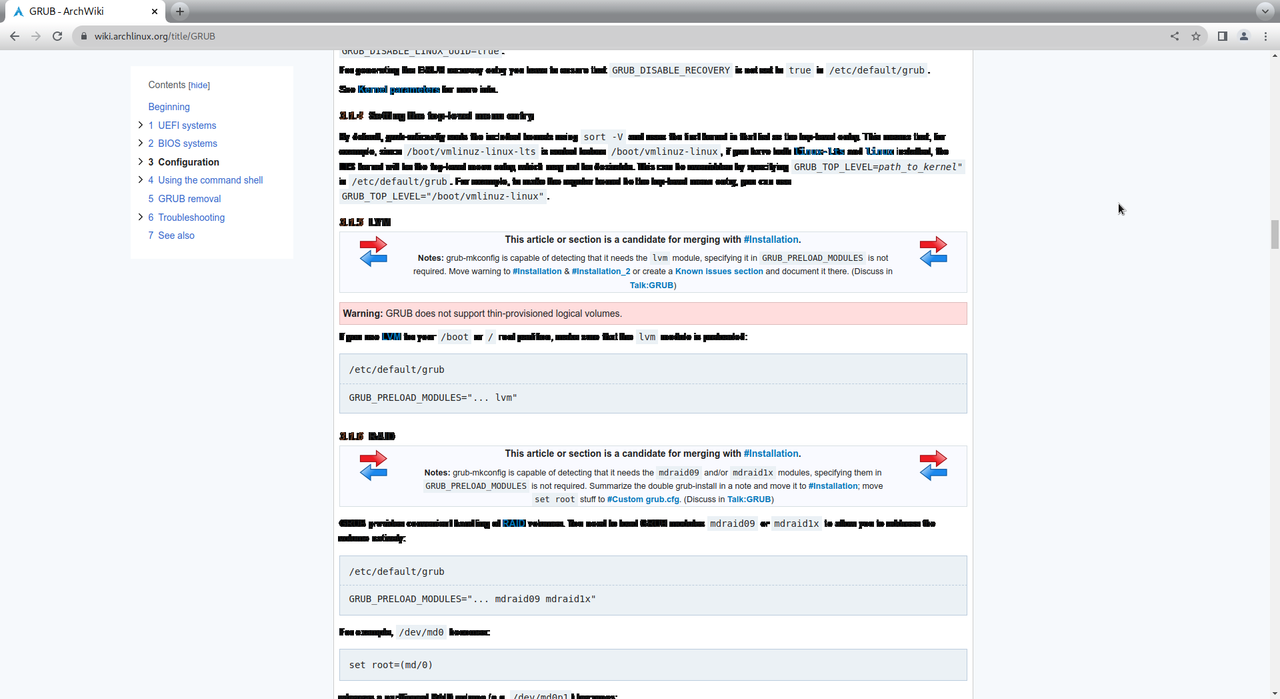
This is the same chromium-version, but with no plugins or special configuration.
So I think I have to submit a bug to chromium...
Offline
#8 2023-01-31 14:52:44
- seth
- Member
- From: Won't reply 2 private help req
- Registered: 2012-09-03
- Posts: 77,854
Re: chromium, fontweight changes to bold on scroll randomly
Please replace the oversized image with a link, the board has a 250²px² max rule
That being said: that's not a bold font anymore, it looks like either the hinting has gone haywire or the glyph cache been corrupted.
Despite the skunktrader being on different HW, can you reproduce this w/
chromium --use-gl=swiftshader --disable-gpu-rasterizationOffline
#9 2023-02-01 06:26:25
- easy
- Member
- Registered: 2015-09-23
- Posts: 18
Re: chromium, fontweight changes to bold on scroll randomly
Please replace the oversized image with a link, the board has a 250²px² max rule
Will link the image next time instead of embedding it. Didn't know that there is a rule for image size, in the quick help there is no such entry.
And it looks like a known bug which seems fixed in current dev builds.
Tested with chromium Version 112.0.5573.0 (Developer Build) (64-bit) and I have no font rendering issues by quick testing some wiki pages.
Edit: See https://bugs.chromium.org/p/chromium/is … 363981#c60
Regards.
Last edited by easy (2023-02-01 06:26:43)
Offline
#10 2023-02-01 07:23:01
- seth
- Member
- From: Won't reply 2 private help req
- Registered: 2012-09-03
- Posts: 77,854
Re: chromium, fontweight changes to bold on scroll randomly
"Quick help"?
https://wiki.archlinux.org/title/Genera … s_and_code
Thanks for linking the upstream bug.
Offline