You are not logged in.
- Topics: Active | Unanswered
#1 2023-02-11 13:49:47
- linken
- Member
- Registered: 2023-02-11
- Posts: 4
[SOLVED] amdgpu wayland screen resolution
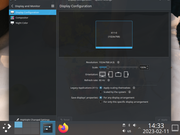
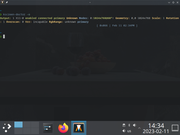
Is there any information on how to get proper screen resolutions to show up?
In X11 everything works just fine, however in wayland I get this:
Last edited by linken (2023-02-12 20:12:53)
Offline
#2 2023-02-11 15:57:45
- ewaller
- Administrator

- From: Pasadena, CA
- Registered: 2009-07-13
- Posts: 20,701
Re: [SOLVED] amdgpu wayland screen resolution
I note there are little information icons next to the resolution (i inside a small circle). Does clicking on those relate anything useful?
Nothing is too wonderful to be true, if it be consistent with the laws of nature -- Michael Faraday
The shortest way to ruin a country is to give power to demagogues.— Dionysius of Halicarnassus
---
How to Ask Questions the Smart Way
Offline
#3 2023-02-11 21:18:49
- V1del
- Forum Moderator

- Registered: 2012-10-16
- Posts: 25,384
Re: [SOLVED] amdgpu wayland screen resolution
You shouldn't see an X11 screen here... Do you have QT_QPA_PLATFORM=xcb exported globally somewhere? qt5-wayland installed?
Offline
#4 2023-02-12 19:47:00
- linken
- Member
- Registered: 2023-02-11
- Posts: 4
Re: [SOLVED] amdgpu wayland screen resolution
@ewaller - no nothing useful
@V1del:
Yes qt5-wayland installed.
I start with this script, using xcb fails to start plasma, it's just loading...
using startx
```bash
~/.xinitrc
#!/usr/bin/env bash
export DESKTOP_SESSION=plasma
export XDG_SESSION_TYPE=wayland
if [[ "${XDG_SESSION_TYPE}" = "wayland" ]]; then
export QT_QPA_PLATFORM="wayland;xcb"
export CLUTTER_BACKEND="wayland"
export SDL_VIDEODRIVER="wayland"
export GDK_BACKEND=x11="wayland"
export MOZ_ENABLE_WAYLAND=1
startplasma-wayland
else
startplasma-x11
fi
```
Last edited by linken (2023-02-12 19:49:24)
Offline
#5 2023-02-12 20:11:15
- linken
- Member
- Registered: 2023-02-11
- Posts: 4
Re: [SOLVED] amdgpu wayland screen resolution
@V1del: I tried to do only:
startplasma-wayland
not using startx, this worked perfectly thanks both of you.
Offline
#6 2023-02-12 20:22:27
- progandy
- Member

- Registered: 2012-05-17
- Posts: 5,321
Re: [SOLVED] amdgpu wayland screen resolution
Some more information on why that works: You should never use startx to start a wayland session. startx will start up an x server and then the desktop environment inside that. For wayland, you start the desktop environment directly, it will not use an external display server, but provide its own server/compositor.
Last edited by progandy (2023-02-12 20:22:47)
| alias CUTF='LANG=en_XX.UTF-8@POSIX ' | alias ENGLISH='LANG=C.UTF-8 ' |
Offline
#7 2023-02-12 20:32:11
- linken
- Member
- Registered: 2023-02-11
- Posts: 4
Re: [SOLVED] amdgpu wayland screen resolution
Alright, thanks
Offline