You are not logged in.
- Topics: Active | Unanswered
Pages: 1
#1 2023-07-15 12:35:11
- TotoShampoin
- Member
- Registered: 2023-07-01
- Posts: 62
- Website
[SOLVED] NVidia driver not working anymore
Hello!
So, I have updated all my packages recently, and today, I realized that the NVidia drivers have stopped working.
My laptop is currently unable to use the dedicated GPU.
It is a Dell G3 15 3500, and I'm using nvidia-dkms as the driver.
[14:32:35 totoshampoin] ~$ lspci -k | grep -A 2 -E "(VGA|3D)"
00:02.0 VGA compatible controller: Intel Corporation CometLake-H GT2 [UHD Graphics] (rev 05)
        DeviceName: Onboard - Video
        Subsystem: Dell CometLake-H GT2 [UHD Graphics]
--
01:00.0 VGA compatible controller: NVIDIA Corporation TU116M [GeForce GTX 1660 Ti Mobile] (rev a1)
        Subsystem: Dell TU116M [GeForce GTX 1660 Ti Mobile]
        Kernel modules: nouveau
[14:32:43 totoshampoin] ~$ pacman -Qi nvidia
Nom                      : nvidia-dkms
Version                  : 535.54.03-1
Description              : NVIDIA drivers - module sources
Architecture             : x86_64
URL                      : http://www.nvidia.com/
Licences                 : custom
Groupes                  : --
Fournit                  : NVIDIA-MODULE  nvidia
Dépend de                : dkms  nvidia-utils=535.54.03  libglvnd
Dépendances opt.         : --
Requis par               : --
Optionnel pour           : --
Est en conflit avec      : NVIDIA-MODULE  nvidia
Remplace                 : --
Taille installée         : 69,53 MiB
Paqueteur                : Sven-Hendrik Haase <svenstaro@archlinux.org>
Compilé le               : mer. 14 juin 2023 16:56:31
Installé le              : sam. 15 juil. 2023 14:05:21
Motif d’installation     : Explicitement installé
Script d’installation    : Non
Validé par               : Signature
I did notice that it says "Kernel modules: nouveau", but that's weird because I never installed it, and I have in fact blacklisted it...
Last edited by TotoShampoin (2023-07-15 14:34:16)
Offline
#2 2023-07-15 12:39:02
- Scimmia
- Fellow

- Registered: 2012-09-01
- Posts: 13,727
Re: [SOLVED] NVidia driver not working anymore
Did the module actually build when you updated? If you're not sure, reinstall the kernel and watch the output.
Offline
#3 2023-07-15 12:41:53
- TotoShampoin
- Member
- Registered: 2023-07-01
- Posts: 62
- Website
Re: [SOLVED] NVidia driver not working anymore
What's the command for that, again?
Last edited by TotoShampoin (2023-07-15 12:52:21)
Offline
#4 2023-07-15 12:55:55
- TotoShampoin
- Member
- Registered: 2023-07-01
- Posts: 62
- Website
Re: [SOLVED] NVidia driver not working anymore
Is this the one?
[14:35:31 totoshampoin] ~$ sudo mkinitcpio -P
[sudo] Mot de passe de totoshampoin :
==> Building image from preset: /etc/mkinitcpio.d/linux.preset: 'default'
==> Using default configuration file: '/etc/mkinitcpio.conf'
  -> -k /boot/vmlinuz-linux -g /boot/initramfs-linux.img --microcode /boot/intel-ucode.img
==> Starting build: '6.4.3-arch1-1'
  -> Running build hook: [base]
  -> Running build hook: [systemd]
  -> Running build hook: [autodetect]
  -> Running build hook: [keyboard]
==> WARNING: Possibly missing firmware for module: 'xhci_pci'
  -> Running build hook: [sd-vconsole]
  -> Running build hook: [modconf]
  -> Running build hook: [block]
  -> Running build hook: [filesystems]
  -> Running build hook: [fsck]
==> Generating module dependencies
==> Creating zstd-compressed initcpio image: '/boot/initramfs-linux.img'
==> Image generation successful
==> Building image from preset: /etc/mkinitcpio.d/linux.preset: 'fallback'
==> Using default configuration file: '/etc/mkinitcpio.conf'
  -> -k /boot/vmlinuz-linux -g /boot/initramfs-linux-fallback.img -S autodetect --microcode /boot/intel-ucode.img
==> Starting build: '6.4.3-arch1-1'
  -> Running build hook: [base]
  -> Running build hook: [systemd]
  -> Running build hook: [keyboard]
==> WARNING: Possibly missing firmware for module: 'xhci_pci'
  -> Running build hook: [sd-vconsole]
  -> Running build hook: [modconf]
  -> Running build hook: [block]
==> WARNING: Possibly missing firmware for module: 'qla2xxx'
==> WARNING: Possibly missing firmware for module: 'qla1280'
==> WARNING: Possibly missing firmware for module: 'qed'
==> WARNING: Possibly missing firmware for module: 'bfa'
==> WARNING: Possibly missing firmware for module: 'wd719x'
==> WARNING: Possibly missing firmware for module: 'aic94xx'
  -> Running build hook: [filesystems]
  -> Running build hook: [fsck]
==> Generating module dependencies
==> Creating zstd-compressed initcpio image: '/boot/initramfs-linux-fallback.img'
==> Image generation successful
==> Building image from preset: /etc/mkinitcpio.d/linux-zen.preset: 'default'
==> Using default configuration file: '/etc/mkinitcpio.conf'
  -> -k /boot/vmlinuz-linux-zen -g /boot/initramfs-linux-zen.img --microcode /boot/intel-ucode.img
==> Starting build: '6.4.3-zen1-1-zen'
  -> Running build hook: [base]
  -> Running build hook: [systemd]
  -> Running build hook: [autodetect]
  -> Running build hook: [keyboard]
==> WARNING: Possibly missing firmware for module: 'xhci_pci'
  -> Running build hook: [sd-vconsole]
  -> Running build hook: [modconf]
  -> Running build hook: [block]
  -> Running build hook: [filesystems]
  -> Running build hook: [fsck]
==> Generating module dependencies
==> Creating zstd-compressed initcpio image: '/boot/initramfs-linux-zen.img'
==> Image generation successful
==> Building image from preset: /etc/mkinitcpio.d/linux-zen.preset: 'fallback'
==> Using default configuration file: '/etc/mkinitcpio.conf'
  -> -k /boot/vmlinuz-linux-zen -g /boot/initramfs-linux-zen-fallback.img -S autodetect --microcode /boot/intel-ucode.img
==> Starting build: '6.4.3-zen1-1-zen'
  -> Running build hook: [base]
  -> Running build hook: [systemd]
  -> Running build hook: [keyboard]
==> WARNING: Possibly missing firmware for module: 'xhci_pci'
  -> Running build hook: [sd-vconsole]
  -> Running build hook: [modconf]
  -> Running build hook: [block]
==> WARNING: Possibly missing firmware for module: 'qla2xxx'
==> WARNING: Possibly missing firmware for module: 'qla1280'
==> WARNING: Possibly missing firmware for module: 'qed'
==> WARNING: Possibly missing firmware for module: 'bfa'
==> WARNING: Possibly missing firmware for module: 'wd719x'
==> WARNING: Possibly missing firmware for module: 'aic94xx'
  -> Running build hook: [filesystems]
  -> Running build hook: [fsck]
==> Generating module dependencies
==> Creating zstd-compressed initcpio image: '/boot/initramfs-linux-zen-fallback.img'
==> Image generation successful
Offline
#5 2023-07-15 13:18:44
- seth
- Member

- From: Won't reply 2 private help req
- Registered: 2012-09-03
- Posts: 76,009
Re: [SOLVED] NVidia driver not working anymore
Is the initcpio a module?
https://wiki.archlinux.org/title/Dynami … le_Support
What's the command for that, again?
How did you install archlinux, again?
Offline
#6 2023-07-15 13:20:09
- TotoShampoin
- Member
- Registered: 2023-07-01
- Posts: 62
- Website
Re: [SOLVED] NVidia driver not working anymore
Well, I installed it using archinstall.
Is that ruled out, btw?
Anyway, I selected the proprietary nvidia driver for KDE plasma profile
Last edited by TotoShampoin (2023-07-15 13:20:58)
Offline
#7 2023-07-15 13:27:24
- seth
- Member
- From: Won't reply 2 private help req
- Registered: 2012-09-03
- Posts: 76,009
Re: [SOLVED] NVidia driver not working anymore
The archinstall script is (was?) officially not meant to be used by end users to install archlinux.
https://wiki.archlinux.org/title/Archinstall - see teh warning and also https://bbs.archlinux.org/viewtopic.php … 1#p1965851 - though idk where Alad got that from, doesn't seem on the archinstall homepage nor github, maybe some internal discussion.
It however explains why you had no idea what Scimmia was even talking about, did you read the dkms page?
Offline
#8 2023-07-15 13:32:44
- TotoShampoin
- Member
- Registered: 2023-07-01
- Posts: 62
- Website
Re: [SOLVED] NVidia driver not working anymore
Well, I just did, and I just tried
[15:15:27 totoshampoin] ~$ dkms status
nvidia/535.54.03: added
[15:31:05 totoshampoin] ~$ dkms install nvidia/535.54.03
Error! You must be root to use this command.
[15:31:49 totoshampoin] ~$ sudo dkms install nvidia/535.54.03
[sudo] Mot de passe de totoshampoin :
Sign command: /usr/lib/modules/6.4.3-zen1-1-zen/build/scripts/sign-file
Signing key: /var/lib/dkms/mok.key
Public certificate (MOK): /var/lib/dkms/mok.pub
Error! This module/version has already been built on: 6.4.3-zen1-1-zen
Directory /var/lib/dkms/nvidia/535.54.03/6.4.3-zen1-1-zen/x86_64 already exists. Use the dkms remove function before trying to build again.
It appears it is already installed
EDIT:
That being said, the friend who told me to mkinicpio -P also told me to mkinitcpio -M, and we noticed that nouveau was still there, and neither dkms or nvidia was there
Last edited by TotoShampoin (2023-07-15 13:35:11)
Offline
#9 2023-07-15 13:40:07
- seth
- Member
- From: Won't reply 2 private help req
- Registered: 2012-09-03
- Posts: 76,009
Re: [SOLVED] NVidia driver not working anymore
Not it appears not.
nvidia/535.54.03: added
That should be sth. like
nvidia/535.54.03, 6.4.3-zen1-1-zen, x86_64: installedUse the dkms remove function before trying to build again.
friend who told me to mkinicpio -P also told me to mkinitcpio -M, and we noticed that nouveau was still there
Unrelated to dkms but what do the hooks in your mkinitcpio.conf look like?
Offline
#10 2023-07-15 13:44:47
- TotoShampoin
- Member
- Registered: 2023-07-01
- Posts: 62
- Website
Re: [SOLVED] NVidia driver not working anymore
Unrelated to dkms but what do the hooks in your mkinitcpio.conf look like?
He asked me the same thing
[15:12:32 totoshampoin] ~$ cat /etc/mkinitcpio.conf
MODULES=()
BINARIES=()
FILES=()
HOOKS=(base systemd autodetect keyboard sd-vconsole modconf block filesystems fsck)
.
Use the dkms remove function before trying to build again.
[15:43:50 totoshampoin] ~$ sudo dkms remove nvidia/535.54.03 --all
[15:43:55 totoshampoin] ~$ sudo dkms install nvidia/535.54.03
Sign command: /usr/lib/modules/6.4.3-zen1-1-zen/build/scripts/sign-file
Signing key: /var/lib/dkms/mok.key
Public certificate (MOK): /var/lib/dkms/mok.pub
Error! This module/version has already been built on: 6.4.3-zen1-1-zen
Directory /var/lib/dkms/nvidia/535.54.03/6.4.3-zen1-1-zen/x86_64 already exists. Use the dkms remove function before trying to build again.
Am I missing something?
Last edited by TotoShampoin (2023-07-15 13:45:05)
Offline
#11 2023-07-15 13:49:18
- seth
- Member
- From: Won't reply 2 private help req
- Registered: 2012-09-03
- Posts: 76,009
Re: [SOLVED] NVidia driver not working anymore
https://wiki.archlinux.org/title/Dynami … ve_modules
Last line.
Probably stray residual because you removed and re-installed dkms at some point?
modinfo nvidiaLast edited by seth (2023-07-15 13:49:51)
Offline
#12 2023-07-15 14:08:06
- TotoShampoin
- Member
- Registered: 2023-07-01
- Posts: 62
- Website
Re: [SOLVED] NVidia driver not working anymore
I don't remember having removed and reinstalled dkms, and I can't check if my pacman upgrade (and my yay upgrade) did either.
modinfo says "Module nvidia not found".
And as for that link in the wiki, I try to understand the state machine thing, and I try to run commands accordingly, but it still fails...
[16:06:29 totoshampoin] ~$ sudo dkms remove nvidia/535.54.03
Module nvidia 535.54.03 is not installed for kernel 6.4.3-zen1-1-zen (x86_64). Skipping...
Module nvidia 535.54.03 is not built for kernel 6.4.3-zen1-1-zen (x86_64). Skipping...
[16:06:32 totoshampoin] ~$ sudo dkms uninstall nvidia/535.54.03 --all
[16:06:35 totoshampoin] ~$ sudo dkms build nvidia/535.54.03
Sign command: /usr/lib/modules/6.4.3-zen1-1-zen/build/scripts/sign-file
Signing key: /var/lib/dkms/mok.key
Public certificate (MOK): /var/lib/dkms/mok.pub
Error! This module/version has already been built on: 6.4.3-zen1-1-zen
Directory /var/lib/dkms/nvidia/535.54.03/6.4.3-zen1-1-zen/x86_64 already exists. Use the dkms remove function before trying to build again.
Offline
#13 2023-07-15 14:15:48
- seth
- Member
- From: Won't reply 2 private help req
- Registered: 2012-09-03
- Posts: 76,009
Re: [SOLVED] NVidia driver not working anymore
State machine??
If the package dkms is removed the information regarding previous module build files is lost. If this is the case, go through /usr/lib/modules/kernel_release and /var/lib/dkms/package_name and delete all files and directories no longer in use.
Offline
#14 2023-07-15 14:27:08
- TotoShampoin
- Member
- Registered: 2023-07-01
- Posts: 62
- Website
Re: [SOLVED] NVidia driver not working anymore
Oh, that's the line you talked about? I thought you meant the "See also" section...
By state machine, I meant this thing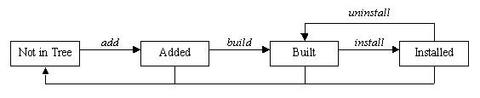
Anyway, I removed the nvidia dkms package, added it, built it and installed it, then I rebooted, and it all works now.
Thanks for your help!
Offline
#15 2023-07-15 14:33:46
- TotoShampoin
- Member
- Registered: 2023-07-01
- Posts: 62
- Website
Re: [SOLVED] NVidia driver not working anymore
As a matter of fact, I will give the exact step by step of what I have done to solve my issue, in case anyone runs into my problem:
$ ls /var/lib/dkms/nvidia/
535.54.03

# rm -rf /var/lib/dkms/nvidia/535.54.03

# dkms add nvidia/535.54.03

# dkms build nvidia/535.54.03

# dkms install nvidia/535.54.03

$ reboot
And everything worked again
Offline
Pages: 1