You are not logged in.
- Topics: Active | Unanswered
#1 2023-08-22 20:22:32
- Blueberry7953
- Member
- Registered: 2023-08-22
- Posts: 3
[SOLVED] Partition manager and file manager show different free space
Hi! I installed Arch on my laptop with 1TB NVMe SSD.
I am currently using KDE Plasma desktop environment, and its Dolphin file manager reports I have 878GiB of free space on my root partition (screenshot)
However, KDE Partition Manager shows that the size of my root partition is 952GiB (screenshot)
Where did 74GiB of space go? Did I mess something up during the partitioning step of installation? I was using fdisk and did everything according to wiki.
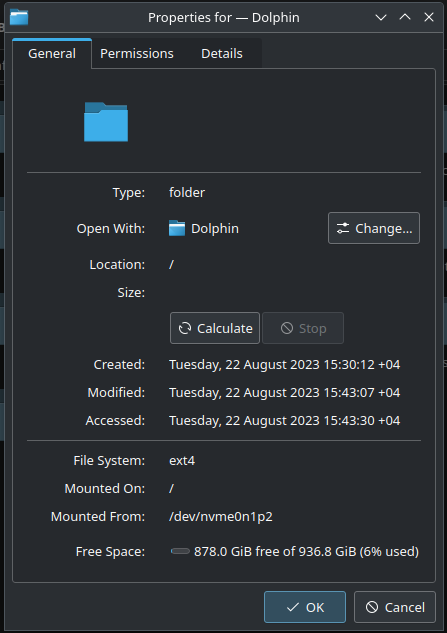
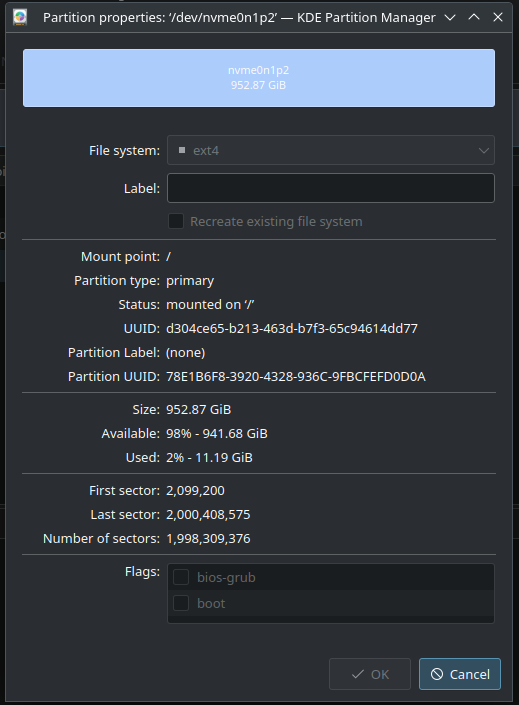
Last edited by Blueberry7953 (2023-08-22 21:48:51)
Offline
#2 2023-08-22 20:57:43
- seth
- Member

- From: Won't reply 2 private help req
- Registered: 2012-09-03
- Posts: 76,104
Re: [SOLVED] Partition manager and file manager show different free space
Please replace the oversized images w/ links (the board has a 250x250 px max rule)
One option is oc that the GUI stuff is broken…
df -h
df -HOffline
#3 2023-08-22 21:18:10
- Blueberry7953
- Member
- Registered: 2023-08-22
- Posts: 3
Re: [SOLVED] Partition manager and file manager show different free space
df -h
Filesystem      Size  Used Avail Use% Mounted on
dev             7.5G     0  7.5G   0% /dev
run             7.6G  5.6M  7.6G   1% /run
/dev/nvme0n1p2  937G   12G  878G   2% /
tmpfs           7.6G     0  7.6G   0% /dev/shm
tmpfs           7.6G   15M  7.6G   1% /tmp
/dev/nvme0n1p1 1022M  244M  779M  24% /boot
tmpfs           1.6G   44K  1.6G   1% /run/user/1000
df -H
Filesystem      Size  Used Avail Use% Mounted on
dev             8.1G     0  8.1G   0% /dev
run             8.1G  5.9M  8.1G   1% /run
/dev/nvme0n1p2  1.1T   13G  943G   2% /
tmpfs           8.1G     0  8.1G   0% /dev/shm
tmpfs           8.1G   16M  8.1G   1% /tmp
/dev/nvme0n1p1  1.1G  255M  817M  24% /boot
tmpfs           1.7G   46k  1.7G   1% /run/user/1000
Offline
#4 2023-08-22 21:39:59
- seth
- Member
- From: Won't reply 2 private help req
- Registered: 2012-09-03
- Posts: 76,104
Re: [SOLVED] Partition manager and file manager show different free space
Dolphin accurately shows the filesystem size and usage in GiB (2^10), kpartmanager fits a 512kB sector size in GiB (2^10) for the partition - it does NOT show the filesystem size
kpartmanager then seems to calculate the usage and free space from the filesystem (2%) but ignores the 5% reserve that's available to root processes only that dolphin and df account for, https://man.archlinux.org/man/core/e2fs … en#resgid=
The kpartmanager data is kinda confusing but this looks all fine.
Offline
#5 2023-08-22 21:46:27
- Blueberry7953
- Member
- Registered: 2023-08-22
- Posts: 3
Re: [SOLVED] Partition manager and file manager show different free space
I didn't know some space was reserved. It makes sense now. Thanks!
Offline