You are not logged in.
- Topics: Active | Unanswered
#1 2023-09-25 13:17:14
- HomyC0der
- Member
- Registered: 2023-09-25
- Posts: 20
Problems with i3 / something really strange
The terminal suddenly stopped working ($mod+Enter). When restarting i3, a config error appears. I can't edit the config. When i launch the terminal, an empty window appears; when i launch another terminal, an input line appears in the first one: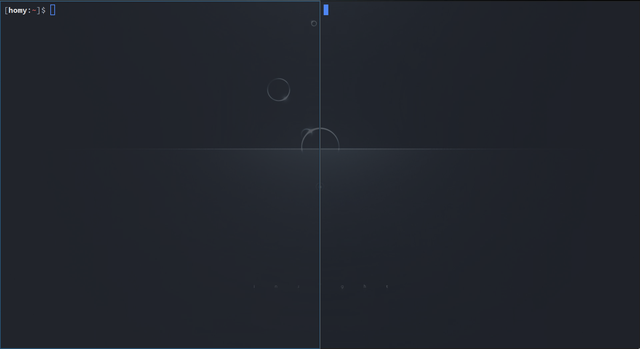
After I entered something into the terminal, I launched the third one, and what I entered appears in the first one. What could it be?
When nautilus starts, nothing is displayed; after clicking there is an error: "Unable to access location. Not authorized to perform operation"
I figured out that xterm works correctly, problems with alacritty and nautilus.
Help, please
Last edited by HomyC0der (2023-09-25 18:50:27)
Offline
#2 2023-09-25 13:32:55
- Irets
- Member
- Registered: 2019-02-01
- Posts: 143
Re: Problems with i3 / something really strange
>When restarting i3, a config error appears.
What is that error?
>I can't edit the config
Why can't you edit the config? Your TTY still works, right?
Do you happen to use oh-my-zsh?
How do you start X?
Offline
#3 2023-09-25 14:10:36
- seth
- Member

- From: Won't reply 2 private help req
- Registered: 2012-09-03
- Posts: 76,093
Re: Problems with i3 / something really strange
Do you also use a compositor (picom/xcompmgr)?
Offline
#4 2023-09-25 14:23:19
- HomyC0der
- Member
- Registered: 2023-09-25
- Posts: 20
Re: Problems with i3 / something really strange
>When restarting i3, a config error appears.
What is that error?
>I can't edit the config
Why can't you edit the config? Your TTY still works, right?Do you happen to use oh-my-zsh?
How do you start X?
> What is that error?
Config error:
> Why can't you edit the config? Your TTY still works, right?
Yes, my TTY still works, but i can't normally open terminal and edit config, every action that i perform in the terminal blindly is executed only after opening one more terminal..
> Do you happen to use oh-my-zsh?
Yes, i use oh-my-zsh
> How do you start X?
startx i starting automatically with .zprofile (startx /usr/bin/i3)
Offline
#5 2023-09-25 14:24:04
- HomyC0der
- Member
- Registered: 2023-09-25
- Posts: 20
Re: Problems with i3 / something really strange
Do you also use a compositor (picom/xcompmgr)?
Yes, picom
Offline
#6 2023-09-25 14:26:53
- Irets
- Member
- Registered: 2019-02-01
- Posts: 143
Re: Problems with i3 / something really strange
Switch your shell back to /bin/bash and proceed from there to fixing your config.
Use your TTY, not a terminal emulator, as it doesn't seem to get you anywhere right now.
Unfortunately I've got no clue what .zprofile is.
Last edited by Irets (2023-09-25 14:27:25)
Offline
#7 2023-09-25 14:32:35
- seth
- Member
- From: Won't reply 2 private help req
- Registered: 2012-09-03
- Posts: 76,093
Re: Problems with i3 / something really strange
Your i3config has an "I tried to use vim" error (stray "i")
Try to kill picom or just don't start it.
@Irets, https://man.archlinux.org/man/extra/zsh … DOWN_FILES
Offline
#8 2023-09-25 14:35:31
- HomyC0der
- Member
- Registered: 2023-09-25
- Posts: 20
Re: Problems with i3 / something really strange
Your i3config has an "I tried to use vim" error (stray "i")
Try to kill picom or just don't start it.
picom is down, i don't know what to do, i can't normally use terminal yet
Last edited by HomyC0der (2023-09-25 14:40:13)
Offline
#9 2023-09-25 15:00:42
- seth
- Member
- From: Won't reply 2 private help req
- Registered: 2012-09-03
- Posts: 76,093
Re: Problems with i3 / something really strange
Have you tried to set your shell back to bash? (OMZ situation)
Have fixed your i3config?
Offline
#10 2023-09-25 15:02:42
- HomyC0der
- Member
- Registered: 2023-09-25
- Posts: 20
Re: Problems with i3 / something really strange
Have you tried to set your shell back to bash? (OMZ situation)
Have fixed your i3config?
Yes, i tried to set shell back to bash, nothing. Even tried to rename config file and drop it to default (cant be an error), but terminal worked as before with lags (not work at all).
Last edited by HomyC0der (2023-09-25 15:11:46)
Offline
#11 2023-09-25 15:19:17
- seth
- Member
- From: Won't reply 2 private help req
- Registered: 2012-09-03
- Posts: 76,093
Re: Problems with i3 / something really strange
What is your terminal emuator?
Try xterm.
And "echo $SHELL" to make sure you're not running zsh in there.
Offline
#12 2023-09-25 16:25:34
- HomyC0der
- Member
- Registered: 2023-09-25
- Posts: 20
Re: Problems with i3 / something really strange
What is your terminal emuator?
Try xterm.
And "echo $SHELL" to make sure you're not running zsh in there.
It cannot be terminal problem. Nautilus (file manager) doesn’t work to.
Btw, alacritty and i definitely changed shell to bash
Offline
#13 2023-09-25 18:51:16
- HomyC0der
- Member
- Registered: 2023-09-25
- Posts: 20
Re: Problems with i3 / something really strange
What is your terminal emuator?
Try xterm.
And "echo $SHELL" to make sure you're not running zsh in there.
xterm works correctly, but when starting alacritty/nautilus - problems..i don't know how to solve this problem
Offline
#14 2023-09-25 19:01:21
- seth
- Member
- From: Won't reply 2 private help req
- Registered: 2012-09-03
- Posts: 76,093
Re: Problems with i3 / something really strange
glxinfo -Band please post your Xorg log, https://wiki.archlinux.org/title/Xorg#General
Offline
#15 2023-09-25 19:47:26
- HomyC0der
- Member
- Registered: 2023-09-25
- Posts: 20
Re: Problems with i3 / something really strange
glxinfo -Band please post your Xorg log, https://wiki.archlinux.org/title/Xorg#General
Xorg log: https://pastebin.com/WZ0NHQs2
> glxinfo -B
Error: Can't open display
Offline
#16 2023-09-25 19:53:04
- seth
- Member
- From: Won't reply 2 private help req
- Registered: 2012-09-03
- Posts: 76,093
Re: Problems with i3 / something really strange
glxinfo will only work with a running X11 server, but get rid of xf86-video-intel
Offline
#17 2023-09-25 19:55:48
- HomyC0der
- Member
- Registered: 2023-09-25
- Posts: 20
Re: Problems with i3 / something really strange
glxinfo will only work with a running X11 server, but get rid of xf86-video-intel
glxinfo -B output: https://pastebin.com/k6p435sV
Offline
#18 2023-09-25 20:09:55
- seth
- Member
- From: Won't reply 2 private help req
- Registered: 2012-09-03
- Posts: 76,093
Re: Problems with i3 / something really strange
get rid of xf86-video-intel
Offline