You are not logged in.
- Topics: Active | Unanswered
#1 2023-10-20 20:23:15
- SPYAM
- Member
- From: IRAN
- Registered: 2020-11-12
- Posts: 156
Problems after installing arch xfce
Hello
I completely deleted my kde version and then installed the xfce version of Arch.
I did everything OK, I have three basic problems:
1- After installing Arch Linux, I had sound, but after a day I have no sound! PluseAudio is also installed!
2- lightdm-webkit2-greeter whenever I install the theme, I get the following error:
An error was detected in the current theme that cloud interface with the system login process.
lightdm-webkit2-greeter.conf :
#
# [greeter]
# debug_mode          = Greeter theme debug mode.
# detect_theme_errors = Provide an option to load a fallback theme when theme errors are detected.
# screensaver_timeout = Blank the screen after this many seconds of inactivity.
# secure_mode         = Don't allow themes to make remote http requests.
# time_format         = A moment.js format string so the greeter can generate localized time for display.
# time_language       = Language to use when displaying the time or "auto" to use the system's language.
# webkit_theme        = Webkit theme to use.
#
# NOTE: See moment.js documentation for format string options: http://momentjs.com/docs/#/displaying/format/
#

[greeter]
debug_mode = true
detect_theme_errors = true
screensaver_timeout = 300
secure_mode         = true
time_format         = LT
time_language       = auto
webkit_theme = material2

#
# [branding]
# background_images = Path to directory that contains background images for use by themes.
# logo              = Path to logo image for use by greeter themes.
# user_image        = Default user image/avatar. This is used by themes for users that have no .face image.
#
# NOTE: Paths must be accessible to the lightdm system user account (so they cannot be anywhere in /home)
#

[branding]
background_images = /usr/share/backgrounds
logo              = /usr/share/pixmaps/archlinux-logo.svg
user_image        = /usr/share/pixmaps/archlinux-user.svg
lightdm.conf :
#
# General configuration
#
# start-default-seat = True to always start one seat if none are defined in the configuration
# greeter-user = User to run greeter as
# minimum-display-number = Minimum display number to use for X servers
# minimum-vt = First VT to run displays on
# lock-memory = True to prevent memory from being paged to disk
# user-authority-in-system-dir = True if session authority should be in the system location
# guest-account-script = Script to be run to setup guest account
# logind-check-graphical = True to on start seats that are marked as graphical by logind
# log-directory = Directory to log information to
# run-directory = Directory to put running state in
# cache-directory = Directory to cache to
# sessions-directory = Directory to find sessions
# remote-sessions-directory = Directory to find remote sessions
# greeters-directory = Directory to find greeters
# backup-logs = True to move add a .old suffix to old log files when opening new ones
# dbus-service = True if LightDM provides a D-Bus service to control it
#
[LightDM]
#start-default-seat=true
#greeter-user=lightdm
#minimum-display-number=0
#minimum-vt=7 # Setting this to a value < 7 implies security issues, see FS#46799
#lock-memory=true
#user-authority-in-system-dir=false
#guest-account-script=guest-account
#logind-check-graphical=true
#log-directory=/var/log/lightdm
run-directory=/run/lightdm
#cache-directory=/var/cache/lightdm
#sessions-directory=/usr/share/lightdm/sessions:/usr/share/xsessions:/usr/share/wayland-sessions
#remote-sessions-directory=/usr/share/lightdm/remote-sessions
#greeters-directory=$XDG_DATA_DIRS/lightdm/greeters:$XDG_DATA_DIRS/xgreeters
#backup-logs=true
#dbus-service=true

#
# Seat configuration
#
# Seat configuration is matched against the seat name glob in the section, for example:
# [Seat:*] matches all seats and is applied first.
# [Seat:seat0] matches the seat named "seat0".
# [Seat:seat-thin-client*] matches all seats that have names that start with "seat-thin-client".
#
# type = Seat type (local, xremote)
# pam-service = PAM service to use for login
# pam-autologin-service = PAM service to use for autologin
# pam-greeter-service = PAM service to use for greeters
# xserver-command = X server command to run (can also contain arguments e.g. X -special-option)
# xmir-command = Xmir server command to run (can also contain arguments e.g. Xmir -special-option)
# xserver-config = Config file to pass to X server
# xserver-layout = Layout to pass to X server
# xserver-allow-tcp = True if TCP/IP connections are allowed to this X server
# xserver-share = True if the X server is shared for both greeter and session
# xserver-hostname = Hostname of X server (only for type=xremote)
# xserver-display-number = Display number of X server (only for type=xremote)
# xdmcp-manager = XDMCP manager to connect to (implies xserver-allow-tcp=true)
# xdmcp-port = XDMCP UDP/IP port to communicate on
# xdmcp-key = Authentication key to use for XDM-AUTHENTICATION-1 (stored in keys.conf)
# greeter-session = Session to load for greeter
# greeter-hide-users = True to hide the user list
# greeter-allow-guest = True if the greeter should show a guest login option
# greeter-show-manual-login = True if the greeter should offer a manual login option
# greeter-show-remote-login = True if the greeter should offer a remote login option
# user-session = Session to load for users
# allow-user-switching = True if allowed to switch users
# allow-guest = True if guest login is allowed
# guest-session = Session to load for guests (overrides user-session)
# session-wrapper = Wrapper script to run session with
# greeter-wrapper = Wrapper script to run greeter with
# guest-wrapper = Wrapper script to run guest sessions with
# display-setup-script = Script to run when starting a greeter session (runs as root)
# display-stopped-script = Script to run after stopping the display server (runs as root)
# greeter-setup-script = Script to run when starting a greeter (runs as root)
# session-setup-script = Script to run when starting a user session (runs as root)
# session-cleanup-script = Script to run when quitting a user session (runs as root)
# autologin-guest = True to log in as guest by default
# autologin-user = User to log in with by default (overrides autologin-guest)
# autologin-user-timeout = Number of seconds to wait before loading default user
# autologin-session = Session to load for automatic login (overrides user-session)
# autologin-in-background = True if autologin session should not be immediately activated
# exit-on-failure = True if the daemon should exit if this seat fails
#
[Seat:*]
#type=local
#pam-service=lightdm
#pam-autologin-service=lightdm-autologin
#pam-greeter-service=lightdm-greeter
#xserver-command=X
#xmir-command=Xmir
#xserver-config=
#xserver-layout=
#xserver-allow-tcp=false
#xserver-share=true
#xserver-hostname=
#xserver-display-number=
#xdmcp-manager=
#xdmcp-port=177
#xdmcp-key=
greeter-session=lightdm-webkit2-greeter
#greeter-hide-users=false
#greeter-allow-guest=true
#greeter-show-manual-login=false
#greeter-show-remote-login=true
#user-session=default
#allow-user-switching=true
#allow-guest=false
#guest-session=
session-wrapper=/etc/lightdm/Xsession
#greeter-wrapper=
#guest-wrapper=
#display-setup-script=
#display-stopped-script=
#greeter-setup-script=
#session-setup-script=
#session-cleanup-script=
#autologin-guest=false
#autologin-user=
#autologin-user-timeout=0
#autologin-in-background=false
#autologin-session=
#exit-on-failure=false

#
# XDMCP Server configuration
#
# enabled = True if XDMCP connections should be allowed
# port = UDP/IP port to listen for connections on
# listen-address = Host/address to listen for XDMCP connections (use all addresses if not present)
# key = Authentication key to use for XDM-AUTHENTICATION-1 or blank to not use authentication (stored in keys.conf)
# hostname = Hostname to report to XDMCP clients (defaults to system hostname if unset)
#
# The authentication key is a 56 bit DES key specified in hex as 0xnnnnnnnnnnnnnn.  Alternatively
# it can be a word and the first 7 characters are used as the key.
#
[XDMCPServer]
#enabled=false
#port=177
#listen-address=
#key=
#hostname=

#
# VNC Server configuration
#
# enabled = True if VNC connections should be allowed
# command = Command to run Xvnc server with
# port = TCP/IP port to listen for connections on
# listen-address = Host/address to listen for VNC connections (use all addresses if not present)
# width = Width of display to use
# height = Height of display to use
# depth = Color depth of display to use
#
[VNCServer]
#enabled=false
#command=Xvnc
#port=5900
#listen-address=
#width=1024
#height=768
#depth=8
3- I want to add the close, minimize and maximize button to the upper panel so that when I maximize the window, those Windows Manager buttons will be added to the panel.
Last edited by SPYAM (2023-10-20 20:26:30)
Only progress!
Offline
#2 2023-10-20 22:18:56
- jonno2002
- Member
- Registered: 2016-11-21
- Posts: 868
Re: Problems after installing arch xfce
1. post output of
pacmd info2. run
lightdm-webkit2-greeterin a terminal and post the output
3. https://aur.archlinux.org/packages?O=0& … &submit=Go
Last edited by jonno2002 (2023-10-20 22:20:01)
Offline
#3 2023-10-20 22:45:31
- SPYAM
- Member
- From: IRAN
- Registered: 2020-11-12
- Posts: 156
Re: Problems after installing arch xfce
1. post output of
pacmd info2. run
lightdm-webkit2-greeterin a terminal and post the output
1. output :
[x@archx ~]$ pacmd info
bash: pacmd: command not found
[x@archx ~]$
2. output terminal and screenshot :
[x@archx ~]$ lightdm-webkit2-greeter

** (WebKitWebProcess:2194): WARNING **: 02:06:55.474: request scheme error: http
Sorry, I use PipeWire and installed this:
[x@archx ~]$ pactl info
Server String: /run/user/1000/pulse/native
Library Protocol Version: 35
Server Protocol Version: 35
Is Local: yes
Client Index: 120
Tile Size: 65472
User Name: user
Host Name: archx
Server Name: PulseAudio (on PipeWire 0.3.83)
Server Version: 15.0.0
Default Sample Specification: float32le 2ch 48000Hz
Default Channel Map: front-left,front-right
Default Sink: alsa_output.pci-0000_01_00.1.hdmi-stereo
Default Source: alsa_output.pci-0000_01_00.1.hdmi-stereo.monitor
Cookie: d0ea:b673
[x@archx ~]$
Last edited by SPYAM (2023-10-20 23:03:00)
Only progress!
Offline
#4 2023-10-20 23:05:03
- jonno2002
- Member
- Registered: 2016-11-21
- Posts: 868
Re: Problems after installing arch xfce
1.
pacman -Qo /bin/pacmd
/usr/bin/pacmd is owned by pulseaudio 16.1-6
you havent got pulseaudio installed it seems.
2.
have you tried a different theme or the default ? might just be a broken theme ?
EDIT:
Default Sink: alsa_output.pci-0000_01_00.1.hdmi-stereoare you using hdmi audio ? you maybe need to change the default sink
Last edited by jonno2002 (2023-10-20 23:07:10)
Offline
#5 2023-10-20 23:18:53
- SPYAM
- Member
- From: IRAN
- Registered: 2020-11-12
- Posts: 156
Re: Problems after installing arch xfce
1.
pacman -Qo /bin/pacmd
/usr/bin/pacmd is owned by pulseaudio 16.1-6
you havent got pulseaudio installed it seems.
2.
have you tried a different theme or the default ? might just be a broken theme ?EDIT:
Default Sink: alsa_output.pci-0000_01_00.1.hdmi-stereoare you using hdmi audio ? you maybe need to change the default sink
I installed five different theme models. I even set the default, but it was still the same model!
Where does the problem really come from?
From there, I click the sound icon and set all kinds of models, but there is no sound! What exactly should I put?
Only progress!
Offline
#6 2023-10-20 23:40:52
- SPYAM
- Member
- From: IRAN
- Registered: 2020-11-12
- Posts: 156
Re: Problems after installing arch xfce
Well, the buttons have been added to the top.
But when I maximize, the Windows Manager itself must be disabled, which is not possible. Look now, I have two buttons to close, minimize and maximize, which should only be in the right panel!
https://gcdnb.pbrd.co/images/0PC42f81uZVB.png?o=1

Then I went into Windows and my second boot
I went back to my first Arch Linux boot.. the sound problem was solved!
I have two problems now
1- How to solve this login theme?
2- Let this problem be solved first, then I will say this.
Last edited by SPYAM (2023-10-20 23:41:16)
Only progress!
Offline
#7 2023-10-20 23:46:52
- jonno2002
- Member
- Registered: 2016-11-21
- Posts: 868
Re: Problems after installing arch xfce
1.
try change:
secure_mode = trueto
secure_mode = falsein 'lightdm-webkit2-greeter.conf'
2.
pactl list sinkswill list sinks available, then
pactl set-default-sink sink_name_here,
EDIT:
3.
i dont use xfce anymore but aparently you can hide the title bar and buttons from maximised windows, refer to linked image:
https://docs.xfce.org/_media/xfce/xfwm4 … bility.png
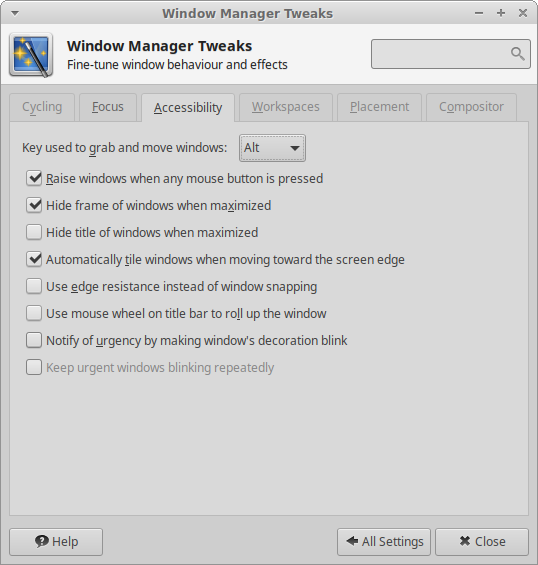
Last edited by jonno2002 (2023-10-21 00:01:58)
Offline
#8 2023-10-20 23:58:04
- SPYAM
- Member
- From: IRAN
- Registered: 2020-11-12
- Posts: 156
Re: Problems after installing arch xfce
1.
try change:secure_mode = trueto
secure_mode = falsein 'lightdm-webkit2-greeter.conf'
2.
pactl list-sinkswill list sinks available, then
pactl set-default-sink sink_name_here
I disabled secure mode, but it didn't work again! The important thing is this login page, I've been trying for a day, but it doesn't work
Then this pactl list-sinks command that I do does not give anything and there is no sink list.
Last edited by SPYAM (2023-10-20 23:58:21)
Only progress!
Offline
#9 2023-10-21 00:01:33
- jonno2002
- Member
- Registered: 2016-11-21
- Posts: 868
Re: Problems after installing arch xfce
damn sorry thats a typo, should be
pactl list sinksand please refer to my previous edited post for window buttons info
Offline
#10 2023-10-21 00:04:32
- SPYAM
- Member
- From: IRAN
- Registered: 2020-11-12
- Posts: 156
Re: Problems after installing arch xfce
damn sorry thats a typo, should be
pactl list sinksand please refer to my previous edited post for window buttons info
[x@archx ~]$ pactl list sinks
Sink #47
	State: SUSPENDED
	Name: alsa_output.pci-0000_01_00.1.hdmi-stereo
	Description: GA104 High Definition Audio Controller Digital Stereo (HDMI)
	Driver: PipeWire
	Sample Specification: s32le 2ch 48000Hz
	Channel Map: front-left,front-right
	Owner Module: 4294967295
	Mute: no
	Volume: front-left: 48496 /  74% / -7.85 dB,   front-right: 48496 /  74% / -7.85 dB
	        balance 0.00
	Base Volume: 65536 / 100% / 0.00 dB
	Monitor Source: alsa_output.pci-0000_01_00.1.hdmi-stereo.monitor
	Latency: 0 usec, configured 0 usec
	Flags: HARDWARE DECIBEL_VOLUME LATENCY SET_FORMATS
	Properties:
		alsa.card = "1"
		alsa.card_name = "HDA NVidia"
		alsa.class = "generic"
		alsa.device = "3"
		alsa.driver_name = "snd_hda_intel"
		alsa.id = "HDMI 0"
		alsa.long_card_name = "HDA NVidia at 0x82080000 irq 17"
		alsa.name = "ASUS VG277Q1A"
		alsa.resolution_bits = "16"
		alsa.subclass = "generic-mix"
		alsa.subdevice = "0"
		alsa.subdevice_name = "subdevice #0"
		api.alsa.card.longname = "HDA NVidia at 0x82080000 irq 17"
		api.alsa.card.name = "HDA NVidia"
		api.alsa.path = "hdmi:1"
		api.alsa.pcm.card = "1"
		api.alsa.pcm.stream = "playback"
		audio.channels = "2"
		audio.position = "FL,FR"
		card.profile.device = "4"
		device.api = "alsa"
		device.class = "sound"
		device.id = "41"
		device.profile.description = "Digital Stereo (HDMI)"
		device.profile.name = "hdmi-stereo"
		device.routes = "1"
		factory.name = "api.alsa.pcm.sink"
		media.class = "Audio/Sink"
		device.description = "GA104 High Definition Audio Controller"
		node.name = "alsa_output.pci-0000_01_00.1.hdmi-stereo"
		node.nick = "ASUS VG277Q1A"
		node.pause-on-idle = "false"
		object.path = "alsa:pcm:1:hdmi:1:playback"
		priority.driver = "696"
		priority.session = "696"
		factory.id = "18"
		clock.quantum-limit = "8192"
		client.id = "34"
		node.driver = "true"
		factory.mode = "merge"
		audio.adapt.follower = ""
		library.name = "audioconvert/libspa-audioconvert"
		object.id = "47"
		object.serial = "47"
		node.max-latency = "16384/48000"
		api.alsa.period-size = "1024"
		api.alsa.period-num = "32"
		api.alsa.headroom = "0"
		api.acp.auto-port = "false"
		api.acp.auto-profile = "false"
		api.alsa.card = "1"
		api.alsa.use-acp = "true"
		api.dbus.ReserveDevice1 = "Audio1"
		device.bus = "pci"
		device.bus_path = "pci-0000:01:00.1"
		device.enum.api = "udev"
		device.icon_name = "audio-card-analog-pci"
		device.name = "alsa_card.pci-0000_01_00.1"
		device.nick = "HDA NVidia"
		device.plugged.usec = "3459169"
		device.product.id = "0x228b"
		device.product.name = "GA104 High Definition Audio Controller"
		device.subsystem = "sound"
		sysfs.path = "/devices/pci0000:00/0000:00:01.0/0000:01:00.1/sound/card1"
		device.vendor.id = "0x10de"
		device.vendor.name = "NVIDIA Corporation"
		device.string = "1"
	Ports:
		hdmi-output-0: HDMI / DisplayPort (type: HDMI, priority: 5900, availability group: Legacy 1, available)
	Active Port: hdmi-output-0
	Formats:
		pcm
[x@archx ~]$
I will check those Windows buttons now.
EDIT :
Windows button is completely solved!
The only major current problem is lightdm-webkit. It will be great if it is solved
Can't you install another tool and set a beautiful login page with it??
Last edited by SPYAM (2023-10-21 00:12:01)
Only progress!
Offline
#11 2023-10-21 00:17:52
- jonno2002
- Member
- Registered: 2016-11-21
- Posts: 868
Re: Problems after installing arch xfce
ok so sound is fixed ? you seem to only have an hdmi audio sink ?
as for the greeter it would seem that the project has been archived since 2019
This repository has been archived by the owner on May 22, 2019. It is now read-only.
so might be failing due to a change somewhere else that hasnt been accounted for and updated....
Last edited by jonno2002 (2023-10-21 00:19:16)
Offline
#12 2023-10-21 00:22:54
- SPYAM
- Member
- From: IRAN
- Registered: 2020-11-12
- Posts: 156
Re: Problems after installing arch xfce
ok so sound is fixed ? you seem to only have an hdmi audio sink ?
as for the greeter it would seem that the project has been archived since 2019
This repository has been archived by the owner on May 22, 2019. It is now read-only.
so might be failing due to a change somewhere else that hasnt been accounted for and updated....
The sound problem is solved.
Windows button problem is solved.
thank you very much
So what alternative do you have for your login page that I can install and customize that actually works?
Only progress!
Offline
#13 2023-10-21 00:44:08
- jonno2002
- Member
- Registered: 2016-11-21
- Posts: 868
Re: Problems after installing arch xfce
Offline
#14 2023-10-21 09:33:02
- SPYAM
- Member
- From: IRAN
- Registered: 2020-11-12
- Posts: 156
Re: Problems after installing arch xfce
I will check and install and configure another one of these.
Only dear friend, the sound was cut off!
UPDATE:
By itself, the sound was fixed!
What do I really have to do!
The problem of the login page was solved with the theme and Web-greeter:
https://github.com/rda0/web-greeter-theme-luminosity
Last edited by SPYAM (2023-10-21 11:46:21)
Only progress!
Offline
#15 2023-10-21 20:02:08
- SPYAM
- Member
- From: IRAN
- Registered: 2020-11-12
- Posts: 156
Re: Problems after installing arch xfce
Friends, I don't know what to do. I went to the first boot of Windows, and then I went back to the second boot of Linux, and then I have no sound again, please help. Sometimes I open Linux, I have sound, sometimes there is no sound
Only progress!
Offline
#16 2023-10-21 20:29:51
- seth
- Member

- From: Won't reply 2 private help req
- Registered: 2012-09-03
- Posts: 76,074
Re: Problems after installing arch xfce
I went to the first boot of Windows, and then I went back to the second boot of Linux, and then I have no sound again
3rd link below. Mandatory.
Disable it (it's NOT the BIOS setting!) and reboot windows and linux twice for voodo reasons.
Offline
#17 2023-10-21 20:37:15
- SPYAM
- Member
- From: IRAN
- Registered: 2020-11-12
- Posts: 156
Re: Problems after installing arch xfce
I went to the first boot of Windows, and then I went back to the second boot of Linux, and then I have no sound again
3rd link below. Mandatory.
Disable it (it's NOT the BIOS setting!) and reboot windows and linux twice for voodo reasons.
Dear friend, unfortunately, I did not fully understand.
I set my first boot to NVME and the first hard drive to Windows.
I put my second boot in NVME and the second hard drive in Linux.
I don't have a third boot!
What should I do next? Can you tell me more precisely? I turn on the sound completely inside Windows and listen for several hours without any problems.
Of course, inside Linux, if there is sound when entering, there is always sound as long as Linux is open, but sometimes when I restart and Linux opens, the sound is not complete! I did not manipulate anything!!!
Only progress!
Offline
#18 2023-10-21 20:39:24
- seth
- Member
- From: Won't reply 2 private help req
- Registered: 2012-09-03
- Posts: 76,074
Re: Problems after installing arch xfce
The 3rd link below that you're supposed to visit is http://wiki.archlinux.org/index.php/Dua … ibernation
Offline
#19 2023-10-21 20:43:04
- Fixxer
- Member
- From: Poland
- Registered: 2011-08-29
- Posts: 232
Re: Problems after installing arch xfce
Can't you install another tool and set a beautiful login page with it??
LightDM is overcomplicated, buggy and all the worst! 
Maybe you could give a try to SDDM (you have probably been using it with Plasma). I'm using it without any problems with Xfce.
Last edited by Fixxer (2023-10-21 20:43:52)
Offline
#20 2023-10-21 20:49:27
- SPYAM
- Member
- From: IRAN
- Registered: 2020-11-12
- Posts: 156
Re: Problems after installing arch xfce
The 3rd link below that you're supposed to visit is http://wiki.archlinux.org/index.php/Dua … ibernation
https://imgurl.ir/uploads/z88182_Screen … 204636.png

Do you mean here, I checked all of them, save and restart?
Only progress!
Offline
#21 2023-10-21 20:51:04
- SPYAM
- Member
- From: IRAN
- Registered: 2020-11-12
- Posts: 156
Re: Problems after installing arch xfce
Can't you install another tool and set a beautiful login page with it??
LightDM is overcomplicated, buggy and all the worst!
Maybe you could give a try to SDDM (you have probably been using it with Plasma). I'm using it without any problems with Xfce.
Yes, SDDM was very good
But it was difficult for me how to completely delete Lightdm in order to use this SDDM instead. I did not find a good education either.
Only progress!
Offline
#22 2023-10-21 20:55:10
- Fixxer
- Member
- From: Poland
- Registered: 2011-08-29
- Posts: 232
Re: Problems after installing arch xfce
Nothing more than:
su -c "systemctl -f enable sddm"After reboot your display manager will be sddm.
Offline
#23 2023-10-21 20:58:10
- SPYAM
- Member
- From: IRAN
- Registered: 2020-11-12
- Posts: 156
Re: Problems after installing arch xfce
The 3rd link below that you're supposed to visit is http://wiki.archlinux.org/index.php/Dua … ibernation
As shown in the image above, I disabled it.
Unfortunately, I still have no voice, what should I do?
Only progress!
Offline
#24 2023-10-21 21:11:33
- seth
- Member
- From: Won't reply 2 private help req
- Registered: 2012-09-03
- Posts: 76,074
Re: Problems after installing arch xfce
How was the sound problem originally solved as by post #12 ?
Are you exclusively using HDMI audio?
What does "pactl list sinks" look like right now?
Also
aplay -lL
amixer -D defaultOffline
#25 2023-10-21 21:25:45
- SPYAM
- Member
- From: IRAN
- Registered: 2020-11-12
- Posts: 156
Re: Problems after installing arch xfce
How was the sound problem originally solved as by post #12 ?
Are you exclusively using HDMI audio?
What does "pactl list sinks" look like right now?
Alsoaplay -lL amixer -D default
The problem was solved by itself! I mean, I had turned off the system, after two hours, I turned it on and the sound was connected and working by itself!
I am using the sound icon in the panel through this:
HDMI / DisplayPort (plugged in)
pactl list sinks EXPORT:
[x@archx ~]$ pactl list sinks
Sink #43
	State: IDLE
	Name: alsa_output.pci-0000_01_00.1.hdmi-stereo
	Description: GA104 High Definition Audio Controller Digital Stereo (HDMI)
	Driver: PipeWire
	Sample Specification: s32le 2ch 48000Hz
	Channel Map: front-left,front-right
	Owner Module: 4294967295
	Mute: no
	Volume: front-left: 57016 /  87% / -3.63 dB,   front-right: 57016 /  87% / -3.63 dB
	        balance 0.00
	Base Volume: 65536 / 100% / 0.00 dB
	Monitor Source: alsa_output.pci-0000_01_00.1.hdmi-stereo.monitor
	Latency: 0 usec, configured 0 usec
	Flags: HARDWARE DECIBEL_VOLUME LATENCY SET_FORMATS
	Properties:
		object.path = "alsa:pcm:1:hdmi:1:playback"
		api.alsa.path = "hdmi:1"
		api.alsa.pcm.card = "1"
		api.alsa.pcm.stream = "playback"
		audio.channels = "2"
		audio.position = "FL,FR"
		device.routes = "1"
		alsa.resolution_bits = "16"
		device.api = "alsa"
		device.class = "sound"
		alsa.class = "generic"
		alsa.subclass = "generic-mix"
		alsa.name = "ASUS VG277Q1A"
		alsa.id = "HDMI 0"
		alsa.subdevice = "0"
		alsa.subdevice_name = "subdevice #0"
		alsa.device = "3"
		alsa.card = "1"
		alsa.card_name = "HDA NVidia"
		alsa.long_card_name = "HDA NVidia at 0x82080000 irq 17"
		alsa.driver_name = "snd_hda_intel"
		device.profile.name = "hdmi-stereo"
		device.profile.description = "Digital Stereo (HDMI)"
		card.profile.device = "4"
		device.id = "40"
		factory.name = "api.alsa.pcm.sink"
		priority.driver = "632"
		priority.session = "632"
		media.class = "Audio/Sink"
		node.nick = "HDA NVidia"
		node.name = "alsa_output.pci-0000_01_00.1.hdmi-stereo"
		device.description = "GA104 High Definition Audio Controller"
		device.icon_name = "audio-card-hdmi"
		device.bus = "pci"
		device.bus_path = "pci-0000:01:00.1"
		node.pause-on-idle = "false"
		factory.id = "18"
		clock.quantum-limit = "8192"
		client.id = "32"
		node.driver = "true"
		factory.mode = "merge"
		audio.adapt.follower = ""
		library.name = "audioconvert/libspa-audioconvert"
		object.id = "43"
		object.serial = "43"
		node.max-latency = "16384/48000"
		api.alsa.period-size = "1024"
		api.alsa.period-num = "32"
		api.alsa.headroom = "0"
		device.enum.api = "udev"
		api.alsa.card = "1"
		api.alsa.card.name = "HDA NVidia"
		api.alsa.card.longname = "HDA NVidia at 0x82080000 irq 17"
		device.plugged.usec = "2719766"
		sysfs.path = "/devices/pci0000:00/0000:00:01.0/0000:01:00.1/sound/card1"
		device.subsystem = "sound"
		device.vendor.id = "0x10de"
		device.vendor.name = "NVIDIA Corporation"
		device.product.id = "0x228b"
		device.product.name = "GA104 High Definition Audio Controller"
		device.name = "alsa_card.pci-0000_01_00.1"
		device.nick = "HDA NVidia"
		api.alsa.use-acp = "true"
		api.acp.auto-profile = "false"
		api.acp.auto-port = "false"
		api.dbus.ReserveDevice1 = "Audio1"
		device.string = "1"
	Ports:
		hdmi-output-0: HDMI / DisplayPort (type: HDMI, priority: 5900, availability group: Legacy 1, available)
	Active Port: hdmi-output-0
	Formats:
		pcm
[x@archx ~]$
[x@archx ~]$ aplay -lL
bash: aplay: command not found
[x@archx ~]$ amixer -D default
bash: amixer: command not found
[x@archx ~]$ Only progress!
Offline