You are not logged in.
- Topics: Active | Unanswered
#1 2023-12-01 17:45:11
- letuss004
- Member
- Registered: 2023-12-01
- Posts: 1
How can I add Windows 10 to GRUB after delete default Windows EFI
Because of the limited partition size, I had to delete the default EFI partition and create a new one.
After creating it, I copied the EFI/Microsoft folder to the new partition, hoping it would boot.
However, it did not, so please help me add Windows to GRUB.
Disk Informations
sudo fdisk -l
Disk /dev/nvme0n1: 476.94 GiB, 512110190592 bytes, 1000215216 sectors
Disk model: INTEL SSDPEKNW512G8
Units: sectors of 1 * 512 = 512 bytes
Sector size (logical/physical): 512 bytes / 512 bytes
I/O size (minimum/optimal): 512 bytes / 512 bytes
Disklabel type: gpt
Disk identifier: A441B4C1-1BF0-4517-A6F8-90AC74265097Device Start End Sectors Size Type
/dev/nvme0n1p1 2048 1085439 1083392 529M Windows recovery environment
/dev/nvme0n1p3 1290240 1323007 32768 16M Microsoft reserved
/dev/nvme0n1p4 1323008 303893708 302570701 144.3G Microsoft basic data
/dev/nvme0n1p5 303893712 674815459 370921748 176.9G Microsoft basic data
/dev/nvme0n1p6 674816000 675839999 1024000 500M Linux filesystem
/dev/nvme0n1p7 675840000 1000214527 324374528 154.7G Linux root verity (S390X)/dev/nvme0n1p2 = the old EFI but I have deleted
/dev/nvme0n1p6 = the new one
sudo blkid /dev/nvme0n1p6
/dev/nvme0n1p6: SEC_TYPE="msdos" UUID="0F58-11E4" BLOCK_SIZE="512" TYPE="vfat" PARTUUID="7697fd3c-c5dc-4ad0-8c10-6467956b6e4e"
os-prober
sudo os-prober
return nothing even I set
GRUB_DISABLE_OS_PROBER=false
So, grub-mkconfig ran but do nothing.
Trying to add manual entry
menuentry 'Windows 10' {
search --fs-uuid --no-floppy --set=root 0F58-11E4
chainloader (${root})/EFI/Microsoft/Boot/bootmgfw.efi
}
lead me to advance start up 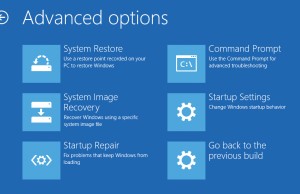
I have no idea what to do next 
Last edited by letuss004 (2023-12-01 18:06:38)
Offline
#2 2023-12-01 18:05:19
- kermit63
- Member
- Registered: 2018-07-04
- Posts: 371
Re: How can I add Windows 10 to GRUB after delete default Windows EFI
The fact that you were able to get to the advanced start-up screen means the manual entry to grub has done its job. How to proceed from that screen is an entirely windows issue and beyond the scope of this forum. You may be better off asking in a windows-centric forum.
Because of limit partition size I have to delete default EFI partition then create a new one.
There's no need to delete the partition, You could've just resized it and probably not have to face this problem.
Never argue with an idiot, they will drag you down to their level and then beat you with experience.
It is better to light a candle than curse the darkness.
A journey of a thousand miles begins with a single step.
Offline
#3 2023-12-01 18:05:21
- Head_on_a_Stick
- Member

- From: The Wirral
- Registered: 2014-02-20
- Posts: 9,003
- Website
Re: How can I add Windows 10 to GRUB after delete default Windows EFI
/dev/nvme0n1p6 674816000 675839999 1024000 500M Linux filesystem
Looks like the EFI system partition type is wrong.
Here's my ESP in fdisk:
/dev/nvme0n1p1 2048 1050623 1048576 512M EFI SystemUse the "t" option ("change a partition type") and pick option "1" ("EFI System").
Note that the custom menuentry doesn't need the (${root}) bit, just the relative path is enough.
Jin, Jîyan, Azadî
Offline