You are not logged in.
- Topics: Active | Unanswered
#1 2023-12-30 14:30:52
- Time0
- Member
- Registered: 2023-10-22
- Posts: 4
Gnome visual/graphical artifacts and glitches
Hey everyone. I have been experiencing stable graphical issues for the whole time using the gnome DE (~3 months).
All of the pictures inside the GNOME file explorer are glitched: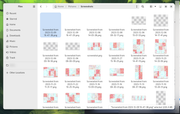
Artifacts in the youtube background inside the firefox browser: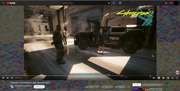
Artifacts around the sliders in the gnome settings: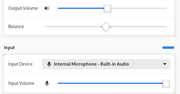
Artifacts in the Android Studio inside the emulator (2 greenish squares are just blurred):
Glitched firefox preview (just the firefox, other ones are just blurred):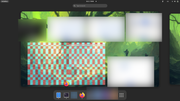
Glitched background (terminal is just blurred):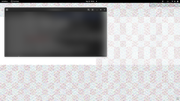
And many more!
My specs:
CPU: Intel I7-8850H
GPU: Nvidia Quadro P1000M
Using NVME SSD. Gnome shell version: 45.2. Arch kernel version: 6.6.8-arch1-1.
It mainly occurs after getting out of the suspend/sleep mode. After a while it gets back to normal. Reopening the glitched program helps usually. Where glitches occur: pretty mush any program. It can be a game or it can be just a youtube video page.
I tried to look up the problem myself, but mainly people have graphical issues using some gnome theme, but I use the default theme, no modifications. Doing regular system updates. Really looking forward to fix this one.
Thank you!
Offline
#2 2023-12-30 17:11:27
- seth
- Member

- From: Won't reply 2 private help req
- Registered: 2012-09-03
- Posts: 78,473
Re: Gnome visual/graphical artifacts and glitches
GPU: Nvidia Quadro P1000M
…
It mainly occurs after getting out of the suspend/sleep mode.
Offline
#3 2024-01-12 18:38:06
- Time0
- Member
- Registered: 2023-10-22
- Posts: 4
Re: Gnome visual/graphical artifacts and glitches
GPU: Nvidia Quadro P1000M
…
It mainly occurs after getting out of the suspend/sleep mode.
I followed the instruction provided in this link. However I didn't have the following folder /usr/share/doc/NVIDIA_GLX-1.0/ like described, but all needed systemd services and utils were already in place.
So I just skipped to the enabling services part:
sudo systemctl enable nvidia-suspend.service
sudo systemctl enable nvidia-hibernate.service
sudo systemctl enable nvidia-resume.service
I tested it for a couple of days and unfortunately I still getting glitches after a suspend. I checked systemd services status and it looked fine:
Jan 11 16:48:57 user systemd[1]: Starting NVIDIA system suspend actions...
Jan 11 16:48:57 user suspend[91351]: nvidia-suspend.service
Jan 11 16:48:57 user logger[91351]: <13>Jan 11 16:48:57 suspend: nvidia-suspend.service
Jan 11 16:48:59 user systemd[1]: nvidia-suspend.service: Deactivated successfully.
Jan 11 16:48:59 user systemd[1]: Finished NVIDIA system suspend actions.
And the resume service:
Jan 11 17:05:09 user systemd[1]: Starting NVIDIA system resume actions...
Jan 11 17:05:09 user suspend[91670]: nvidia-resume.service
Jan 11 17:05:09 user logger[91670]: <13>Jan 11 17:05:09 suspend: nvidia-resume.service
Jan 11 17:05:10 user systemd[1]: nvidia-resume.service: Deactivated successfully.
Jan 11 17:05:10 user systemd[1]: Finished NVIDIA system resume actions.
Am I missing something?
Last edited by Time0 (2024-01-12 18:39:44)
Offline
#4 2024-01-12 21:37:57
- seth
- Member
- From: Won't reply 2 private help req
- Registered: 2012-09-03
- Posts: 78,473
Re: Gnome visual/graphical artifacts and glitches
There's actually https://wiki.archlinux.org/title/NVIDIA … er_suspend
nb. the caveat on the resume service, probably disabled that.
Make sure the module paramers are applied
systool -vm nvidiaand make sure that NVreg_TemporaryFilePath provides sufficient free space for your VRAM (a tmpfs position like the default /tmp can be insufficient)
Offline