You are not logged in.
- Topics: Active | Unanswered
#1 2024-03-03 01:35:07
- SofieSasao
- Member
- Registered: 2024-03-03
- Posts: 20
[SOLVED] Enable Secure Boot on LUKS encrypted Arch + Win11
There is a laptop with Windows 11, and it also needs Arch on the LUKS encrypted LVM partition. In the end dual boot with GRUB should work as expected, and Secure Boot should be enabled.
Since I didn't have much experience in Arch installation, I tried to achieve it using VirtualBox before I messed up real system.
I managed to make GRUB dual boot work with the following partitioning: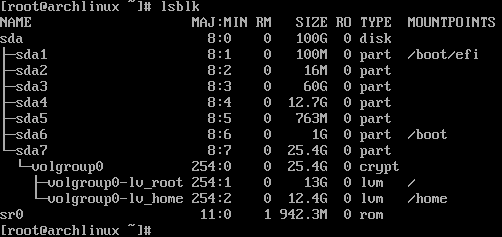
The first 5 partitions should not be removed/resized, as they are related to the existing Windows installation:
1. sda1 - EFI partition created by Windows installation
2. sda2 - MSR
3. sda3 - Windows C: system partition
4. sda4 - Windows E: data partition
5. sda5 - Windows recovery partition
Other sda partitions were created during the Arch installation process.
As for the last reqirement (to enable Secure Boot back after installation) I followed this really straightforward instruction.
Despite GRUB actually started booting with enabled Secure Boot after that, Arch itself, unfortunately, did not. Enter key on the "Arch linux" option in the boot menu doesn't work: screen becomes black for a moment and displays the boot menu back.
I tried to install Arch with Windows several times in slightly different ways, but this setup is the closest to my initial goal so far. I would love to know what I'm doing wrong or what is left to do to make this work.
I can provide more details about installation process and installed packages if necessary.
Thank you!
Last edited by SofieSasao (2024-03-10 12:11:04)
Offline
#2 2024-03-10 09:39:44
- SofieSasao
- Member
- Registered: 2024-03-03
- Posts: 20
Re: [SOLVED] Enable Secure Boot on LUKS encrypted Arch + Win11
I managed to solve the issue.
The problem didn't have anything to do with partitioning or encryption.
My mistake was that while signing files with sbctl I relied only on the list of files displayed by sbctl verify command, as instructions suggest.
The fix was to sign vmlinuz kernel image. In my case, I had two kernels installed: linux and linux-lts. These commands resolved the issue:
sudo sbctl sign -s /boot/vmlinuz-linux
sudo sbctl sign -s /boot/vmlinuz-linux-lts
After this sbctl's pacman hook seems to handle these two files automatically every time system is updated.
Offline